I’m running Ubuntu 19.04
I have that in VM. (I have all the supported distros in VM because I do packaging and use them for forum support as well as packaging development)
I had the same problem even with Debian 9.
May I have the media XML (which shows the video, audio and subtitle portions only) of some examples?
I will compare them side by side to what I have and start looking.
I have that for example:
<Media id="1304" duration="2546736" bitrate="3740" width="1280" height="720" aspectRatio="1.78" audioChannels="6" audioCodec="ac3" videoCodec="h264" videoResolution="720" container="mkv" videoFrameRate="24p" videoProfile="high">
   <Part accessible="1" exists="1" id="1304" key="/library/parts/1304/1476431031/file.mkv" duration="2546736" file="XXXXXX" size="1191324341" container="mkv" deepAnalysisVersion="4" requiredBandwidths="9688,8045,4805,4428,4428,4428,4428,4428" videoProfile="high">
      <Stream id="5504" streamType="1" codec="h264" index="0" bitrate="3356" language="English" languageCode="eng" bitDepth="8" chromaLocation="left" chromaSubsampling="4:2:0" frameRate="23.976" hasScalingMatrix="0" height="720" level="41" profile="high" refFrames="8" requiredBandwidths="9304,7661,4421,4088,4088,4088,4088,4088" scanType="progressive" width="1280" displayTitle="720p (H.264)" />
      <Stream id="5505" streamType="2" selected="1" default="1" codec="ac3" index="1" channels="6" bitrate="384" audioChannelLayout="5.1(side)" requiredBandwidths="384,384,384,384,384,384,384,384" samplingRate="48000" displayTitle="Unknown (AC3 5.1)" />
      <Stream id="20007" key="/library/streams/20007" streamType="3" selected="1" codec="srt" language="English" languageCode="eng" format="srt" displayTitle="English (SRT External)" />
      <Stream id="22367" key="/library/streams/22367" streamType="3" codec="srt" language="Français" languageCode="fre" format="srt" displayTitle="Français (SRT External)" />
   </Part>
</Media>
Extracted from the latest version of Plex (1.16.3.1402), which doesn’t work.
I think I might have discovered the difference.
To help confirm, can you extract the SRT subtitle into an external file and create a sidecar (.srt) file ?
It would be named: Movie (year).language.srt
In my examples:
- Sidecar
Lucy (2014).mkv
Lucy (2014).eng.srt
- Embedded
Lucy (2014).mkv
I observe a difference in CPU resources used.
It is already a sidecar for me.
The difference is straightforward on my system:
- 1.16.3.1402: 100% of 1 or 2 core used continuously.
- 1.14.1.5488: 1 to 2% max
The player is indeed set to automatic and you’ve confirmed, in the Plex/Web settings popup, it is not set to burn? (double checking)
Yes, confirmed, set to automatic, not burn.


Here is a sample file (Creative Commons licence) with the bug : https://drive.google.com/file/d/1crKvnS919IYQQI_8GPz3lvbQDLN9I8DJ/view?usp=sharing
I included a small srt file inside the MKV.
But I noticed something interesting. As long as the transcoder process is running, the PMS process is stuck to 100% CPU. But if we move the playback to the last minute, once the transcoder process exits, the PMS process goes back to 1-2%.
So it’s definitely related to transcoding.


PMS will always keep feeding the transcoder as long as it’s calling for information.
Initially, everything runs at full load to fill the player buffers.
What is important to determine here is the steady-state processing level.
What you want to take into account also is that it’s not the transcoding process which clogs the whole CPU, it’s the PMS process.
That’s why I said “Steady-state processing level”. It includes PMS and transcoding.
How can we help you to understand that?
I am already looking at:
- Idle CPU loading (without PMS running but everything else)
- PMS running but not playing.
- PMS playing something else which isn’t problematic.
- PMS in this scenario.
Defining exactly what “this scenario” is, and reproducing multiple times on different distributions is key. Once I can reliably recreate it myself, I can then start crafting data to exploit it. As I refine the exploitation, I get closer to the true root cause.
I believe I have a definitive test which, when showing the CPU load (screenshots) before starting, during steady state playback with subtitles enabled, and after disabling subtitles, captures the problem.
- Screenshot to show CPU load with nothing playing
- Start Playback
- Allow to ready state (first buffer fill… watch CPU load come down again then back up a bit)
- Screenshot
- Let play for a few minutes to verify steadystate has been achieved.
- Screenshot
- In Plex/Web - Turn off subtitles (set to None)
- Observe CPU load
- Wait about 1 minute for CPU to again steadystate
- Screenshot it.
Should look like:
Subtitles ON
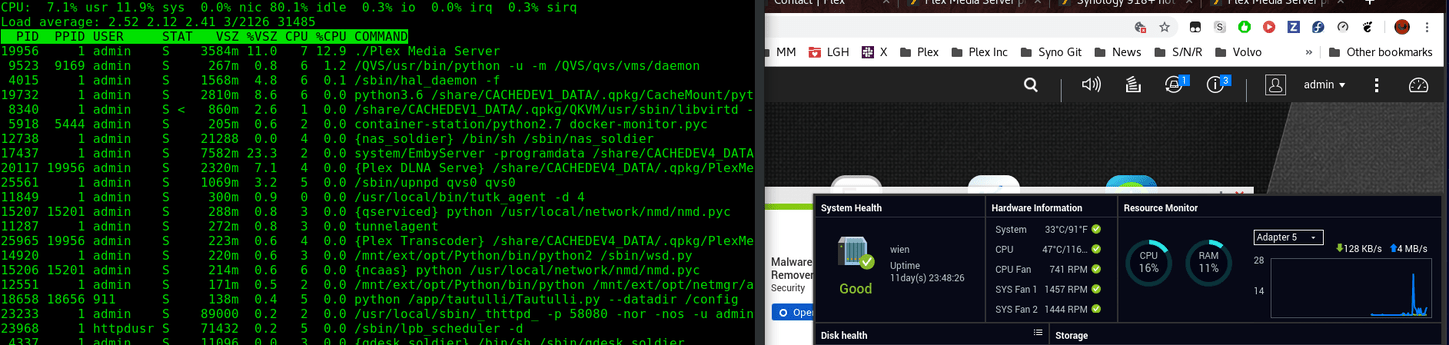
Subtitles OFF
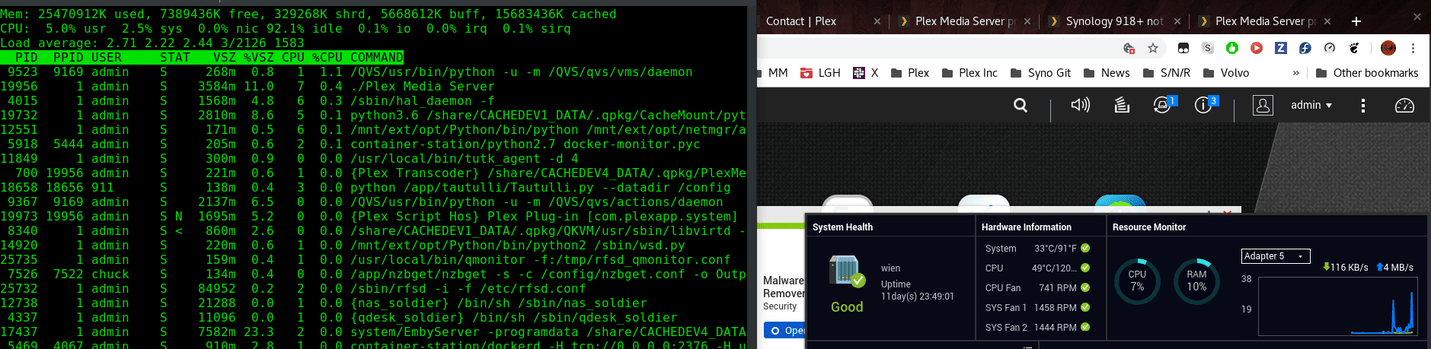
Version: 1.16.3.1402
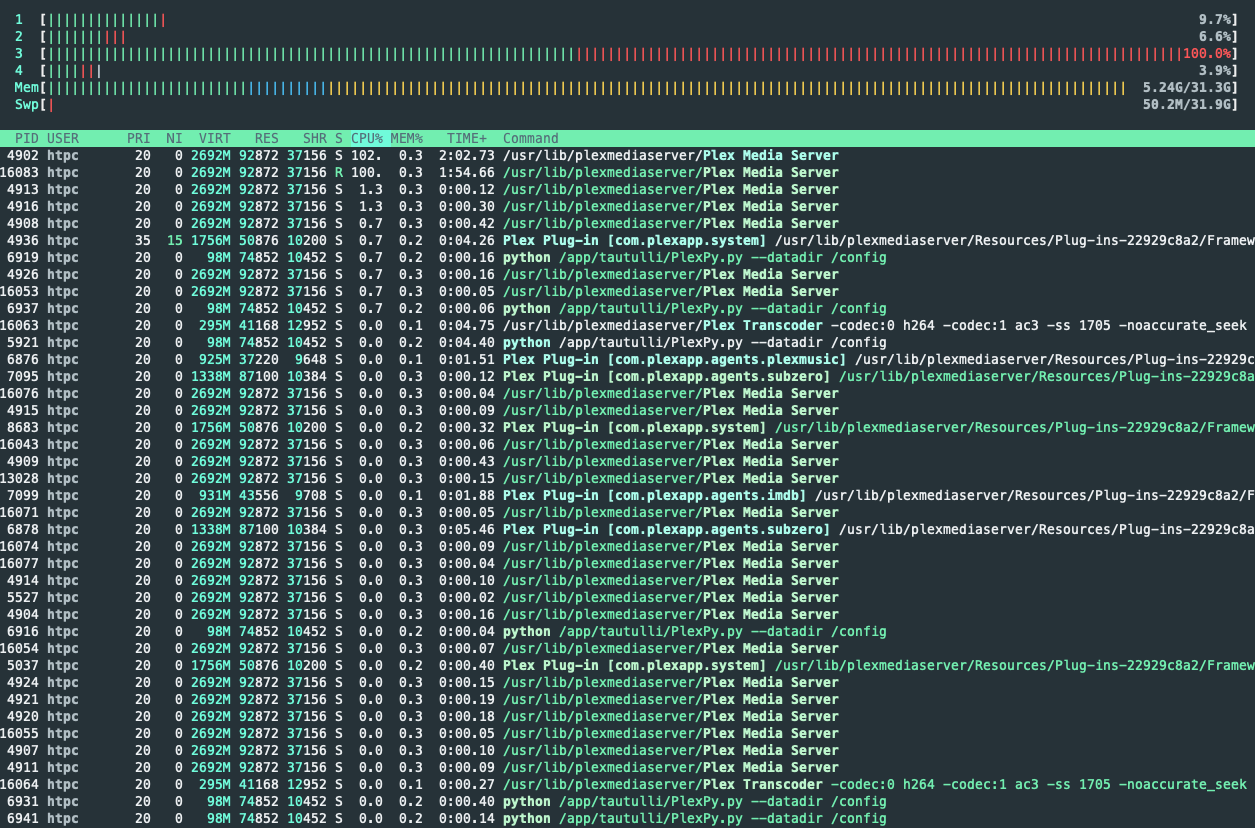
I’ve filtered only plex stuff in the screenshots and processes are ordered by CPU usages. Top is using the most, bottom the less.
- Idle load:
- playing with subtitles after 2/3 min wait time (2x PMS process using 100% of 1 CPU):
- Disabled subtitles (almost same as idle, no more PMS using 100% of CPU):


Don’t need Htop / thread breakout. That’s actually harder to track (we would need add up the thread totals to be useful). We’re still at the process level.
