I updated my Synology DS423+ (from DSM Version: 7.2.2-72806 Update 4 TO DSM version: 7.2.2-72806 Update 5) and now Plex suddenly stops by it self.
I start PMS and open the PMS and within a few seconds after login PMS stops again.
In Synology Package Center it reports that PMS stopped manually.
But I didn’t. Meaning Plex lives on its own.
I thought it was due to an old version of Plex Media Server (PMS).
Therefore I updated PMS.
First I updated from Plex Media Server 1.42.1.10060
TO v.1.42.2.10156-f737b826c. Sadly without the hoped effect.
Thereafter I updated to Beta PlexMediaServer-1.43.0.10346
And without positive effect.
Plex Media Server stops right after I start it and logs in.
I’m a bit out in the dark. Can any one please help?
Current installed versions
DSM version: 7.2.2-72806 Update 5
Beta: PlexMediaServer-1.43.0.10346
Before I experienced the problems
Installed version:
DSM Version: 7.2.2-72806 Update 4
Plex version: v.1.42.2.10156-f737b826c
Looks like this may be a PhotoTranscoder issue Dec 01, 2025 19:48:39.390 [140164836891448] WARN - [Req#6d/PhotoTranscoder] Crash: Crash reporting disabled
Not something Ive done a lot with. @ChuckPa any chance you can see more in these logs?
The “crash” or server-stop happened during a scan after I stored a new movie on it.
The server some kind of halted and/or slowed down.
I thought it was due to at upgrade of DSM version og Plex. In my bewilderness I tried to update the Plex-version. I suppose I should have withhold from doing that.
I hope sincerly the is som kind of possible solution to my wrongdoing.
Sorry to bother you again. This is the first time I’ve have to reach out to Plex experts. I’m still stucked with a stopping Plex Server. But I dont know if I can or how to reach out to Chuck or appeal to other experts to contribute or direct me to a usable solution.
Dec 01, 2025 19:49:39.377 [140651058563896] WARN - [HttpClient/HCl#2b] HTTP error requesting GET https://downloads.plex.tv/relay/relay_v1.pub (7, Couldn’t connect to server) (Failed to connect to downloads.plex.tv port 443 after 5005 ms: Couldn’t connect to server)
Dec 01, 2025 19:49:39.377 [140651180579640] ERROR - [EventSourceClient/pubsub/172.104.133.220:443] Relay: Failed to retrieve relay host key from plex.tv
First steps.
Make certain NAS Date & Time are sync’d to the NTP (world clock). If it’s too far out of sync, secure connection (port 443) will fail.
Make certain the Default Gateway IP (Control Panel - Network - eth0 ) points to your modem router and is set as the Default Gateway
If either is changed, restart the NAS and let it come up clean again
PS: I can be pinged by @chuckpa (need the @ in front of my name )
Christmas came in between and postponed my work on my problems on Plex
But now I looking into it. Make certain NAS Date & Time are sync’d to the NTP (world clock). If it’s too far out of sync, secure connection (port 443) will fail.
Plex does NOT have a Control Panel, so you should set the default gateway in the DSM Control Panel > Network > Network Interface > LAN x Interface settings.
If you mean ChuckPa database-repair. No, I am kind of afraid of messing with a server in terminal. The last time I tried I ruin my NAS totally. So I’m a newbee and did not repair using ChuckPa . I rekon it’s the best way to solve my problems but I’m into the dark even though ChuckPa has detailed instructions. I don’t dare don’t know how to go down that road. Sorry for my incompetence in this field.
In Plex I have tried to optimize the database (I chose the wrench (1) > Administration (2) > Troubleshooting (3) > Optimize Database (4) and also Clean Up Content (5). (My translations to the attached picture on my danish installation with numbers).
Unfortunately, your steps wont cut it, you really need to run ChuckPa’s script in order to correct your issues.
I know it is daunting, but you must try it at least.
Make sure you back up your NAS configuration in DSM Control Panel > Update & Restore > Configuration Backup before you start, although it should not be needed at all, none of the commands given by ChuckPa are dangerous at all.
You can also backup the PlexMediaServer folder and all of it’s contents.
I recommend using Hyper Backup which you will find in the Package Center for that.
Make sure you enable SSH in DSM Control Panel > Terminal & SNMP.
Here is what you need to do after downloading the DBRepair.sh file from ChuckPa’s page and placing it in the PlexMediaServer folder on your NAS.
Hit enter after you type in each command.
Open a terminal window on your PC
Type in ssh NasAdminUserName@NAS-IP-Address
Type in your NAS Admin User Password (it will not show on screen)
Type in cd /volume1/PlexMediaServer
Type in sudo bash (the prompt in the terminal window will change)
Type in chmod +x DBRepair.sh
Type in ./DBRepair.sh (Don’t forget the . period at the beginning of the command)
Then you should be presented with a numbered menu. You want to:
Stop Plex (option 1)
Run the Automatic routine (option 2)
Start Plex (option 7)
Since You’ve been so kind to lead the way I’m crossing my fingers and try to run ChuckPa’s script.
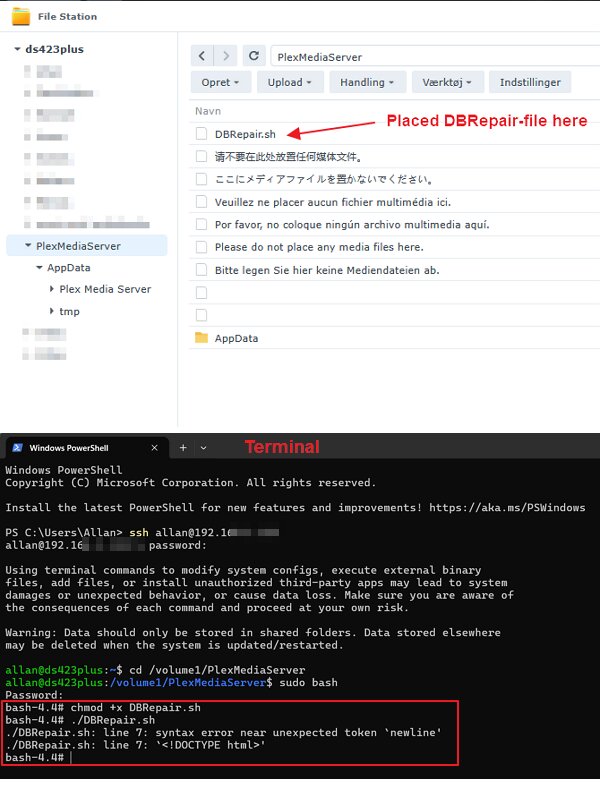
Placed the DBRepair-script in the folder /PlexMediaServer (shown in attached screendump). Is it the right place? I have my doubts.
I’ve managed to get to #5 in your Guide (shown in attached screendump). When I type my password it says “bash-4.4#” in the terminal. I type “chmod +x DBRepair.sh” as in your guide #6. The I type as requested in #7 in your guide. But sadly I get an error
In ChuckPa’s guide it says that I should change volume (look at the attached picture below). I haven’t done that because I don’t how to if it is necessary. Is it mandatory when I run Plex Server on DSM7? Could it be the cause of the error?
To answer question 1, yes, you have the file in the correct place.
Just to add to what ChuckPa Stated, he is correct, your file contains Windows line ending characters which are causing the error.
His solution is better, but another way to correct that, is to open File Station and go to the DBRepair.sh file, right click on the file and select Open in Text Editor.
Do not change anything in the file and simply save the file using Text Editor. That should correct the line ending characters and allow the file to run without error.
If you do not see the Open in Text Editor option in File Station, then you need to go to Package Center and install Text Editor on your NAS.
A big thank U to the goto-helpers @trumpy81 and @ChuckPa for helping me in my Plex-trouble.
Sad to say that their effort only brought me part of the way.
With your support and assistance I managed to run ChuckPas DBRepair-script. But now my Plex Server stops immediately when I start it.
I’m in distress and looking into uninstalling my Plex Server all together and start all over again. Installing it completely from scratch. I don’t see any other way.
Once again thank U for your kind and heartwarming effort in helping me.
 )
) lol
lol