Server Version#: 1.20.1.3252
Player Version#: All players are having this issue including the web player on the same PC. http://127.0.0.1:32400/ works but https://app.plex.tv/desktop does not. Error Unable to connect to “GhostPC2018” securely.
I have checked to make sure it’s all on the same subnet. I have checked to make sure secure connections are preferred. I have also tried remotely from my xbox, ipad and cell phone. TheyPlex Media Server Logs_2020-09-24_18-11-58.zip (10.1 MB) get the error that the server is not reachable. I am not running through a VPN. What else can i try? Log attached.
Does it work with http://app.plex.tv/desktop?secure=0 ?
If it does, you might be affected by “DNS rebinding protection” which is done by the DNS resolver for your network (i.e. for a typical home user that is usually in the router).
See https://support.plex.tv/articles/206225077-how-to-use-secure-server-connections#toc-4
Thank you. I have looked through every setting inside my TP link router, as well as my ATT modem. Thinking about it i remembered that the att modem is also a router(that I don’t use). I found something about a 2 router setup but that was just for getting my media outside of my network, which is not what i am trying to do. My setup is Att fiber connection to the att modem/router(with the wifi turned off) a wire from that into my TP-link router(Archer C3150) and then a wire from that into my desktop PC(plex server). All other devices are wireless through the TP-link router. All of my devices are on the 192.168.0.1 network. The att device is on a 192.168.1.? network(again the only device). Please let me know if this additional information is helpful.
If your “modem” has an IP, then it is a router of its own, yes.
But that is, as you have already read correctly, only imprtant for remote access.
The “DNS rebinding” issue is important when accessing a server in the local network.
If your main router doesn’t provide any preferences for DNS rebinding protection, then either the router doesn’t perform it at all (good for Plex)
or
it does perform it, but doesn’t allow the user to make any adjustments (bad behaviour).
Judging from the current behaviour of Plex, I’d say your router belongs to the latter, “bad” category.
Here is another thing to try:
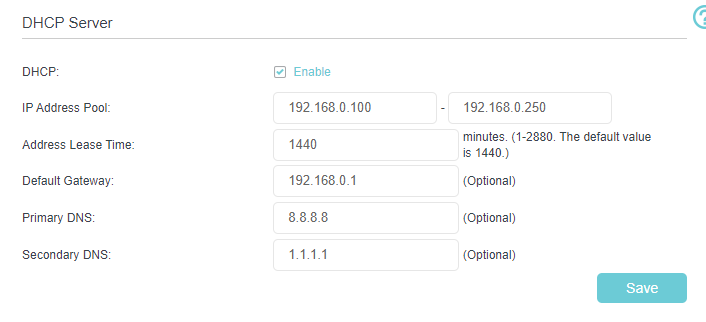
Set the DNS server in your router to either 1.1.1.1 (Cloudflare) or 8.8.8.8 (Google).
Both are known good/reliable and fast-updating DNS servers, something which cannot be said of some ISP’s DNS servers.
After doing this change, reboot the router first and after a few minutes the Plex server and then the Plex clients as well.
Ok, i have tried that. I used them both just in case. Rebooted the router and then my PC(rebooting the server and the client). However, i am still having the same error. I did check the modem however there is not a way for me to update the DNS on it, but that shouldn’t be needed for access on my home network correct?
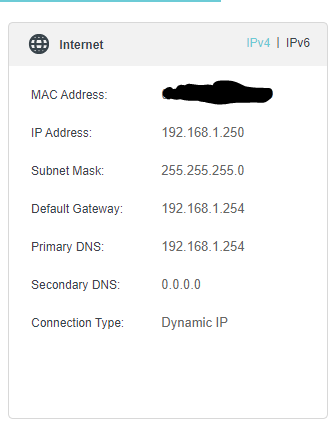
Also, i noticed that the DNS did not update on my main page and has my cable modem as the DNS server, but that’s just to get outside the network correct?
Then I’m afraid there is no way to solve the issue, except you learn to live with unsecure connections.
You could try a different router which has the necessary settings.
There might also be an alternative firmware for your router available at projects like DD-WRT, OpenWRT or Tomato.
Correct.
Yes, that’s to get to the outside - but as @OttoKerner said, it means your cable modem is also “smart”. More and more, “smart” ISP-provided modem-router things are inspecting or hijacking DNS in the name of security. :-/
What is that modem/router? Can you visit it in a web browser? http://192.168.1.254/
Since you’ve configured Cloudflare and Google, does this return Cloudflare or Google?
If it’s anything else, it’s possible that the Cable modem/router is “helpfully” implementing DNS rebinding protection.
Live with unsecure connections? so does that mean i can change something to get my decives to connect? Change perfered to off maybe?
Here is my ATT device info if it helps at all.
|Manufacturer|ARRIS|
|Model Number|BGW210-700|
http://192.168.1.254/ is what i use to get to the att modem/router
using that website it came back with this, so I think we are good with the DNS right?
DNS Server 74.125.42.69
Reverse DNS 74.125.42.69
IP Owner (From ARIN) Google LLC
Did http://app.plex.tv/desktop?secure=0 work for you?
That’s a good sign the cable modem/router isn’t hijacking your DNS, anyway.  That’s what you want to see, but it means there’s nothing to try “fixing”.
Did you … hahaha. Yeah - typing at the same time.
Did you try Otto’s ...?secure=0 link?
on my desktop yes, but i can just connect through 127.0.0.1 for it. But my issue is my devices can not connect, that’s what triggered me to make this post. Is there something i need to do in the plex players to do the same thing? Primarly my xbox, thats how i watch on my TV. It be nice to get it to work on my Ipad but not as important.
Try disabling secure connections on your server.
Settings - Server - Network
But this will also disable the Plex relay connection. So remote access won’t work at all with your current double-NAT router configuration.
I am fine with not being able to access from outside the network. I made that change on the server, what do i need to change in the cleints? I am poking around the Ipad plex app, i happen to have it next to me, and it shows the server offline. In advance i see a place for server connections but it wants me to setup a manual conection, can I put http://app.plex.tv/desktop?secure=0 there? I tried my PCs IP address 192.168.0.101, but that didnt work.
No, you need to put the local IP of your server machine in there.
If iOS asks you about “local network access” permission for the Plex app, grant it.
i checked the apps permisions and local network access was already on, i turned it off and back on and restarted the Ipad. I also tried http://192.168.0.101/ in my webbroswer and getting a refused to connect. Not usre if that matters but figured it was worth trying. I have avg, any know issues with that? Would adding an exception to that help?
This is very unusual.
Is the network connection in your Windows system classified as ‘public’? It should be ‘private’.
You mentioned that you aren’t running through a VPN. Do you have any VPN software installed or running on the server at all?
it was set to public, no idea why, i have updated it but probably need to reboot which i can not do right now. I have also found this solution for the IOS issue, i have tried that as well, once i reboot i will see how it looks, thank you for your help so far.
I do have keep solid VPN but it is not running at all, not in the task bar or task manager, i have it setup to where i have to manually start it.
