Plex no longer auto starts when I reboot

Hello,

I screwed up and killed a bunch of autostart features - it helped my PC running Windows in a number of ways, however plex no longer auto starts. I just downloaded it and reinstalled but plex doesn’st start and I don’t even remember where it was - registry, services, msconfig, startup folder.

I can manually start plex media server but I’d like to put the entry back if someone knows, please let me know.

Have you tried to simply enable the autostart option from the PMS icon in the system tray? In case it’s already checked… disabling and re-enabling the option might do the trick.
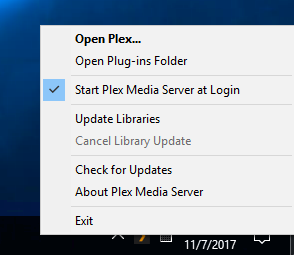
PMS context menu in Windows System Tray

1 Like

Thanks!! I never noticed that - I’m a tool! I’ll try that.

I admit I kept thinking I’ll test and verify but never got around to it but after multiple reboots, I can confirm this didn’t work for me.
image

Click the Windows button, type startup, click on startup apps, click On next to Plex Media Server.

Capture

Thanks - I don’t see it there. I’ll try to figure a way to put it back.

That link is about the native Plex Player app for Windows, not about the server.

This topic was automatically closed 90 days after the last reply. New replies are no longer allowed.

