Plex not honoring IPV6 Traffic as local

Server Version#: 1.20

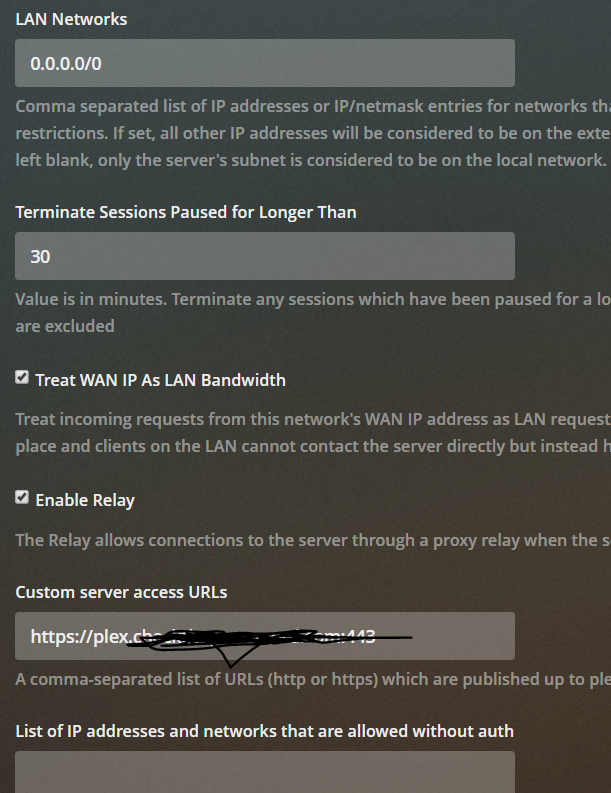
You can see in my screenshots below that I have "treat all bandwidth as local enabled. I am also attaching a screenshot that shows a client connecting over IPv6 and being treated as remote.

Is this is bug? Or do I have something configured incorrectly?

Capture2

Your netmask is questionable. A 0 length netmask is the degenerate case in all I’ve seen

0.0.0.0/1,128.0.0.0/1 avoids that case.

what you show here is:

  1. Every contacting IP is to be consider on the local LAN
  2. All bandwidth calculations are to assume being on the local LAN.

I will make this change and report back

Also, one afterthought.

You’re specifying in IPv4 format for the IPv4 stack.
Your specification doesn’t speak to the IPv6 stack.

1 Like

True - I had considered disabling IPV6 altogether, but I was afraid I could inadvertently disable some folks like this one if their ISP were IPV6 only.

Plex is still largely IPv4 only. IPv4-v6 address translation occurs just about everywhere.

Does that host have IPv4 or IPv6 as primary at the point-of-presence for internet ?

Not sure, I would have to ask, It is a remote user., I could always disable ipv6 and wait for a call. :slight_smile:

What would the proper range be to encompass on ipv6 addresses as I have done with ipv4?

I don’t have IPv6 service at all.
You need to google that one

I’m lucky (truly) to have internet at all where I live. (not being sarcastic)

When you specify anything in the LAN Networks preference, it completely takes over for determination of Local vs Remote. This pref currently only works for v4 addresses. So if the pref is set to anything, all IPv6 addresses will be treated as remote.

If the pref is empty, the server attempts to examine the local interface IP/subnets and determine if the remote address is within that subnet. If the remote address in a v6 address that is mapped from v4, it’ll convert it to v4 and do the matching against the v4 IP/subnets. Otherwise if it’s v6 and not a mapped v4, it’ll just check for a link-local address (of which yours is not) and use that for determination of whether it is in the LAN or not.

1 Like

I’ve just moved from an area where I had the choice of internet bandwidth (all the way to 1Gbps) into an area where I am expecting 8Mbit, one provider, no choices. I now truly understand when people complain about their local broadband provision.

This design makes no sense at all for IPv6, why wouldn’t you just treat every address on the same /64 as the server as local?

I’m fairly certain that’s the case for 99+ % of the residential ISP configurations.

This is an ongoing issue here at my residence as well.

I have both IPv4 and IPv6 properly configured. However, Plex classifies local IPv6 traffic as remote when it is, in fact, local.

I think this may have been causing issues with:

  • Lower quality selections and unnecessary transcoding
  • Clogging Remote Access -> Internet upload speed limit

At least now I know why Plex doesn’t respect my /64 Networks -> LAN Networks entry.

This seems like an attempt to cover mobile phones (which love link-local IPv6) while forgetting about publically configured IPv6 networks. I understand this probably was a requirement because of more and more consumer equipment turning on IPv6 by default (mobile devices).

Since publically accessible IPv6 servers will have an address that is not link-local for public access, this just won’t work.

Any chance publicly accessible IPv6 servers can get some love soon?

This topic was automatically closed 90 days after the last reply. New replies are no longer allowed.