Server Version#: Version 1.19.4.2902
Player Version#: Version 4.30.2
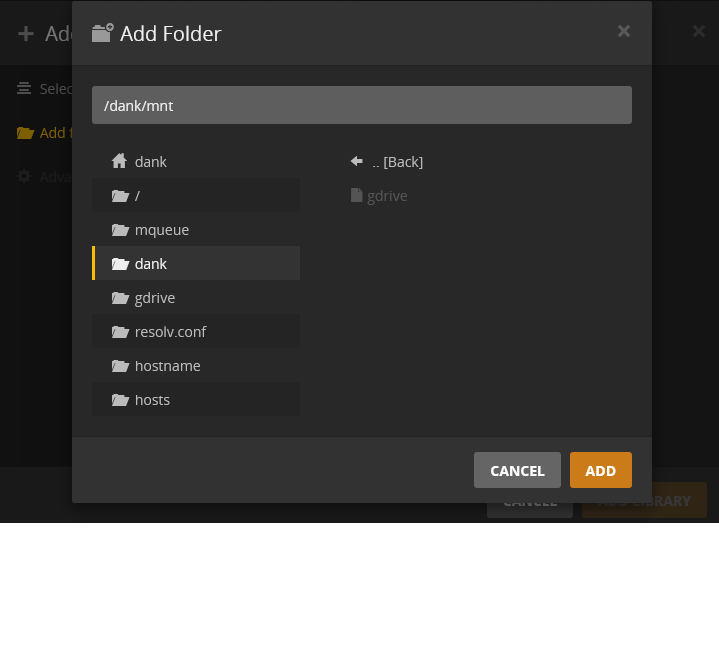
I have my google drive mounted properly on my seedbox with rclone. I can access the mounted drive through sftp. Plex refuses to access the mounted drive. It shows it as an un-selectable greyed out file in the directory.
Seedbox support has been completely unhelpful other than saying plex media server works with docker and that is why I have error and to restart plex, which i have.
I had originally made a thread on rclone support forums and they said it was most likely on the providers end. https://forum.rclone.org/t/rclone-mount-plex-help/17057
Any possible advice here?
Permissions on the directory path before mount and after mount must be sufficient to all user plex permission to read. This usually means granting 755 to directories and 644 to files.
Have you tried adding the
--allow-other
flag to your mount command.
Don’t know if it will help, but I checked my mount scripts on my linux box and I have that flag in mine.
Ok im trying to set the permissions but im not too experienced with ssh.
I tried
find * -type d -exec chmod 755 {} “;”
find * -type f -exec chmod 644 {} “;”
in the directory above the mount and they just hang, ls -alh in the mount gives me:
drwxrwxr-x 1 dank dank 0 Jun 4 16:15 Anime
drwxrwxr-x 1 dank dank 0 Jun 4 21:25 Books
drwxrwxr-x 1 dank dank 0 Jun 4 22:03 Education
drwxrwxr-x 1 dank dank 0 Jun 4 21:29 Graphic Novels
drwxrwxr-x 1 dank dank 0 Jun 4 22:18 Howard Stern
drwxrwxr-x 1 dank dank 0 Jun 5 18:16 Misc
drwxrwxr-x 1 dank dank 0 Jun 4 16:09 Movies
drwxrwxr-x 1 dank dank 0 Jun 4 16:14 Music
drwxrwxr-x 1 dank dank 0 Jun 5 16:28 Music Production
drwxrwxr-x 1 dank dank 0 Jun 5 01:11 Phone Backups
drwxrwxr-x 1 dank dank 0 Jun 4 16:15 Programs/Apps
-rw-rw-r-- 1 dank dank 0 Jun 11 03:00 seedhost.docx
drwxrwxr-x 1 dank dank 0 Jun 4 16:09 TV
so those arnt changing to 755, however the before mount folder i could change to 755.
Also my provider does not all the --allow-other flag 
I am almost certain that the allow-other is necessary here. Otherwise, the same user has to establish the rclone mount and access it. All other users can’t. Which user mount the rclone storage and which runs plex?
I think they are saying that about the fuse conf, not the rclone mount command.
Have you tried adding it your mount command e.g:
rclone mount gcache: ~/mnt/gdrive --allow-other
Ah sorry. Did not read the full post on the rclone forum…
From my provider
You can’t use allow-other option and it can’t be enabled and it is not required to get it working with Plex. This option is security risk because everyone could be able to see your data. You just need to restart your Plex when you mount something to be able to see it there.
Thats basically what they keep telling me, just to restart plex… the command doesnt do anything if i run with --allow-other
If the same user mounts and runs Plex than allow-other is possibly not need. You have to tell us. Is Plex ran by user dank?
With the ps command it looks like im not running plex under my user.
dank@gold:~$ ps -A
PID TTY TIME CMD
1510 pts/157 00:00:00 ps
3304 ? 00:00:16 rclone
14165 ? 00:00:03 apache2
14313 pts/49 00:00:00 rtorrent
14321 pts/49 00:17:33 rtorrent
22649 pts/69 00:01:48 irssi
29153 ? 00:00:05 rclone
29416 pts/157 00:00:00 sh
30566 pts/80 00:04:22 java
30937 ? 00:00:17 apache2
30938 ? 00:00:17 apache2
30939 ? 00:00:17 apache2
30940 ? 00:00:17 apache2
30942 ? 00:00:17 apache2
31593 ? 00:00:17 apache2
31989 ? 00:00:17 apache2
32012 ? 00:00:18 apache2
32027 ? 00:00:17 apache2
however i do have the Plex Media Server folder in my home folder