I have my install on an ssd, just not using mysql, it's pretty slow for me too, I have a very large media library along with quite a few users in my house. It takes about 10 seconds or so for 400 events to get parsed or whatever happens.
I have my install on an ssd, just not using mysql, it's pretty slow for me too, I have a very large media library along with quite a few users in my house. It takes about 10 seconds or so for 400 events to get parsed or whatever happens.
I have 10K HD on my server over gigabit lan (because I have my main install of plex notify on my server and I have a plex notify client on my desktop) using MySql 523 records takes about 6-7 seconds to load. If you have a high volume server I highly recommend you download MySQL or MsSql (2014 has some seriously awesome memory optimized tables stuff in it that will make the load lightning fast)
@sfnetwork:
Possibly something went wrong with the latest update, so you haven't gotten that one yet.
It's been several hours since JBurlison announced v0.0.0.101 in his latest post above, and it still hasn't arrived here, though my PlexNotify has auto-update enabled (and has auto-updated well for several months now, up to and including v0.0.0.100)
Best regards: dlanor
lol oops I forgot to change the version number so when it checks the server they have the same version! lol. Tomorrow I will fix this settings bug and the versions.
Plex notify terminates when I hover over the icon. Should I start fresh?
Sent from my Moto X
small issue, for PushAlot notifications, I'm trying to disable both client connected and disconnect but it doesn't keep the settings... (when I go back in, it's stuck back enabled)
Same issue with 102 but now only with Client connected in PushaLot (Disconnect stays disabled now)
Same issue with 102 but now only with Client connected in PushaLot (Disconnect stays disabled now)
Sorry about that!
Alpha v0.0.0.102 - 103
- Fixed several settings bugs.
Plex notify terminates when I hover over the icon. Should I start fresh?
Sent from my Moto X
Humm this is interesting. is there anything in the logs?
Same issue with 102 but now only with Client connected in PushaLot (Disconnect stays disabled now)
Sorry about that!
Alpha v0.0.0.102 - 103- Fixed several settings bugs.
Perfect, it's fully fixed now.
U the man!
Humm this is interesting. is there anything in the logs?
I'll check.
Sent from my Moto X
I have 10K HD on my server over gigabit lan (because I have my main install of plex notify on my server and I have a plex notify client on my desktop) using MySql 523 records takes about 6-7 seconds to load. If you have a high volume server I highly recommend you download MySQL or MsSql (2014 has some seriously awesome memory optimized tables stuff in it that will make the load lightning fast)
Yeah, to be perfectly honest, PN for me is just for the notifications.
Statistics are just to slow to load (or parse if you prefer).
Statistics loading:
Primary PN: 14 sec + another 25-30 secs to get to log of events = aprox. 40 sec
Secondary (over LAN PN): 27 sec + another 25-30 secs to get to log of events = aprox. 50-60 sec
Too long to wait IMO for this kind of information.
I'm on MySQL BTW.
And this parsing is taking server resources so I don't want to let it run in background just in case I want to see statistics...
Since I don't have the expertise what I'm saying might not make any sense (so sorry in advance lol)
I also use MySQL for centralized XBMC and when I open any of my XBMCs, there is no "parsing" etc... it reads and show my library instantly from the SQL database...
Even Plex itself is instant loading when reading from PMS...
This is why waiting this long for PN only to see the log of events doesn't make any sense (in my end user with limited knowledge mind)
It just feels there is an extra layer for nothing with this "parsing" with the data being there already in the SQL database.
Again, maybe my lack of knowledge here makes these statements and examples senseless...
But once loaded, PN is AWESOME though... I just find myself giving up waiting to load and closing PN when wanting to have a quick look at the log of events or other statistics...
I haven't tried PlexWatch, etc... to compare (way too complicated installation for me to take this time for it) so maybe it's the same thing there also and technically, this parsing is required...
Please don't see this as complaining, I LOVE your project! I'm just trying to give a feedback and understand in the process... :)
I think it’s time for me to nag about the incorrect ETA usage in logs again… 
As I’ve stated previously ETA as shown in notifications and in the main PlexNotify screen are both fine now,
but the ETAs shown in the “Log Of Events” are mostly incorrect. (Often seem based on double video length.)
As in previous posts I’ll include some screenshots to illustrate my point.
The first picture shows the main screen of PlexNotify and its list of recent notifications:

Pay special attention to The third notification from the top, which shows the start of “Star Trek: Voyager - S04 E12” in an event with timestamp 17:49:54 and an ETA of 18:33:15, which matches the video length well.
The second picture shows the screen reached by clicking on the list entry mentioned above:

Note how this screen shows the same correct ETA as shown in the first picture.
So much for the correct ETA, now on to the incorrect ones…
The third picture shows the “Log Of Events” list corresponding to the period of the first picture:

Again pay special attention to the event timestamped 17:49:54, and note how this now shows an incorrect ETA of 19:16:34, which is 43 minutes and 19 seconds later than the correct ETA shown in the first two pictures.
Here it is noteworthy that MediaInfo evaluates the video length at 43 minutes 21 seconds (as does PHT).
So the incorrect ETA is exactly 2 seconds less than (timestamp + (2 * video_length))…
The fourth picture shows the screen reached by clicking on the “Log Of Events” entry mentioned above:
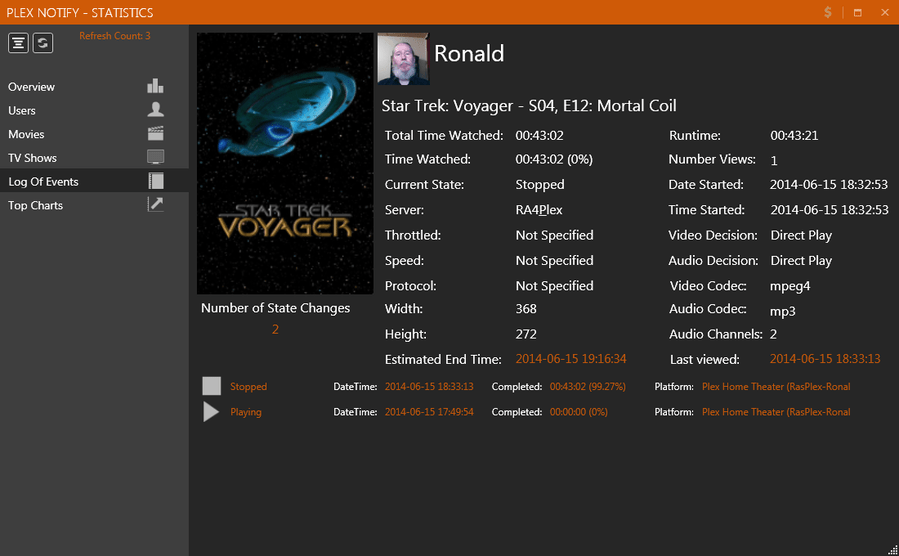
Here we see that the “Estimated End Time:” again shows the same incorrect value 19:16:34 as in picture three, but this time with the amusing addition of the true ‘stopped’ timestamp of 18:33:13 with 99.27% completed.
I hope this report helps you pinpoint the program error causing this ETA mixup.
Best regards: dlanor
What log level do I need to enable to get the IP address working with Plex Notify? And do I need to restart the server after log level change?
TIA!
Wow I have never tested it with that kind of volume. There is an option in the settings to keep the statistics cached so you don't have to wait every time.
Sent from my SM-N900P using Tapatalk
Could you point me to this setting? PlexNotify is pretty much broken right now. It just isn't working. It never updates, and when it tries to do a scan it just craps out.
If you are interested in taking a look, we can do a TeamViewer session sometime :) Server 2012 R2.
PleX/Notify is installed to a three disk RAID 5 array, 15000RPM Enterprise Class drives. I don't think the hardware is the issue. I really don't want to wipe the database, but at the same time, I'm slowly losing features lol.
Could you point me to this setting? PlexNotify is pretty much broken right now. It just isn't working. It never updates, and when it tries to do a scan it just craps out.
If you are interested in taking a look, we can do a TeamViewer session sometime :) Server 2012 R2.
PleX/Notify is installed to a three disk RAID 5 array, 15000RPM Enterprise Class drives. I don't think the hardware is the issue. I really don't want to wipe the database, but at the same time, I'm slowly losing features lol.
It's right in basic settings. On the right side. To reset your database it's in advanced.
Sent from my SM-N900P using Tapatalk
What log level do I need to enable to get the IP address working with Plex Notify? And do I need to restart the server after log level change?
TIA!
Plex Notify does not parse log files. It uses http://localhost:32400/clients
Note that only plex clients will show. Web and some TV clients will not show as they are not considered clients.
Sent from my SM-N900P using Tapatalk
It's right in basic settings. On the right side. To reset your database it's in advanced.
Sent from my SM-N900P using Tapatalk
Maybe I'm missing something?

I'm not seeing it?
Maybe I'm missing something?
I'm not seeing it?
Right side, Keep stats window running in background, switch right below that.
Plex Notify does not parse log files. It uses http://localhost:32400/clients
Note that only plex clients will show. Web and some TV clients will not show as they are not considered clients.
Sent from my SM-N900P using Tapatalk
Ok, well dang. Looks like I have something not right then. I never get the IP of any user connecting, nor does the "Connected Clients" area ever show anyone connected. I'm running the latest PMS and PHT, most users on my system use PHT, I get the notifications of playing, pausing, stopping, but never client connected nor their IP. PMS is on a WIn7 (64bit) machine. Anything I can try? I've tried local PHT, and remote PHT. TIA
Ok, well dang. Looks like I have something not right then. I never get the IP of any user connecting, nor does the "Connected Clients" area ever show anyone connected. I'm running the latest PMS and PHT, most users on my system use PHT, I get the notifications of playing, pausing, stopping, but never client connected nor their IP. PMS is on a WIn7 (64bit) machine. Anything I can try? I've tried local PHT, and remote PHT. TIA
https://forums.plex.tv/topic/112400-httplocalhost32400clients-only-shows-local-clients/#entry667474
I looked into this, Looks like clients dont support external ones yet =( The only way to do it is parsing the log files and i am avoiding that. so when the functionality is added to plex, Plex notify is ready
Still no ETA for a fix of the ETA bug ?
(check my previous post in this thread == post #1491)
Best regards: dlanor
