I’m new to Plex, I’m running a Synology 218+, I’m keen to know how to set it up for HDR content tone mapping as some of the devices don’t support HDR (using a Firestick 4k Max).
A couple of challenges I’ve had are;
The NAS server sits inside my LAN (over a wifi-mesh), if I connect indirectly (relay) or directly the load time is shocking, it takes a good minute for the film to load and every time I try to move to a point in time during a film (not only 4k films, but all streams including small 720p short films). Is there a simple trick I’m missing to speed up performance?
My FireStick 4k cannot see my NAS folders. There available through the local server interface and I can see them (when I don’t disable relaying) on my Plex account. Does anyone know of any FireStick 4k compatibility issues?
The oddest issue I’ve encountered is if I turn off Transcoding, the Plex player tells me that the server doesn’t have enough power (which is odd as transcoding consumes CPU and it players fine through Synology DS video)… I wanted to disable Transcording with Direct access as that surely should be the fastest way of streaming as there’s no load on the NAS CPU
Last question, am I barking up the wrong tree? My ideal setup is streaming 4k HDR to a 1080p SDR TV from my NAS to my Firestick, am I bonkers who is it feasible?
first, you should read @ Plex, 4k, transcoding, and you, the whole thread, and you may need to re-read multiple times to fully understand.
you may also want to check out other threads on that particular nas, my understanding is that it can do hardware transcoding, but it is not exactly a powerful beast. that said, hw transcoding requires plex pass (you can subscribe for 1 month to try it out).
ideally, you should serve 4k to only 4k clients, otherwise, you are just making it difficult for yourself.
relay is limited bandwidth. you should avoid wifi for the server, and you should ensure that all your local clients are all on the same ip network. Plex treats local and remote streams differently (which can be configured in both server and client settings). You can use the plex dashboard or 3rd party tools like tautulli to monitor the active streams.
no idea, not enough information provided. personally I have had nothing but bad like with fire devices, I avoid them like the plague. but others seem to have no problems and like them, so your milage may vary.
the nas has a low powered cpu, and synology has its own internal transcoding engine (as far as I understand) that is separate from what plex uses (and plex requires plex pass for the gpu/hw transcoding, which you do not appear to have). So no, the cpu is not strong enough for 4k transcoding on cpu only.
DIRECT PLAY (ie no transcoding) is the only way you will be able to play 4k (see the 4k faq linked above) without any load.
yes, you are sort of barking up the wrong tree. there is zero benefit to using 4k on non-4k devices. and trying to transcode 4k can lead to a whole new set of problems.
I have the same NAS … this is accurate. It can do most 1080p transcoding - even SSA subs (not PGS) - but the more native the playback the better and it’ll handle pretty much anything in that case.
I use mostly Roku and iOS devices with pretty solid success as client devices. The Roku and Synology devs are pretty active, accessible and responsive in the forums which has helped when bugs have come up (either in Plex or from Roku\Synology). My Roku devices are currently handling direct play 4k HDR\DV and Atmos to a compatible TV\Soundbar combo.
Doing 4k to non-4k devices is not worth the fight with 218+ … particular HDR->SDR (until the “maybe someday” of hardware tone mapping on Synology) … so for all my 4k rips I have a 720p version as alternative and Plex does a pretty good job of knowing which one to play for compatibility when I play a title via Plex. I have limited server space at the moment otherwise I’d probably do 1080p as the SDR\non-4k alternative. This avoids transcoding for local - and remote when bitrates are higher (plays the 720p instead of transcoding the 4k to fit my restricted upload bandwidth for remote access folks).
Roku can also do DLNA (or USB playback if you get one with USB port) using the Roku Media Player channel\app. Not a bad alternative if you’re setup for native direct play options - the Synology Media Server package (usually tied to DS Video) or Plex can both act as DLNA servers - that’d be the closest to native direct play options on the device itself. It’s just not as pretty but does do the “folder navigation” option for you easily.
AppleTV can do quite a bit - the Atmos support is odd - but I think everything is pretty solid (and supports SSA\PGS subs natively I believe). There’s also an Infuse app which can connect to Plex - it is more like VLC in that they have codecs that can handle more than the Apple native support but the interface isn’t as nice. I’ve debated switching to it over Roku as a “nicer” hardware setup and household has a lot of Apple hardware already… but I haven’t felt a real need.
The nVidia Shield is the “best” option for native playback as it supports the most formats and has quite a bit of power in the device itself - I think that article @TeknoJunky links discusses that aspect quite thoroughly.
Edit: No device is perfect or actually best overall though… they all have something that makes them different from each other.
Thanks TeknoJunky. I’ll read through the guides / forums.
I can directly read a 4k file over the network and play it back either directly in VLC player (over the afp protocol on my Mac) or via Synology video (no transcoding) and its seamless and fast (I have an Orbi mesh setup, with a 6Gbp backhaul, etc…). I can also stream to the Firestick via DS video to VLC and its super smooth and fast.
Ideally I’d do it via ethernet, but sadly its not an option @ the moment. I was thinking is the speed impact (same device) because Plex is using a SMB connection (v1 not v3)? Which won’t handle the throughput needed.
I’ve had loads of problems with LG’s, Samsungs, etc… streaming over wifi as their 5Ghz, but the wifi-6 of the Firestick 4k Max supports Wifi-6 and it really zipped when directly streaming (without Plex).
Thanks Insomnic_1, I’m going to give up on the transcoding :), sounds like the 218+ isn’t strong enough for the HDR to SDR tone mapping (luckily I’m planning to upgrade the non-4k TV’s). Though I’m still worried about alot of the TV’s streaming the content over wifi directly as the built in DNLA on the sets is often woefully slow.
I’ve got an Apple TV 4k and infuse, that streams nicely the content (and I think thats running 5Ghz not wifi-6), the Firestick was cheaper as well than buying another.
I’m thinking I may stick with DS video and VLC on the firestick instead, just like the interface of Plex (Emby runs equally as slow as well, guessing the additional server load of each solution just pushes the 218+ too hard).
vlc is completely different and not really comparable to how plex works.
unfortunately, unless you get a plex pass, there is probably not a lot that can be done as far as transcoding 4k on your nas.
hevc/4k transcoding requires an enormous amount of processing (compared to more common x264), which all but the newer more powerful cpus simply cannot handle.
gpu transcoding offloads the processing from the cpu to the gpu, which lets low power cpu devices, be able to transcode efficiently.
please also remember, plex is a client/server type architecture.
every client can be different, if the client cannot direct play the chosen content, then server tries to convert to a more compatible (or less bitrate for remote) streams.
so there are multiple things to look at, what can the client do or not do, and how much heavy lifting the server can do (or not do) to get the content to the client.
I’m thinking that the DS video server / client setup is optimised for the NAS as its both Synology.
I tried running Emby just now as well and its just too slow as well.
I’m going to subscribe to Plex now for a month and give it a go to see if the hardware transcoding makes a difference, though I fear direct 4k to 4k TV’s will remain very slow (moving away from 1080p to 4k, so 4k is an important factor).
the 4k faq goes into more detail, but for direct play to work, you need a 4k tv + 4k compatible receiver/soundbar.
both the video and audio have to be compatible with the player for direct play.
the only 2 mainstream devices that support HD audio (ie truehd/atmos/dts-hd-ma) are shield and xboxone.
everything else will transcode HD audio, and if subtitles are enabled, that can cause video transcoding, which of course all leads back to the server being powerful enough to handle the load (multiplied by the number of streams happening).
as my recommendation is explained in the faq, you may well be better off keeping 4k separate and only using 4k content on 4k devices.
in any case, I suspect you are starting to understand a bit more, so hopefully the faq and other links will help as you get deeper into it.
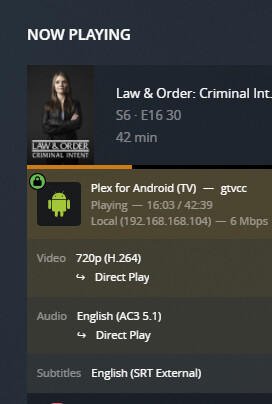
with plex pass, you should be able to utilize the plex dashboard Plex Web > settings > dashboard, to monitor your streams.
you can expand the info to show more details on if the video or audio are transcoding, and if the connection is local or remote.
the dashboard will go a long way to helping you understand what the server is doing
That is the error message Plex uses when it needs to transcode video, but transcoding is disabled (instead of saying, “Hey! I need to transcode, but you disabled it!”).
Plex also uses the message when transcoding is enabled and the CPU really isn’t powerful enough to transcode video.