Server Version#: Versión 1.13.9.5456
Player Version#: PlexMediaPlayer-2.20.0.909-46413dd1-windows-x64
When I try to open de Plex Media Player doesn’t start. The program try to start because I can see the edges of the windows, but finally it closes.
I attach the PMP logs
logs.zip (46,3 KB)
Looks like it is crashing soon after launch in Qt5Gui.dll
Will raise with the development team
I think that is related with OpenGL but I’m not sure.
Do you think that someone can helps me?
Thanks
could be
Just noticed that you are not running the current version 2.22.1 which was released 12 days ago
Let me have fresh logs if it continues to crash with 2.22.1
extremely old chipset with no offical drivers after 2009 from intel since windows 7, i personally wouldnt expect this to work properly on Windows 10.
The crash has been referred to the development team
The PC is an Dell Optiplex 755 MT. The last version of the drivers installed is from 2013.
Is there any progress with the development team? Do you need any more information?!
I have another PC model optiplex 755 with practically similar characteristics. When installing PMP on said PC the following error appears (I hope you can clarify something even if it is in Spanish)
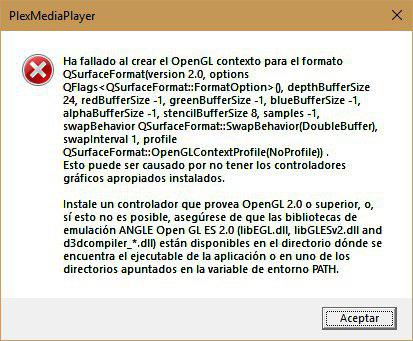
I don’t have any feedback at this moment - may be something specific to Dell OptiPlex 755
I have passed on the extra info
At what point does that error arise ?
At the beginning. The program finally fails to start with that error message
This may be a factor
Look for any updates and also any DirectX updates
Could you try the following. With Plex Media Player process not active, save a copy of the file
C:\Users\vayaf\AppData\Local\PlexMediaPlayer\plexmediaplayer.conf
Then edit the config file
C:\Users\vayaf\AppData\Local\PlexMediaPlayer\plexmediaplayer.conf
Find entries referencing "useOpenGL" and if set to true, change to false
Save the changes and try to launch Plex Media Player
Let me know if this circumvents the problem
I tried that solution before writing this post, because it was the solution I found in the forums. That configuration change did not solve the problem.
Is the crash the same ?
yes. The same problem. The program does not start.
Thanks for your help
There is a slim possibility that program not starting could be to different error. We would only know it is the same crash from logs and seeing what crash reports got uploaded - could you also send me by private message zip of copies of the conf files in the PlexMediaPlayer directory
sorry, I’m not sure if I understand you. Do you need the log and conf files form both computers for be sure if is the same problem?
some news of this problem? With OpenPHT I have not problems, but I think that the oficial app should works.
Don’t have any new info on this - but i can say that these crashes have only been seen for a handful of users. They are not common and it could be specific to your hardware and drivers that are in use
You could provide logs and conf files from latest version of PMP 2.27.0 and also logs and conf files from OpenPHT and I can compare. You could get a ListDLLs for OpenPHT process to compare with what shows up in one of your PMP crash reports
This topic was automatically closed 90 days after the last reply. New replies are no longer allowed.
