Hooray!
I was ready to throw my shield (and plex) in the bin. Was already checking out Emby.
The provided update fixed all my issues. Everything is working smooth, even the interface navigation is more snappy!
Hooray!
I was ready to throw my shield (and plex) in the bin. Was already checking out Emby.
The provided update fixed all my issues. Everything is working smooth, even the interface navigation is more snappy!
I have been having this problem for at least the last year and it’s really starting to get annoying. My server is an i7 12-core with 64 gigs of RAM, Samsung 970 512gb SSD so, what’s 13 terabytes of raid storage and running Plex on the latest Ubuntu LTS.
It’s not the hardware it’s not the cables. It has to be the software.
My internet is 500 megabits down 25 megabits up Ford remote access to my Plex server. I run Nvidia shield in the living room and master bedroom. My wife has an iPhone 7 + oh, I have a Galaxy note 9 oh, I have a predator 17 in gaming laptop and a Samsung 70-inch TV. They all do it. remote or local.
At this moment, my server and living room Nvidia shield are connected via gigabit cables (5’) each to the same router and are only sitting three feet apart. Watching it on my local network still gives me the errors at least twice per movie. I can back out of the movie and hit play again and it works fine. It’s just annoying.
Plex, if you can’t solve the issue at this moment in time, can you at least change the error message to something more appropriate so people stop spending hours troubleshooting something that they can’t fix?
Plex, if you can’t solve the issue at this moment in time, can you at least change the error message to something more appropriate so people stop spending hours troubleshooting something that they can’t fix?
Visit Topic or reply to this email to respond.
To unsubscribe from these emails, click here.
Which update are you referring to? My Shield and my Plex server are both on latest version and I still see this issue.
This one:
In this thread:
Took 24h for my shield to get the update. All issues solved.
Seems like you got an even newer version than the others. 7.2.3(30.6.131. 8 ) is a more recent release than 7.2.3(30.6.131. 71 ).
I don’t follow.
How can 30.6.131. 8 be more recent than 30.6.131. 71
As versioning goes : .71 > .8 THUS .71 is LATER
Versioning counts UP, not DOWN.
You’re right, versioning counts up and not down bur you do know that .8 decimal is greater than .71, right?
.8 and .80 are equivalent. You’re probably thinking about .08.
You’re right, versioning counts up and not down bur you do know that .8 decimal is greater than .71, right?
.8 and .80 are equivalent. You’re probably thinking about .08.
Software is not generally versioned like that. .8 = 8
If it was meant to be .80, it would have been .80
.8 is a lower version than .71
the .8 (or .71) in this instance is the BUG release version, and counts up in decimals from 1 to XXX, so .8 = 8
So a new issue has cropped up (come on PLEX) (really should open a new thread, but feel it is related, possible)
I have updated to the dev version as supplied ( 30.6.131.71)
Now, plex client streams great, but the home panel is blank. (no ‘On Deck’ etc)
After letting it sit there for a bit is the top bar that shows the media sections.
this is on plex client 7.17.0.10904
if I uninstall updates, to version 5.6.1.505, all works again, and home screen in plex works as expected (plus streaming still works flawless)
It’s not related start a new thread.
My playback gets interrupted 4-5 times during a 2-hour movie with this message. i5-8400 server running linux, nvidia shield tv 2017, all latest versions, gigabit wired, direct play 1080p h264 files. The curious thing is that it never comes back after freezing, but I can immediately stop playback and restart where I left off without any problems. Am I in the right thread?
It’s cool that Shield got an update and a way to fix this, but what about on the Roku? I’ve been getting this lately, but it seems to on certain movies and not on others. I’m wondering if there’s another thread this has been resolved in…
Fire TV version 7.16.1.10610 still having this issue too. Streaming locally and remotely. I have 100mbps internet and can’t even watch a 720p movie without it stopping once or twice.
Regarding the “Your connection to the server is not fast enough error”, I noticed some “unexpected” behavior while monitoring network bandwidth coming out of my headless ubuntu linux server running on a raspberry pi 3+. I am using Version 1.16.1.1291 available from the plex linux repository.
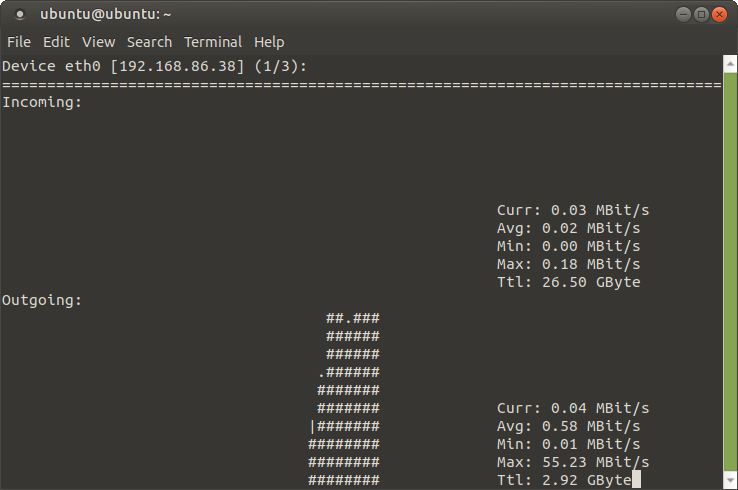
I used nload -u m to display the network throughput on the server. See attached screenshots. It appears the Plex server is chucking data all at once to fill the buffer on the player, and then it does not subsequently follow up sending data to the player, which then results in the “not fast enough” error, which is not an accurate error message for this situation. This can be verified by anyone watching the on screen data load bar when they start a video. It loads data, but does not continue when the progress nears the end of the buffer. It’s clear to me that at least for my situation/environment, this error has nothing to do with network throughput from the server to the client.
It appears to me that the Plex Player on my Fire TV will continue playing the movie until it runs out of buffered content. I am seeing this behavior consistently across multiple attempts.
The graphs below show the initial data sent out for buffering, denoted by the # symbols. The blank space represents no data being sent out at that time. It clearly shows that the server stops sending out data, and the buffer runs out of data to play on the client.
FYI the first screenshot is the one where there is no data being sent out. Curr: 0.04 MBit/s represents whatever other data is being sent out by my server, including my ssh connection to it showing nload output. The second screenshot represents the server sending out buffered content to the player all at once.
So the obvious question is, why is the server failing to send follow up buffered data to the client, after the initial load to get the session started?
UPDATE 2:00PM: I was able to stream a movie for a while, and the server sent data intermittently to buffer the client. Then it eventually stopped sending data, and the client ran out of buffered data to play. I then got the incorrect error message that my network was not fast enough. No, rather, the server was not sending any data to my FireTV.

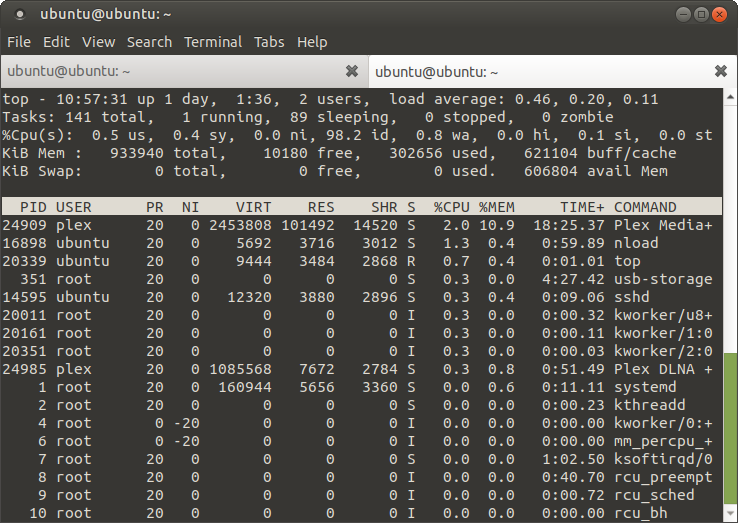
Also, see the following screenshot. To eliminate any possibility of this being a CPU issue during transcoding, I took a screenshot of the top command showing CPU utilization AFTER the initial buffered data load. Plex Media+ is only using 2% CPU at that time, give or take a few percentage points. By watching the PID CPU % for Plex Media+ in this screenshot, I verified the server didn’t even attempt to process/transcode data to send to the client.
DURING the initial data load, CPU utilization went well above 100% for Plex Media+.
Quoting myself for a bump. Seriously though, just change the error message so poor dudes like @aesen don’t lose their minds.
No kidding. I noticed the server is not even attempting to direct play, or transcode and send buffer data. Mind lost!
Actually, I don’t believe the Plex client can know the difference between a maxed out CPU slowdown or a network slowdown, so it’s more of a general message that is confusing everyone. It would be helpful for the client to know this if possible so the user can appropriately change settings.