Server Version#: 1.20.5.3600
Player Version#: N/A
Please help!
I am running into an issue with the way Plex handles external SRT subtitles and forced subtitles. I use Bazarr to automatically download .srt files for my media and Plex is set to auto-select subtitles with a priority towards local media assets. This works perfectly except for media with subtitles flagged as forced. For whatever reason, Plex prioritizes forced subtitles over external .srt files if the subtitles are flagged as forced. Let me give an example with Season 1 of Boardwalk Empire.
Boardwalk Empire is an English TV show with sporadic bits of foreign audio in a handful of episodes. Episodes with foreign audio have a second set of English subtitles included in its .mkv file. This second subtitle is flagged as “forced” as indicated by the “F” in this screenshot:

When Plex scans the show’s folder, it prioritizes and selects these forced subtitles instead of the external .srt files. This means that anytime an episode contains forced subtitles for foreign audio, I must manually select the external .srt file to be used instead. Otherwise, I only get subtitles during the foreign audio parts instead of during the entire episode as I would like.
I have tried every combination of settings I could think of in Plex without success.
Screenshot of subtitle settings: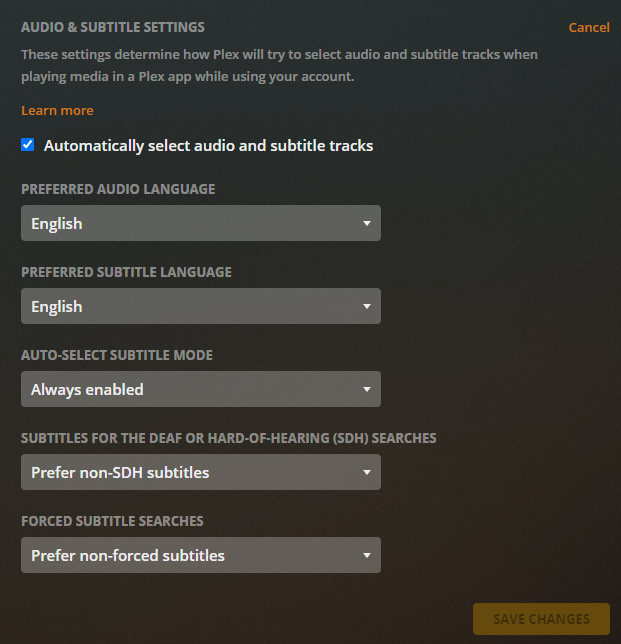
Screenshot of agent settings:
The only workaround I have found is to manually remove the forced subtitles from the .mkv files, but this is not ideal as I would prefer to keep them and it requires re-processing thousands of files. This issue could be solved very easily with an “ignore forced subtitles when auto-selecting subtitles” setting which is what I hope is added eventually.
Any ideas on how to solve this for now? I am running out of ideas. 
