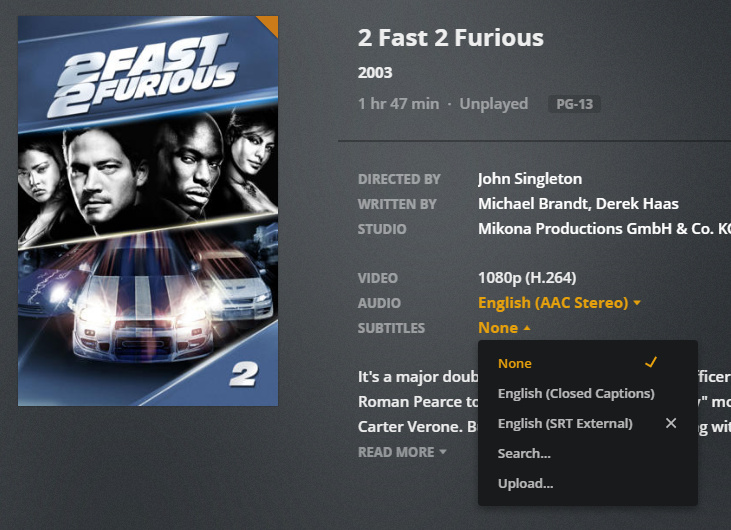
I’ve read through several discussions on forced subtitles and I have confirmed everything everyone said to do, is setup correctly. I’ve made sure my profile settings is correct. I’ve made sure that there is only one subtitle with the forced subs enabled.
I even ripped the file and same issue. This is an issue ONLY with plex. I open the file with VLC and it selects the correct forced subs. Any ideas?
Yes… if i extract the subs or download a sub and add the name.eng.forced.srt, plex auto selects that. Does it not detect the forced tag in the mp4 file? Does this only work with separate sub files? If I select the subs, the subs that are embedded in the file show up, but nothing is auto selected.
what is the preferred file type of subtitles? Testing ass vs srt… SRT direct plays on Windows app, iPad and Android Tablet, but transcodes on the iphone. ASS direct plays on the Windows app, but it says it “burn in” on the iphone. Is SRT the most universal? I’m also wondering why the text is so different between devices.
Everything seems to be working now. I’m extracting the subs from the mp4 using xmedia recode. The only thing I’m noticing is the text sizing is depending on the client. Is there a way to set it for everyone? I mean the windows app, the text has to be like 24 pt!
Interesting… also seems movie dependent. Tried a different movie and its tiny using the same process same client.
No, that wouldn’t make sense anyway.
The size setting is always made in the client.
Simply because every client can be used in a wholly different situation. I prefer smaller subtitles when I use a large screen, but absolutely hate them when they are too small while watching Anime on a phone screen.
Make sure you use SRT files without any formatting instructions in them. Because even though these are not really standardized, many SRT files “out there” are using them anyway.
Depending on the Plex client, some may interpret these formatting instructions differently.
That is a warning that this line might be either too long to fit on a screen
or may have a “screen time” which is too short to be read in full.
These warning are configurable and are merely intended as hints.
You can perform a multitude of checks like this with the “Fix Common Errors” button.
For compatibility reasons with lots of different Plex clients, I recommend to perform at least these two:
Fix overlapping display times
Remove empty lines/unused line breaks
There are a lot more, which can fix common errors made during the OCR process, but they are purely cosmetic.
Messing around a bit with this… if I choose the Closed Captions that are part of the file, all these weird characters show up. When I extracted the Closed Captions, I can see why it shows the weird characters. Once I clean them up and create the SRT file, works perfectly. I’m wondering is there a program out there that will let me delete the closed caption from the mp4 file so that plex can then ONLY see the srt file I created? I think subler can do that but I’m hoping to do everything from my windows box and not have to jump back and forth on my mac.
I understand that true closed captions are integrated into the video stream. I didn’t come across a software yet, which was able to remove them losslessly.