Server Version#: 1.24.1.4931
Player Version#: 4.59.2
I updated my Synology Plex server to DSM 7.x. The update went fine and for about a month I’ve had no issues. Recently, however, the Plex server has been acting erratically. Basic symptoms are that a lot of activity is happening like suddenly it goes out and is updating metadata or generating thumbnails, etc. This is in the middle of the day whereas I have these scheduled tasks to operate between midnight and about 5 Am. In the past when 5 Am rolled around the activity dies down as it should.
Aside from being busy, the Plex server starts consuming more and more memory until DSM notices it and kills it. Sometimes the Plex server finishes whatever it was doing and returns the memory. Needless to say, this is extremely interruptive to my users and to me. Trying to watch something from the Plex server sometimes results in the warning that it cannot connect securely or it just saying it can’t connect to it at all.
Sometimes I can stop and start the Plex server and it recovers. One time I had to restart DSM which I hate doing!
Right now the Plex server is working hard on gathering metadata. How can I get it to stop?
I’ve tried Troubleshooting and managed to “Clean Bundles” once but when I tried to optimize the database, Plex went off working and working, consumed all memory then died. Right now I can’t get to the server settings, it says Server settings are unavailable.
Here’s a performance monitor on Synology indicting the growth in memory
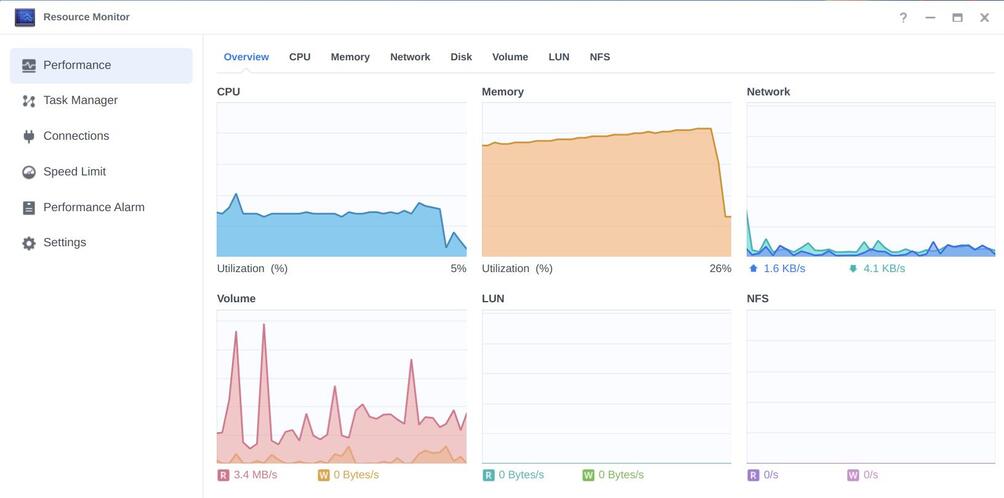
In the past, I tried turning off all scheduled tasks but now I can’t even get to the server settings. Eventually, the Plex server became non-responsive so I stopped it and restarted it. Upon coming back up I was able to get to the server settings and I collected the logs (attached).
Plex Media Server Logs_2021-08-24_12-52-30.zip (1.2 MB)
Thinking there may be some corruption of some sort in the database I looked at https://support.plex.tv/articles/202915258-where-is-the-plex-media-server-data-directory-located/. For Synology, they say /volume1/Plex/Library/Application Support/Plex Media Server but I have no “Plex Media Server” directory under Application Support - I only have a Cache directory:
Jupiter:ll /volume1/Plex/Library/Application\ Support/
total 0
drwxrwxrwx+ 1 plex users 10 Aug 4 20:21 ./
drwxrwxrwx+ 1 plex users 38 Sep 21 2020 ../
drwxrwxrwx+ 1 1026 users 318 Sep 22 2020 Cache/
Jupiter:
Apparently, it’s now located under /volume1/@apphome/PlexMediaServer/Plex Media Server/Plug-in Support/Databases/.
Interestingly, there are several dated databases there (2021-08-13, 2021-08-16, 2021-08-19, and then 2021-08-22). All of the databases are around 600 - 900 Meg. The 2021-08-22 one however jumps to 3.7 Gig and the current database is 5.5 Gig. Seems like corruption to me.
Running the integrity check as described on https://support.plex.tv/articles/repair-a-corrupted-database/. It’s taking forever.
I will attempt a recovery next but it seems to me like simply removing the large, corrupted databases and putting the more normal-sized 2021-08-19 database in place would be a better solution.
OK so I ran the recovery and all I got was “SQL error: database or disk is full”. Needless to say, the disk was not full.
Tried the SQL dump method. Dumped out a large file. Tied the import. The new database size was ~4.3 gig. started Plex server and it immediately started consuming memory. Got to around 92-94% of my memory while I watched an episode for about 1 hr 20 minutes. I expected what I was watching to freeze but it never did. Instead, the Plex server eventually gave back most of the memory. Looked at the database size and it grew to 5.3 Gig. Continued to monitor it and eventually, it went off getting metadata for one movie, got halfway there, and pretty much froze as the memory again got eaten away up to around 94%. Eventually, Plex browser tabs stopped responding and my Synology complains saying it killed Plex due to lack of memory. It didn’t actually kill it but I stopped it by hand.
At this point, I move the database aside and fired up the Plex server again. Now it created a tiny database but going to a Plex web page showed no libraries fo my server. I was prepared for this as I had jotted down the configuration of all of my libraries and I’ve been recreating my libraries. Plex is now rightfully rebuilding the database by getting metadata and detecting intros and the like. What a bother! And I apparently lost any indication of which movies and episodes I have previously watched. Great! 
This will likely take days to re-index the database and now I’ve lost my place in all of the stuff I’ve previously watched. Way to go guys.


 before asking for help


 time
time 
