Synology FAQ - Questions, Answers, and How-To's

Synology Frequently Asked Questions

Table of Contents

Intro: Posting in the Plex Synology Forum

DSM 6 & 7 FAQ

Some of these FAQ apply equally to DSM 7 and 6. Others do not. Please read carefully before proceeding.

  1. Getting access to the Logs
  2. Have I installed the latest version…?
  3. Which version do I need, Intel or ARM?
    3a. Using Plex’s package signing public key - DSM 6
  4. LAN addressing requirements - RFC1918 specification for local LAN?
  5. First run & Setup
  6. Recommended Media Organization and Adding Media to Plex
  7. Reorganizing your media after it’s been indexed
  8. Uninstalling PMS - Reverting to a previous version
  9. Uninstalling PMS - Completely start over
  10. Reorganizing media without losing metadata (while PMS is running)
  11. Determining which package you need to download
  12. Default Plex file locations
  13. Manually obtaining log files
  14. Use SSH to access the Synology command line
  15. Claiming & Connecting to a troublesome Synology server
  16. Increase the number of folders Plex can monitor
  17. Recover from a corrupt database
  18. Moving PMS from Mac/Windows to Synology
  19. Setting permissions to allow Plex access to media files
  20. Bypassing the iHD video driver older Intel only
  21. After migrating from Windows to Synology
  22. When Server and Device credentials are out of sync (Hard & Soft Reset).
  23. Moving large amounts of data on Synology via GUI.
  24. Restoring Share Permissions to Default Settings
  25. Reclaiming your server - (after password reset, etc)

DSM 7 - FAQ

  1. Migrating (upgrading) from DSM 6 to DSM 7
  2. Migrating from Windows to DSM 7
  3. DSM Complains Port 32400 In Use When Installing Plex
  4. Give PlexMediaServer access to your media
  5. Repairing a corrupted database using FileStation
  6. Reclaim or Reset credentials on DSM 7 (Not Authorized - Locked out)
  7. Repairing the PlexMediaServer shared folder
  8. How to backup just your PMS databases
  9. Upgrading Plex to DSM 7.2.2+
  10. DSM 7.1.1 Update 7 Start/Stop control

General info

For new DSM users:

7 Likes
DS1019+ Volume & Shares Setup for Plex
Can't Access Plex At All For Last week
Plex Media Server Fails to Run after DSM update
Move plex application folder
ncomplete uninstall of Plex Media Server on Synology NAS
Plex Slow, inconsistent "There was an unexpected error when loading this library" error
Cannot connect to server with a refuse connection
Synology Plex Media Server Issues
Synology DS720+ can't transcode a single 1080p stream
Plex Playback Error "Please check that the file exists and the necessary drive is mounted"
Synology NAS - $NAME is currently unavailable
Synology Plex Server stops permanently, Synology reboot neede
How to install a new disk on a Synology NAS to store Plex files
My data keeps going away
New to NAS and needing help!
Plex library not updating automatically synology ds218+
PMS cannot run on D218+
Manual install of PMS update
Problems with Hardware Accelerated Transcoding
Unable to claim server in synology
A server could not be found. Download and install Plex Media Server, and it will appear here
Synology NAS constantly unavailable
Why is Plex so damn fragile?
Moving my Plex Media Server from Windows to Synology NAS
Plex won't show local server
Remote Play: Plex will NOT transcode video files
Settings are Correct - still no remote access
Plex Stops Working After New Update
Cant access my NAS files from Firestick, can from laptop
Direct Plex to Network Drive - Help
TV Shows Won't Play on Laptop
Synology DSM 7.2.2 Unable to change ownership to new account
Plex Server availability outside my network
Cannot add my NAS libraries to Plex
Plex Server not working on Synology
Server Unavailable Across All FireTV / Roku apps
Plex can't see my files on Synology
Plex Media Server offline but not actually offline
New to Plex and NAS, need help!
From Windows to Synology?
How to configure Plex on Mac Mini and also Plex on Synology NAS
Server Keeps manually stopping on synology nas
Plex auf Synology - Videoverzeichnis nicht mehr vorhanden. Was passiert?
Newly created music library access issue, new to plex and need pointers please
Complete newbie: How to avoid Plex from assigning titles to movies?
Movie Extra's Duplicating, Failing to Play, or Not Populating after Media Path Rename
[SOLVED] Mac to NAS Migration = No Soup For You
How to upgrade plex server on Synology DSM 6.X?
HELP! Plex is running but when opened says "Get Plex Media Server"
Synology ds920+ dsm7 fresh hardware can't use plex 1.25
Plex Media Server - Not Authorized You Do Not Have Access To This Server
Help adding My Media to Plex on Synology
Impossible to connect Plex to my synology NAS
New Plex Server on Synology DS920+
Cannot access Plex Server on local network
Synology DS1520+ Plex Server Setup Issues
Playback error Synology DSM 7
Adding my synology server to plex
Synology NAS setup...anyone free to help me?
Synology | No Access to Server
Plex on Synology No Longer Seeing Library
Firefox can’t establish a connection to the server at myserver.us6.quickconnect.to:32400
Issue with upgrading library
Does Deleting a PLEX library delete the files or only what it indexes?
Server disappeared now any new servers say "Not authorized"
Synology plex server package for intel celeron J4025
Plex Media Server install on Synology DS220+
Does Plex retrieves metadata from both IMDB and TMDB references?
Synology 920+ Plex not recognising/detecting NAS on first time setup
My server on synology is acting insane
New Server Install on New DS220+ running DSM 7.1, no Library Wizard or way to see server
Mediafiles on synology nas not added in library
Super beginner on Plex and one question!
HDR tone mapping on Synology platforms
Can multiple clients stream from the same Plex server concurrently?
No Soup for you - Synology DS920+
There was a problem claiming this server on setup
Synology DSM 7.2.2
PMS not working after installation on Synology DSM 7 (no upgrade)
Claim Server not working
Witchcraft ?!
Claim Server not working
Can't find my folder in PMS when browsing for it to add in library
Sysnology PMS beta
Can't mount library
Missing Plex user on NAS Server
(DSM 7) Plex Media Server wont find new movies
Plex account has email that I no longer have access to
Plex on synology not scanning for new media
PLEX finds no content
Synology DSM 7.2.2
Need help fixing permissions on all my folders for synology
How to make Plex Server attached to Synology Video folder
I give up, how do wipe pms off and start fresh
Plex on Synology needs restarting almost daily to access my libraries
Movies not getting added to Plex
Question about Migrating PMS to a New Synology
Is it possible to delete and start again? I think I've messed it up
Plex APP findet keine Verbindung zu Synology NAS nach upgrade auf DSM 7
Server does not appear in browser app but appears in player
Not all my photos show
How to get my TV Show featurettes to show up in Synology Plex on TV
Plex not seeing the content of certain folders
Check Consistency of Data between NAS & Plex
Not seeing it?
Migrating Plex to a new location- how do I preserve the metadata & "watched" counts
Is upgrading to DSM 7 still a problem for Plex in 2023?
LIVE TV reseten
Synology: DSM 7 Installation Archive -- Archived from main thread
New plex install on docker (NAS)
First Installation - I am totally lost
Allowing plex to access another folder on separate hdd (same NAS)
Synology Plex Share Folder Name
New user on Synology NAS with all sorts of problems
Plex Libraries went missing and I cannot set up new one on my Synology DS920plus
Can't Add Sub Folders To Plex Library
Plex Video Files Stored within Plex?
Plex Media Server not visible from Apps on LAN
How to add a library
ERROR - JobManager: child process returned: 2 (No such file or directory)
What IP address's will work with plex
Synology device not in authorized devises list?
Cannot delete a movie that no longer exists
Plex Installed several unknown files that can't be deleted
Synology - DSM 7.0 Release - Plex Installation (Not Operational) Issues
Synology: DSM 7 Installation Archive -- Archived from main thread
Reinstallation of PlexMediaServer does not work properly
Trying to connect Plex to NAS
Synology Plex not finding all files
Synology NAS upgrade
Restaurar base de datos
Going around in circles with 'permissions'..Help!
Synology DSM 6 > 7 Upgrade
NAS upgrading: questions/concerns around DSM 6 to 7 migration, HW Transcoding
Not authorized and Media server not found
How to add a synology server to plex account again?
NAS upgrading: questions/concerns around DSM 6 to 7 migration, HW Transcoding
Helppppp
Testing a NAS installation with existing Plex account/server
DSM 7 and Plex updates
Plain and Simple what is required for Streaming 4K Media from your PLEX
Default Automatic Backup Directory - where? (not self-defined Schedueld Task)
Plex can't connect to server after update - I need help
Buying Advice - Synology DS920+
100% Prozess mit Transcode "convert to wav" brauche hilfe
Plex media server can't load IP address
Cannot manually install PMS1.30.2...DSM7.spk
Synology - DSM 7.0 Release - Plex Installation (Not Operational) Issues
Synology: DSM 7 Installation Archive -- Archived from main thread
Updated from DSM 6.2 - DSM 7.1.1 Update 3 - reinstalled plex - issues
How much data can be shared with iTunes
Playback Error occurs when trying to play video after editing its file name
Newbie -Plex isnt seeing my movie files, but it does see my TV shows
Specific video file is locking up Plex on XBOX app
Unable to access server after password reset
MP4 File Won't Transfer To Plex Media Library
Adopted my parents' old NAS - Plex can only play with some subfolders?
After failed Docker update plex is showing playback error: Please check that the file exists and the
Files Unavailable to play, but they exist and are seen in Get Info
How do you cliam server on Synology NAS?
Reseting Plex setup on Synology DSM7
Some files in NAS files not showing up in Plex Media Server
Plex Media Server library set up problems
SSD for storage in Synology DS218play
NAS migration - Migrating Database
Unnecessary signal paths? Or?
So confused .. Why isn't plex indexing my files?
New Server setup Synology DS423+ (already have existing server on PC to be decomissioned)
Plex searching for server after restart/reinstall
Media Missing. No Access To Media Library
DS1019+ Volume & Shares Setup for Plex
Plex server for Synology Ds920+
Plex Hanging but still using CPU
Loading videos
Command line auf Synology NAS
Where's my server i can't see any films help
Unable to find files in libraries
Synology NAS constantly unavailable
Plex on Windows PC won't add Music from PMS on DS216J
Synology Plex Server Completely Unresponsive
Cannot open PLEX on my DS1019+ after downloading Synology PLEX app
Synology plex server stops
Help, my library was suddenly autofilled with other movie content!
Synology NAS: Deinstallation vor Update?
Plex Server on Synology DS218+ OR Desktop with i7-4790K 4.0 GHz CPU
DS128+ -- Transcoding is taking 98% CPU suddently
With Synology NAS, moving from version 6 to 7.2 on new NAS, will Plex work properly afterwards?
Roku Home Video buffering
No content is showing up in Plex after uploading to NAS
Synology Zugriff verweigert
Getting No Soup For you Error, followed guide to Edit Preferences.xml. none of that info is in my Perferences.xml
Cannot get Plex to find media folders on Synology NAS
Libraries are gone
Metadata on Synology
Move & Backup Plex Media Library in Synology NAS
Status Abnormal
Can't claim server on Synology NAS
Plex Install on DS1515+ - Package Not Supported
Same local trailers playing over and over
Plex Folder With all of my Files Has Suddenly Disappeared, Yet all FIles are Accessible Still via the Plex Server?
Plex on tv only works when plex on pc is running
Newly added movies are not showing up
Plex server app on Synology Nas
Plex Server in Synology DS220+ nur mit USB?
Plex, HDHR Connect, and DS218Play -- can it work?
Plex Spielt keine Filme mehr ab via Handy
Can updates be installed manually?
How do I get my Plex to recognize my music in my NAS?
New files not detected by Plex server
Update to 1.20.1 causing "daily crash"
HW Transcoding on Synology DS920+ Setup Question
Plexmedia auf Synology DSM 7
Fresh install of Plex on DSM 7
Synology Nas & Plex advice
Synology NAS - Plex keeps on stopping
Can't add library
Plex Datenverzeichnis auf externer USB 3.0 Festplatte statt interner HDD in Synology Diskstation
Issues connecting to PMS
DSM 6 Plex Server & Sony Bravia
First new movie files were not visible - reinstalled and now no movie files are visible
Media server shut down
Getting set up to use an ioSafe 214 NAS as a Plex server
Synology DS920+ doesn't have Hardware Acceleration option
Plex füght keine Filme Serien mehr hinzu
Why are these videos not shown in Plex?
FAQ for Synology setup? Can't see movies in database
Newbie question about buffering and Synology DS220+
Cannot access server
Plex asks me to "Get Plex Media Server" from within Plex Media Server
DS920+ not letting me add server and media
Downgrade PMS auf vorherige Version
PLEX stops running
A definitive backup guide?
1 out of 600+ movies will not import into Plex...help!
Advice on which MyCloud for server
Uploaded and Metadata did not pull correctly
What version Plex for DS1821+ with Ryzen CPU?
How to change meta data language
Why is Plex so damn fragile?
RE: Plex URL Erreichbarkeit funktioniert nicht
How can I force Plex to see a directory?
PLEX Server Package on Synology NAS not keeping settings between updates
Installing Plex on Synology DS1621xs+

Intro - Posting in the Plex Synology Forum.

When making a post in this forum, please provide as much information about your issue as possible and include the following details:

  1. NAS Model you have (e.g. DS1815+)
  2. DSM Version installed
  3. PMS version
  4. When creating the thread, affix the “server-synology” tag so we are notified of it and can find it easier.

Also include as much as possible of:

  1. Logfiles ZIP’d from your Synology
  • The log files, downloaded from Settings - Server - Troubleshooting - Download Logs if you can access it
    -or-
  • Manually ZIP’d “Logs” directory directly from the Plex share (if PMS won’t start)
  1. Description of what you see beyond “it doesn’t work” please. The more you can describe, and steps you’ve taken to date, the quicker we can get it working again

Go to Index

2 Likes

FAQ 1: Gaining access to the Plex logs or when PMS isn’t running / won’t start

Your Plex metadata, which is where the logs are stored, is stored out on /volume1 adjacent your content shares. It’s only hidden by default. To make it visible:

DSM 7

  1. Control Panel
  2. Shared Folders
  3. Highlight the PlexMediaServer shared folder
  4. EDIT
  5. “Permissions” tab
  6. Give your Synology username permission to “Read/Write” the share.
  7. Save.

To manually retrieve the logs:

  1. File Station
  2. PlexMediaServer share
  3. Navigate: AppData / Plex Media Server
  4. Right-click Logs
  5. Compress to Logs.zip
  6. Download the ZIP file (click it) to your computer.
  7. Upload it to your thread.

DSM 6

  1. Control Panel
  2. Shared Folders
  3. Highlight the Plex share
  4. EDIT
  5. “Permissions” tab
  6. Give your Synology username permission to “Read/Write” the share.
  7. Save.

To manually retrieve the logs:

  1. File Station
  2. Plex share
  3. Navigate: Library / Application Support / Plex Media Server
  4. Right-click Logs
  5. Compress to Logs.zip
  6. Download the ZIP file (click it) to your computer.
  7. Upload it to your thread.

Go to Index

2 Likes
Nothing is working
Old PMS version in Synology Package Center
What to do when Plex doesn't work
V.1.18.7.2457 Update - Synology DS418play - Fails to work properly
Plex searching for server after restart/reinstall
Remote access does not work after last update
Trouble setting up Plex on Synology after crash
Server Gone; Does Not Come Up When Launhing
Plex Hanging but still using CPU
NAS is currently unavailble
Synology update failure v1.18.9.2571 and reinstall stuck at server is unclaimed
Can't connect to plex server locally nor remotely
Synology plex server stops
Unable to access Plex directly
Cannot connect to Plex any more
Plex unavailable on DSM 6.2.2 - relocated
Plex Unreachable after "Scan Library Files"
Plex shows running but inaccessible
PMS Crashes Daily same time (Restart Required of service)
Synology Dispeared from my servers
Plex on Synology Nas getting errors
Can you set up Plex server entirely remotely on a NAS?
Issue trying to claim server on Synology (was working fine)
Failed to run the Package Services
Plex on Synology suddenly stopped working
Issues with my DS415+
My Plex wont link with my Synology Nas
Plex Folder With all of my Files Has Suddenly Disappeared, Yet all FIles are Accessible Still via the Plex Server?
Failed to run the package service error / DS216+II
Help Please! - I can't seem to figure this one out
I installed a new router and now Plex cannot be found on my NAS Synology system
Unable t create libraries
Can't access first-time setup of a new server on my network
How to force framerate conversion during transcoding if above 30fps?
Plex Stops Working After New Update
Unable re-install Plex on NAS on DSM 6.X
Constantly getting "something went wrong, an unexpected error occurred" or "server settings unavailable"
Plex randomly stops on Synology dsm7
Plex media Server manually stopped in Synology NAS
Plex on Synology DSM 7.2.2 fails to start
Plex Media Server on SYNOLOGY DSM 7.1.1-42962 Update 5 wont run

FAQ 2: Is the latest version installed.

If you installed Plex from the Package Center then most likely, you do not have the latest version but sometimes that’s better off.
The Package Center is maintained by Synology and is always a few versions behind.

We suggest you visit https://www.plex.tv/media-server-downloads/ instead.

See # 3 below for installing manually.

Go to Index

1 Like

FAQ 3: Which version do I need to download, Intel or ARM?

  • The answer is dependent on the processor your Synology uses: The package you download should be the one specifically created for your model.
  • The specific CPU in your NAS, and its model number, can be found in the DSM Control Panel -> Info Center.

See also: What kind of CPU does my NAS have?

Go to Index

1 Like

FAQ 3a: Using Plex’s package signing public key (DSM 6 only)

We strongly advise you install the Plex Public Signing Key

You should also follow the above guide if you receive an error message that states ‘unknown publisher’ when installing the package.

To manually install Plex, open Package Center and click on Manual Install (top center of the window), the rest is straight forward, just follow the prompts.

After installation is complete, type http://Your.Synology.IP.Address:32400/web into a browser and hit enter. (e.g. http://192.168.0.23:32400/web)

See FAQ 4 for more details about addressing requirements.

Go to Index

1 Like

FAQ 4: LAN addressing requirements - RFC1918 specification for local LAN

Subnet Size	         IP Address Range	     Number Of Hosts
24-bit block	 10.0.0.0   -   10.255.255.255  (16,777,216)
20-bit block	172.16.0.0  -  172. 31.255.255  ( 1,048,576)
16-bit block	192.168.0.0 -  192.168.255.255  (    65,536)

Note: Any address outside of the ranges shown above are considered WAN (Internet) addresses. You cannot use a remote or WAN address to configure Plex unless you use a SSH Tunnel. (see below)

References:

Go to Index

1 Like

FAQ 5: First run & Setup

  • Prerequistes
  1. Install the Plex package in Package Center either manually from Plex or Synology
  2. Media on your NAS, named and ready for indexing per the Plex naming standards
    Naming Television series
    Naming Movie files
    Naming Home Videos
    Naming Music
  • Allowing Plex Access
    By default, Plex has no access to anything on your NAS. You must expressly grant that permission. To do so:
    a. Control Panel
    b. Shared Folders

  • For each of your media shares
    a. EDIT the share
    b. “Permissions” Tab
    c. Check the box for Read/Write or Read-Only as you deem appropriate
    – “Plex” for DSM 6
    – (System Internal User) "PlexMediaServer for DSM 7
    d. OK the change

You are now ready to setup Plex on your Synology.

  1. From your home LAN
  2. Open a browser to: http://ip.addr.of.synology:32400/web
  3. You will be greated by “Got It” (We found a server)
  4. Sign into your Plex account (or acknowledge ‘Claiming’ it)
  5. Proceed through the wizard to create your first media Library
    a. It is recommended to only create one at a time. Synology NAS systems are not that powerful. Give it time to process each to completion until you’re more familiar with how it all works together with your content.
    b. Do not ask PMS to index more than 5000 music tracks or audio at one time unless you are willing to wait a few days for it to complete. This is the limited CPU of the Synology causing the delay
  6. After adding a shared folder, ADD the type.
  7. You will arrive at the Dashboard.
  8. Go to that media library.
  9. Clicking “Library” (top center) will allow you to see your media being indexed and added.

Supplemental information:

  • It is strongly recommended you use an automated tool to help you name your media. It will save you, and the support staff, hours of frustration chasing down ill-named files

  • One of the defacto standard tools to use is FileBot. FileBot is licensed but, in the eyes of most, well worth the small license fee per year. FileBot is available for PC, Mac, Linux, and Synology directly (FileBot Node package)

  • To add FileBot to Synology:

  1. Open Package Center > Settings > Package Sources and add this address: https://get.filebot.net/syno/

  2. Package Center > All and install Node.js v8.

  3. Package Center > Community and install FileBot and FileBot Node

Note: FileBot currently requires a License which may be purchased from within the FileBot Node > Tools drop down menu.

Go to Index

2 Likes

FAQ 6: Recommended Media Organization and Adding Media to Plex.

  1. It is recommended you create a top-level Synology share for each major grouping of media instead of placing them in the default “Videos” share. “Videos” is utilized by Video Station and has been known to conflict with PMS. However you group your shares, they should be named to best serve your needs.

  2. Please do not place media in the Plex share. This share is created to store the metadata (internal information about your media). It is made accessible to only to allow diagnostics and support in the event PMS is not working correctly on your NAS.

  3. The names are entirely as you wish them to be. Some examples of top level shares are:
    a. Movies
    b. Movies (Dramatic)
    c. Movies (Holiday)
    e. Music (Classical)
    f. Music (Rock)
    h. Home Videos (Vacations)
    i. Home Videos (Projects)
    j. Workout Videos
    k. Family Photos
    l. Vacation Photos

Under each of these you will create the storage structure appropriate to the type as detailed in FAQ 5 above.

An example of how it will appear might be:

Movies/
 Avatar (2009)/
    Avatar (2009).mkv
    Interview with the Director-interview.mkv

  Weekend at Bernies (1989)/
    Weekend at Bernies (1989).mp4
 
Television/
  Star Trek The Next Generation/
    Season 01/
      Star Trek The Next Generation - S01E01 - Encounter at Farpoint.mkv

Music/
  Sweetback/
     Sweetback/ 
       01 - Gaze.mp3
       02 - Softly Softly.mp3
       03 - Sensations.mp3
       04 - Au Natural.mp3
       05 - Arabesque.mp3
       06 - You Will Rise.mp3
       07 - Chord.mp3
       08 - Walk of Ju.mp3
       09 - Be Happier.mp3
       10 - Come Dubbing.mp3
       11 - Cloud People.mp3
       12 - Powder.mp3

Vacation  Photos/
  2004 -  Italy/
      IMG_9034.JPG
      IMG_9035.JPG
 
  2007 -  Germany
       Berlin/ 
         Brandenburg Gate.JPG
         Kaiser Wilhelm Memorial Church.JPG

With your media now organized, you only need add the Share name (top-most level) to PMS. “Drilling down” into the sub structure will lead to mismatched media.

Using the examples above. knowing you can add as many shared folders to a Library type as you wish (the limit is only that of your available storage)

  1. “Movies” - Add:
    a. /volume1/Movies
    b. /volume1/His Movies

  2. "Movies (Seasonal) - Add:
    a. /volume1/Christmas Movies
    b. /volume1/Thanksgiving Movies

  3. “Vacation Photos” - Add;
    a. “/volume1/2007 - Berlin”
    b. “/volume1/2004 - Italy”

It is important to understand that PMS works with you to organize your media how you want it.

As long as it makes sense to you and PMS can understand your structure & naming, it will do the rest of the organizational work.

Go to Index

2 Likes

FAQ 7: Reorganizing your media after it’s been indexed.

As you add media, you may find that you want to reorganize it to what works better.
While performing this reorganization, your media library can look messy. If you keep track of what you’re doing on paper, or move only one section at a time, you’ll be fine.

  1. Preparation
    – Disable “Scan my Library automatically”
    – Disable “Run a partial scan when changes are detected”
    – Disable “Scan my Library periodically”
    – Disable “Empty trash automatically after every scan”
    – SAVE these changes.

  2. Stop Plex

  3. Move your files
    – Make any changes or physical media file moving you need to.
    – When you are done, proceed with the actual PMS configuration change

  4. Start Plex, Updating your PMS configuration to reflect the new structure
    – Edit each library section - Folders - ADD the new location (Do not remove the old yet) - SAVE the changes.
    – PMS will see the new location and begin scanning.
    – When completed, Edit the library section again. REMOVE the old media location.
    – Scan one final time.
    – Empty the Trash
    – Clean the bundles
    – Optimize the database
    – Wash - Rinse - (Repeat for each library section until done)

That’s it. Your media has now been moved to its new location(s) and PMS is updated to reflect this.

Revisit Settings - Server - Library and turn on those flags which you previously turned off.

Go to Index

3 Likes

FAQ 8: Uninstalling PMS - Reverting to a previous version

  1. Changing versions (up or down) does not lose your data unless you manually delete it
  2. Programs are stored in the App Store. Metadata is stored is the Plex share.
  3. Uninstalling the package from Package Center is 100% safe - except for any activities PMS may be performing.

The safest procedure is:

  • Stop PMS in Package Center
  • Uninstall PMS ( Uninstall + KEEP on DSM 7 )
  • Manually install the version you wish to use.
  • PMS will start again and, after a couple minutes to adjust itself again, will be fully operational.

This sequence is mandated by Synology.

Go to Index

1 Like

FAQ 9: Uninstalling PMS - Completely start over

DSM 7

  1. Uninstall the Plex package
  2. Select the “ERASE” option
  3. Restart DSM

DSM 6

  1. Package Center - Remove the Plex package
  2. Control Panel → Users - Delete user Plex
  3. Control Panel → Shared Folders - Delete the Plex share
  4. Restart DSM

Go to Index

1 Like

FAQ 10: Reorganizing media without losing metadata (while PMS is running)

  1. Disable the following options in Settings - Server - Library - Show Advanced and remember to Save the changes.
    a. Scan my library automatically
    b. Run a partial scan when changes are detected
    c. Scan my library periodically
    d. Empty Trash after every scan

  2. Move your media
    Make any configuration changes or physical media file moving you need to.
    When you are done, proceed with the actual PMS configuration change

  3. Updating your PMS configruation
    a. Edit each library section - Folders - ADD the new location (Do not remove the old yet) - SAVE the changes.
    b. PMS will see the new location and begin scanning.
    c. As each item is matched, a 2 will appear (duplicate) on each item already in your library . This is expected and desired proof everything is going as expected.
    d. When completed, Edit the library section again. REMOVE the old media location.
    e. Scan one final time. Observe the 2 being removed.
    f. Empty the Trash
    g. Clean the bundles
    h. Optimize the database
    i. Wash - Rinse - Repeat for each library section until done
    j. Return to Settings - Server - Library, Enable those options you previously turned off.

That’s it. Your media has now been moved to its new location(s) and PMS is updated to reflect this.

Go to Index

FAQ 11: Determining which package you need to download

  1. Control Panel - Info Center - This is confirm your DiskStation model number

  2. Look up the CPU https://www.synology.com/en-global/knowledgebase/DSM/tutorial/Compatibility_Peripherals/What_kind_of_CPU_does_my_NAS_have

  3. There are 3 architectures in use. Select the appropriate one below at Plex.tv/downloads
    a. Intel 64 bit
    b. RealTek RTD129x (ARMv8 - 64 bit)
    c. Marvel - ARMv7 - 32 bit)

Go to Index

1 Like

FAQ 12: Default Plex file locations:

  • Please do not place any media in any of the locations listed here.
  • DSM allows you create any shared folders you want for your media. PLEASE DO SO.

DSM 7

  • Plex support software - /var/packages/PlexMediaServer
  • Plex executables - /var/packages/PlexMediaServer/target
  • Plex Metadata - /var/packages/PlexMediaServer/shares/PlexMediaServer

DSM 6

  • Plex support software - "/var/packages/Plex Media Server"
  • Plex executables = "/var/packages/Plex Media Server/target"
  • Plex metadata folder - /volume1/Plex (not visible by default. No user data here)

The Plex installer supports installing Plex Media Server on any Volume you wish.
Select the desired installation volume in Package Center when installing.

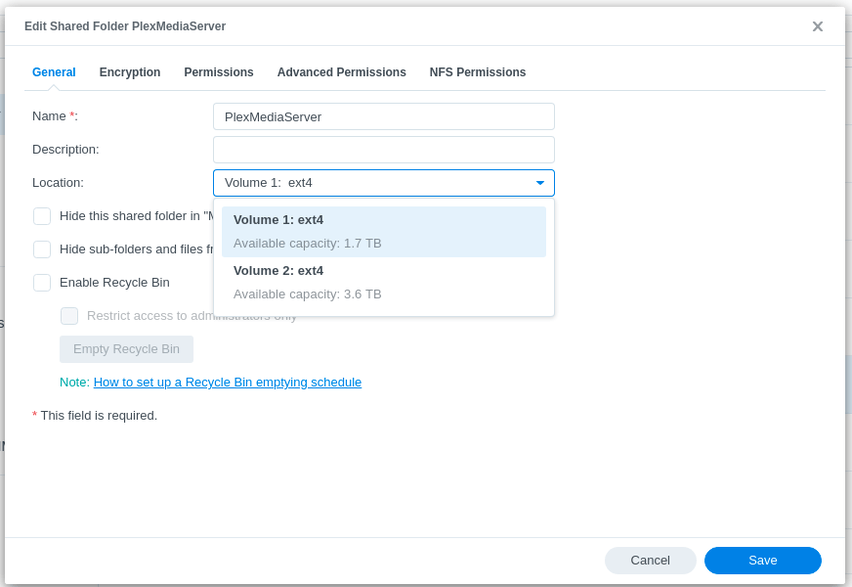
You may move the Metadata directory to any DSM-supported volume using Control Panel - Shared Folders

  1. Stop Plex.
  2. Select the “Plex” (DSM 6) or “PlexMediaServer” (DSM 7) shared folder
  3. EDIT it
  4. Change “Location” to the desired volume
  5. SAVE the change.
  6. Wait for DSM to complete the relocation operation.

Example showing DSM 7

Go to Index

2 Likes

FAQ 13: Manually obtaining log files

Log files are maintained in the Plex share. This share is normally hidden by default because, under normal usage, there is no reason to access it.

In those cases where PMS won’t start, the share can be made visible to File Station in order to facilitate manual collection and posting in the forums for assistance.

Procedure to retrieve log files

DSM 6

Prerequisite: (Do this only once)

  1. Control Panel - Shared Folders
  2. EDIT the Plex share
  3. Permissions Tab
  4. Grant your Synology username permission to R/W the share.
  5. Exit Control Panel

Log file retrieval

  1. File Station
  2. Plex share
  3. Drill into Library / Application Support / Plex Media Server
  4. Right-click Logs
  5. Compress to Logs.zip
  6. Wait for this to complete.
  7. Download the ZIP file
  8. Upload / attach to your forum post as needed.

DSM 7

  1. Control Panel - Shared Folders
  2. EDIT the PlexMediaServer share
  3. Permissions Tab
  4. Grant your Synology username permission to R/W the share.
  5. Exit Control Panel

Log file retrieval

  1. File Station
  2. PlexMediaServer share
  3. Drill into AppData / Plex Media Server
  4. Right-click Logs
  5. Compress to Logs.zip
  6. Wait for this to complete.
  7. Download the ZIP file
  8. Upload / attach to your forum post as needed.

Go to Index

FAQ 14: Use SSH to access the Synology command line

  1. Control Panel
  2. Terminal & SNMP
  3. Enable SSH
  4. Sign into the NAS using PuTTy (Windows) or ssh (Mac & Linux)
  5. Open the SSH session
  6. Use your username & password
  7. Be greeted with the command line prompt $

Go to Index

FAQ 15: Claiming & Connecting to a troublesome Synology server

This FAQ is for those situations where the normal claim process has failed.
There are multiple techniques to accomplish this.

DSM 7

  1. Uninstall the package with the “Keep” option
  2. Reinstall the package , selecting the “Plex Claim Token” option
  3. Click “Get Plex Claim Token”.
  4. Browser tab will open and display a “claim-xxxxxxx” token string
  5. “COPY” the string
  6. Return to the installer window
  7. PASTE the claim-xxxxx into the small window on the form.
  8. Click NEXT until it starts installing.
  9. Installation will need an extra 15-20 seconds for the installer to communicate with Plex.tv and obtain new credentials for your server. After it receives the credentials, it updates your “Preferences.xml” automatically so the server is again connected to your account.
  10. The installer will confirm success or failure attaching. Success will include your Plex account username in the message
  11. Open an Incognito Browser Window.
  12. Connect http://LAN.IP.of.Syno:32400/web
  13. Confirm Sign in
  14. Confirm “Got it”
  15. Skip through wizard if presented
  16. Arrive at dashboard.

DSM 6

Normal Method 1

  1. Both Workstation (Computer performing the claiming) and the Synology MUST be on the same LAN subnet.
  2. In the browser, open http://app.plex.tv/desktop?secure=0

Alternative Method 2

This method has two parts. For those with DSM 7, you’ll recognize it to be the “Plex Claim Token” method.

The procedure is:

On Synology,

  1. Preparation
  • Create a scheduled task named “Claim Plex Server”, which is a “User Script”.
  • It runs as user ‘root’
  • The “Settings” tab is the script contents. Copy and paste this text
#!/bin/bash

# Make certain you have removed the following NAME="VALUE" pair
# from Preferences.xml  with Plex stopped

# Remove:  PlexOnlineUsername, PlexOnlineToken, PlexOnlineMail, PlexOnlineHome

# Save and Start Plex

# In your browser, open https://plex.tv/claim
# COPY the link to your browser
# PASTE the claim-xxxxxx value in the statement below .  
# Be careful of quotes

curl -X POST 'http://127.0.0.1:32400/myplex/claim?token=PASTE_TOKEN_HERE'

# Check the email from DSM.   It will tell if you successful or 
# give you the error to bring to the forums.
  • SAVE this Scheduled Task. We’ll come back to it shortly.
  1. Stop PMS

  2. Ensure the Synology Text Editor app is installed.

  3. Depending on DSM version , open Preferences.xml in the Synology text editor

  • DSM 6: Plex/Library/Application Support/Plex Media Server/Preferences.xml
  • DSM 7: PlexMediaServer/AppData/Plex Media Server/Preferences.xml
  1. Carefully remove the following Name="Value" pairs from Preferences.xml being careful not to damage any others or the punctuation then save the file.
  • PlexOnlineUsername
  • PlexOnlineToken
  • PlexOnlineMail
  • PlexOnlineHome (if it exists)
  1. Now start PMS. Do not open it. Let it sit idle

  2. Open http://plex.tv/claim

  3. You will be given a claim-xxxxxx token. COPY this token into your browser.

  4. Quickly open the Scheduled Task settings again for ‘Claim Plex Server’

  5. Go to Task Settings, scroll down to where you paste the Token and paste the claim-xxxxx token into the comand.

  6. Save the task changes

  7. RUN the command.

  8. Wait for your email to arrive (takes 30-60 seconds depending on ISP)

  9. You should see a whole bunch of “Feature Flags” ending with </MyPlex>. This indicates your server has been claimed under your account.

Go to Index

2 Likes
Cannot claim server: "No soup..."
Plex server app on Synology Nas
Can't Claim My Server after a Reinstall
Filled with rage
Locked out of server and Plex reference article on how to get in didn't work (for me)
Synology Plex Freezes DS1019+
Problem when Reclaiming Server
No soup for you! The server you're trying to access doesn't want to let you in. Make sure you're signed in as a user with access to this server
Unable to access server after password reset
Can't get my server visible on app.plex.tv after a password change
PMS not working
Unable to access server after password reset
Server unavailable on PCs after password change (iPhone working)
Unable to access server after password reset
Geen toegang meer na nieuw wachtwoord
Is it possible to access Plex (remotely) with no fixed public IP? How?
Cannot See My Libraries from Anywhere
Lost Synology Plex Server after PW Change
Reclaiming Server on Synology strange issue
Plex Media Server - Unclaimed Server Issue
You don't have any connected servers
Where do I start?
Plex Media Server lässt sich nicht mit meinem Konto verbinden
HELP! Lost connection to my server and libraries after switching from Facebook to Google sign-in
Unable to find and re-claim server
Plex not showing my media library on Sinology
Unable to connect to plex server on synology via browser or desktop app while plex server is up and
Changed Plex Password Can't Find Server
Changed admin password and now admin doesn't have access to the local media server
Action required: Important notice of a potential data breach
Security password reset
After Resetting Password My Plex Server Will Not Show Up
Can't find my server after password reset
Unable to reclaim my Plex Server after password reset and sign-out
Passwort Zurücksetzen
Do not access to the library since I change my password
Cannot reclaim Synology PMS Server
How to make Plex Server attached to Synology Video folder
Claim Plex server
PLEX zeigt bei + Deine Medien - Holen sie sich den Medien Server
My servers are just gone, both on plex.tv and locally
Plex can't find my server
Plex Pass umziehen?

FAQ 16: Increase the number of folders Plex can monitor

Applicable to all supported versions of DSM.

When the Linux ‘inotify’ table fills up, this will cause when Plex to stop automatically detecting new media you add to the server. It will also manifest when there are transcoder problems with Dolby audio codecs.

Linux has a default table size which is static. We can increase this at will.
On some versions it’s 8192. On newer kernels, the default is 65536 folders.

This is easy to increase but requires a bit of math.

  1. First, get the total number of directories in use for your media (movies, series, music, and photos). For each share containing media:
    a. File Station.
    b. Left Pane
    c. Right-click the share
    d. Properties
    e. Write down the number of folders it finds.

Example:

When done collecting the number of folders in use:

a. Add 32768 to the value
b. Divide by 32768
c. Add 1 to the the Integer result (No fractions here)
e. Multiply by 32768
f. Use this final result. (integer part only)
g. If the number of folders you are using is less than 8192, stop here unless you are about to add a lot more media.

Example: I have 208,244 directories (because I curate a lot of music and photos)

(208244 + 32768) / 32768 = 7.35  ->   7
7 + 1 = 8
8 * 32768 = 262144  (This is the value I use - room to grow)

We do this because we want a multiple of 32768 slots to be allocated. It allocates kernel memory on a memory boundary and allows for future growth.

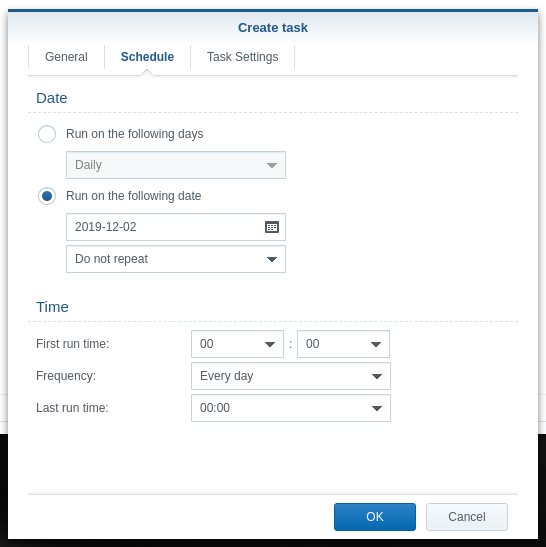
Create a Scheduled task you will run ONE TIME -OR- when DSM updates and you need to increase the table again.

Here is how it will look in Task Scheduler:

  1. Create a Scheduled Task
  2. User defined script

a. Create the task

b. Declare it to run one-time Today only

c. Paste in the contents but use your values.

# Remove any previous s2s_watches_max entries (avoid clutter)
sed -i 's/^s2s_watches_max=.*$//' /etc/synoinfo.conf
sed -i 's/^s2s_watches_max=.*$//' /etc.defaults/synoinfo.conf

# This is an example only.   Use your actual result below to add the new value
echo 's2s_watches_max=262144' >> /etc/synoinfo.conf
echo 's2s_watches_max=262144' >> /etc.defaults/synoinfo.conf

When you’ve added your value and clicked 'OK",

  1. Run it
  2. Restart DSM (Required to activate)

WARNING:

Due to how Synology manages this capability, you are strongly urged to place ONLY those items which should be monitored in your media.

Cases have been found where “Sample” and “Example” files have been included or the media storage contains unnecessary extra folders.

Please curate your media with care.

Go to Index

5 Likes
HW Transcoding not working anymore (Synology Diskstation)
Plex Media doesn't detect automaticaly new media
Certain MKV Files won't Play
Plex connection without remote Access & Insufficent max_user_watches
Is ChuckPA's FAQ 16 still applicable for DSM 7?
Automatic Library scanning not working
Automatic media detection inoperative after DSM 7 upgrade
Nach dem Upgrade von "Plex Media Server" Fehler im Log und Abspielprobleme
Library stopped updating
PLEX Creating duplicates of all my music without end
Certain files won't stream over internet, but no problem on home network
Plex server on Linux in Docker: frequent transcode errors when not transcoding
Plex will not scan library
Plex library not updating automatically
Plex will not scan library
Plex transcoding stopped working?
Plex freezing a transcode no matter the client stating out of space
28: no space left on device
Plex stops running every once in awhile? Why?
Trancod error
100% Prozess mit Transcode "convert to wav" brauche hilfe
Error displaying photos + no new media detection
Problems transcoding files with EAC3 sound
Plex Server Showing Spikey CPU Usage
Synology Suite latest 8555 version analysis title problem, serious problem, urgent help
Libraries don't automatically update when adding new content
"Conversion failed. The transcoder exited due to an error"
HEVC 10bit main is transcoding fine but HEVC 8bit main is not
S2s_watches Fix
Turned on 'Required' secure connection and can no longer access ANY Plex interface
Auto scan for new media files in library folder not working
Plex Media Server "manually stopping"
Music Library versus number of directories
Plex doesn't scan my NEW files only!
Plex library not updating automatically synology ds218+
Plex Server (Synology DS-3615xs): Playback does not start (stuck on playback spinner)
PMS does not see NAS after changing password
PMS continuously scanning for series intros; tons of errors in console
Plex Server (Synology DS-3615xs): Playback does not start (stuck on playback spinner)
Plex Media doesn't detect automaticaly new media
Libraries not auto scanning on new media being added
Plex Server (Synology DS-3615xs): Playback does not start (stuck on playback spinner)
Plex cannot show newly added files, but existing ones are OK
Plex Consistently Shuts Down Every Day on my Synology
Automatic/Partial Scanning has stopped
There was an unexpected error loading this library
Synology Nas + Temp location for transcoding
Plex 1.40: Error while decoding stream #0:1: No space left on device , is the bug back?
Plex Console shows errors [Notify] Failed to add watch for "<path>" (28: No space left on device)
PMS Shutting down/crashing randomly
Choppy video and freeze up on Shield TV Tube
Download link required for PlexMediaServer-1.19.4.2935 x86_64 spk (for x86 64-bit Intel Synology DS218+)
Cant play video with E-AC-3 audio
Indirect playing does not work for SOME title
Unable to find newly added movies
New movies not automatically added
Intro detection taking forever
Plex not auto detecting new tv shows added
Please Help! have tried all I can: EAE timeout! EAE not running, or wrong folder? Synology DS 918+ NAS
Problème scan auto depuis un dossier mapper CIFS
Plex Package infinite load, needs to be restarted at least daily (not loudness bug)
Plex server crashes after deleting media library or optimize database/clean bundles
Plex Media Server - Synology DSM 7 Preview - Issues ( Archive )
Plex stopped automatically recognizing new files
DSM 7 what should I do
Kein automatischer Scan der Bibliothek
Trouble with DSM 7 Plex Playback Error
PMS won't play EAC3 items. Tried multiple PMS versions
Can't Transcode any video remotely since update
Plex does not see new TV shows
Pesky bug with auto content scanning
DSM 7, Daily Plex server crashes
Certain files refuse to play
Newly added episodes are not recognized
Newly created music library access issue, new to plex and need pointers please
Plex deja de funcionar en mi nuevo nas Synology DS920+
Plex Media Server - Synology DSM 7 Preview - Issues ( Archive )
I Updated to 1.25.2.5319 and now nothing is streaming to anywhere
Server only runs for a few minutes
[DS918+ - DSM7] Plex unable to play certain files but on (Android) mobile apps
I need help with a library in plex, constantly scanning it
Library Upgrade Required Failing on Synology DS423+
SOLVED! - Plex gets stuck spinning at 33% with all videos with EAC3 EAC audio (Plex recently stopped playing EAC3)
20% of my movies are not being recognized
Library updater does not manually update library media
Web App Cannot Connect Securely, frequently flips between secure and insecure
PMS routinely crashing on DSM
Latest Plex on DSM 7 Problems with EAC3 5.1 Sound
Witchcraft ?!
Witchcraft ?!
Libraries Not Detecting Changes
I can no longer watch any of my library over cellular network
Server unreachable even in bundled web app
Optimized Versions on Synology DS1821+
Plex on synology not scanning for new media
Somethings Wrong
Auto-Scan doesn't work
Sonic analysis stuck on 6 albums forever + several issues on the log file
Library Autoscan Not Working
Automatic Scan not working with Synology NAS
Music categories don't get scanned automatically
Cannot Transcode files remotely, but remote access is confirmed. Giving me errors
Only CERTAIN titles won't play outside of my LAN
"EAE timeout! EAE not running" error
Files not being added to only one Library
Auto Detect of New Media No Longer Working (Windows and Linux)
Issues with 1) loss of deleted files 2) automatic library scanning
Plex not auto scanning media
Plex stopped responding most of the time
EAC codec issues & iNotify still an issue?
Version 1.32.2.7100 not added new files
Content unavailable until I manually analyze the library
Auto scanning stopped working on Synology NAS
Plex buffering issues (not for all libraries) on Android app / Chromecast / web app, not Windows app
Why isn’t my Plex library being updated?
Ple agents not finding matches for new movies
Large music library keeps removing then adding albums
HW Transcoding Not Working for HVEC/H265 Content (1019+)
Transcoding E-AC3 on Android 14 not working
PMS 1.32.4.7164 : Still have issues with HW Transcoding (Synology DS 1019+)
Moved PMS to New NAS- Transcode of Intros Unable to find Codec

FAQ 17: Recover from a corrupt database

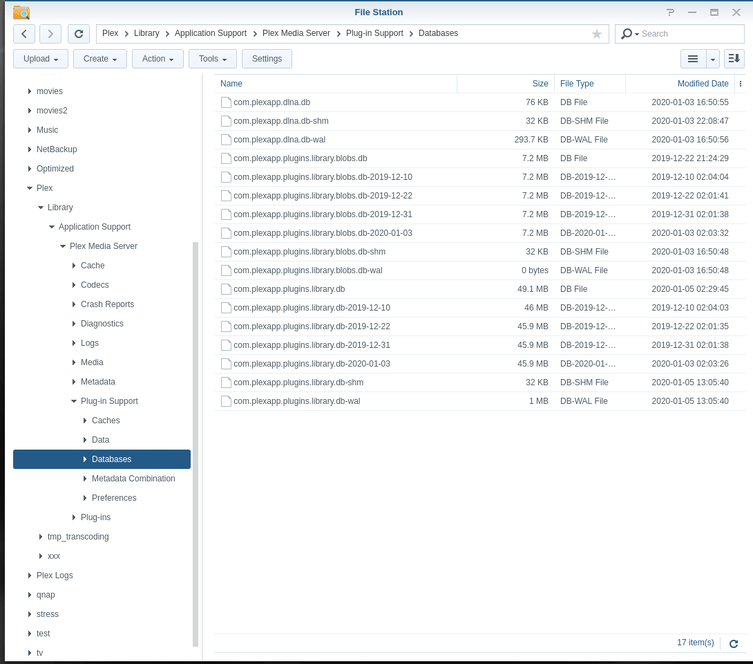
On Synology NAS machines, we have direct GUI access to the database area.
We can use File Station to recover if PMS was previously able to make database backups

  1. Open Control Panel - Shared Folders - EDIT the Plex share
    a. Permissions tab
    b. Give your username R/W permission to the Plex share

  2. Open File Station

  3. Navigate to the databases folder

  • DSM 6: Plex / Library / Application Support / Plex Media Server / Plug-in Support / Databases

  • DSM 7: PlexMediaServer / AppData / Plex Media Server / Plug-in Support / Databases


4. If you have corresponding .wal or .shm for the main Database file, delete them

  1. Rename com.plexapp.plugins.library.db to com.plexapp.plugins.library.db-damaged

  2. Due to how Synology handles making copies of files (Skip or Overwrite only),
    a. Copy your most recent backup to another folder somewhere
    b. Rename it to add -copy to the name
    c. Move the renamed copy back here.

  3. Rename it to be the original, proper, name

  4. Right-click com.plexapp.plugins.library.db → Properties

  5. Set the owner to be plex . (It will have changed when you made a copy)

  6. Start Plex

  7. Scan Files to bring the database back into sync with your current media status

  8. When you are satisfied the -damaged file is no longer needed, you can delete it.

Go to Index

2 Likes
PMS Suddenly stop adding new media in library. Synology NAS
Plex Slow, inconsistent "There was an unexpected error when loading this library" error
How to repair database on Plex Server on my Synology
Unable to delete libraries
New Server Build & Migrate (Windows to Linux)
DS920+ not in authorized devices, DS415 play working fine
Plex Has Over-ridden My Previous Movies Folder Metadata - How do I recover it?
Moved Video Files to a new location now "collections" shows up blank
PMS refuses to run on Synology
Plex searching for server after restart/reinstall
Plex Server Library Scan will no longer recognize new files!
Can´t start Plex Media Server. Pop up: Package service cant be run
Unexpected error only under certain views
Plex Slow, inconsistent "There was an unexpected error when loading this library" error
Playback error Error code s1001 (Network)
Checksum mismatch errors - New media not adding
Plex on Synology Nas getting errors
Failed to run the package service on synology DS 718+
Synology DS1019+ - Failed to Run Package Service after transfer of PMS DB from Mac
Server won't start
Failed to run the package service error / DS216+II
Libraries won't load (says it's empty). Restarting PMS fixes things for a few hours
iOS player reporting corrupt database
Synology DS218+: PMS stopped and cannot be startet anymore
New Movies won't appear
Problems after an update
Plex Media Server not starting on Synology DS1019+ "Failed to run the package service"
Database Corrupted
Help needed: Ghost in the machine (DS218+)
PlexAmp iOS hangs when clicking on track search results
Later versions of Plex losing Movie Library