Server Version#1.25.6.5577-c8bd13540:
Player Version#:
Hello - I am using Plex since 2010 and generally very excited with it. Recently, I had some serious trouble with my Drobo, I use as Database. During the process of finding problems, I noticed, that in my kummer/application support/Plex there are many, many folders that are obviously duplicates and very old. To clear up this mess, I wonder which strategy is the right one or better, what should or could be deleted. Some housekeeping sure is necessary.
Thanks for any help and suggestions. BTW my iPhone complaints sometimes „Database is corrupted“ but Plex runs w/o problems on the iPhone.
Maybe you could share what specific folders you’re looking at… there’s a lot of stuff in the Plex Media Server directory should shouldn’t mess with.
As for the notifications about database corruption… this hasn’t so much to do with your iPhone but your server. If your server database is corrupted, you urgently should look into this.
You can e.g. attempt to repair the database or restore a backup of the database (the longer you wait, the older the last good backups get).
Database corruption can e.g. happen if the server is shut down hard while writing to the database or if the underlying drive is failing.
Thank you for the fast response. I shall answer in detail tomorrow.
For the Database corruption: if I understand the instructions well, it results in deleting the db file and starting over from scratch. In the instruction are two options listed, but so far I see, it is more or the same.
That’s not correct.
The linked support article describes how you can attempt to repair the database using two different scenarios.
If both fail, you’re left with attempting to restore your server database from a backup (assuming you haven’t disabled that option in the scheduled tasks section of your server settings). Keep in mind that Plex won’t create new backups after it detects your database has been corrupted (this is mostly to avoid overwriting good backups with bad databases). Depending on how long you’ve seen those corruption warnings, your latest backup can be rather old.
Your absolute last resort (after failing to repair or restore your database) will be to nuke your setup and start over.
After reading your discussion and you mention 2010, if your database has been updated over such a long time, I would suggest a fresh install. You must have updated your server’s OS a few times to be able to keep the server current if hardware is the same.
Following a uninstall of Plex exactly as the support article outlines, will result in a large clean out from the Application support folder. Plex has some very good scanners now and you will up and running in quick time. The only caveat that comes to mind is if you use Video Previews Thumbnails, that can take a very long time to regenerate and a large chunk of drive space.
The uninstall is a solution with some work in result. I concede, a long installation period can cause lots of troubles over time. If I look in my Applications Support Folder, I often think it is a miracle, the at macOS is still willing to work.
I looked in the Plex Media Server Folder and found the last backup of the database file was from Feb 3rd 2022, which is not too far away. Of course, same entries of new Videos were copied since then, but if I take the 3rd Feb. file to replace, a scan should update the database to the actual state.
BTW - in the Application Support Folder are 4 folders: Plex - Plex Home Theater - Plex Media Server - Plexamp. Is that OK resp. can some be deleted?
If I understand this correctly, I have to use the SQLite command line interpreter. I tried that yesterday and could start the interpreter but pasting the command listed under Windows had no result. Since I am absolutely not firm in Terminal, I assume my path to the database file is not correct. Listed in the instructions is:
"C:\Program Files (x86)\Plex\Plex Media Server\Plex SQLite.exe" com.plexapp.plugins.library.db "PRAGMA integrity_check"
The real path to the file is:
Macintosh HD/Benutzer/kummer/Library/Application Support/Plex/Plex Media Server/Plug-in Support/Database/com.plexapp.plugins.library.db
So for me the question occurs: what is the correct command line in SQLite Interpreter?
This seems perhaps a little naive from my side, but obviously Mac Users don’t bother too much with the terminal.
Now I finally got it: I use the command of the Windows example and exchange the directory with the alternate command shown in the Macintosh section. I did this and got an OK quite immediately.
“/Applications/Plex Media Server.app/Contents/MacOS/Plex SQLite” com.plexapp.plugins.library.db “PRAGMA integrity_check”
ok
I have meanwhile repaired my database following the instructions on the Web page. Hopefully all went well? I got the output file in the databases directory, but the whole process runs almost immediately. I hope very much that is not a bad sign.
Hello again - I am meanwhile many steps further, but the following questions wpuld require your help again.
First, I have some Plex related folder in application support. 1. Plex 2. Plex Home Theater 3.Plex media Server 4. PlexAmp
The related files are all in the third - Plex media Server. I assume all others could be deleted.
In the Databases folder of Plex Media Server is the database file we need to use.
I can successfully make all checks and repairs of the tutorial but - and now comes the problem:
Terminal reports the following if doing the integrity check:
Michaels-iMac:Databases kummer$ “/Applications/Plex Media Server.app/Contents/MacOS/Plex SQLite” com.plexapp.plugins.library.db “PRAGMA integrity_check”
*** in database main ***
On tree page 69384 cell 6: Rowid 60815 out of order
row 29745 missing from index index_media_parts_on_hash
row 29751 missing from index index_media_parts_on_file
row 29753 missing from index index_media_parts_on_hash
row 32374 missing from index index_media_parts_on_file
database disk image is malformed
After trying the repair attempt, the output of the repeated integrity check is the same.
Is there a particular reason why you would want to delete those files?
I’m not 100% sure how severe the integrity check output is – usually this means the database repair didn’t work after all.
If that’s the case, your last options are
No particular reason for the deletion of the redundant folders - only housekeeping
The last backup was feb 3rd 2021. I assume, that. all additions after that would be updated via Plex.
The whole mess started as I wrote at the beginning of this thread at this day, since my Drobo was suddenly write protected. I later found out that all following problems were caused by a faulty RAM SIMM. After replacing it, all went back to normal, but the Plex database was corrupted during this process.
I assume, the problems in the database are not very severe, since all looks more or less fine when using it. On the other hand - you never know and to be on the safe side, a perfect database would be sure a good idea.
Those folders aren’t about your server and not redundant.
They’re settings / caches / … of the other respective apps. In the case of the Plex for Mac desktop app, this is also where downloaded items will be stored.
Only delete those folders if you want any installed Plex app on that machine to “star over”.
Hello again - I meanwhile got a Mac Studio and had to install it a Plex Server. I took the opportunity to build it from scratch, so I could get rid of any old problems. So far the installation went well, but I have some problems, I can not solve myself. Any help would be greatly appreciated.
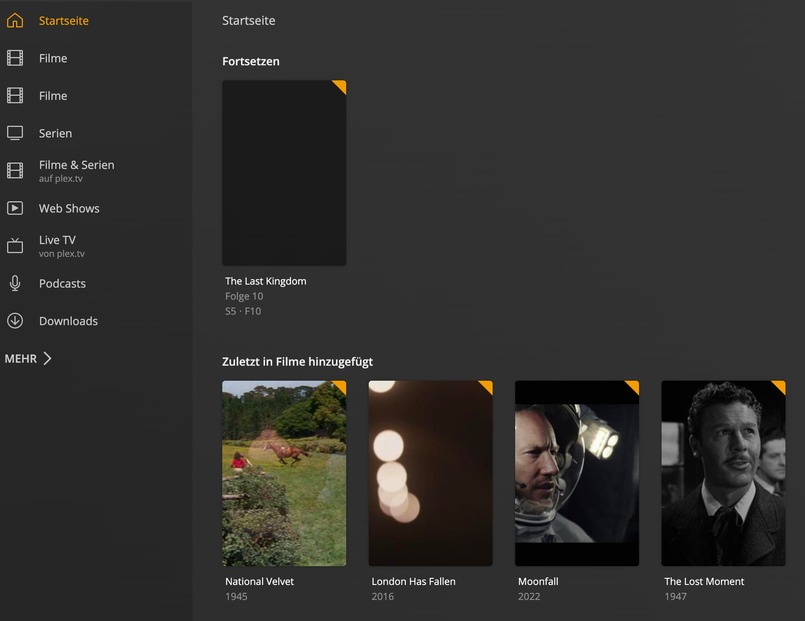
I could bring all my movies etc. into the ne Plex Server. But I can’t bring all the movie info in. The movies are shown, but no info at all. I tried to connect the agents to Movie database, but Plex does not save these agent. The selection box has a checkmark, but it is greyed out. I assume, there is anything wrong with it.
I can’t rename the folder either. I can edit the name, but no language selection is active - the pulldown is empty. So the “weiter”-box is not selectable.
Screenshots please – I’m not sure I understand what you’re trying to explain.
There should be no (not much) need to switch agents in most cases. Most of the time you should only experience missing metadata if Plex isn’t able to determine what movie a file belongs to (which again is mostly linked to poor file names).
You might want/need to look at your Plex Media Server’s database and potentially repair the database if you experience changes to libraries not sticking etc.
After leaving the section and going back to the main screen, the return to the agents sheet is reset.
No follows, what I did to build the new database:
I left the old installation on my iMac as it was but was quitting the Plex server and Plex App. After that I closed down the iMac.
On my Mac Studio I downloaded both the server and the App and logged in with me Plex pass credentials.
After that I started new Mediatheken by selecting File etc.
The selected folders are on my Drobo - the path is shown on the first screen shot.
Finally all Movies and TV Shows were included and to be found in Plex App - but all information was gone and could not be revived.