Server Version#: 1.21.0.3616
Player Version#: Plex Web 4.43.4
I’ve noticed the Plex Server doing periodic scheduled tasks. I don’t mind that and I know they need to be done but it seems that often the task is needlessly trying to rework things. For example, when performing such tasks as
Upgrade media analysis during maintenance
Refresh music library metadata periodically
Perform extensive media analysis during maintenance
Fetch missing location names for items in photo sections
Analyze and tag photos
Seem to perform this work on things already in my library. I see things like searching for intros and artwork happening on things that surely were just processed last week. Nothing has changed, even the timestamps on the file should tell Plex that this doesn’t need to be done again. So why all the waste of processor cycles and disk reads? Is there perhaps a setting, short of turning off such scheduled tasks, to tell these tasks don’t bother with stuff you’ve already done?
If it’s in the log file, or via the Alerts viewer, that may be normal. For many operations, Plex runs the tasks, and the task itself identifies if any work needs to be performed, quitting immediately if nothing needs to be done.
If you see the same long-running tasks in Activity, over and over, that could be something different. That could mean that there’s a problem processing a particular bit of media.
Or, you know, there might be a bug, or extra processing going on. I dunno.
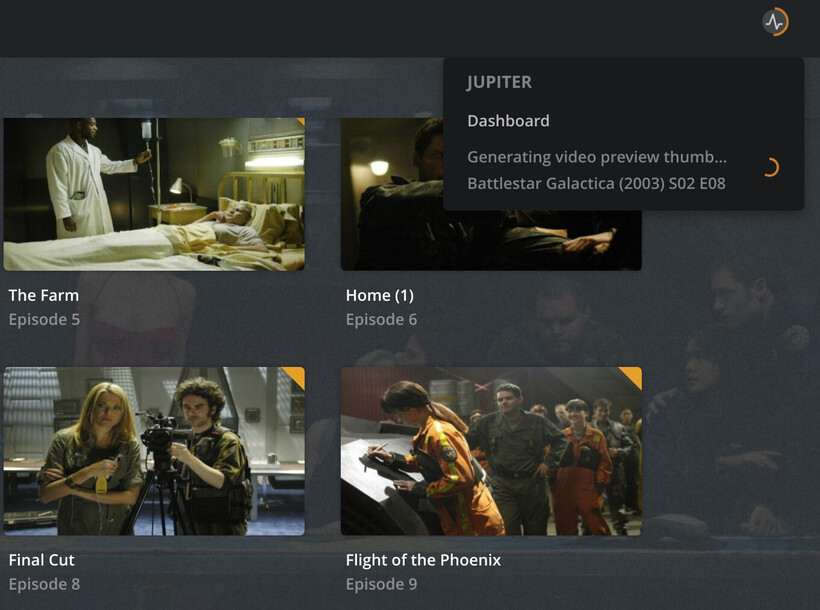
I believe I see it through the Activities Icon. There may be a plugin involved. But it’s a round lightning bolt icon and there is a spinning glow around it. When I click on it it offers me the Dashboard and has a couple of lines below it where it says things like "Finding intros for ", etc. I’ll try to capture it next time it happens.
What I do know is that the disk drives on my Synology are going nuts, keeping me awake, and Synology DiskStation OS says that the Plex server is busy. I see many series names in the messages from long ago and it’s processing stuff on each of them. Quickly perhaps, but it seems to me that work on those files should be avoided as it should be simple to determine that the file timestamps rule out any kind of “newness” that needs to be worked on.
Checking to see if files exist, and checking timestamps, also requires disk access. The disks seeking around is probably noisier than when actual work is being done.
If the tasks stick around for a while, or especially if you see the same show processed repeatedly, try to grab some screenshots. If they complete quickly, that sounds normal.
I really wish it was that simple but no, the Synology is in my living room. Alas, I am often up late at night and often with the sweats and my living room has a nice leather couch which is quite cool to the touch and a good place to resume my sleep. But even if I was not drawn to my cool couch with the noisy Synology, I can still hear the Synology my bedroom bed, but in either case, the Synology is loud and busy and doing things I just don’t think need to be done over and over again so let’s stay on point here, OK?
It’s not obvious which tasks are causing the noise. When you notice it happening, grab some screenshots - or even better, gather the logs. Maybe there are some media files with errors that are being processed repeatedly.
The scheduled for tasks can also be changed. Maybe the impact would be reduced if these tasks were performed during the day.
Moving the Plex data directories to an SSD can quiet things down significantly, and moving all media to SSDs enables completely quiet systems. Expensive ones, but quiet.
I’m partial to putting servers in the garage, myself. Putting them in the cloud is pretty popular, too.
At the risk of annoying the OP - who I genuinely do sympathize with, because I hate computer noises and want to help - I know where my hair has gone. Mostly to my back.
I’m always hearing some disk activity. Then again, this NAS is also NFS mounted to my two Linux systems. I also perform backups from the Linux systems to the NAS but that’s not the problem here. The problem here is definitely that PMS is busy doing things, which I understand, but which I seem to see as doing things it has done before and shouldn’t need to be done again.
I’d submit that if media files are processed with errors then the system should reprocess them if nothing has changed with the files for the same errors would happen, no?
The Synology doesn’t have SSDs and as you point out, that’s way expensive. Yes, I have Iron Wolf drives. Nobody told me they were noisy.
Correct me if I’m wrong but putting servers and NAS boxes in the garage would first require that I have a garage. I don’t. I’m in an apt. Plus my router is in the apt too. I thought about stuffing it in a closet but I couldn’t wire the NAS to the router and I’m not doing wireless.
Besides the problem isn’t just that the disk drives make noise but that they seem to be making noise unnecessarily.
Nobody is disagreeing. Just asking you to share what you are seeing.
One thing that comes up frequently is that Plex is never completely idle, and usually will prevent drives from ever sleeping. Plex frequently updates a statistics database, especially if any clients are open and connected to it.
My friend also runs a Plex server but had configured it for Unraid. He boasts about his disk drives being quiet and sleeping and his NAS is in his garage (as well as his gaming gear, etc.). The Synology has a setting for sleeping drives but as you say, Plex frequently accesses the disk causing them not to sleep.
Is there some setting in PMS that I didn’t see that controls how busy Plex makes your system and/or allows you to turn off some of this activity. IOW I’m not that interested in collection statistics like this if I can make the disks quieter. The scheduled tasks run only in the early morning hours and I’m quite sure my users are not using the Plex server at those hours.
I see what you’re saying and agree that would be a nice option. I would really like a view into the status of things - what’s been analyzed, what hasn’t, what failed and needs attention.
I think Plex’s trigger logic is simple: if analysis isn’t up-to-date, perform analysis.
In a lot of ways that’s good - many times a file is just temporarily locked, or there’s a network error, or something failed that will succeed on a second attempt.
But if there’s broken media, it just cheerfully tries over and over.
If (analysis isn’t up-to-date) then perform analysis
to
If (analysis isn’t up-to-date && the local data/file has changed) then perform analysis
Obviously, things like locked files, network errors, etc would be excluded from this. IOW if the file was locked or network error then mark it such that it will be attempted next go around.
Oh, and if there were broken media or other things that the server owner would need to become aware of then how about notifying them like may be by email or notification in Plex itself?
OK, I’ve got some images. Here at 4:30 Am, can’t sleep. Headed to my couch and the Synology is rattling off a consistent banging of the disk drives loudly so I decide to take a look. Yup, it’s doing things I think are unnecessary. Specifically this time generating video thumbnails for things I’ve had on my PMS for at least 50 days!
I watched as video preview thumbnails were generated for Battlestar Galactica (2003) S02 E10 then E11, etc. The problem is I had copied this set of videos from my friend at least 50 days ago and when I brought my Synology NAS back home it went nuts generating video thumbnails, detecting intros, and otherwise categorizing and getting metadata for all of those files I copied from my friend. Then it stopped. Now it appears to be doing maintenance on my files and to me, needlessly regenerating thumbnail photos and detecting intros.
As this shows it’s generating a thumbnail for S02E08 but we can clearly see E08 (Final Cut) already had a video thumbnail. So why is it doing it again? I watched as the process counted down in the Battlestar Galactica S02 down to E01 then start on S01.
They take a while to create. It’s basically a screenshot every few seconds of the movie. Personally I love them. They make it possible to seek/scrub directly to a desired scene. Some people don’t care as much.
VPT creation will definitely attempt to run repeatedly if it fails. Usually this means a corrupt file, but not always.
You can tell if the VPT generation process succeeded. Get Info on one of those BSG episodes.
If “Indexes sd” is present, it shouldn’t try to process that file again.
Interesting stuff Volts! It may very well be that PMS has still not processed all of the videos I got from my friend. It was like 18 TBs! But 50 days?!?
Scheduled tasks are set to run between 2-5 Am. Would it make sense to just set it to all day and let it crank away? Geeze I should have done that when I went on an RV trip last week. It could have been cranking away while I was away and hopefully not setting the apt on fire! For now I configured it for Midnight -> 11 Pm. Saved the changes. Nothing is processing. Hmmm…
I really don’t use or rely on the Video Preview Thumbnails that much but I do like the intro skip thing! Another problem I will probably eventually post here is that often if you are say 30 minutes into something and stop playback then later decide to watch the rest Plex will give you the option of continuing where you left off. But on many media files it just fails and starts at 0:00. I’ve trained myself to make a mental note of where it was (e.g. 30:31) and if it goes back to 0:00, on my Vizio TV I can hit the up arrow and it will skip forward by 10 minutes for every up arrow. So 3 up arrows and a right arrow or two and I’m back in business. Note that the newer Plex app for Vizio TVs doesn’t scrub like that and has other issues for me but I’m always wondering why do some media files fail to resume while others resume without issue and how can I fix that? Another day, another post…
Is there a rhyme or reason to PMS’ processing of these things? I mean BSG is in the B’s. Does it go alphabetically? I have a ton of TV series and movies. It’d be good to know where it’s at in my stash of media…