Analyze Problem

Server Version#: 1.32.8.7639
Player Version#: Irrelevant

For the past three years I’ve had a DM thread going with a Plex employee for various ongoing problems we were trying to solve. In May, I had to move all my data from my older servers to newer servers. This process was going to take about 5-6 months. So we decided we’d reconvene when the migration was complete. However, when I came back, his Plex Employee account was anon. I learned he was fired in June.

I tried to follow up with the DM but I guess he was the only one observing our message threads. I need a Plex employee who is still employed to DM me.

After the migration, and everything matched, I have files that are sometimes required to be analyzed 20 times before it will accept the codecs so the file will play. It’s not a permissions issue, it’s PMS not picking up or analyzing the file correctly. Hitting analyze over and over and over eventually gets it to take. But I have a large library so it’s not something I can do one by one, tho that’s what I’m doing now when I come across this with something I’m trying to play. A massive inconvenience since this process can take 20 minutes per file to fix. And analyzing the entire library is useless, I’ve tried, since analyze has to be hit so many times for PMS to properly recognize the codecs.

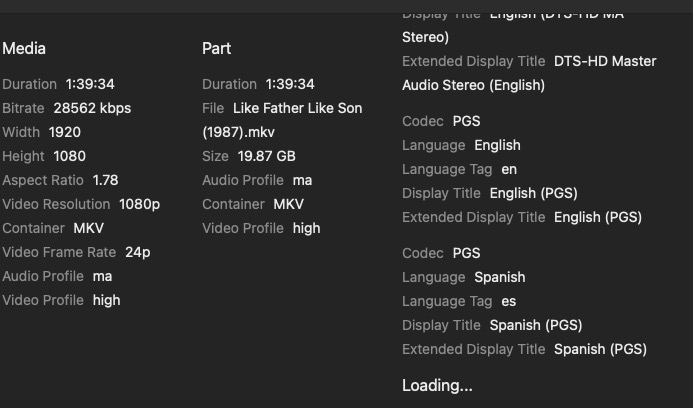
Screenshot 2023-11-27 at 4.39.44 PM

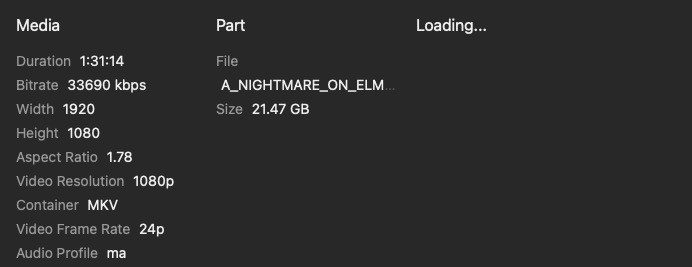
Screenshot 2023-12-13 at 11.44.35 PM

Bump.

Bump again. This problem isn’t going away.

I realize it’s the holiday season, but nearly two weeks without Plex support acknowledging a clear problem with the deep analysis in their software leaves me wondering if support even exists anymore.

Besides, forums are great for being helpful understanding how something works, but a poor platform to seek technical support.

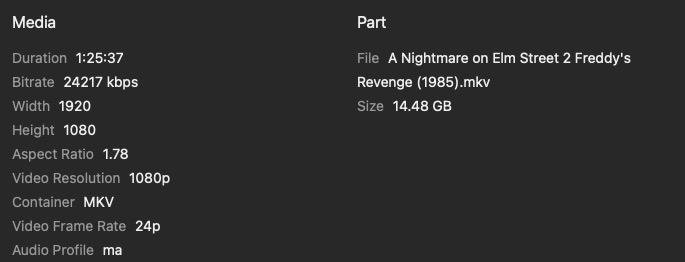
I don’t see the video codec in any of the screenshots, presumably due to the issue. Maybe post a screenshot of the codec info in VLC or from some other program? Or at least post what codecs these are? MKV is just the container.

It’s not discriminating. It randomly happens with every variation of video and audio codec. The container doesn’t seem relevant to the issue. It’s a deep analysis problem.

Would need logs to confirm but it sounds like he is having database issues with slow response. Probably in need of a database export/import to defrag but you can try doing optimized more frequently.

Thank you for the responses… I’m aware of all the things I can do. Optimize database didn’t fix it, optimize is also part of my nightly scheduled tasks. … It’s an analyze problem only on existing files and sometimes whenever I replace a file, but even a single analyze pass doesn’t fix it. Running analyze on the entire library doesn’t correct it because it takes multiple analyze passes. I have to stumble across one and, then possibly, analyze the file 15-20 times. And my library is too large to go thru every file. Plus old staffer MovieFan.Plex spent almost 3 years fine tuning my library while informing me of all of Plex’s limitations. I’m well versed in the ins and outs, but I need someone who can get into the code to see what’s going on.

That’s why I need a staff member to DM me so when I come across another file, they can inform me of the settings they want and which log(s) to provide.

You can message me your server logs. ( just download the zip file and attach that to message). I am only going to communicate in this topic though.

How big is your library?

@Speidel Hi. I have started to look at the logs you provided @BigWheel

Would help to get a zip of your Plex Media Server database

I can see analysis taking 20 minutes for a media item with title “I Come in Peace” or is it Dark Angels - might have been mismatched initially.

For some reason the analysis is being done many times for this item but I can also see that it was being streamed on an Apple TV - so what can you tell me about this media item and why the analysis was being rerun many times?

Is it either Dark Angels (1990) or I come in peace (2013) ?
What is the actual file name ? Is it adhering to the recommended guidelines here
Naming and organizing your Movie files | Plex Support

The analysis logs do not cover this item - to see what happens during the analysis, could you run with number of log files increased to say 20 - see hidden server setting LogNumFiles on this support article - Advanced, Hidden Server Settings | Plex Support

and with the increased number of log files and a fresh launch of Plex Media Server, perform a manual analysis for this item and after completion of the analysis - say wait 30 minutes, capture the logs. Do not do any other analysis during this period and capture the logs 30 minutes after starting the analysis

The logs provided for the 3rd January show this item being analyzed 22 times between about 06:00 am and 06:45 am - taking between 7 minutes and 20 minutes for each analysis

I see that scheduled tasks run till 7am - presume they start at 1am - can’t see the start as logs go back to 3am

May be get me logs for a few examples of the analyze needing to be run over and over and each taking a long time to complete

So pick a few examples of movies - one I mentioned above and others you know there is an issue with - capture the logs after each media file test - logs would probably be too big for the forum with the increased number - so please upload on dropbox/google drive etc and send me links

The logs show this was what scheduled tasks attempted on the 3rd Jan

Jan 03, 2024 03:10:20.471 [0x700007944000] DEBUG - Butler: Performing new intro detection for 7711 items

Jan 03, 2024 04:00:38.856 [0x700007944000] DEBUG - Butler: refreshing metadata for 23 seasons because they contain episodes released in the past week

Jan 03, 2024 04:00:39.647 [0x700007944000] DEBUG - Butler: refreshing metadata for 899 seasons because they contain episodes missing some metadata fields and haven't been refreshed in the past month

Jan 03, 2024 04:00:39.895 [0x700007944000] DEBUG - Butler: refreshing metadata for 18 movies because they have been released in the past 2 weeks

Jan 03, 2024 04:00:40.137 [0x700007944000] DEBUG - Butler: refreshing metadata for 207 movies because they're recently released and have no been refreshed in the past week

Jan 03, 2024 04:00:40.406 [0x700007944000] DEBUG - Butler: refreshing metadata for 100 movies because they haven't been refreshed in the past month

Jan 03, 2024 04:00:40.433 [0x700007944000] DEBUG - Butler: refreshing metadata for 11 shows because they have been released in the past 30 days

Jan 03, 2024 04:00:40.873 [0x700007944000] DEBUG - Butler: refreshing metadata for 17 shows because they have had a new aired episode in the past week

Jan 03, 2024 04:00:40.903 [0x700007944000] DEBUG - Butler: refreshing metadata for 100 shows because they haven't been refreshed in the past month

I am concerned that if it takes more than a month to clear the backlog of what scheduled tasks need to do, then the periodic refreshes every month will get in the way - perhaps you can disable some of the scheduled tasks actions to help reduce the load on the daily scheduled tasks

May be you can trying running with all scheduled tasks settings disabled apart from:

  • Optimize database every week
  • Upgrade media analysis during maintenance

Also look at the server settings for library - removing the scheduled tasks option for these

  • Generate video preview thumbnails
  • Generate intro video markers
  • Generate credits video markers
  • Generate chapter thumbnails
  • Analyze audio tracks for loudness
  • Analyze audio tracks for sonic features

and then when all analysis is completed - to bring these back gradually

Something to consider doing whilst I look into the need to rerun the analyze for some media files and the time it takes to complete each - I will probably need actual media files for the examples you will provide logs for

The database is almost 500MB’s so we need to find a way to get it to you since there’s an 8MB limit here…

I COME IN PEACE is the US Theatrical Title. The original title was DARK ANGEL but changed for US release. It’s matched correctly, I manually changed it so it’s correct to me. The DARK ANGEL title was manually added to the Original Title section.

Regarding it being analyzed 22 times… This is the problem.

First, I need to acknowledge that Plex doesn’t have a kill switch, it has to timeout to fail. I know you know this, but I need to state this to give context.

It takes less than a minute to analyze and if the codecs do not load, I hit analyze again. And again. And again… until the codecs load. This one took 22 tries. The reason it was also playing is because once it loaded I started watching it. But because Plex doesn’t have a kill switch, the process for all those failed analyze tries keeps going until it times out. If I were to step away after the first analyze, it would never load the codecs and I could not watch it. I’ve been dealing with this for months trying to find a solution before I’ve said anything, but finally got overwhelmed by it.

I will look into increasing the log files.

So after that, the next step… This problem is random, I can’t go thru my entire library one by one to find the files that don’t have the codecs loaded. This means I only stumble upon one if I try to play something and it fails. Now that we’ve opened this dialogue and I know what you need, I will follow your instructions and respond with the results.

My scheduled tasks run from 3am-7am. It doesn’t start at 1am, I have remote users who watch late sometimes, but the computer Plex is on is dedicated solely to Plex, there’s no other apps running on that Mac. It reboots every night at 158am.

I increased the time frame so it runs until noon instead so it can catch up. This is an extremely large library, plus I’ve been working on finishing a project that just completed on the 1st. So it should have some breathing room to get thru the backlog soon.

Current settings:

  • Optimize database every week - ON
  • Upgrade media analysis during maintenance - ON
  • Generate video preview thumbnails - set to NEVER
  • Generate intro video markers - set to when media is added
  • Generate credits video markers - set to NEVER
  • Generate chapter thumbnails - set to when media is added
  • Analyze audio tracks for loudness - set to NEVER
  • Analyze audio tracks for sonic features - set to NEVER

That’s a good starting point… Let me know how to get the database zip file to you.

What about these server settings for Scheduled Tasks:

  • Refresh local metadata every three days
  • Update all libraries during maintenance
  • Refresh library metadata periodically

There was evidence of at least one of these being enabled

Can you run with these 3 disabled please

I normally get these uploaded by users to Dropbox, Google Drive. One Drive , etc and send me a public link by private message

I can understand that if a media file is not analyzed and is in the backlog for Scheduled Tasks to process then that would not play until it is analyzed.

But … an analyze taking 20 minutes or more to complete - I want to see logs for that in a specific test run with no other analysis running and with then increased number of log files

And an analyze completing but the media file still has no codes - i want to see evidence of that in terms of logs

And we will probably need to have one of these media files to see if the issue can be reproduced

We have had issues before with analysis failing on some smb paths and there was specifically an Nvidia Shield issue relating to that

All 3 are checked…

  • Refresh local metadata every three days
  • Update all libraries during maintenance
  • Refresh library metadata periodically

Sent you a DM with the link

The issue I’ve faced is I can’t reproduce the problem. And it’s random on the file type. I can only discover and re-analyze to correct. Sometimes it’s all the codecs, sometimes it’s just the audio. And my process when I upgrade an existing file is to reopen Get Info and scroll to the bottom, see that it’s Loading… and wait for it to snap back to the top. Then it has been analyzed correctly. It’s time consuming.

I have been analyzing your PMS database - found the following 2 movies with no analysis data. Don’t know if that is still the case - but it could be movies you can try to get debug server logs for if the analyze needs to be rerun several times

Sgt. Kabukiman N.Y.P.D.
Bait

There are also 61 episodes with no analysis data
They were for these seasons

show Season
Dare Me Season 1
Sanford and Son Season 1
Reel Britannia Season 1
RWBY: Fairy Tales Season 5
RWBY: Fairy Tales Season 6
Blood Season 1
Housing Complex C Season 1
Inside The Sydney Opera House Season 1
Elvis Goes There Season 1
D.P. Season 1

Thank you! And thank you for being so thorough!! You found a bunch of corrupt files.

The two movie files were replaced and they’re now good.

The TV series:

DARE ME - episode 10 was corrupt, replaced
SANFORD AND SON - episodes 5 & 6 were corrupt, replaced
REEL BRITANNIA - episode 2 was corrupt, replaced
RWBY: FAIRY TALES was incorrectly matched. My file naming (Fairy Tail) is correct, but Plex decided to match to the wrong show. I had to use the IMDb number to get it to match, the correct show would not come up no matter how much I tried.
With the amount of corrupted episodes, it looks like transferring files to my server failed.
FAIRY TAIL - Season 5, episodes 4, 7, 8, 12, 13, 16, 18, 19, 21, 24, 28, 29, 30, 32, 33, 34, 36, 38, 40, 43, 46, 47, 50, 51 were all corrupt, replaced
FAIRY TAIL - Season 6 - episodes 1, 4, 6, 7, 8, 10, 12, 14, 15, 16, 18, 19, 20, 22, 24, 25, 26, 28, 29, 32, 36, 37, 38 were all corrupt, replaced
BLOOD - episode 1 was corrupt, replaced
HOUSING COMPLEX C - episodes 1 & 4 were corrupt, replaced
INSIDE THE SYDNEY OPERA HOUSE - episode 2 was corrupt, replaced
ELVIS GOES THERE - episode 1 was corrupt, replaced
D.P. - episode 4 was corrupt, replaced

I believe you likely found every corrupt file.

Since every file had to rematch when I moved servers, I suspect the scheduled task backlog is what’s keeping the few stragglers from get re-analyzed. Tho, what I want to determine is why it takes 20 tries to get it to complete the analyze task sometimes.

I turned on debugging in case you need it. Unless there’s a log you want, I’ll follow up once I run into one of these pesky files again.

Thank you again!

I need debug server logs to cover times when these issues arise:

  1. A media analyze takes 20 minutes or so to complete
  2. A media analyze completes but needs to be re-run more than once

and probably the actual media file

Update to this thread with current state:

Using a copy of @speidel’s database and following of new very good diagnostic logs provided, the cause of the issue of analyze not appearing to work has been tracked down to very slow database queries leading to an analyze for some movies taking circa 5 minutes to complete. On-the-fly analysis is only given 30 seconds to complete and so gets aborted by Plex Media Server before it completes.

I suspect that this only arises on servers with very large libraries.

This has now been referred to the server development team.

1 Like

@sa2000 could what is being debugged here be the same/similar to what I reported Butler Scheduled Task "UpgradeMediaAnalysis" keep running on same sets of files

That thread has auto closed and logs at the time were sent to @drzoidberg33 but I’ve heard anything since and every night I still see the following regardless of any content being added.

Mar 10, 2024 05:28:42.012 [140165483191096] DEBUG - The butler analyzed 3871 items.

It’s been like this for months.

sorry I do not know the position with that - would probably need copy of the database as well as logs and the logs need to be captured very soon after that message.

I would be happy to have a look but would need the database as well as the logs.
I have re-opened the forum thread