Server Version#: latest as of 1/21/22
Player Version#: varies
I have a plex server that has been running flawlessly for years (Running as a service on server 2019 vm, plenty of cores/ram/storage).
For the last couple of months it has randomly stopped responding. It could last a week or just a couple of hours but eventually it just stops working. There are no resource contention issues, no memory leaks or high utilization. It will often stop in the middle of the night when no one is using it.
I’ve been updating to the most recent version as soon as they come out to see if it’s a bug with no luck.
I’ve deleted the codes folder with no change in behavior.
Any thoughts? I’ve purchased a lifetime account, is there any official support offered? I would be happy to turn on logging and upload if someone can point me in the right direction.
Thanks!
When it stops responding, is the Plex Media Server.exe still running or did it quit?
Hi, thank you for responding. About 80% of the time the .exe is still loaded in memory, there is simply no response until restarted. About 20% of the time it actually shuts down and those cases I can monitor for and fix without having someone contact me telling me it’s down again.
Are you monitoring your Plex Media Server’s HTTP/s web server?
Are push notifications enabled?
I am monitoring to see if the service is running. About 80% of the time it just stops responding while still staying resident in memory. It must be partially working as I can get the initial plex screen when accessing via web browser but it never loads anything past that.
I just checked and push notifications are disabled in the server config. Didn’t even know that feature existed!
Can you provide some troubleshooting diagnostic logs?
You bet, I zipped up the log folder, you can download it here:
If I need to turn on any specific logging features let me know.
Thanks!
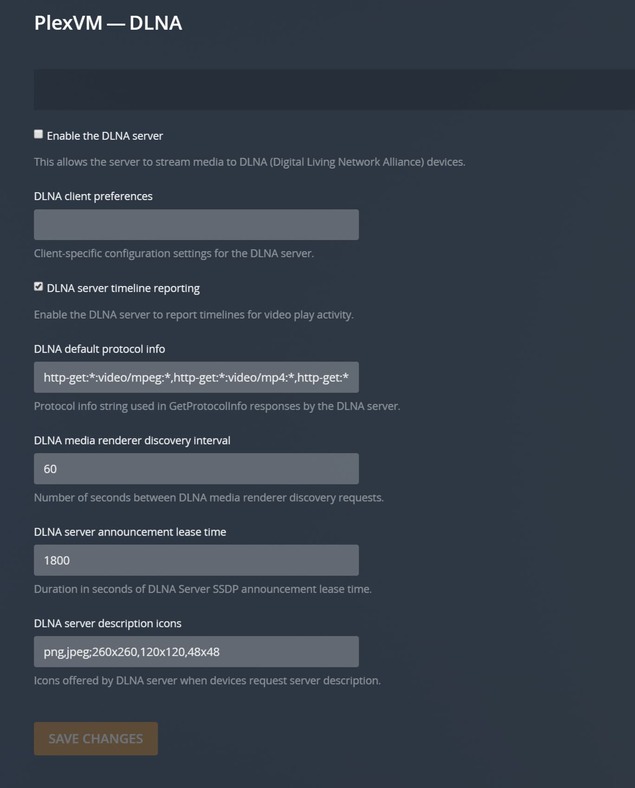
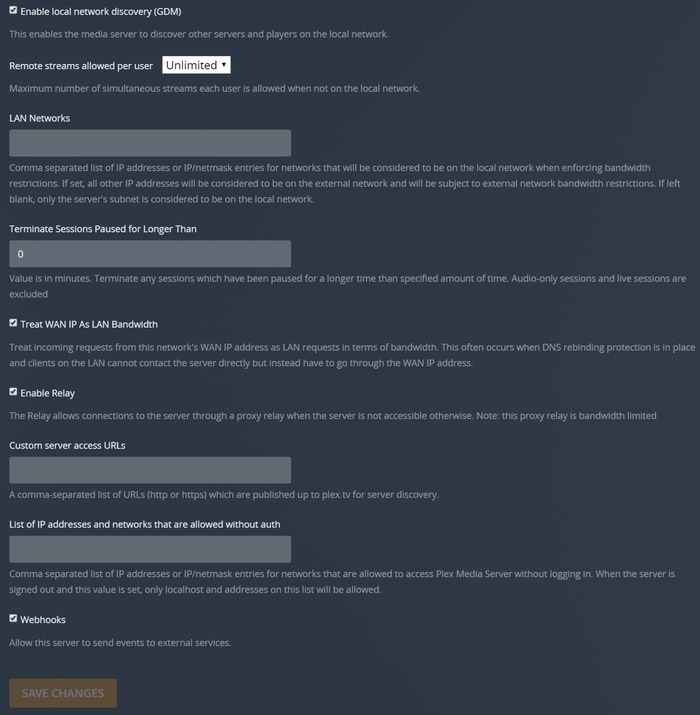
Lets get a screenshot of your settings.
- In Plex go to Settings \ Transcoder (Show Advanced)
- In Plex go to Settings \ Network (Show Advanced)
- In Plex go to Settings \ DLNA (Show Advanced)
Describe your internet connection, do you have a static NAT port forwarding rule?
What storage technology are you using for the E drive?
Also which virtualization technology are you using?
Good morning, images have been attached. It is running under Server 2019 Hyper-v on an epyc rome system with dynamic ram (8GB base). The vhdx files are hosted locally on the epyc system, no iscsi or fiber connections (boot and E drive are both on ssds). I have a comcast 1Gbps/35Mbps connection with a static nat port forward rule. This system was running flawlessly for years, it’s just been the last couple of months that it started randomly failing.
Thanks!
Jeff R.
Hi Jeff,
Do you have a Passthrough DDA GPU from the host to the VM configured?
Nope, all transcoding is handled strictly by the CPU
Try these Plex Server settings
Settings \ Transcoder \ Transcoder quality = Prefer higher speed transcoding
Settings \ Transcoder \ (Uncheck) Enable HDR tone mapping
Settings \ Transcoder \ (Uncheck) Use hardware acceleration when available
Settings \ Transcoder \ (Uncheck) Use hardware-accelerated video encoding
Settings \ Transcoder \ Maximum simultaneous video transcode = 14
Settings \ Network \ (Uncheck) Enable server support for IPv6
Settings \ Network \ (Uncheck) Enable local network discovery (GDM)
Settings \ Network \ (Uncheck) Treat WAN IP As LAN Bandwidth
Settings \ Network \ (Uncheck) Enable Relay
Settings \ Network \ (Uncheck) Webhooks
Done, I will test with these new settings and let you know if it is stable. Thank yo for the help!
Thank you for the help, zero crashes since I made the changes! Any thoughts as to which setting(s) might have been causing the random failures?
Thanks,
Jeff R.
You had a number of issues, I had you apply a good config for your environment.
You might want to consider a RAM drive for transcoding.