Plex stops daily

Server Version#: 1.25.3.5409

Since the latest update I’ve found PMS stops running every day.
I have to login to DSM and then open Package Center and start PMS from there. When I then open PMS, it again stops running, and I have to start it a second time.
I then have to repeat this process the next day. And the next…etc etc.

Plex Media Server Logs_2022-01-26_16-13-57.zip (1.5 MB)

Update to version 1.25.4.5487
PLEX still stops working every day.

更新到版本 1.25.4.5487
PLEX 仍然每天都停止工作。

Plex Media Server Logs_2022-02-02_16-29-42.zip (1.6 MB)

Is it related to the booking task??

螢幕擷取畫面 2022-02-02 163106

@Steveoh66

Sorry for the delay.

Looking through your logs, i see where PMS is being ordered to stop (signal 15).

Jan 26, 2022 04:29:15.708 [0x7f922e7aa8] ERROR - SSDP: Error parsing device schema for http://192.168.1.108:5000/ssdp/desc-DSM-eth0.xml
Jan 26, 2022 04:29:45.706 [0x7f922e7aa8] DEBUG - NetworkServiceBrowser: Parsing SSDP schema for http://192.168.1.108:5000/ssdp/desc-DSM-eth0.xml
Jan 26, 2022 04:29:45.707 [0x7f922e7aa8] DEBUG - HTTP requesting GET http://192.168.1.108:5000/ssdp/desc-DSM-eth0.xml
Jan 26, 2022 04:29:45.709 [0x7f922e7aa8] DEBUG - HTTP/1.1 (0.0s) 403 response from GET http://192.168.1.108:5000/ssdp/desc-DSM-eth0.xml (reused)
Jan 26, 2022 04:29:45.709 [0x7f922e7aa8] ERROR - SSDP: Error parsing device schema for http://192.168.1.108:5000/ssdp/desc-DSM-eth0.xml
Jan 26, 2022 04:30:11.943 [0x7f941c6aa8] DEBUG - Shutting down with signal 15 (Terminated)
Jan 26, 2022 04:30:12.213 [0x7f941c6aa8] DEBUG - Ordered to stop server.
Jan 26, 2022 04:30:12.216 [0x7f97622d40] DEBUG - Stopping server...
Jan 26, 2022 04:30:12.216 [0x7f97622d40] DEBUG - HttpServer: Stopping server.
Jan 26, 2022 04:30:13.216 [0x7f97622d40] WARN - Timed out waiting for server to finish.
Jan 26, 2022 04:30:13.216 [0x7f97622d40] DEBUG - Server stopped.

Do you have something else running somewhere ?

Dear ChuckPa

Thanks for your reply.
The settings of PLEX on Nas are all default.
It has not been specifically changed other than changing the default time for task scheduling on PLEX.

Because the number of automatic stops of PLEX increases,
There is a task schedule set on the NAS, and the plex media server is turned on every minute to avoid the inability to remotely watch videos after PLEX stops automatically.
(The minute-by-minute startup task of PLEX has been stopped because of continued PLEX auto-shutdown.)
And attach the latest log file.

Plex Media Server Logs_2022-02-03_12-18-48.zip (2.7 MB)

I actually noticed the same when I updated to 1.25.4.5487 yesterday. Today I had to start Plex Server manually again.

Edit: Maybe ignore my comment, it looks like Plex crashed or something, I need to have another look :thinking:

Hi @ChuckPa

The logs you have highlighted coincide with the time my NAS shuts down. But when it restarts later, PMS fails to start automatically.

It seems PMS stopping is not the problem. But failing to start is.

@Steveoh66

If that’s when DSM shut down, I recommend -

  1. Uninstall the app (keep option)
  2. Restart DSM
  3. Reinstall same package (re-register it)
  4. With PMS running, Restart DSM
  5. If it fails to restart, having rebooted with it in the run state --Syno help is needed.

Hi @ChuckPa

Thanks.
Would that be Uninstall Only or Sign Out and Unclaim This Server as both have a keep option?

Hi @ChuckPa

I’ve tried several times to solve my problem, but PMS is still shutting down daily.
My NAS switches on at 11am and PMS starts but one hour later shuts down.
I downloaded the logs direct from the NAS without restarting PMS (these were the latest one’s, created at the time of shutdown).

Plex Media Server.log (296.5 KB)
Plex Tuner Service.log (2.0 KB)

All I can see is this line:
ERROR - SSDP: Error parsing device schema for http://192.###.#.###:####/ssdp/desc-DSM-eth0.xml
which repeats every 30 seconds until PMS shuts down, after one hour.

Could you please tell me why the shutdown is happening?

FWIW: It’s 100% safe to pubish RFC-1918 LAN addresses here.
There is no way to reach them from outside your home.

My server is 192.168.0.18.
To you, that’s a meaningless/ useless address because per IETF (the RFC) none of the ‘Private Network’ addresses which provide NAT for us are routed beyond the modem/router in our homes.

It looks like PMS is having a really hard time with your DSM adapter itself.

Is eth0 in use?
What’s the configuration you have?
Which adapter is the default gateway?

It looks like eth0 is .

Feb 18, 2022 11:02:59.491 [0x7fa018cc10] DEBUG - Detected primary interface: 192.168.1.108
Feb 18, 2022 11:02:59.491 [0x7fa018cc10] DEBUG - Network interfaces:
Feb 18, 2022 11:02:59.491 [0x7fa018cc10] DEBUG -  * 1 lo (127.0.0.1) (loopback: 1)
Feb 18, 2022 11:02:59.491 [0x7fa018cc10] DEBUG -  * 2 eth0 (192.168.1.108) (loopback: 0)
Feb 18, 2022 11:02:59.491 [0x7fa018cc10] DEBUG - Creating NetworkServices singleton.
Feb 18, 2022 11:02:59.491 [0x7fa018cc10] DEBUG - NetworkServices: Initializing...

Further , it looks like you have devices on 192.168.1.x which ARE being found.

What does the eth0 config look like? /23 netmask?

Feb 18, 2022 11:03:13.603 [0x7f9af18aa8] DEBUG - NetworkServiceBrowser: found 3 SSDP devices via http://192.168.1.254:64877/6905e5e6/rootDesc.xml
Feb 18, 2022 11:03:13.604 [0x7f9af18aa8] DEBUG - NetworkServiceBrowser: SSDP arrived: 192.168.1.254 (BT HomeHub6DX)
Feb 18, 2022 11:03:13.604 [0x7f9af18aa8] DEBUG - NetworkServiceBrowser: SSDP arrived: 192.168.1.254 (WANDevice)
Feb 18, 2022 11:03:13.604 [0x7f9af18aa8] DEBUG - NetworkServiceBrowser: SSDP arrived: 192.168.1.254 (WANConnectionDevice)

@ChuckPa

Thanks for your prompt reply.
I appreciate your comments about LAN address (I was following advice from a friend)

But I’m afraid the rest has gone completely ‘over my head’.
Well, I am nearly 70. :confused:

I’m going to try leaving my NAS switched on permanently and see if this helps.

@Steveoh66

I am nearly 10% younger than you :smiley: LOL (63yo)

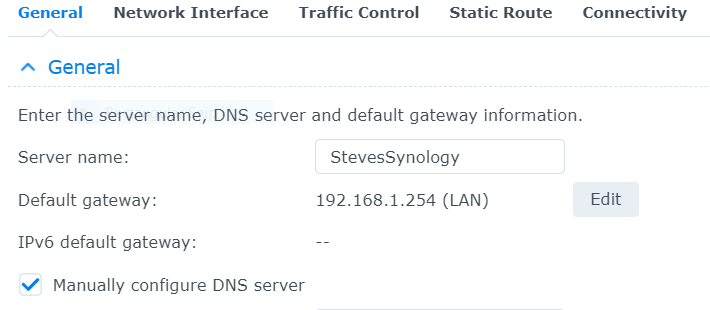
What’s the IP address of your modem/router ?
When you open the Syno’s Control Panel - Network - Interfaces?

  • Is the box ‘default gateway’ checked for ETH0 ?
  • Does it point (by IP address) to the modem router?

@ChuckPa

No mention of ETH0


LAN adapter 1 == eth0.
LAN adapter 2 == eth1.

etc.

If you only have one then it will be eth0 (the first ethernet adapter… 0-based numbering)

This topic was automatically closed 90 days after the last reply. New replies are no longer allowed.