TO ALL:
For those who are seeing Plex stop running for no apparent reason, I’d like to enable memory usage logging.
The procedure involves adding the hidden preference in “Preferences.xml”
DSM:
- Stop Plex
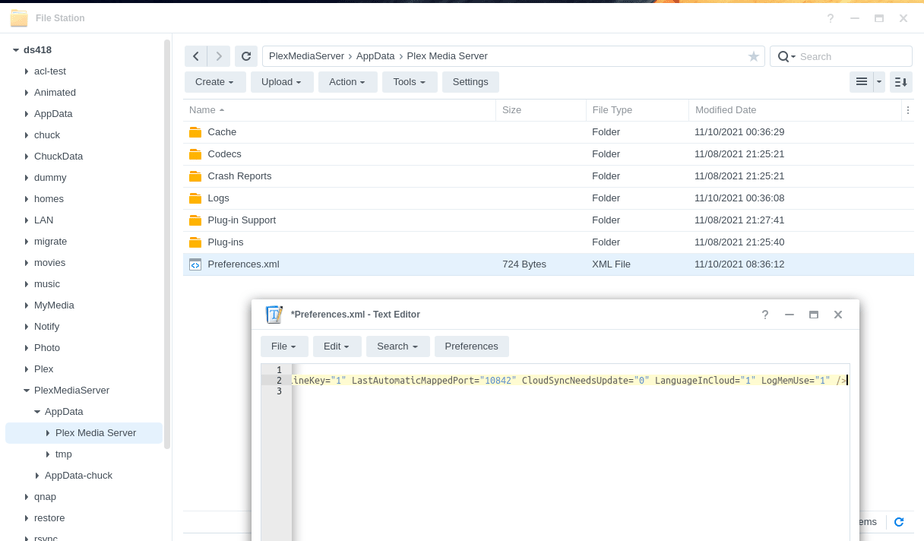
- Open FileStation:
- (DSM 7) - PlexMediaServer → AppData → Plex Media Server
- (DSM 6) - Plex → Library → Application Support - Plex Media Server
-
Install Synology Text Editor app (if not already installed)
-
Right-click “Preferences.xml” →
Open with Text Editor -
At the bottom, right before the closing
/>addLogMemUse="1" -
It will look like this:
-
Save the file
-
Start Plex
Plex:
- Settings - Server - General - Show Advanced
- Ensure “DEBUG” logging is enabled
- Ensure “VERBOSE” logging is disabled
- “SAVE” if changes made.
Now, when it fails with OOM errors, we will be able to see exactly which action caused it. (We are pretty close to being 100% certain but the more information which can be gathered ; the better)
