Server Version#: latest on QNAP
Player Version#: 5.2 on Tizen
Player Version WIndows #: 1.45.0.3013-1676042f
Hello i’m new to Plex. I have a Plex Pass and a simple flat 1 Gbps network connecting the Samsung TV (2019), my windows 10 laptop and the Plex Server on QNAP TS653D which hold my collection of movies.
QNAP stream properly any MKV movies on internet on any device, tv, phone, web
QNAP stream and transcode locally any MKV movies even the heaviest one like Avatar 6000 nits which need 70 Mbps but it does so only on the Iphone. On the TV apart from very simple files of 720p, the TV mostly doesn’t work. Same thing for the Windows application.
There are no network bottleneck. The QNAP is able to transcode to the Iphone on any format. But doesn’t seem to be able to do it with the TV client or the Windows client.
I don’t know how to diagnose and repair this strange situation. I find strange that the Iphone works but no others.
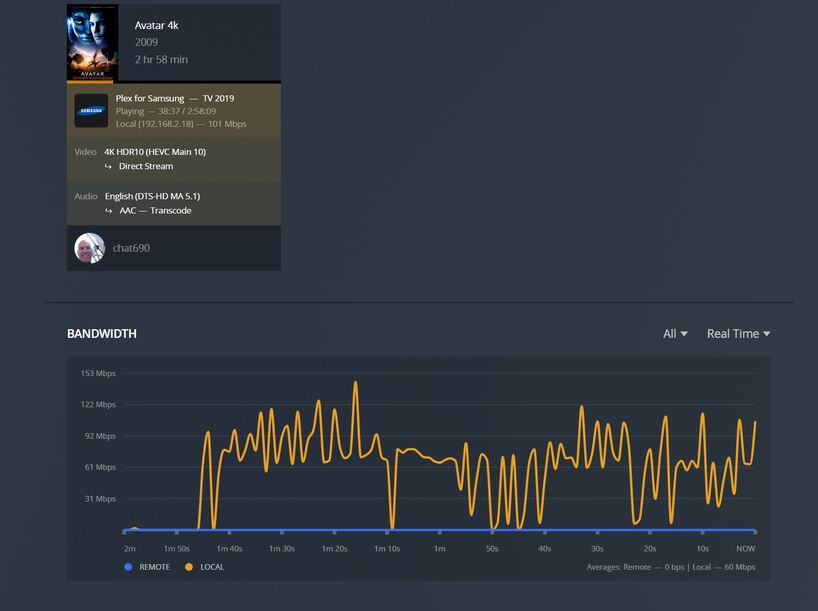
Take a look at the Dashboard of the Plex web app, during the playback on the TV and enable the “Detail” view.
It will probably say that the TV is connected “indirectly”.
This is caused by “DNS rebinding protection” in your DNS resolver (usually located in your router). If you have a way of defining exceptions from that protection, add the domain plex.direct to the exception list.
Some Plex clients let you define a preference for using “insecure connections” in their settings, which allow you avoid the need for the DNS in local connections.
(the Samsung might be one of those clients)
Thanks for the information. I have noticed that i can play complex movies on the TV condition of not including subtitles.
I think the TV is connected directly. But the bandwith is stressed… 100 Mbps its a lot of bandwith to process. I will investigate. Altough that movie play seamlessly on my Iphone through wifi (802.11ac) it buffers every few minutes on the TV (wired connection to the same wifi router). Strange…
Smart TVs usually have only 100 mbps Ethernet ports. If you have a 5GHz wireless AP near it, try switching to WiFi.
In general, smart TVs are neither developed, nor optimized for “raw” Bluray rips. They are intended to be used with online streaming services, which all use far lower bandwidth streams.
Good point. I have noticed yesterday that i can play whatever movie on the TV from PLEX but as soon as i add a subtitle… i got an error message and performance degrade.
I guess that is because instead of direct streaming, it forces the transcoder to work and i’m overloading the small CPU on the QNAP ?
Precisely. “Burning in” subtitles cannot be accelerated by dedicated hardware like encoding or decoding video. Instead, the regular CPU has to do it. And that is the one part which is usually lacking in most NAS devices (unless you pay a premium).
What puzzle me the most is that given the source of the movies being on my QNAP TS653, whatever the Plex client is… it should be the same request to the QNAP, the same workload, the same UI experience.
On the Iphone Plex if i start for example Avatar (which i use often as test bed since its a big file and need a lot of Mbps) i can see on the console that the CPU is not that much used but i can’t see a difference between using subtitles or not. We can see a peak when i turned subtitle on and bandwidth went up to almost 400 Mbps ! That might explain why the TV Plex client is having a hard time to keep up with the Plex server on QNAP.
But the CPU is not much that stressed after starting the subtitle and more importantly, the console doesn’t say about “transcoding” it still says “direct play”. Is that a correct information ?
No, not at all.
Each client can have different preferences, different available bandwidth to the server, and most importantly different playback abilities.
So while your iOS app can extract the DTS core from the DTS-HD MA audio track above and play it, your smart TV might not be able to do it.
And a simple web browser doesn’t support DTS or Dolby, nor HEVC and HDR. So the web app is usually one of the most prone to transcoding on the server.