The player is just a standard Apple TV and a Google Chromecast TV - is it even possible to make those IPs static? They’re both on Wifi
Server is definitely wired, IP is not a static IP, could look into changing that (also really hate network problems). I’d have to change both the proxmox server as well as the VM to a static IP i’d assume
Okay learnt I could assigned a static IP for my player inside my routers settings so I’ve done that.
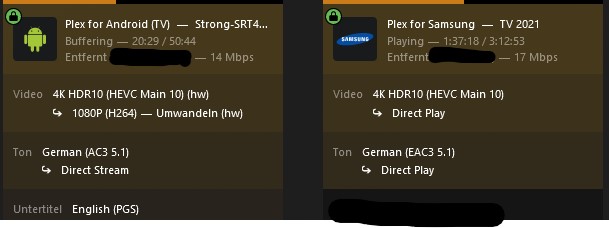
It seems to now show up when i change to transcoding as HW transcoding (see screenshot below)
However player just seems to buffer forever, eventually loading the content on the screen but not being able to play more than a second at a time before heavy buffering. To get this to happen I had to click “convert to 1080P” on my player and wait a few minutes before even seeing this, which isnt ideal
My network graph is bouncing all over the place. Im almost certain its not my network not being fast enough to load the specific item as like I mentioned previously, upon booting it works great for about 30 minutes or so before just stopping.
May 19, 2023 19:26:03.524 [139670725667640] INFO - Plex Media Server v1.32.2.7100-248a2daf0 - Debian GNU/Linux PC x86_64 - build: linux-x86_64 debian - GMT 10:00
May 19, 2023 19:26:03.524 [139670725667640] INFO - Linux version: 11 (bullseye), language: en-US
May 19, 2023 19:26:03.524 [139670725667640] INFO - Processor: 5-core Common KVM processor
May 19, 2023 19:26:03.524 [139670725667640] INFO - Compiler is - Clang 11.0.1 (https://plex.tv 9b997da8e5b47bdb4a9425b3a3b290be393b4b1f)
May 19, 2023 19:26:03.524 [139670725667640] INFO - /usr/lib/plexmediaserver/Plex Media Server
Make a new VM
4 cores / 8 threads
8 GB RAM
Pass through the GPU
Install Ubuntu 20
Install all updates
Give it a different hostname than your other VM
Set networking as PEER (it will be a new IP on your LAN)
Load one section
Test
You’ve got a fundamental systemic problem.
PITA to diagnose unless the test base is controlled.
This is just wrong. You don’t do this. Even numbers only 1-2-4-8, etc
Processor: 5-core Common KVM processor
If you have to micromanage the resources, you don’t have enough resources.
I didnt even realise I had 5 cores, must’ve been a typo from a while ago
ANYWAYS
I’ve set up a brand new VM exactly as mentioned above, added the GPU, set a static IP, and set everything up.
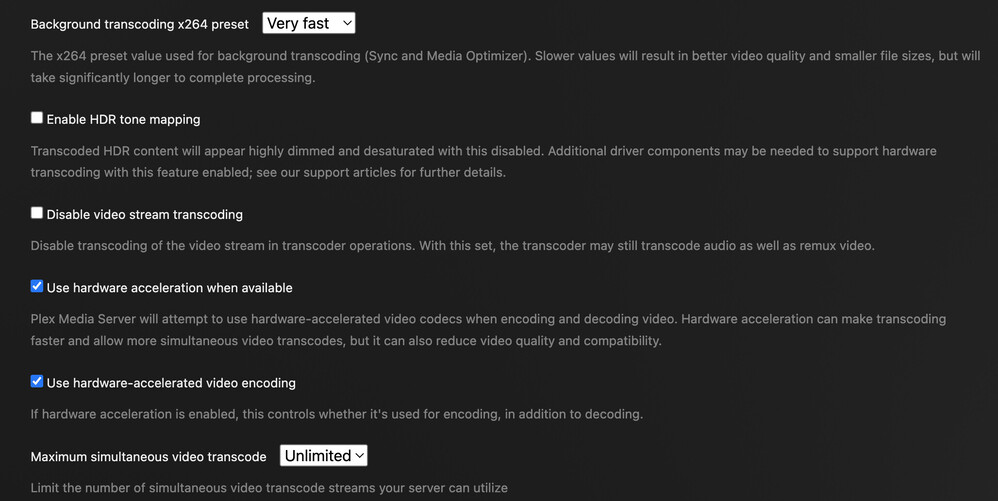
Now it seems to just go straight to software transcoding instead of hardware. Yes I have enabled the hardware transcoding inside my settings and have installed the correct GPU drivers, GPU is showing up as active and working inside of ubuntu.
Nvidia SMI only tells you the kernel can see the card.
It doesnt say if the API libraries are installed.
Got the API drivers for PMS?
[chuck@glockner ~.1997]$ dpkg -l | grep nvidia-encode
ii  libnvidia-encode-525-server:amd64     525.105.17-0ubuntu0.22.04.1             amd64        NVENC Video Encoding runtime library
[chuck@glockner ~.1998]$ dpkg -l | grep nvidia-decode
ii  libnvidia-decode-525-server:amd64     525.105.17-0ubuntu0.22.04.1             amd64        NVIDIA Video Decoding runtime libraries
[chuck@glockner ~.1999]$
When you map through any VM, make sure the GID works.
Quick test to see if GID / permissions problem.
– SSH into the NAS
– sudo chmod 666 /dev/dri/card* /dev/dri/render*
REMEMBER, In most systems, udev works with the kernel to coordinate permissions for enumerated devices in /dev.
– English : Your UID must be a member of the group which owns /dev/dri and the inodes. (restart if changed)
– If the device is passed through (ALL FUNCTIONS) to a VM, I know the DPKG installer (my scripts will put user plex:plex in the right group for HW access if it can see /dev/dri
[chuck@lizum ~.2004]$ ls -la /dev/dri
total 0
drwxr-xr-x   3 root root        140 May 15 16:27 ./
drwxr-xr-x  21 root root       5200 May 19 19:07 ../
drwxr-xr-x   2 root root        120 May 15 16:27 by-path/
crw-rw-r--+  1 root render 226,   0 May 18 10:00 card0
crw-rw-r--+  1 root render 226,   1 May 19 19:03 card1
crw-rw-r--+  1 root render 226, 128 May 18 10:00 renderD128
crw-rw-r--+  1 root render 226, 129 May 18 10:00 renderD129
[chuck@lizum ~.2005]$ groups plex
plex : plex video render
[chuck@lizum ~.2006]$
Logs attached.
When using the Plex PC player, it seems to show up as HW transcoding however the file being played is just buffering. Strange as about 5 minutes before that it played a full 10 minutes on HW transcoding with no problems
If you want to throw a stone or two
May I suggest loading Windows 10 and running PMS there ?
PS: I also have Unraid and Proxmox; Not an issue there either
Moral of this story?
Docker is NOT A REQUIREMENT for HW transcoding. Native works best
Docker adds an abstraction layer which trips up a lot of people.
I’m here to support Plex, not Docker
I’ve spent a lot of time to make sure the installer does all the correct configuring for you in the native environment. When it sees a docker container – it does nothing.
Take all the time you need!!! No rush at all, sorry to bother you!!
I get the same error no matter the player I use.
Ive tested on
Web broswer
Plex Windows/Mac App
Apple TV
Google TV
Plex for IOS
Im happy to provide logs for all if need be, I just have no idea of the issue. The player definitely does not loose connection as I can change over to direct play and it works fine and the same file plays as normal.
I had to re play it over a few times and quickly change from Direct Play to transcoding, which you’ll probably see
(This player isn’t the one im specifically going to really need HW transcoding on, but the same issue happens regardless of player)
Im also having some network issues tonight, but it didnt seem to effect the playback and HW transcoding when it was working (I would occasionally get the message about a slow internet connection when dropping the quality but the video played fine using HW transcoding other than that, until it didnt)