Plex Transcoder Cannot Initialize VAAPI on Intel Arc Pro A40 (DG2)

Summary

Plex Media Server is unable to initialize VAAPI hardware transcoding on an Intel Arc Pro A40 GPU passed through to an Ubuntu 24.04.3 VM.

System VAAPI works perfectly, and system ffmpeg can use VAAPI correctly under the same user, but Plex’s bundled ‘Plex Transcoder’ binary fails immediately with “Failed to initialise VAAPI connection: -1 (unknown libva error)”.

I think this indicates that Plex Transcoder’s VAAPI stack is incompatible with the Intel Arc DG2 GPU on current Linux distributions, even though the OS-level VAAPI stack is configured and functioning.


Environment

Hardware

  • CPU: Intel Core Ultra 5 235 (Arrow Lake-S)

  • Intel Arc Pro A40 (DG2)

  • Host OS: TrueNAS SCALE (KVM/QEMU VM) Version 25.04.2.6

  • GPU passthrough via PCIe to VM (works correctly)

VM

  • Ubuntu Server 24.04.3 LTS

  • Kernel: 6.8.x (Ubuntu default)

  • vCPUs: 6; Cores:1; Threads:1

  • Memory Size: 8 GiB

  • i915 + xe drivers loaded

  • User for Plex: plex

Plex

  • Plex Media Server version: EDIT: [1.42.2.10156-f737b826c] void, updated to BETA version 1.43.0.10389 (released Dec. 3rd)

  • Installation method: Debian/Ubuntu APT repo

  • GPU selected in Settings → Transcoder: Intel DG2 [Arc Pro A40/A50]


Troubleshooting step 1: Confirmed VAAPI works correctly in the OS and for the Plex user

vainfo as root:

Success — all VAAPI profiles listed (H.264, HEVC, VP9, AV1, etc.)

vainfo as plex user:

Success — identical output to root.

System ffmpeg with VAAPI as plex user:

Command:

sudo -u plex ffmpeg -hwaccel vaapi -vaapi_device /dev/dri/renderD128 -i "/Movies/SomeMovie.mkv" -t 5 -f null -

Result:
Runs normally, no VAAPI errors.
This confirms:

  • /dev/dri/renderD128 is accessible

  • Permissions are correct

  • VAAPI driver stack (libva, intel-media) is fully functional

  • The plex user can use VAAPI successfully


Troubleshooting step 2: Plex Transcoder fails to initialize VAAPI

When using Plex Transcoder directly:

sudo -u plex /usr/lib/plexmediaserver/Plex\ Transcoder \
  -hwaccel vaapi \
  -hwaccel_device /dev/dri/renderD128 \
  -vaapi_device /dev/dri/renderD128 \
  -i "/Movies/SomeMovie.mkv" \
  -t 5 \
  -f null -

Result:

[AVHWDeviceContext] Failed to initialise VAAPI connection: -1 (unknown libva error).
Device creation failed: -5.
Failed to set value '/dev/dri/renderD128' for option 'vaapi_device': I/O error
Error parsing global options: I/O error

This is the same error Plex logs during actual transcode attempts, where it falls back to software transcoding.

Plex logs (excerpt):

[Req#/Transcode] [FFMPEG] - Failed to initialise VAAPI connection: -1 (unknown libva error).


Analysis

All OS-level checks confirm VAAPI and the Intel Arc GPU are fully functional:

  • VAAPI works via vainfo

  • VAAPI works via system ffmpeg

  • VAAPI works as both root and plex user

  • /dev/dri/renderD128 has correct permissions (plex is in both render and video groups)

  • Drivers (i915 + xe) initialize correctly

  • Hardware is passed through properly

The only component that fails is Plex’s bundled Plex Transcoder binary, indicating:

  • A VAAPI/libva/libigdgmm mismatch inside Plex’s ffmpeg build

  • A compatibility issue with Intel Arc DG2 GPUs

  • Or Plex’s VAAPI device initialization path is not compatible with Ubuntu 24.04’s newer Intel media stack

This appears to be an internal limitation of Plex’s own ffmpeg build rather than a system configuration issue.


Help Request

I would greatly appreciate help investigating/troubleshooting compatibility between:

  • Intel Arc DG2 GPUs

  • Plex Media Server’s bundled ffmpeg/VAAPI stack

  • Modern Linux driver stacks (Ubuntu 24.04, kernel 6.8+, i915/xe + intel-media-va-driver)

In particular:

  • Why Plex Transcoder cannot open /dev/dri/renderD128, even though system ffmpeg can

  • Whether Plex is shipping a VAAPI build incompatible with Intel Arc DG2

  • Whether Plex overrides or ignores LIBVA_DRIVER_NAME=iHD or VAAPI_DEVICE

  • Whether Plex can update their ffmpeg/libva build to support modern Intel GPUs

Happy to provide full logs, system details, and test additional builds if needed.

Thank you!

Plex Media Server Logs_2025-11-28_22-05-27.zip (1.1 MB)

You might want to give this forum preview build of PMS a try:

It updates the FFMPEG version upon which Plex Transcoder is based to 6.1 (that’s actually present in all current beta builds) and updates the Intel drivers included with the server (present only in the forum preview build).

Obviously, backups are the order or the day.

1 Like

@slhogg

The TL;DR

  1. Production FFMPEG is 4.2 which is way too old to do what’s needed.
  2. Production Intel Compute Runtime and Intel Media Driver do not support any of ARC GPUs , again, too old.

FFMPEG Beta (soon to be production release)

  1. FFMPEG 6.1 , with all upstream improvements and features we need
  2. Updated Intel Compute Runtime and Intel Media Driver to current release

Regarding why PMS ignores older preferences

  1. VAAPI_DEVICE is no longer needed because you can select the GPU in transcoder (advanced) settings

  2. LIBVA_DRIVER_NAME is no longer needed because the most-capable driver is selected when you select the GPU. This also prevents selecting an incompatible driver (e.g i965 with TigerLake or newer GPUs which don’t have the i965 interface.

1 Like

Thank you for this reply! I have tried installing the preview build “plexmediaserver_1.43.1.10350-71a2c3fa9_amd64.deb” directly in the ubuntu vm, this successfully upgraded my PMS and the WebUI is reporting version 1.43.1.10350; however, I am sad to report that it did not fully resolve my issue.

Tests I ran after installing the new build:

  1. Checked Plex’s internal hardware acceleration capabilities

Command:

sudo -u plex /usr/lib/plexmediaserver/Plex\ Transcoder -hwaccels

Confirmed:

  • Plex internally supports vaapi, drm, opencl

  • So Plex believes it can attempt VAAPI

  1. Checked system VAAPI & ffmpeg

Confirmed:

  • vainfo works as root

  • vainfo works as the plex user

  • system ffmpeg can use VAAPI on the Arc GPU

This told me hardware, drivers, and user permissions are all correct.

  1. Checked Plex’s internal transcoder (the important part)

Command:

sudo -u plex /usr/lib/plexmediaserver/Plex\ Transcoder \
  -vaapi_device /dev/dri/renderD128 \
  -hwaccel vaapi \
  -i "/Movies/SomeMovie.mkv" \
  -t 5 \
  -f null -

Still recieved the Result:

Failed to initialise VAAPI connection: -1 (unknown libva error)
Device creation failed: -5.

It appears the new build’s Transcoder still cannot use VAAPI with my Arc Pro A40 GPU.

I also tried to investigate why Plex Transcoder still failed…

  1. I Checked which VAAPI libraries Plex uses

Command:

ldd /usr/lib/plexmediaserver/Plex\ Transcoder | grep -E "va|drm"

The output showed:

libva.so.2 => /usr/lib/plexmediaserver/lib/libva.so.2
libva-drm.so.2 => /usr/lib/plexmediaserver/lib/libva-drm.so.2
libdrm.so.2 => /usr/lib/plexmediaserver/lib/libdrm.so.2

This implies to me that Plex is not using the modern VAAPI libraries from Ubuntu 24.04 but is instead using its own bundled, VAAPI stack.

I tried to force Plex to use the system VAAPI by moving the bundled libraries out of the way:

mv libva.so.2 libva.so.2.bak
mv libva-drm.so.2 libva-drm.so.2.bak
mv libdrm.so.2 libdrm.so.2.bak

I hoped this would force the PlexTranscoder to load:

/usr/lib/x86_64-linux-gnu/libva.so.2
/usr/lib/x86_64-linux-gnu/libdrm.so.2

but the PlexTranscoder crashed immediately, Plex Media Server failed to start, and expirenced Errors like:

  1. __isoc23_sscanf: symbol not found
    __isoc23_strtol: symbol not found
    

So I restored the original libs and Plex started again.

If there is something I am missing, please let me know.
I am super greatful for the help!

Thankyou so much for this summary!
I just posted a summary of my expirence after installing the new build with FFMPEG 6.1, but unfortunately it didn’t resolve all of my issues. Let me know if there are other troubleshooting steps that I missed :slight_smile:
Thank you so much for the help.

Yes, this is always the case. Plex bundles its own libraries and has for some time.

This is likely because Plex builds its libraries again MUSL. Dynamically loading the system-provided libraries is never going to work.

Hopefully Chuck and the team will have more suggestions.

1 Like

What do you have substituted ?
( Don’t alter/assert LD_LIBRARY_PATH or any file in /usr/lib/plexmediaserver )

All Plex programs use the MUSL libraries and are fully selfcontained. No GCC / Glibc is used.

These __isoc23 prefixed functions are from GCC/GLIBC.

To answer your question:

What did I substitute?

I did not modify LD_LIBRARY_PATH or any system paths.
The only thing I did was temporarily move Plex’s internal VAAPI libraries:

/usr/lib/plexmediaserver/lib/libva.so.2
/usr/lib/plexmediaserver/lib/libva-drm.so.2
/usr/lib/plexmediaserver/lib/libdrm.so.2

I renamed them to:

libva.so.2.bak
libva-drm.so.2.bak
libdrm.so.2.bak

My intention was simply to force PlexTranscoder to fall back to the system-provided versions in:

/usr/lib/x86_64-linux-gnu/

As soon as I did that, PlexTranscoder failed with:

__isoc23_sscanf: symbol not found
__isoc23_strtol: symbol not found

So I restored the original bundled libraries back to their original names, and Plex Media Server started successfully again.

Current status (after restoring original libs):

  • Plex Media Server starts normally

  • VAAPI still fails immediately inside PlexTranscoder with:

    Failed to initialise VAAPI connection: -1 (unknown libva error)
    
    
  • vainfo works

  • system ffmpeg with VAAPI works under the plex user

  • Plex’s bundled ffmpeg fails to initialize VAAPI even with the 1.43.1.10350 build

Let me know what additional info or tests would be helpful — very happy to provide logs or run any diagnostic commands. Thank you!

You cannot intermix system libraries with PMS under any circumstance.
The system is glibc based. PMS is MUSL based.
Intermixing will immediately cause unresolved library symbols.

I will work out some commands for you on truenas. ( I have a NUC8-based machine )

Given this is a VM, my first recommendation is to uninstall PMS using dpkg
(removes /usr/lib/plexmediaserver only)

Next, reinstall the DEB file using dpkg.

1 Like

Understood - this was a ChatGPT troubleshooting suggestion, but I now see that mixing system glibc-based VAAPI libraries with PMS’s MUSL-built stack will always cause symbol resolution failures. I appreciate the explanation — that makes complete sense.

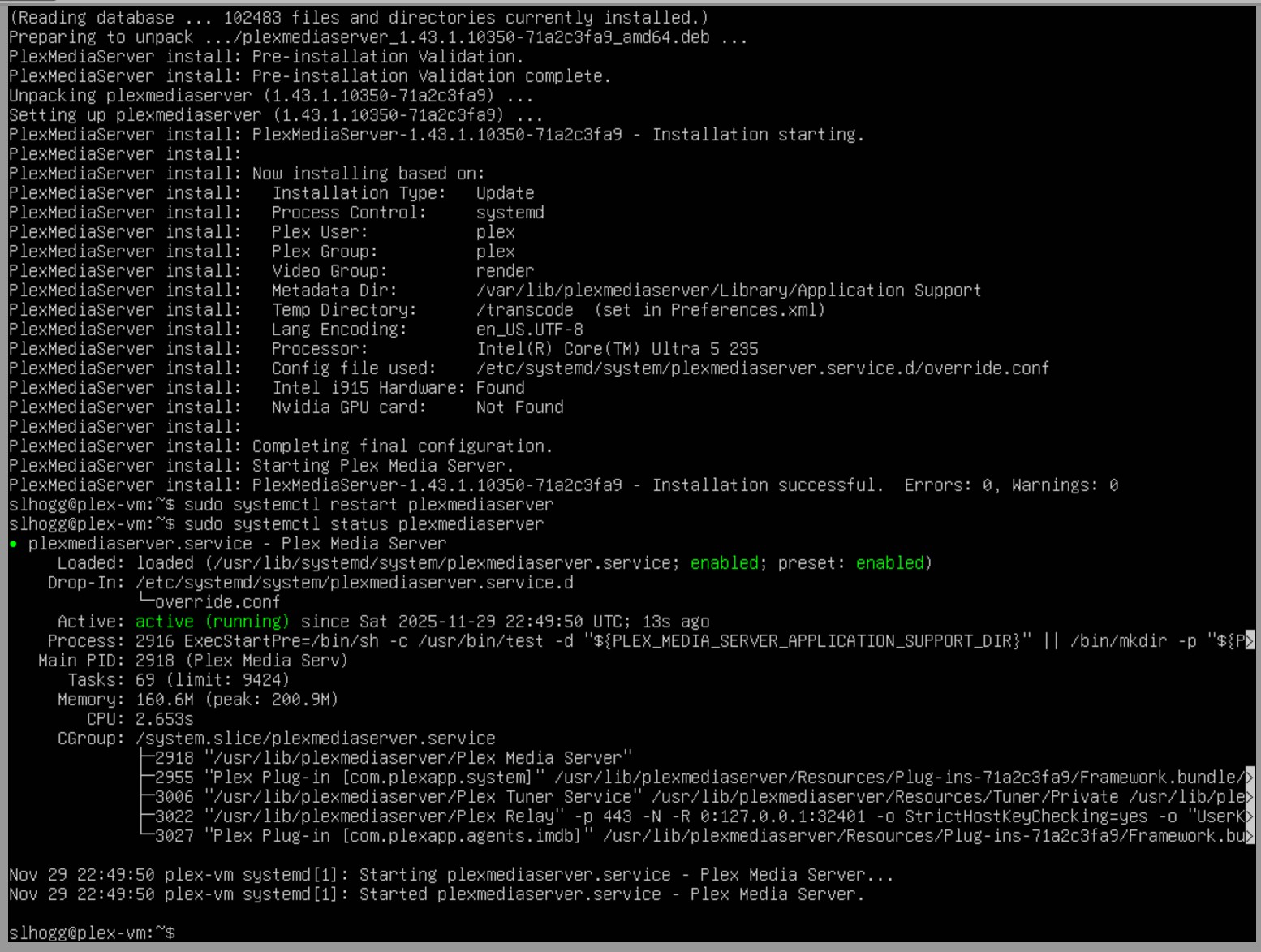
Okay, I did a quick uninstall / reinstall using the dpkg (screenshots attached below) and I am still running into the FFMPEG error.

Confirmed version Installed:

Removed PMS cleanly using “sudo dpkg -r plexmediaserver” and Verified that /usr/lib/plexmediaserver was removed:

Ensured I was installing the correct build:

Reinstalled using “sudo dpkg -i /home/slhogg/plexmediaserver_1.43.1.10350-71a2c3fa9_amd64.deb”:

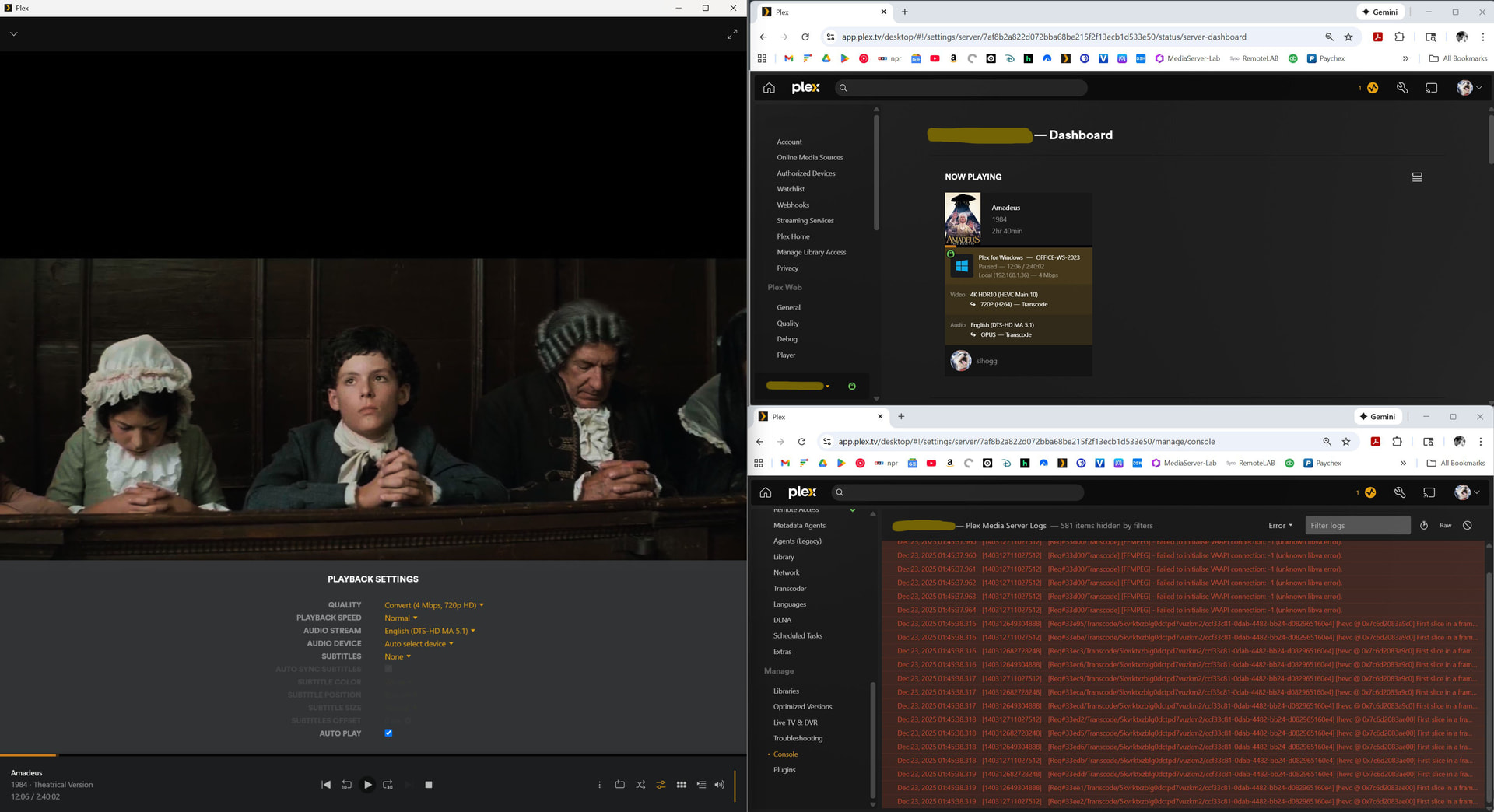
PMS starts normally again after the reinstall, but the Plex transcoder still fails with “Failed to initialise VAAPI connection: -1 (unknown libva error) Device creation failed: -5” and falls back to software transcoding via the CPU:

I want to genuinely thank you for taking the time to prepare the TrueNAS commands — I’m looking forward to trying them. Since the Arc DG2 GPU is passed through via PCIe and is working correctly at the OS level, it feels like we’re very close to getting hardware transcoding running on the A40 GPU, and your insight has been incredibly helpful.

Thank you again for all your time and assistance!

I got a reply from Chris.

The Alchemist drivers (needed for your GPU) are not in the current build.

Chris has more drivers to add as it goes public and immediately thereafter

1 Like

Thanks for this - I’ll keep an eye out for the updated build.

Looking at picking up this exact card, but I’m a little confused as to why the A40 isn’t supposed to work due to lack of Alchemist drivers.
I’ve been browsing through this forum and the TrueNAS one, and it seems that people are reporting the A310, A380, and Arc Pro A60 as working. These are all Alchemist cards and have seemingly been working as far back as 2 years ago. The ARC Pro A40 seems to basically be an A380, which has numerous reports of working with Plex transcoding, so I’m confused as to why there’s now an experimental update to provide compatibility, and why @slhogg is having issues.

@erichng

The problem is the combination of the new Transcoder.

In the old (production) transcoder, the drivers are there.
The new transcoder doesn’t have them yet.
This is a build issue Chris is working on

(Forgot to hit the Reply button, so reposting)

So to clarify, Alchemist GPUs should work with the current public “stable” release build, but not yet with the newer betas with the new transcoder?

Edit: Actually, I’m still confused, because @slhogg seems to be on 1.42.2.10156, which is seemingly on the old transcoder, and not the new 6.1 ffmpeg, which to my understanding is from 1.43 (still in beta) and beyond.

Hello. I am sorry I didn’t jump back into troubleshooting sooner - I just noticed that a beta release was made available on December 3rd for version 1.43.0.10389:

I downloaded with the command:
cd ~
wget ``https://downloads.plex.tv/plex-media-server-new/1.43.0.10389-8be686aa6/debian/plexmediaserver_1.43.0.10389-8be686aa6_amd64.deb
and installed with the command:
sudo dpkg -i plexmediaserver_1.43.0.10389-8be686aa6_amd64.deb

Verified new version was active and running:

I double checked that the plex user can talk to the GPU the same way root can by running vainfo as plex with the command: sudo -u plex vainfo --display drm --device /dev/dri/renderD128

I then ran a tiny VAAPI ffmpeg test as plex to avoid Plex entirely and just use ffmpeg + VAAPI, as the same user with the command:
sudo -u plex ffmpeg
-hwaccel vaapi
-vaapi_device /dev/dri/renderD128
-f lavfi -i testsrc=size=1280x720:rate=30
-t 5
-vf ‘format=nv12,hwupload’
-f null -

I ran a seperate VAAPI direct PlexTranscoder test with the command:
sudo -u plex /usr/lib/plexmediaserver/Plex\ Transcoder
-vaapi_device /dev/dri/renderD128
-hwaccel vaapi
-i “/Movies/SomeMovie.mkv”
-t 5
-f null -

This is the same failure Plex logs during real playback when I try to transcode with the Arc pro A40 gpu:

**
Key conclusions from the test on the new 1.43.0.10389 build:

:check_mark: ffmpeg upgraded to 6.1
:check_mark: Newer Intel runtime bundled
:check_mark: Plex sees VAAPI as a valid hwaccel
:check_mark: Plex sees /dev/dri/renderD128
:check_mark: Plex attempts VAAPI initialization
✘ Plex fails during VAAPI device creation

This failure happens before decoding/encoding begins.

It appears that the beta includes newer stack, but DG2 coverage is still incomplete or conflicted. **
**

Hi @erichng, happy to share some background from my experience in case it helps with your decision.

Full transparency on my Arc Pro A40 journey: I went into this with the same assumption you mentioned. I had seen reports of the Arc A310/A380 and Arc Pro A60 working, and I already have Plex running flawlessly with hardware transcoding on a Synology NAS using an Intel J4125 iGPU (Quick Sync). Based on that, I reasonably inferred that the Arc Pro A40 (DG2) would also “just work.”

I put my current build together to create redundancy with my other NAS, so it isn’t urgent for me to get this fixed. My goal was an open-source system with modern hardware and a bit of extra compute headroom. I assembled an ITX build in a half-height case, and the A40 seemed like a perfect encode/decode dGPU for my use case. I also tried HexOS initially, but ultimately failed over to TrueNAS.

Unfortunately, the A40 has not worked for me in any scenario so far:

  • HexOS curated Plex app (Docker via app catalog)
    → Fails with Failed to initialise VAAPI connection
    → Assumed issue was related to OS compatibility, moved to troubleshooting in traditional TrueNAS

  • TrueNAS SCALE Plex app (Docker via app catalog)
    → Fails with Failed to initialise VAAPI connection
    → Assumed issue was due to some combination of user permission settings & docker container using an old version of ubuntu, moved to VM to control ubuntu version and have more granular troubleshooting of user permissions

  • Ubuntu 24.04 VM with PCIe GPU passthrough
    (PMS Linux version 1.42.2.10156-f737b826c)
    → System-level VAAPI tests (vainfo + system ffmpeg) work perfectly as both root and the plex user
    → Plex Transcoder still fails with the same VAAPI error
    → Reached the limit of my own troubleshooting capibility, reached out to forum for help.
    @pshanew suggested preview build

    • tried Plex forum preview build with FFmpeg 6.1
      (PMS version 1.43.1.10350-71a2c3fa9)
      → Still fails
      @ChuckPa confirmed issue is due to hardware driver support for A40 gpu
    • tried Plex BETA channel build with FFmpeg 6.1
      (PMS version 1.43.0.10389 – most recent/current)
      → Still fails

So at this point, this is not a TrueNAS or Ubuntu issue (these environments fully suport and recognize the gpu) — it’s simply that Plex’s bundled VAAPI / Intel media stack does not yet fully support the Arc Pro A40

That said, I do want to emphasize that I am incredibly grateful to the Plex team for their transparency and continued work on improving Intel GPU support. Newer preview builds are clearly moving in the right direction, and I’m optimistic that Arc Pro A40 support will land in a future release — it’s just not there yet.

Hopefully this saves someone else a few days of troubleshooting :slightly_smiling_face:

Can I get clarity.

I have a server with the sparkle 40w a310 card, its docker pinned to :pms-docker:1.42.2.10156-f737b826c and working great.

If it updates to 1.43.x? It will break?

Thanks for the detailed write up. I think I’ll have to wait and see how things work out for ARC A40 Pro support then. Seems to be pretty unfortunate timing with TrueNAS dropping Pascal support (currently on the Tesla P4), and Intel ARC support on Plex.

I’m still a little puzzled as to why there seem to be others with success, supposedly with the A40 Pro and/or other A series Pro cards, yet that doesn’t seem to be the case with you. Hopefully we can get some more insight from @ChuckPa ?

I’m also a bit puzzled by this. My current understanding is that one (or both) of the following is likely true:

  1. This issue may be specific to my particular deployment — something about the exact combination of hardware, OS, kernel, and Plex build I’m using. It’s possible others are seeing success with the A40 due to differences in OS environment, kernel version, container vs VM deployment, or PMS build.

  2. The Plex team is actively working on improving Intel GPU support, and this appears to be an edge case that hasn’t been fully resolved yet but may soon be addressed in an upcoming release.

If your OS environment or PMS build differs from mine, you may have better luck — but based on my experience so far, I can’t recommend the A40 with confidence for Plex hardware transcoding in this specific setup.

I am also looking forward to more insight from @ChuckPa, and I would also be curious to know more about the environment @Menel is running his Sparkle A310 card in.