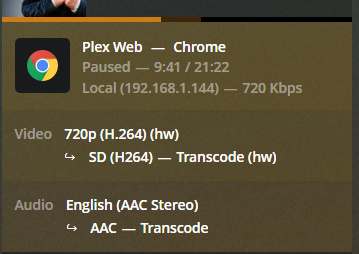
Server Version#: 1.19.1.2701
Player Version#: 1.8.2.1192
My Plex server just keeps transcoding all streams, even if I’m watching them locally.
Here’s the attempted playback from my Windows-client (via plex app for windows). As you can see, it shows a 91.-address - which is my WAN-address actually.
And this is when I access plex via dockerhost:32400 directly via browser (from the same windows PC: 192.168.1.144)
Is there no update on this?
maybe some sort of firewall rule I need to set?
I’ve tried looking at the plex console output, but there don’t seem to be any errors
Logs would probably help to get some idea.
I’m not super familiar with looking at the logs but even though OMV isn’t supported per @ChuckPa, maybe someone from Plex can still at least help point you in the right direction based on the logs.
my streaming quality settings are: ‘maximum for local’ and ‘2Mbps for remote’.
I’m guessing the problem stems from me using pfsense behind my ISPs router.
So I have a WAN-IP (on my ISPs router), which then has a LAN. My pfsense is a member of that LAN. But it also has another LAN internally - with my server in it (which is running plex in a container).
Internet --WAN-IP–> ISP-Router --Lan1-IP–> pfsense --Lan2-IP–> Server --Docker-IP–> Plex
the 91.x.x.x is my WAN IP. So I’m guessing pfsense doesn’t realize that it’s my ISPs Router, which is technically still local.
I have added
server:
private-domain: "plex.direct"
to my pfsense dns resolver. do I also need this setting on my ISPs router?
Based on your network setup I’m not sure if what you added to your DNS resolver will help or not as the setup I run has pfSense directly connected to the internet and my network is behind that. When I initially set it up I added the same thing to my DNS resolver and have been fine ever since.
You can see if there is a setting in your ISP provided router that allows you to disable or modify DNS rebinding or if you can use a different DNS provider on it like the support article said.