Server Version#: 1.40.3.8555
Player Version#: Android Tv app
I have a samsung tv purchased new in 2012. Model number UE46ES6300 and no matter what the settings i use on the android box audio is always transcoded unless its Opus or AAC even thought he tv supports other codec.
This is an ongoing problem and not recent so it not related to Server or App as far as i can tell.
WHAT I HAVE TIRED
If i force direct playback of audio then playback has no audio or at least i cant hear it.
I have tired multiple different android boxes including a MiBox 4k, some generic android box and currently have a Nvidia shield Pro and have the same result with all.
Tired multiple different plex servers on different version and different OSs.
I have gone through TV and plex and android box settings numerous times and can not figure out how to get direct play of audio working.
For years i thought the TV was unable to play any of these audio codecs but after seeing my fathers 2005 720p tv play back these files without any issue i started to try to figure out why this is happening.
The TV manual says it supports a number of audio codecs including AC3 and i confirmed this by putting files on a usb and playing them back using the tv mediaplayer. All files playbacked fine where they were transcoded with plex. An example of the audio from one of the files is below and
Audio ID : 2 Format : E-AC-3 Format/Info : Enhanced AC-3 Commercial name : Dolby Digital Plus Codec ID : A_EAC3 Duration : 33 min 53 s Bit rate mode : Constant Bit rate : 192 kb/s Channel(s) : 6 channels Channel layout : L R C LFE Ls Rs Sampling rate : 48.0 kHz Frame rate : 31.250 FPS (1536 SPF) Compression mode : Lossy Stream size : 46.5 MiB (2%) Language : English Service kind : Complete Main Default : Yes Forced : No
Are you using TV speakers or a receiver/soundbar/etc.? If the latter, is it connected via HDMI-ARC or optical cable?
In the Shield (not Plex) settings, leave audio at Auto. Do not enable/disable specific codecs.
If you’ve the 2019 Shield, disable Dolby Processing in the Shield settings. It forces the Shield to convert EAC3 to AC3. The TV manual says it supports EAC3, so you do not need that option enabled.
In the Plex app on the Shield, set passthrough = HDMI.
Unplug the cable connecting the Shield to the TV for ~5 seconds. This forces the two devices to perform a HDMI handshake, where they communicate supported video & audio information.
If you’ve the 2019 Shield, disable Dolby Processing in the Shield settings. It forces the Shield to convert EAC3 to AC3. The TV manual says it supports EAC3, so you do not need that option enabled.
Unplug the cable connecting the Shield to the TV for ~5 seconds. This forces the two devices to perform a HDMI handshake, where they communicate supported video & audio information.
tried with 3 different cables and on all the HDMI ports on the tv but same result.
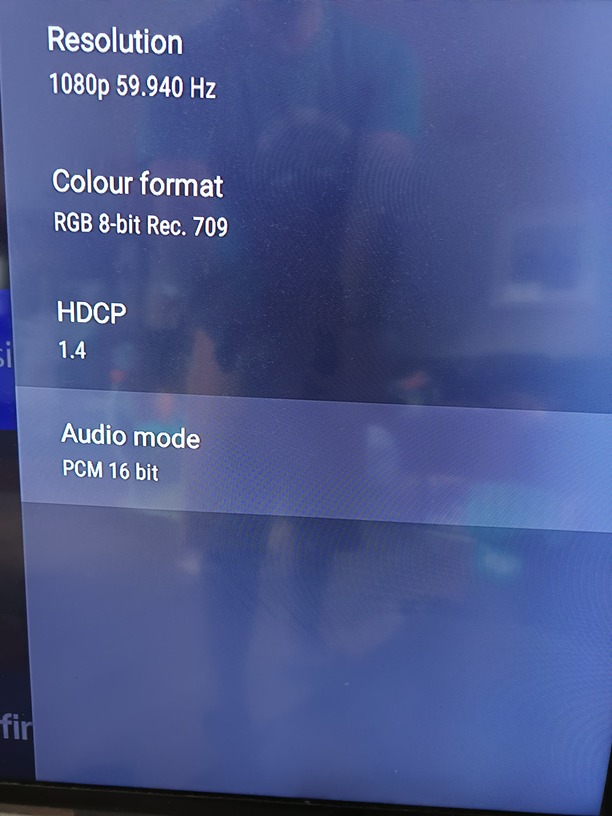
The TV is telling the Shield it only supports PCM audio.
So, for Dolby and DTS formats, they will either be transcoded by Plex Media Server or decoded by the Shield itself.
To be honest, it won’t matter much. You’re using the TV speakers, so if there was any drop in quality you most likely would not hear it.
Transcoding audio does not require much CPU power. It should not be a problem for your server.
If you ever get a sound bar or receiver, make sure it has HDMI inputs. You can then attach the Shield to one of those inputs, and the Shield will pass whatever formats the device supports. Shield → rcvr/soundbar → TV
Any idea why the TV is saying it doesn’t support codecs other than aac and opus when it does as I can play videos with other audio codecs using the TVs media player and a usb stick.
I really couldn’t care less about the audio quality/codec. It’s a small room and I’m not an audiophile. I just don’t want the transcoding even if it is low load.
If I could get the shield to do the audio decoding/transcoding I would be happy with that.
Not sure why the TV is reporting it only supports PCM. It might be a TV setting or maybe it is just designed that way.
As far as the Shield decoding vs PMS transcoding, you can experiment with the settings in the Plex app. Try disabling audio passthrough. You might also try changing the Shield audio settings. Instead of Auto, try manually disabling the various codecs. No idea if that will make any difference.
You have to experiment with the audio settings in Plex and Shield.
And please use the Shield Plex Player, not the Plex on Samsung TV.
For testing, maybe try the VLC Player.
My own problem was a old 5.1 AVR, no Dolby Digital Plus, no Atmos, no DTS-HD, no DTS:X, no True HD. Only DD5.1 and DTS5.1 or transcoding. So i buy a new AVR and now I can play highend audio and video in direct play without any transcoding.
An affordable solution would be the Sony HT-S2000, with Dolby Digital, Dolby Digital Plus, Dolby TrueHD, Dolby Atmos, Dolby Dual Mono, DTS, DTS HD High-Resolution Audio, DTS HD Master Audio, DTS ES, DTS 96/24, DTS:X, LPCM.
Im after spending hours upon hours messing with settings in plex, shield and TV and cant get it to work.
Thanks at least i know now for sure its the TV so i am just going to give up there must be either something wrong with the TV or else it was designed like this. Did you know could see the audio tv was reporting to shield till you said it.
Is the HDMI cable going straight from the Shield to the TV?
If you have any other devices inbetween, like switches, splitters, or active extenders, they all could mess with the information about the TV’s abilities.