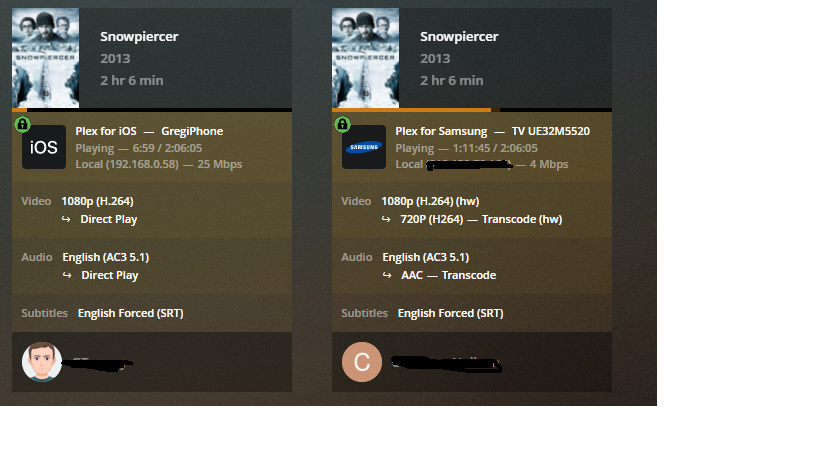
Hi, I had an issue with my sons Sonos not being able to playback from plex using the sonos app. To resolve this issue I changed secure connections from required to preferred. Since doing this it is now treating his TV as if it’s on the WAN. As you can see from the below screenshots, Plex is picking up both streams as LAN but is applying WAN transcoding and also displaying my WAN IP for the stream to the samsung TV.
Is there anyway to chance this back so it does not apply WAN transcoding?
I am not from Plex but I will start:
Your son’s TV is connected to the same lan? What are you network settings in PMS?
In would start by setting the LAN networks to 192.168.0.1/24
What LAN IP does your son’s tv have?
Yes all devices connected to the same LAN, have also just tested with my laptop via chrome and it’s treating it the same, showing LAN but actually shows WAN IP.
Sons TV: 192.168.0.54
LAN settings is already set to that and always has been but I have 192.168.0.0/255.255.255.0 as that seemed to be the method listed by plex staff on the forums.
Sorry, that is wrong afaik. Please try 192.168.0.1/24
Could also be 192.168.0.0/24, sorry not an expert. Dunno what the difference is.
Edit:
Gave it another read, probably your notation also works, not sure though /24 works for me, that is why I recommended it
Sounds like router/TV is doing DNS-Rebinding protection…
Also check that you don’t have this option on.
 Treat WAN IP As LAN Bandwidth
Treat incoming requests from this network's WAN IP address as LAN requests in terms of bandwidth. This often occurs when DNS rebinding protection is in place and clients on the LAN cannot contact the server directly but instead have to go through the WAN IP address.
If I have treat WAN as LAN disabled then it detects it as remote but that’s not what I want as I’d like all LAN traffic to be original and not transcoded to remote quality.
Its just strange it never used to do it until I changed the secure setting so his sonos would work.
Samsung must be bypassing your router for their own DNS (tracking purposes). On the TV can you enter in DNS in the network settings? I would set it to Google 8.8.8.8 ( I know another tracker) but at least it understands *.plex.direct.
I just find it so strange I’ve ran plex for years and always used secure connection required and ever since having to change it for the sonos to work it’s also thrown any TV players out.
I can’t tell you when and why this occurred, but there seem to be changes also on the backend of Plex (or within the clients and how secure connecting is handled) which broke things for several people.
Still not quite sure if this is your issue, client logs would help to see what is going on on the Samsung.
You could be right about it being changes within plex and maybe i’ve only just noticed when I looked into the sonos. My son isn’t the type of person to even mention if the quality is dropped from 1080p to 720p but I’d notice straight away.
Updates for plex seem to come almost twice weekly lately so could possibly be that if others have reported similar.
Rolling back won’t be a permanent fix. The custom domain is probably the source of the issue with Plex tightening up on TLS specifications. Anyone using custom domain instead of Plex’s Cert takes on the administration that goes with it.
Ok, just wanted to share that
If I read the link correctly it is the root certificate and not the user certificate that has expired. But if you are still sure that doesn’t apply, the problem might be somewhere else.
 /24 works for me, that is why I recommended it

