The database.
https://drive.google.com/file/d/1AW4gwwJigF8Ae8PwlXfhGxIegsblCZDO/view?usp=sharing
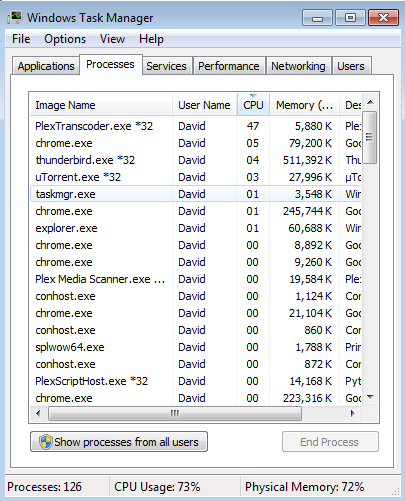
Plex may transcode FLAC in some cases. Your latest screenshot only shows the transcoder using 3%, which is about right for music. PMS is 12%, which is also not that much. Your shot doesn’t show what the other 85% load is coming from.
I see that you have the Plex DLNA server enabled. If you don’t really need this, I would turn it off. I’ve seen rogue DLNA clients clog up networks.
Checking your logs again, I do see that the scanner got triggered around 11:30. You are not following the naming guidelines or recommended folder structure. This is causing Plex to scan every file each time the scanner kicks in. This is not necessarily a problem, but it will add extra stress and if it runs into a bad file, it can cause the scan to abort and just start over and could potentially end up in a scanning loop, although I don’t see evidence of this. I see no reason why Plex would have gotten bogged down at that time.
Are you using another program that might trigger Plex to update it’s library? I’m seeing something I don’t quite recognize.
Do you also have Networx installed? Or any special firewall?
If so, this might be a related topic:
download process explorer: https://docs.microsoft.com/en-us/sysinternals/downloads/process-explorer
and see the end of the command line of the process using high cpu to find which plugin is causing it.
And this morning…PlexTranscoder.exe banging away once more. I notice it was doing this while once again stuck in a loop scanning the audiobooks section, so there may be something in there confusing it. I’ll dig through and see.
Plex Media Server Logs_2018-08-30_10-53-35.zip (5.8 MB)
This has Thunderbird running up the cycles as well (running filters on incoming mail) but the transcoder is banging away…with nothing playing, and no new media added in the past couple of hours (the log may show it finding new media, but it was ripped a couple of hours ago.)
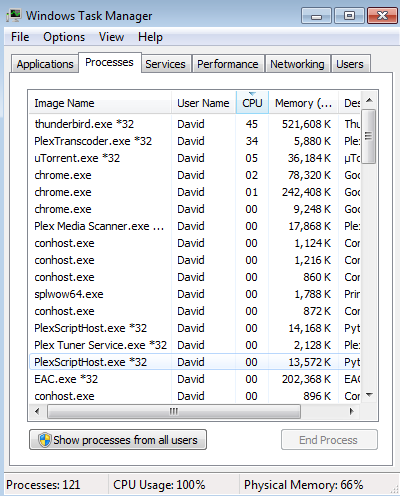
This with Thunderbird going to idle. PlexTranscoder, though, is still beavering away.
The other load was in part coming from EAC, as I’m engaged in ripping CDs from my collection. I mainly wanted to show what things look like when Plex is behaving relatively normally.
I do use other clients with the DLNA, but not that often, so I might experiment with turning that off.
I do try to follow the naming guidelines and folder structures, though often this gets corrected when things go onto the other server after being backed up. I run into problems mainly with the downloaded items – there’s rarely a consensus on folder structure or naming over at Bandcamp, Groupees, and Humble. I also run into trouble with the audiobooks that I’ve been ripping from CDs – cleaning those up where I can, but, oy veh. Then there’s the Audible backups. And the box sets (the Russia Gold box set got ripped with some CDs having numbers in parentheses at the start, other discs not.)
My biggest problem is that I have so much media on the various drives that correcting things completely is nigh impossible.
Nope, not Networx. I use Nord VPN, Avast, and Peerblock.
I’ve restarted Plex on Brainbuntu. Meanwhile, I’m going through the audiobook folder and seeing what’s going on there. Making some corrections now.
I just deleted the audiobook library altogether, and will rebuild it.
Right now the scanner is looking for new music…unfortunately it’s not finding some of the new things.
And PlexTranscoder is in the 45%-48% range AGAIN, with nothing playing.
I’m not seeing anything stand out in your log. Just some music being played back, so I don’t understand why the transcoder would causing that much load.
I do see 2 things in your log, though may not be directly related to your issue.
1 - You have the option enabled to “Support IPv6”. Unless you are sure you’ve configured your network properly for IPv6, I would turn this off.
2 - Your Plex DLNA server is running. I would turn this off if you don’t have any DLNA clients. I see that last week on the 25th, it triggered the analysis of what appears to be a large chunk of your library but nothing actually played. The load you are seeing could be this analysis.
The network should be configured for ipv6, but I’ve had trouble with that before (earlier computer, Windows XP), so I’ll give turning that off a shot.
I do use DLNA clients, but not a lot. I’ll see if shutting that off does anything.
The only time I see the transcoder work is when you were playing back an audio book.
7.3 -The Jago & Litefoot Revival Act - Part 1.mp3
Can you provide the XML for that? Wondering why it is trying to transcode that.
That’s really weird, as I haven’t been playing that. And why would tyhe transcoder hack at an mp3?
How do I find the XML?
From Plex Web, find that track, far right, click on … icon. Select get info, then view XML. Save as text into a .txt file and attach that.
Got it. It’ll be a while; the audiobook library is being rebuilt right now.
The playback was initiated by a Galaxy Tab A 10.0 device. It’s not actually playing, its just sitting there paused. There is an issue we are looking at for the Android client where playback of flac files sometimes won’t stop because the duration info is lost somewhere along the line. I wonder if this is related and the transcoder is just chugging away not knowing when to stop.
Can you PM me that file, so I can test it?
Sure.
And, again, very strange as I don’t think I’ve ever played that file on the Tab A.
I get some occasional odd behaviour out of the Android client (I have it on my LG Stylo 3 as well) in that certain files will simply end…and then sit. Or the next one in line won’t start until I manually pause and restart.
Oh, you’re going to love this.
It’s not on the Brainbuntu server at all. Backed up to DVD, and moved to BearcubII. It’s been gone from Brain for probably a couple of months at least.
Unless I have a phantom.
Edit: Nope, looking in the wrong folder.
This is what MediaInfo pulls out about the file.
7.3 -The Jago & Litefoot Revival Act - Part 1.mp3.txt (2.9 KB)
Ok, this is my last comment for you as this is getting off topic, if you want to continue please create a new post.
Your MP3 file is not an MP3 file. It’s actually an audio only mpeg video file with multiple audio tracks. And the file was not made correctly. I’m amazed this file can be played by anything.