I have put Debug Level to Verbose, restarted Plex, waited a little and after it was at 100% CPU again it looked at ALL logs, also in the browser, but also on hard disk and found zero ERROR or other strange things. Looked in the following files:
Plex DLNA Server.log - Only that it started, and the last message is always “Initialization complete”
Plex Media Server.log - Only showing this every 20 seconds
Dec 19, 2018 07:05:25.645 [22120] DEBUG - handleStreamRead code 2: End of file
Dec 19, 2018 07:05:25.656 [14196] DEBUG - Auth: authenticated user 1 as koalabear84
Dec 19, 2018 07:05:25.657 [17916] DEBUG - Request: [192.168.178.25:50774 (Subnet)] GET /player/proxy/poll?deviceClass=pc&protocolVersion=1&protocolCapabilities=timeline%2Cplayback%2Cnavigation%2Cmirror%2Cplayqueues&timeout=1 (5 live) GZIP Signed-in Token (koalabear84)
Dec 19, 2018 07:05:25.658 [17916] DEBUG - Beginning read from two-way stream.
And every 2 hours and 5 minutes (because I kill it automatically after 5 minutes of 100% CPU) it will log this:
Dec 19, 2018 06:50:51.221 [20732] DEBUG - Jobs: ‘C:\Program Files (x86)\Plex\Plex Media Server\Plex Dlna Server.exe’ exit code for process 16992 is -1 ()
Dec 19, 2018 06:50:51.221 [28660] DEBUG - Plex Dlna Server.exe exited.
Dec 19, 2018 06:50:51.323 [28660] DEBUG - Job running: C:\Program Files (x86)\Plex\Plex Media Server\Plex Dlna Server.exe
Dec 19, 2018 06:50:51.327 [28660] DEBUG - Jobs: Starting child process with pid 8236
And then after this is logged, two hours later it will get to 100% CPU again. And this is already like this for a half year or even longer. Every 2 hours after starting “Plex Dlna Server.exe” it will get to 100% CPU. And if you restart Plex, then PlexScriptHost will also get to 100% CPU (and will be killed).
If Plex DLNA server is causing the issue, this is often due to a rogue DLNA client somewhere on your network trying to access it. If you don’t need the DLNA server, disable it. If you do need, it look around for what DLNA client might be trying to access it. Turn that off and see if the cpu load drops.
Ok here is a full logs with debug enabled and this happened this morning when I was sleeping.
The problem occurred between 0 am and 7:30 am of 2018-12-29. Any error after that time was my maybe closing the process or shutting down the server. And before that time I was awake and the bug was not present.
I checked the logs and there is nothing, only some connectivity loss to plex server caused by remote server that fixed itself a few seconds later.
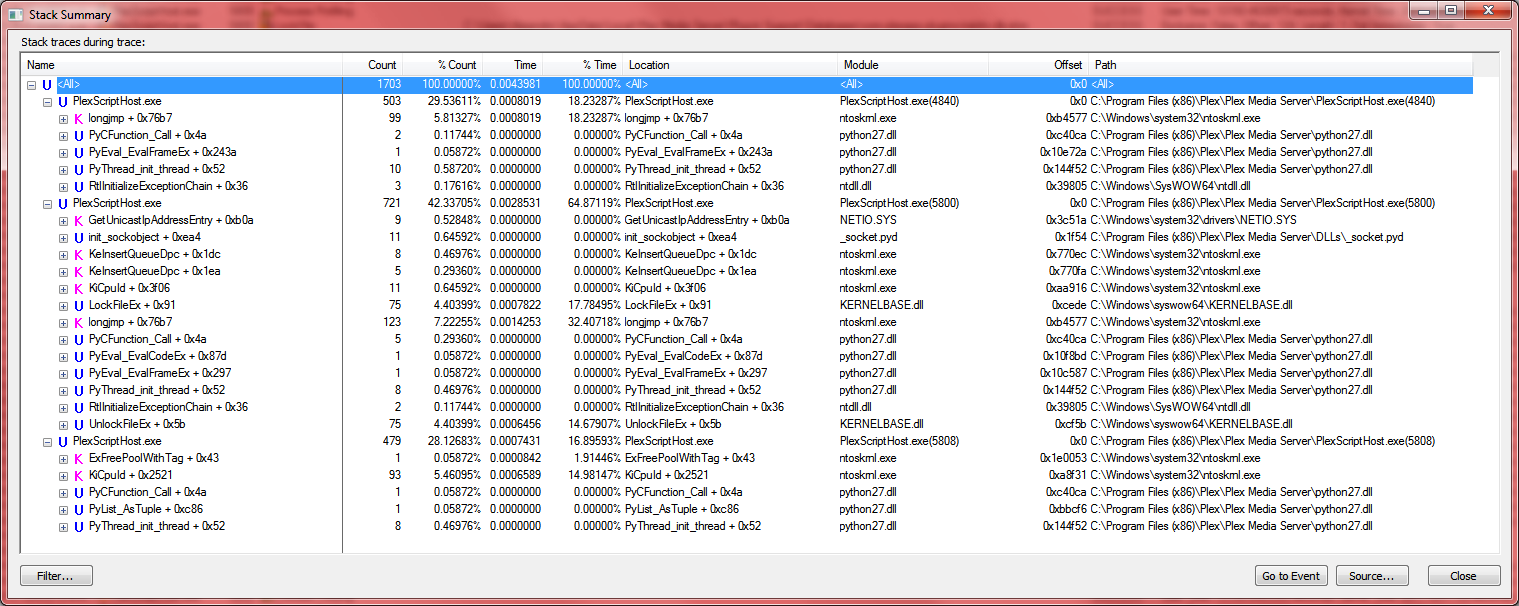
also opened the Process Monitor (during the high cpu usage) to check if there was any unusual activity but didnt understand very well. only registry reads and some local connections.
Here is the Stack Summary from process monitor. Maybe you have some useful info here:
again. now i set a system log 24/7 to verify exactly when this happen. i removed almost all plugins so now there is only 3 plexhostscript than when they bug they dont use 100% cpu usage.
now the bug happen again and checking the log could verify the exact time with hour:minute:seconds that this happen like see here:
now checking the logs i can see at that exact time only this log (a connectivity lost from plex server, caused by plex remote server, not my connection):
now check 23:20:34
Jan 08, 2019 23:18:43.218 [3996] DEBUG - Checking if time for scheduled update
Jan 08, 2019 23:18:54.467 [4116] DEBUG - Network change.
Jan 08, 2019 23:18:54.467 [4116] DEBUG - NetworkInterface: Notified of network changed (force=0)
Jan 08, 2019 23:18:54.473 [4116] DEBUG - Network change notification but nothing changed.
Jan 08, 2019 23:18:54.474 [4116] DEBUG - Network change.
Jan 08, 2019 23:18:54.474 [4116] DEBUG - NetworkInterface: Notified of network changed (force=0)
Jan 08, 2019 23:18:54.479 [4116] DEBUG - Network change notification but nothing changed.
Jan 08, 2019 23:20:34.333 [3648] DEBUG - handleStreamRead code 10054: Se ha forzado la interrupcie una conexixistente por el host remoto
Jan 08, 2019 23:20:34.333 [3648] DEBUG - NotificationStream: Removing because of error
Jan 08, 2019 23:20:34.350 [1552] DEBUG - EventSource: Failure in ReadData (10054 - Se ha forzado la interrupcie una conexixistente por el host remoto).
Jan 08, 2019 23:20:34.350 [1552] DEBUG - MyPlex: We appear to have lost Internet connectivity, resetting device URL cache.
Jan 08, 2019 23:20:34.350 [1552] ERROR - EventSource: Retrying in 15 seconds.
Jan 08, 2019 23:20:49.350 [3648] DEBUG - EventSource: Resolving 45.33.103.230 port 443s
Jan 08, 2019 23:20:49.350 [3648] DEBUG - EventSource: Resolved 45.33.103.230 to 45.33.103.230
Jan 08, 2019 23:20:49.791 [3648] DEBUG - EventSource: Connected in 295 ms.
Jan 08, 2019 23:20:49.791 [1552] DEBUG - EventSource: Wrote data, reading reply.
Jan 08, 2019 23:20:50.455 [1552] DEBUG - EventSource: Read HTTP reply header.
Jan 08, 2019 23:20:50.455 [1552] DEBUG - MyPlex: We appear to have regained Internet connectivity.
Jan 08, 2019 23:20:50.455 [1552] DEBUG - EventSource: Successfully connected to 45.33.103.230.
Jan 08, 2019 23:20:58.586 [4116] DEBUG - Network change.
Jan 08, 2019 23:20:58.587 [4116] DEBUG - NetworkInterface: Notified of network changed (force=0)
Jan 08, 2019 23:20:58.603 [4116] DEBUG - Network change notification but nothing changed.
Jan 08, 2019 23:23:43.219 [2824] DEBUG - Checking if time for scheduled update
Jan 08, 2019 23:28:43.219 [18808] DEBUG - Checking if time for scheduled update
Jan 08, 2019 23:33:43.220 [18808] DEBUG - Checking if time for scheduled update
no other log file show anything near that time for hours.
Great analysis! I never found this in the logs. Just curious, do you have WiFi or wired network? Because it’s strange that it thinks the network is changed.
That log is from an earlier time and since you didn’t know exactly when it happened before, it would be better if you can provide the log for the current event on 1/8 and we can focus on this since we now know the exact time to examine.
… wow seriously. always the same excuses. before we had the exact date and the log but “hey you need debug enabled” now i had debug enabled, run a lot of log system because of this bug. THERE NOTHING IN THE LOGS!!. want me to decompile plex and fix it too?
I couldn’t find anything in your server logs even with debugging enable. So that didn’t help.
However, I looked through your other logs and I did find that you had the trakt bundle running that appears to have died at the same time you see the spike. Since the process you’ve found running is the ScriptHost which indicates a plugin. I would try removing the trakt plugin and see if this issue persists.
If that turns out to be the problem, I would contact the trakt plugin developer and see if they might be able to identify the problem. It could be a problem with how PMS handles crashed plugins, but since plugins are being phased out, I don’t know if any time would be put into resolving this on Plex’s side.
And looking back at your earlier log from December, the Trakt plugin also appears to have died on 12/28 around 21:00, just a little before the time you thought it occurred.
Well, the trakt plugin is what I see failing from your logs. It could be other python scripts as well, but i can’t see any evidence of that. You previously mentioned that you have another version of python installed. Although this shouldn’t impact Plex, maybe it is causing some sort of conflict. If you don’t need it, remove it. Or if you do need python for other reasons, maybe try installing the same version PMS uses to avoid any version conflicts.
like i said for third time. this happened with NO plugins installed. or you need logs again with exacr date again with no plugins?
im sick of this, 100 messages and the only replys are excuses or asking for 100000 logs or blaming anything not related to plex. already lost a cpu.
just close the thread since you obviously have 0 intentions of fixing it.
im not going to participate anymore. thanks god i cancelled my plex pass months ago. what a waste of time and money
I have a similar problem. System OMV 4 (Debian 9). After some update, Plex constantly loads one core of a four core processor. In this case, no settings have changed and nothing is viewed. In the course of the clarification of the reasons, I determined that even just an installed PMS package without setting up libraries on a clean system behaves the same way. Processloading processor / usr / lib / plexmediaserver / Plex Media Server
So far, I installed an older version of plexmediaserver_1.13.2.5154-fd05be322_amd64.deb with no such problem. By the way, where can I download old versions? Find them almost impossible.
Some plex features like the scanners are also based on python, not just the plugins. It may be a conflict with the other python you have installed, which is why i suggested looking there.
We can only fix a problem once we identify the cause. So far, ther information you’ve provided doesn’t reveal any specific cause. For example, if the problem is with python and we can conclude that PMS doesn’t work right when python version x.x is installed, then we can look into that and try to find a fix.