Plex Won't Transcode My Files Once I Claim My Server

(this is a new summary of the current state from my previous post, Reddit - Dive into anything)

I created a Plex server in a TrueNAS jail. When the server is Unclaimed, media plays without issue, for example, software transcoding HEVC x265 to x264. When the server is Claimed, this previously working media doesn’t play - I get the orange spinning circle forever. Unclaiming the server makes the problem return. Some file formats (mp4, avi) will Direct Play fine whether claimed or unclaimed.

I’ve created console logs of both situations.

Unclaimed (Working): Apr 30, 2023 00:08:53.245 [0x80aa2ee00] DEBUG - Request: [192.168.1.100:62765 (S - Pastebin.com

Claimed (Not Working): Apr 30, 2023 00:52:14.164 [0x80b91d000] DEBUG - Request: [192.168.1.100:53866 (S - Pastebin.com(i played 10 seconds of spinning circle and then stopped the log. transcoding seemed to continue for a few minutes but I omitted this from the above log)

I am at a loss of what to do next. What actually happens when you Claim a server? Why is it wrecking my transcodes? What can I do about it?

Please help.

Hardware: Dell R730XD, dual E5-2650v4, 128GB RAM, no GPU. TrueNAS virtualized in ESXi per jgreco’s guide using an HBA330 passthrough configuration, although I’ve also tried booting to TrueNAS on the bare metal with the same result. The VM has 32GB RAM, 16GB boot drive, and multi-terabyte storage pools. Terabytes of free space on the drives housing both the Plex jail and the media. Failed whether HW en/decoding was enabled or not.

Server Version#: 1.32.1.6983
Player Version#: 4.100.1

No Linux nor TrueNAS person here, but try this for confirmation of the culprit:
After claiming the server, go to
Settings - Server - Transcoder
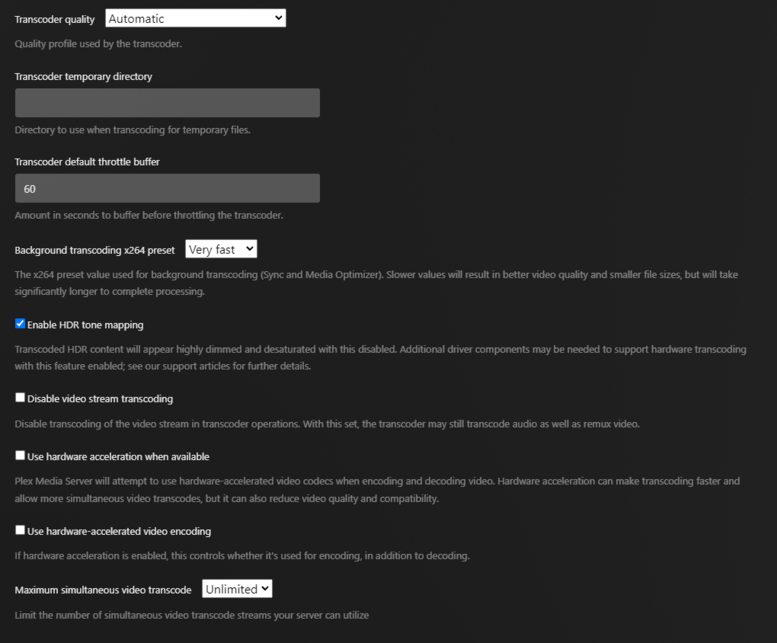
and DISable “Use hardware acceleration when available”

If it now works like before you claimed it, you know to look for hardware transcoder related things. Like drivers for instance.

Looking at your posted logs.

  1. HW is enabled
  2. No hardware is found. (Not passed into the host or container / non-existent ?)
Apr 30, 2023 00:52:14.360 [0x80b91d000] DEBUG - [Req#2bfc/Transcode] Cleaning directory for session agt72avr5fe269pi3zu4idue ()
Apr 30, 2023 00:52:14.360 [0x80b91d000] DEBUG - [Req#2bfc/Transcode] Starting a transcode session agt72avr5fe269pi3zu4idue at offset -1.0 (state=3)
Apr 30, 2023 00:52:14.361 [0x80b91d000] DEBUG - [Req#2bfc/Transcode] TPU: hardware transcoding: enabled, but no hardware decode accelerator found
Apr 30, 2023 00:52:14.361 [0x80b91d000] DEBUG - [Req#2bfc/Transcode] [Universal] Using local file path instead of URL: /media/Barry.S04E03.1080p.HEVC.x265-MeGusta[eztv.re].mkv

You will need to get into the command line and confirm the Guest OS sees the adapter properly enumerated in /dev/dri.

Once enumerated there, the next task is to pass through into the container.

Thank you @OttoKerner and @ChuckPa for your comments. I do not have a GPU in this server, and I don’t believe the E5-2650v4 supports Intel Quicksync Video. Software transcoding would be fine, since that’s what it seems to do (properly) when the server is Unclaimed. I’d be happy if it just did that same software transcoding after the server is Claimed.

I did as @OttoKerner suggested and went into the Settings → [my server] → Transcoder, and I unchecked both Use hardware acceleration when available and Use hardware-accelerated video encoding. I still get the spinning orange circle, even after letting it sit for minutes.

I re-gathered the logs for this particular case, for comparison against the original Unclaimed (Working) set of logs:

Claimed (Not Working, HW Decoding Disabled): May 03, 2023 03:23:02.786 [0x80ae0c500] DEBUG - Request: [192.168.1.100:57736 (S - Pastebin.com
(10 seconds of spinning circle, then stopped playback and the log stopped)

@ChuckPa, you will notice that in this log, the lines about hardware transcoding have disappeared.

One thing I’ve noticed about all of the Claimed (Not Working) logs are the 401 errors that don’t seem to be in place in the Unclaimed (Working) logs.

Example:
May 03, 2023 03:23:04.273 [0x806a14a00] DEBUG - Completed: [192.168.1.140:60165] **401** POST /video/:/transcode/session/ibmt1j9bv5syqk09csirjqks/9984b396-393d-4d31-8d05-9755c39838fc/manifest (10 live) #707d 0ms 268 bytes

I’m guessing this 401 is part of the problem, but I don’t know how to examine it or fix it. Is there something else I need to set up firewall wise beyond port 32400? The permissions on the files in the jail don’t change between me Claiming and Unclaiming the server, as far as I know.

What should I do next?

May I have the full ZIP file ? The segments being posted are insufficient.

Is this what you need?

Plex Media Server Logs_2023-05-03_12-11-58.zip (3.6 MB)

If you check May 3rd at 12:07pm that’s when I did another ten-second spinning circle test.

Thank you!!

Thank you for the logs.

PLEASE turn VERBOSE logging off. Verbose generates 1 useful line for every 6 output LOL. (it makes this process extremely difficult)

example:

May 03, 2023 12:07:25.741 [0x806a16600] DEBUG - Request: [10.251.1.100:59637 (Subnet)] GET /web/js/chunk-639-82d3d64fc49879bd7a62-plex-4.100.1.29405-21e8735.js (7 live) #9c65 GZIP Signed-in / Accept => text/html,application/xhtml+xml,application/xml;q=0.9,image/avif,image/webp,image/apng,*/*;q=0.8,application/signed-exchange;v=b3;q=0.7 / Accept-Encoding => gzip, deflate / Accept-Language => en-US,en;q=0.9 / Connection => keep-alive / Host => 10.251.1.140:32400 / Purpose => prefetch / Referer => http://10.251.1.140:32400/web/index.html / User-Agent => Mozilla/5.0 (Windows NT 10.0; Win64; x64) AppleWebKit/537.36 (KHTML, like Gecko) Chrome/112.0.0.0 Safari/537.36
May 03, 2023 12:07:25.741 [0x806a16600] DEBUG - [Req#9c65] Final path: "/usr/local/share/plexmediaserver-plexpass/Resources/Plug-ins-93784ef3f/WebClient.bundle/Contents/Resources/js/chunk-639-82d3d64fc49879bd7a62-plex-4.100.1.29405-21e8735.js"
May 03, 2023 12:07:25.741 [0x806a16600] VERBOSE - [IDLE] Adding (0->1) work item http_download - /web/js/chunk-639-82d3d64fc49879bd7a62-plex-4.100.1.29405-21e8735.js
May 03, 2023 12:07:25.741 [0x806a16600] VERBOSE - [IDLE] * http_download - /web/js/chunk-100-1ae9cf655a5b8e852b4a-plex-4.100.1.29405-21e8735.js - 1 active item(s)
May 03, 2023 12:07:25.741 [0x806a16600] VERBOSE - [IDLE] * http_download - /web/js/chunk-639-82d3d64fc49879bd7a62-plex-4.100.1.29405-21e8735.js - 1 active item(s)
May 03, 2023 12:07:25.741 [0x806a16600] VERBOSE - [IDLE] * http_download - /web/js/chunk-735-7590a699af5a9ea9fd05-plex-4.100.1.29405-21e8735.js - 1 active item(s)
May 03, 2023 12:07:25.741 [0x806a16600] VERBOSE - [IDLE] * http_download - /web/js/chunk-785-7dfba974788d9abf5abb-plex-4.100.1.29405-21e8735.js - 1 active item(s)
May 03, 2023 12:07:25.741 [0x806a16600] DEBUG - Content-Length of /usr/local/share/plexmediaserver-plexpass/Resources/Plug-ins-93784ef3f/WebClient.bundle/Contents/Resources/js/chunk-639-82d3d64fc49879bd7a62-plex-4.100.1.29405-21e8735.js is 618514 (of total: 618514).
May 03, 2023 12:07:25.741 [0x806a14a00] DEBUG - Completed: [10.251.1.100:59629] 200 GET /web/js/chunk-735-7590a699af5a9ea9fd05-plex-4.100.1.29405-21e8735.js (7 live) #9c62 GZIP 5ms 4693 bytes (pipelined: 5)
May 03, 2023 12:07:25.741 [0x806a14a00] VERBOSE - [IDLE] Removing (1->0) work item http_download - /web/js/chunk-735-7590a699af5a9ea9fd05-plex-4.100.1.29405-21e8735.js
May 03, 2023 12:07:25.741 [0x806a14a00] VERBOSE - [IDLE] * http_download - /web/js/chunk-100-1ae9cf655a5b8e852b4a-plex-4.100.1.29405-21e8735.js - 1 active item(s)
May 03, 2023 12:07:25.741 [0x806a14a00] VERBOSE - [IDLE] * http_download - /web/js/chunk-639-82d3d64fc49879bd7a62-plex-4.100.1.29405-21e8735.js - 1 active item(s)
May 03, 2023 12:07:25.741 [0x806a14a00] VERBOSE - [IDLE] * http_download - /web/js/chunk-785-7dfba974788d9abf5abb-plex-4.100.1.29405-21e8735.js - 1 active item(s)

And every one of these :man_facepalming:

May 03, 2023 05:48:38.217 [0x806a15100] VERBOSE - WebSocket: processed 1 frame(s)
May 03, 2023 05:48:39.044 [0x806a14a00] VERBOSE - WebSocket: processed 1 frame(s)
May 03, 2023 05:48:48.241 [0x806a14a00] VERBOSE - WebSocket: processed 1 frame(s)
May 03, 2023 05:48:49.057 [0x806a15100] VERBOSE - WebSocket: processed 1 frame(s)
May 03, 2023 05:48:58.256 [0x806a15100] VERBOSE - WebSocket: processed 1 frame(s)
May 03, 2023 05:48:59.087 [0x806a15100] VERBOSE - WebSocket: processed 1 frame(s)
May 03, 2023 05:49:08.261 [0x806a14a00] VERBOSE - WebSocket: processed 1 frame(s)
May 03, 2023 05:49:09.101 [0x806a15100] VERBOSE - WebSocket: processed 1 frame(s)
May 03, 2023 05:49:18.284 [0x806a15100] VERBOSE - WebSocket: processed 1 frame(s)
May 03, 2023 05:49:19.127 [0x806a14a00] VERBOSE - WebSocket: processed 1 frame(s)
May 03, 2023 05:49:28.302 [0x806a15100] VERBOSE - WebSocket: processed 1 frame(s)
May 03, 2023 05:49:29.134 [0x806a14a00] VERBOSE - WebSocket: processed 1 frame(s)
May 03, 2023 05:49:38.312 [0x806a15100] VERBOSE - WebSocket: processed 1 frame(s)
May 03, 2023 05:49:39.141 [0x806a15100] VERBOSE - WebSocket: processed 1 frame(s)
May 03, 2023 05:49:48.324 [0x806a15100] VERBOSE - WebSocket: processed 1 frame(s)
May 03, 2023 05:49:49.157 [0x806a15100] VERBOSE - WebSocket: processed 1 frame(s)
May 03, 2023 05:49:58.341 [0x806a14a00] VERBOSE - WebSocket: processed 1 frame(s)
May 03, 2023 05:49:59.184 [0x806a15100] VERBOSE - WebSocket: processed 1 frame(s)

Regarding your issue:

  1. Given you have an E5-2650v4, much like my E5-2690v4, go into Settings - Server - Transcoding - Show Advanced
    – Turn OFF the hardware options.

  2. Create an Other Videos section. Unzip and place this file there.

  1. Play it using Plex/web (Web Browser). Don’t use the Android app.

  2. Gather the logs ZIP

  3. Attach.

I believe I’ve done all that you ask. I created a new library and made that LG file the only file in it. I’m including screenshots of my relevant settings so you can verify if I did everything you needed. I unchecked Verbose but I still see a few entries in the Plex Media Server log.

My play attempt was on May 03, 2023 at around 16:47.


Plex Media Server Logs_2023-05-03_16-48-29.zip (3.0 MB)

Thank you!

Regarding the logging: There is VERBOSE in both Plex/web (Player) settings and in Server. We’re still getting verbose Player logs. Please check that.

The demo file I gave you is attempting to DirectPlay. ( not unexpected on certain browsers) and failing there.

[Req#2ea/Transcode/JobRunner] Job running: FFMPEG_EXTERNAL_LIBS='/Plex\ Media\ Server/Codecs/e51a01b-4528-freebsd-x86_64/' X_PLEX_TOKEN=xxxxxxxxxxxxxxxxxxxxxxxxxxxxxxxxxxxxxxxxxx "/usr/local/share/plexmediaserver-plexpass/Plex Transcoder" -codec:0 hevc -ss 0 -noaccurate_seek -analyzeduration 20000000 -probesize 20000000 -i "/media2/LG Colors of Journey HDR UHD 4K Demo.mkv" -map 0:0 -metadata:s:0 language=eng -codec:0 copy -map 0:1 -metadata:s:1 language=eng -codec:1 copy -f dash -seg_duration 5 -dash_segment_type mp4 -init_seg_name 'init-stream$RepresentationID$.m4s' -media_seg_name 'chunk-stream$RepresentationID$-$Number%05d$.m4s' -window_size 5 -delete_removed false -skip_to_segment 1 -time_delta 0.0625 -manifest_name "http://127.0.0.1:32400/video/:/transcode/session/6fuf6btntyqx4mvkv82vy6da/c62ac0ed-0ff0-42ee-b15e-1b8d42dddf27/manifest?X-Plex-Http-Pipeline=infinite" -avoid_negative_ts disabled -map_metadata -1 -map_chapters -1 dash -start_at_zero -copyts -vsync cfr -y -nostats -loglevel quiet -loglevel_plex error -progressurl http://127.0.0.1:32400/video/:/transcode/session/6fuf6btntyqx4mvkv82vy6da/c62ac0ed-0ff0-42ee-b15e-1b8d42dddf27/progress

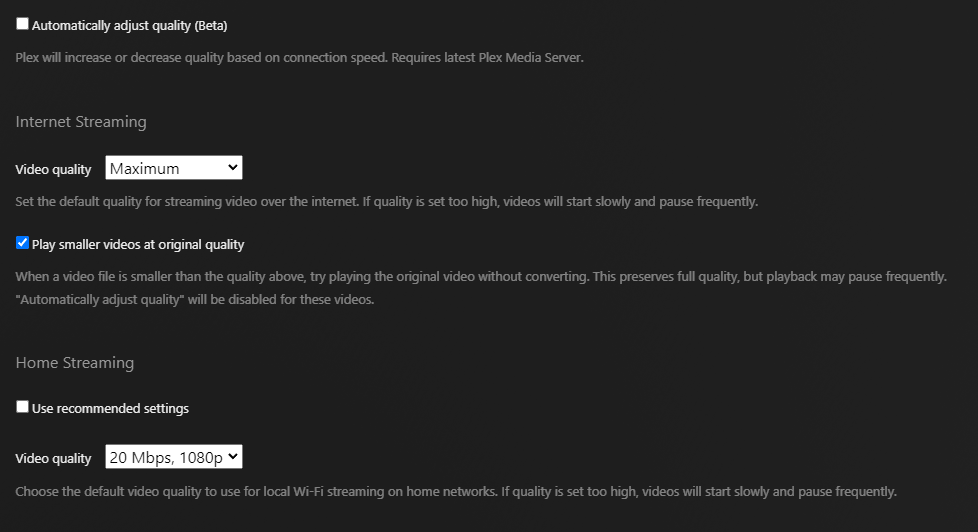
I would like you to go to Settings - Player - Quality and force it down to 20 Mbps @ 1080p

now retest.

Can you tell me where the VERBOSE setting is in the player? I’ve checked Advanced settings under General, Quality, Debug, and Player, and I don’t see anything set.

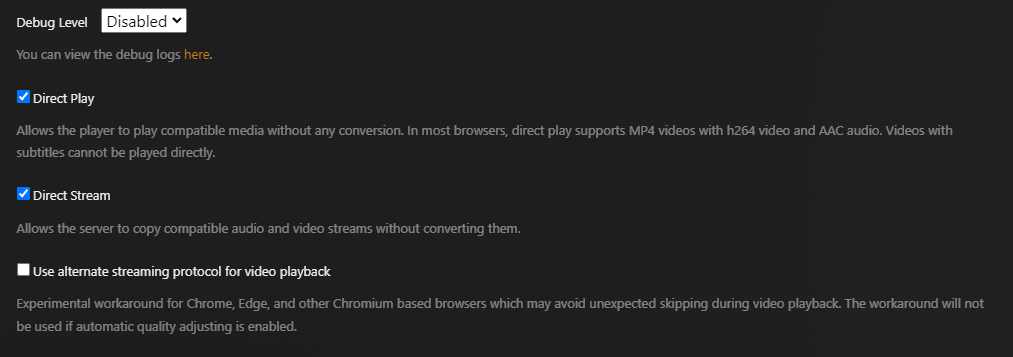
I’ve made the modifications to force it down to 20Mbps @ 1080p. (it was originally at 8 Mbps) Here are all four of my current config screens for Plex Web:

General:


Quality:

Debug:

Player:

Here are the logs:
Plex Media Server Logs_2023-05-03_17-56-21.zip (3.2 MB)

Playback still failed when the server was claimed. Attempt was May 3, 2023 at 17:56.

Thank you!!

It’s still remuxing for the DASH protocol.

May 03, 2023 17:56:02.329 [0x80daaae00] DEBUG - [Req#136a/Transcode/JobRunner] Job running: FFMPEG_EXTERNAL_LIBS=‘/Plex\ Media\ Server/Codecs/e51a01b-4528-freebsd-x86_64/’ X_PLEX_TOKEN=xxxxxxxxxxxxxxxxxxxxxxxxxxxxxxxxxxxxxxxxxx “/usr/local/share/plexmediaserver-plexpass/Plex Transcoder” -codec:0 hevc -ss 0 -noaccurate_seek -analyzeduration 20000000 -probesize 20000000 -i “/media2/LG Colors of Journey HDR UHD 4K Demo.mkv” -map 0:0 -metadata:s:0 language=eng -codec:0 copy -map 0:1 -metadata:s:1 language=eng -codec:1 copy -f dash -seg_duration 5 -dash_segment_type mp4 -init_seg_name ‘init-stream$RepresentationID$.m4s’ -media_seg_name ‘chunk-stream$RepresentationID$-$Number%05d$.m4s’ -window_size 5 -delete_removed false -skip_to_segment 1 -time_delta 0.0625 -manifest_name “http://127.0.0.1:32400/video/:/transcode/session/gm4tyjacmkf9aiy6yhwm6hne/39e7779d-de11-41e0-bc87-e5c8fb3705c8/manifest?X-Plex-Http-Pipeline=infinite” -avoid_negative_ts disabled -map_metadata -1 -map_chapters -1 dash -start_at_zero -copyts -vsync cfr -y -nostats -loglevel quiet -loglevel_plex error -progressurl http://127.0.0.1:32400/video/:/transcode/session/gm4tyjacmkf9aiy6yhwm6hne/39e7779d-de11-41e0-bc87-e5c8fb3705c8/progress

Do you have this setting for Home quality ?

I changed Internet Streaming Video quality to Maximum, unchecked Home Streaming “Use recommended Settings” and could then set Home Streaming Video quality to 20Mbps @ 1080p.

Here are the new set of logs. Playback attempt was at 19:15.

Plex Media Server Logs_2023-05-03_19-15-26.zip (3.2 MB)

Thank you!!

while attempting to play with server claimed or unclaimed,
Is the player also signed in / signed out?

You’re getting HTTPS 401 (not authorized).

May 03, 2023 19:15:03.889 [0x806a14a00] DEBUG - Request: [10.251.1.140:64126 (Subnet)] POST /video/:/transcode/session/xrqs536q2s6qyc7pk54kjyex/6916733e-7a01-4409-a696-54db0d186daa/manifest (7 live) #15ad Signed-in / Accept => / / Connection => close / Host => 127.0.0.1:32400 / Icy-MetaData => 1 / Transfer-Encoding => chunked / User-Agent => Lavf/LIBAVFORMAT_VERSION / X-Plex-Http-Pipeline => infinite
May 03, 2023 19:15:03.889 [0x806a14a00] DEBUG - Completed: [10.251.1.140:64126] 401 POST /video/:/transcode/session/xrqs536q2s6qyc7pk54kjyex/6916733e-7a01-4409-a696-54db0d186daa/manifest (7 live) #15ad 0ms 268 bytes
May 03, 2023 19:15:03.975 [0x806a14a00] DEBUG - Request: [10.251.1.140:14967 (Subnet)] POST /video/:/transcode/session/xrqs536q2s6qyc7pk54kjyex/6916733e-7a01-4409-a696-54db0d186daa/manifest (7 live) #15b0 Signed-in / Accept => / / Connection => close / Host => 127.0.0.1:32400 / Icy-MetaData => 1 / Transfer-Encoding => chunked / User-Agent => Lavf/LIBAVFORMAT_VERSION / X-Plex-Http-Pipeline => infinite

There’s definitely something screwy & incorrect right here.

1 Like

While claimed, the player is signed in. I’ve tried the player signed in with two separate accounts: 1) the account that’s claimed the server, and; 2) a test account that has been granted access to the server. I’ve tried using the player both locally (via the IP address) and via plex.tv.

I don’t know how to have the player be not signed in. If I sign out of the player, then when I visit the IP address for my plex server, it auto-redirects me to sign in at app.plex.tv.

What or who is not authorizing me? If it’s on my server, this is a fresh install (TrueNAS Plugin, but I could try to install manually instead?) with a fresh library with fresh media, so what do I need to authorize? If it’s not on my server, then how do I authorize whatever needs to be authorized by whomever needs to authorize it, and where would I do this?

There’s definitely something screwy & incorrect right here.

That’s as far as I’ve gotten. I have no idea what’s causing the 401 POST error, or how to fix it.

FYI on a whim, I tried changing my password to my Plex account, then signing out, then signing back in and reclaiming the server. The thought was to renew a token of some sort. The problem persists. It only starts working if I unclaim the server.

The server is what’s returning the HTTP 401 codes.

I don’t know why either. (we have only a handful of FreeBSD installations and I don’t know BSD anymore.)

I tried to setup a TrueNAS Core (BSD) in a VM and run PMS on that TrueNAS installation. I failed.

I then tried it on TrueNAS Scale (Linux) in a VM and succeeded.

If I may be bold,

  1. Let your TrueNAS Core (BSD) be a fileserver
  2. Run your PMS on a Linux, Mac, or Windows machine.

As a “Wild Hair” idea -

  1. Install Ubuntu 20.04 or 22.04 in a VM on TrueNAS
  2. Install PMS in that VM.

You won’t have HW transcoding unless you pass a Nidia GPU through but that’s not a surprise.

You will be running a Linux native package on the same Linux OS PMS is developed on instead of a BSD package through a SDK
.

Is it worth a shot?

When I had this Plex jail on the previous hardware (a Dell 0Y2MRG Motherboard with an i7-2600 processor and integrated graphics, using FreeNAS upgraded eventually to TrueNAS), it worked without issue for 2 years. When I migrated it to my server hardware, I downloaded TrueNAS Core 13 fresh from the website.

I appreciate the suggestions for workarounds and have considered them myself. However, I am curious as to exactly what’s happening here and why it works in an Unclaimed state (which proves that it is not likely to be a hardware problem) but not in a Claimed state. I like the simplicity of having TrueNAS in a lightweight jail instead of on a virtualized Windows / Mac / Linux machine.

I had tried installing TrueNAS Scale in a separate VM and installing Plex as an App there, but I ran into a strange issue where it wouldn’t allow me to create a library, even upon destroying and recreating the App (it would tell me “Not Authorized”). Perhaps I’ll revisit that to see if I can get it working on Scale. Maybe I’ll also try doing it using my old FreeNAS ISO to see if it’s truly a FreeBSD version thing.

If it’s my server that’s returning the HTTP 401 codes, then I should be able to find a way to authorize some account to accomplish whatever it is trying to do. Is there any way to know what Plex is trying to do at that moment when it’s blocked? I tried enabling other Debug logging but I couldn’t decipher the results.

Mainly I’d just like to solve this problem so if some poor sap in the future encounters it, s/he’ll know how to fix it.

Thank you.

@ChuckPa @OttoKerner

YOU GUYS

I FIXED IT!

I went down a million rabbit holes, but it was @ChuckPa’s hint that led me to the solution:

May 03, 2023 19:15:03.975 [0x806a14a00] DEBUG - Request: [10.251.1.140:14967 (Subnet)] POST /video/:/transcode/session/xrqs536q2s6qyc7pk54kjyex/6916733e-7a01-4409-a696-54db0d186daa/manifest (7 live) #15b0 Signed-in / Accept => / / Connection => close / Host => 127.0.0.1:32400 / Icy-MetaData => 1 / Transfer-Encoding => chunked / User-Agent => Lavf/LIBAVFORMAT_VERSION / X-Plex-Http-Pipeline => infinite

There’s definitely something screwy & incorrect right here.

I was desperate, so I searched Google for:

manifest (7 live) #15ad Signed-in / Accept => / / Connection => close / Host => 127.0.0.1:32400 / Icy-MetaData => 1 / Transfer-Encoding => chunked / User-Agent => Lavf/LIBAVFORMAT_VERSION / X-Plex-Http-Pipeline => infinite

The single returned Google result reflected my experience, where the transcoder was running, I could see the files being generated in the Transcode directory, but the Player just kept spinning:

There was no solution there, but the last mention on that page led me to:

… where this comment suggested a solution:

The fix in my case was was the “List of IP addresses and networks that are allowed without auth” mentioned above. I had tried this previously but had forgotten that every time the stack came up the subnet that swarm was using was changing. It may not be ideal but I’ve just added 10.0.0.0/8 to the allow list and playback is working perfectly.

Now, I don’t even know what “clusterplex” or “the swarm” is, but using that comment to craft a solution solved the issue for me!

Settings → Server → Network

Now my server plays just fine while Claimed. Thank you all so much for your help and tenacity!

I’m not sure why this only came up recently, as I’d never populated this before, and my old server had the same IP address as the new one. Also, my test servers had different addresses and still didn’t have this set. I’m baffled as to the “why”, but I’m thrilled to have a fix!

WOO HOO!

This topic was automatically closed 90 days after the last reply. New replies are no longer allowed.