Player Version#: 3.2.0 for MacOS
Really appreciate the new PlexAmp 3.2 features! But for some tracks the waveform progress bar is missing (just a plain line) and for other tracks the full CODEC badge is missing. Depending on the track, one or the other (or both) are missing. My library is 100% FLAC. The song in the screenshot is a basic 16/44 track, nothing exotic.
Most tracks show fine, but I can’t pinpoint why some have missing pieces. Bug?
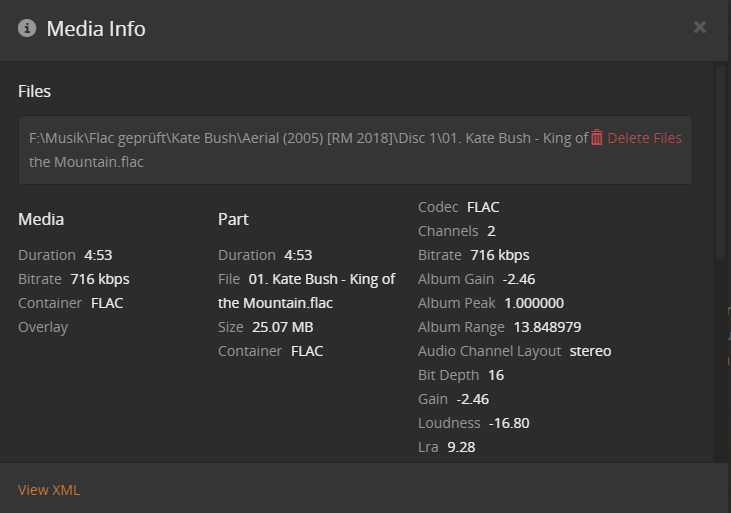
Look into the Plex media info if the track has been analyzed for loudness.
If it has, there should be numerical values for loudness etc. in there.
Are you positive that this track is located on your server and not on TIDAL?
Has this track been downloaded to Plexamp, instead of getting streamed from the server?
I don’t have Plex linked to any streaming services, so all tracks are 100% local to my PMS running on my Synology. The track is streamed from my server, as far as I know. I haven’t downloaded any tracks on my desktop PlexAmp instance.
I don’t see loudness in the Media Info. Is there a way to force that to update for my library, or is that a background process that just hasn’t completed?
It also seems odd that CODEC is “TXT”, whereas in the XML output it is clearly marked as FLAC.
Yes, I experienced this behaviour on certain tracks in 3.1.1 but haven’t tried to see if it’s still there for me in 3.2.
Edit: can confirm this still occurs for me in 3.2
Yes, but the loudness information is missing from this screen. So that explains the missing seek print.
Other technical data about the file container and the audio stream are also missing, which explains the missing bandwidth badge.
Here is a screenshot how it is supposed to look like for a flac track:
Are the file recently added?
Is your server actually running during the server maintenance window? https://support.plex.tv/articles/201553286-scheduled-tasks/
This particular track was added about 3 days ago. I checked the scheduled task page, and everything seems in order. PMS is running 24/7 on my Synology NAS. PMS server version 1.20.1.3252.
Try to “Analyze” the album. To see if this at least restores the bitrate in the media info.
Analyze did restore the CODEC info, sans any loudness info. Playing back in PlexAmp now shows 44/16.
Since this happens on a number of albums, is there a way for force a re-scan of the whole library to fix everything? Is there a way to force a loudness rescan as well?
Loudness will be computed at night anyway, if it’s missing.
Unless you have that disabled under
Settings - Server - Library
Keep an eye out on the logs (activate ‘Debug’ but not ‘Verbose’), then restart the server.
Sometimes there is an album which crashes the analysis. The logs should at least provide a hint which album that might be.
You might also want to disallow the NAS to spin down the disks.
Thanks I just changed the loudness scan to scheduled and when new media is added. Previously it was just set to scheduled. Synology is already configured to never spin down the disks.