Server Version#: 1.20.3.3483
Player Version#: PlexAmp 3.2.2, Plex 1.21.0.1410
It’s great to see the recently added casting options in PlexAmp, however, earlier today whilst playing music in Plex and subsequently PlexAmp I noticed some oddities related to casting.
PlexAmp doesn’t appear to show up as a cast to device in Plex - even when the two are on the same machine.
For example: The following is from PlexAmp of some devices on my network with Plex loaded:
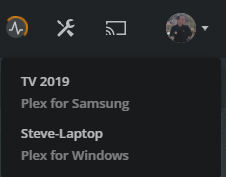
Then from Plex for Windows on my server, only the Plex instance on my laptop and the Tizen App on my Samsung The Frame TV show up - and not the PlexAmp instance:
Whilst Plex for Windows on my laptop shows:
In PlexAmp my main Plex instance, from the same machine, shows music that finished playing a few hours ago as the app name. Not only that but I played another album by Lenka after the Kaiser Chiefs
PlexAmp shows “This device” where I would expect to see the hostname.
PlexAmp doesn’t differentiate between “Plex for Window” and “Plex for Samsung” like the Plex for Windows client does - it only shows “Plex”
Let me try and answer your questions point-by-point
Plexamp is not yet able to be a cast receiver. The feature is planned, but no roadmap or timeline is yet available. This is why it can see Plex for Windows, but Plex for Windows can’t see it.
Strange. I’m not entirely sure why you’re seeing that. If you press the refresh button at the top right of the cast menu, does it update to the correct track?
This was a conscious design decision, as many people don’t change the device name in Plexamp’s advanced settings. “This Device” is therefore more recognisable than the default app name (for platforms like iOS and Android, the default is the OS name, and not super-distinguishable).
Probably a valid point! I’ll raise that with the right people and see if I can get some thoughts on this for you
Thanks for all the feedback and for using Plexamp!
Ah I did wonder - thank you and I look forward to seeing this in future
I have closed both Plex for WIndows and PlexAmp since so I will try and repeat when I next put on some tunes.
That makes sense - however, the default name/the name a user can set appears below “This device”. Prior to changing this setting to “PlexAmp” (which is what you see in the screenshot above) this appeared as “This device” followed by “server004”. Given what you said I would have expected that setting to appear where “This Device” is displayed when/if a user changes that setting and for the software (ie PlexAmp) to appear below it.
Cool - thank you
PS. As a member of the curl development team I like the credits screen
I might not be parsing this correct, but in general the second line of “This device” should reflect the player name in settings (although it’s possible it doesn’t refresh properly and a change takes effect the next start).
Ah okay - I could be interpreting what you guys are saying incorrectly but that seems to contradict what @aubrey.wodonga stated above
I thought the “This device” line was there because as he wrote that “was a conscious design decision, as many people don’t change the device name”.
It may be, to be consistent with the other players, that the setting should simply default to “PlexAmp” like I have changed mine to if it is supposed to be on line 2 - rather than default to the hostname
But out of the box the comparison of the two lines for each of the players I use is as follows
Player            First Line  | Second Line in PlexAmp | in Plex for Windows
----------------------------------------------------------------------------
PlexAmp:          This device   <hostname>               [N/A given point 1]
Plex for Windows: <hostname>    Plex                     Plex for Windows
Plex for Samsung: TV 2019       Plex                     Plex for Samsung
Plex for Xbox:    <hostname>    Plex                     Plex for Xbox
Plex for Android: <hostname>    Plex                     [Doesn't show up]
----------------------------------------------------------------------------
Thank you. I downloaded v3.3.1 last night and noticed the updated app names
I’m still a little confused why v3.3.1 is defaulting the app name to the hostname in Plexamp.
Even though I only use Plexamp on my Precision workstation, the following is a screenshot from a fresh install on my laptop:
As you can see all but Plexamp show the app name on the second line. If we compare just the two products on my laptop the Plex for Windows entry shows the hostname on the first line and the app name on the second whilst the Plexamp entry shows “This device” on the first line and the hostname (although is changable in the settings) on the second.
For consistency shouldn’t it either display:
“This device” on the first line and “Plexamp” on the second
The hostname on the first line and “Plexamp” on the second
I would also hope that the second line updates with the currently playing track just like Plex for Windows does
As for the overridable setting - I guess that could be displayed on the first line and default to either “This device” or the hostname as above.