There is no ’ > ’ next to sonically similar albums to expand the list and see the what percentage they are related. I manually went to 1 album on the list and found that is was 77% but tried the 2nd and 3rd album and the problem album doesn’t even show up on the sonic similar at all. I’d assume the percentage is low and is not showing due to a larger amount of higher percentage matching.
Please explain that a bit more detailed.
Are you expecting a certain album to appear as sonically similar?
Are you expecting to get more sonically similar albums in general?
What you personally perceive as “similar”, doesn’t necessarily mean the same to the sonic analysis algorithm. Just because two albums are by the same artist, or have the same genre attributed to it, doesn’t mean that they are sonically similar.
I think what the user is referring to is that we don’t show the % inside the hubs, only on the full page.

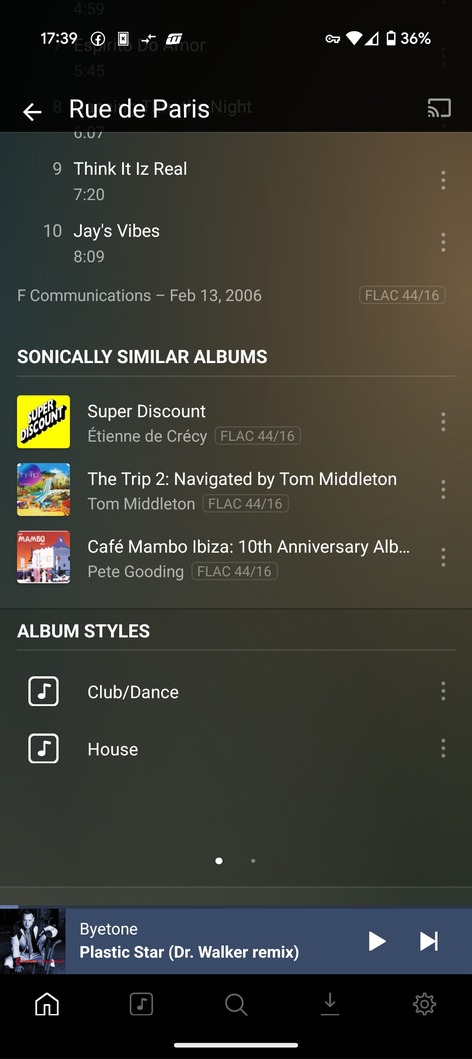
Im in the album, Heres the album with no option to get into sonic similar percentage
Normally you get this,
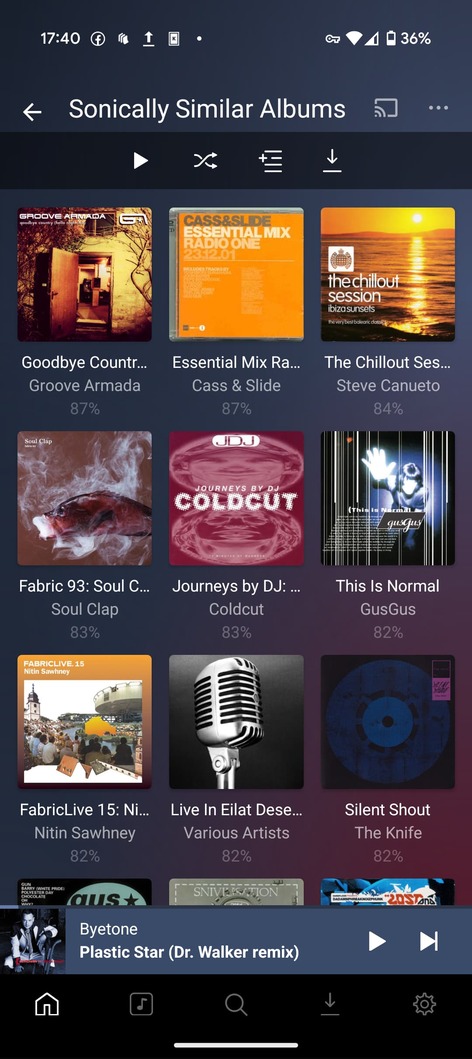
Is there another way to get the percentage?
Looking at your Rue de Paris image. Do you mean there is no arrow to the right of the sonically similar album to click on and open the sonically similar album page?
Or do you mean that you want to see the sonically similar percent in the sonically similar albums sections/hub?
Trying to figure out if the menu is not there or if you want to have more information displayed in the sonically similar albums section
This topic was automatically closed 90 days after the last reply. New replies are no longer allowed.
