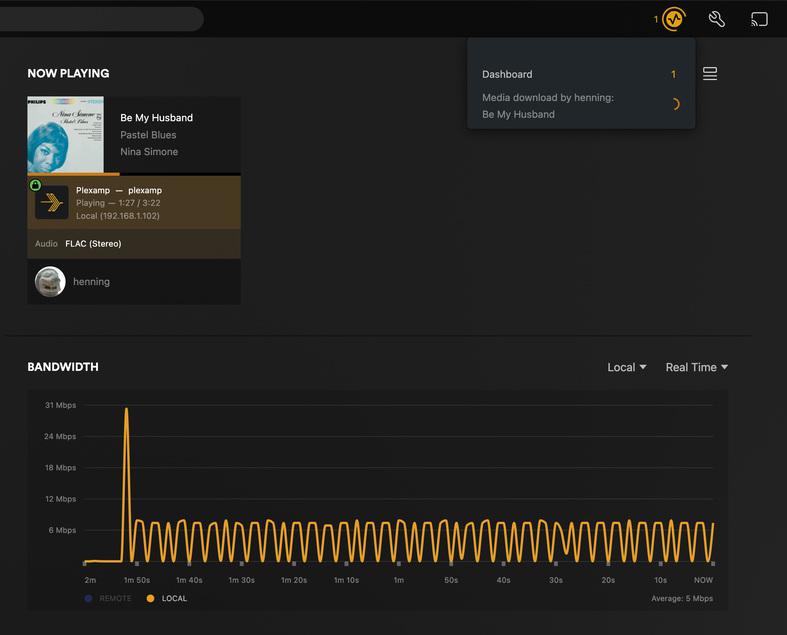
I have been having an issue for the past few months with playback on a headless RPi4, the issue seems to be that plexamp(pi4 /w Allo Boss2 hat) don’t have enough bandwidth and doesn’t buffer enough causing stuttering, pausing and making my files(flac) basically unplayable. Additionally, the track will become un-pausable as the play button is flickering like mad between play and spinning buffering.
This is only a problem on the headless Pi4, when playing a track and looking at the plex dashboard, it is showing an average bandwidth of 0-6Mbps which is not enough to play smoothly.
The Pi is connected with gigabit ethernet. Running iperf3 shows no problem, getting 921 Mbits/sec to my plex server. The MPS is on my unraid server, rock solid.
Using plexamp on my Macbook Pro over wifi(local) playing 192/24 Flac files is not a problem at all, showing 600+Mbps in the dashboard and plays beautifully. Also using Plexamp on my iPhone 15 wifi(local) not a problem at all.
Things I have tried on the Pi4 headless:
Replaced the sd-card - No difference
Fresh install Plexamp and booting from 3 different USB3-sticks - No difference
Restarting the PMS, Plexamp, Server, Client - No difference
Trying all the different cashing options - No difference
What I’m Running:
RPi4 4GB with AlloBoss2 Hat
Plexamp V4.10.1
PMS Version 1.40.2.8395 (Docker)
Feel like a strange bandwidth problem, but haven’t had any problem in the past and i haven’t changed anything in my setup. There is something going on. Screenshots & log attached.
Thanks!
Plexamp.log (297.3 KB)
Open the web interface of your headless Plexamp. http://ip-of-raspi:32500
Enter the Settings - Playback - Caching - WiFi caching
set to “only next track”.
Consider swapping out the SD card.
If you have a lot of high-res lossless tracks, consider limiting the quality of the Pi under
Settings - Playback - Quality - “Ethernet or WiFi”
try limiting to 1 mbps
If you enable this limit, consider setting
Settings - Playback - Quality - “Conversion Bitrate”
to something higher than 128 kbps
Hi OttoKerner, thanks for your suggestions.
I have tired every playback caching option there is without any difference.
and i’m not using a SD card i’m booting from a USB3 stick, unfortunately no difference.
Just tried limiting quality to 1 mbps with Conversion Bitrate at 192Kbps and that did nothing, still buffering super slow. Also not a real solution as i would like to play my highres files at their original quality.
happy to try anything else to solve this!
Then use a different USB stick.
Or switch to an SD card. A good/speedy one.
Yeah, tried that! I did a fresh install of Plexamp on 3 different USB3-sticks, no difference unfortunately.
I received a tip that this might be an issue that’s been fixed in an internal version.
So until the next version of Plexamp is publicly released, you can only drop back to version 4.9.5 to avoid this issue.
That actually worked!
Did a new fresh install of NodeJS16 and Plexamp 4.9.5 and now the buffer bandwidth is 60-200 Mbps! much better and now plays fine, still not anywhere near the bandwidth when playing from my macbook or iPhone. Could it be a limit of the rpi4 hardware or is it a software thing?
Thanks anyway. Solved for now  Hope to see improvements in the next version.
Most certainly that. Don’t expect comparable performance out of that thing which costs a fraction of fruity hardware or a fully-blown PC.