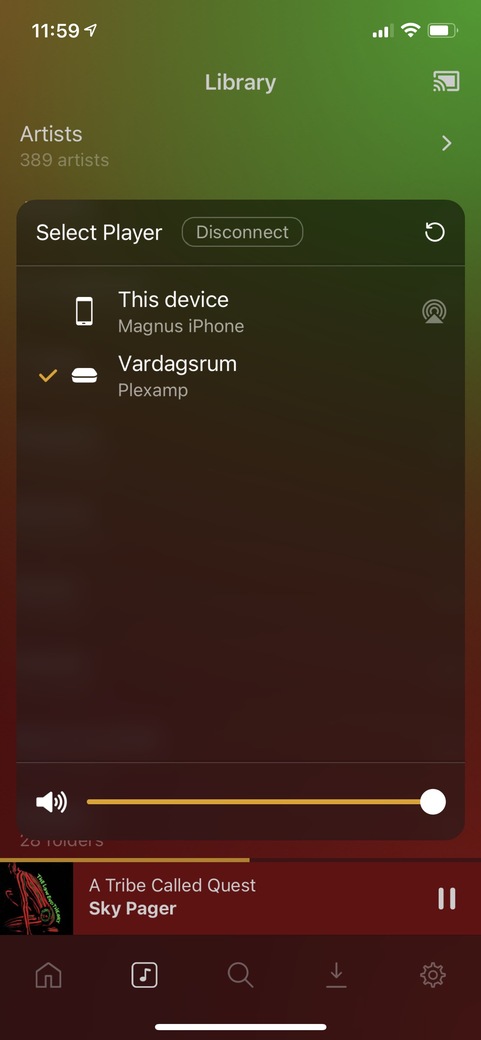
Testing out Plexamp since a week back or so. Also started to experiment with Plexamp on Raspberry Pi. So far I’m pretty impressed. However - one small question… I find no configuration items at all for the headless Plexamp on Raspberry Pi, is that correct? Is there any way to set a fixed volume output (and let my preamp be the only source of volume setting)?
I use Plexamp app (3.4) on iPhone as the “controller” of the RPi Plexamp (“Vardagsrum” in the screenshot below). The slider at the bottom of the dialog affects the volume level on the RPi… Also, the volume buttons on the iPhone itself adjusts same slider (and hence volume on RPi), when selected. Is this not as expected? And if it is, is there a way to “fix”/lock the volume (not make it adjustable from the controlling app)?
Completely disabling softvol in ALSA still makes it possible to adjust volume in Plexamp.
The RPi Plexamp player provides API where controller can (remotely) set volume. Visible in player log file:
Jan 08, 2021 16:12:53 DEBUG - GET /player/playback/setParameters?volume=66&commandID=5748&type=music 200 2 - 0.781 ms
Jan 08, 2021 16:12:53 DEBUG - GET /player/playback/setParameters?volume=70&commandID=5749&type=music 200 2 - 1.639 ms
Jan 08, 2021 16:12:53 DEBUG - GET /player/playback/setParameters?volume=75&commandID=5750&type=music 200 2 - 0.802 ms
Jan 08, 2021 16:12:53 DEBUG - GET /player/playback/setParameters?volume=80&commandID=5751&type=music 200 2 - 0.832 ms
Jan 08, 2021 16:12:53 DEBUG - GET /player/playback/setParameters?volume=84&commandID=5752&type=music 200 2 - 0.806 ms
Jan 08, 2021 16:12:53 DEBUG - GET /player/playback/setParameters?volume=87&commandID=5753&type=music 200 2 - 0.793 ms
Jan 08, 2021 16:12:54 DEBUG - GET /player/playback/setParameters?volume=91&commandID=5754&type=music 200 2 - 0.833 ms
Jan 08, 2021 16:12:54 DEBUG - GET /player/playback/setParameters?volume=94&commandID=5756&type=music 200 2 - 0.770 ms
Jan 08, 2021 16:12:54 DEBUG - GET /player/playback/setParameters?volume=97&commandID=5757&type=music 200 2 - 0.792 ms
Jan 08, 2021 16:12:54 DEBUG - GET /player/playback/setParameters?volume=100&commandID=5758&type=music 200 2 - 0.799 ms
Really ugly hack to force player to ignore volume setting and always set to 100%:
sed -i 's/setVolume(t.volume)/setVolume(100)/g' server.prod.js