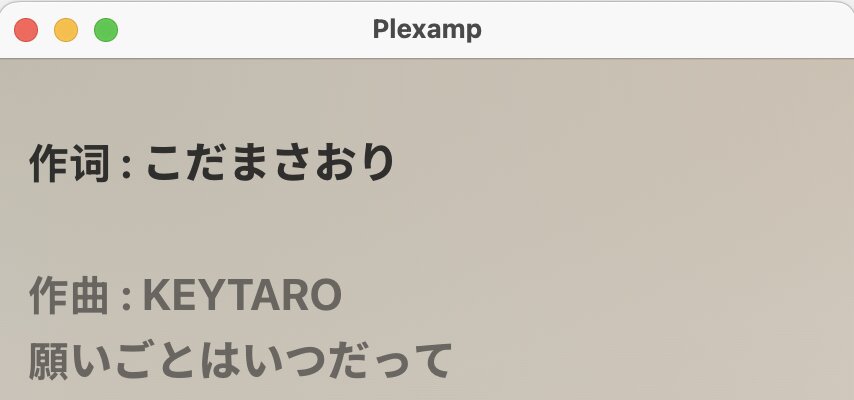
I ramdomly found this issue because some of my songs’ lyric files contain metadatas like artist names, producer names, translator names, etc. I did some experiments and confirmed it is caused by repeating [00:00.000] timestamp. Repeating any other timestamps are fine.
Interestingly, tapping certain lines of lyrics can bring me to certain timestamp. Also, Plex app can handle this correctly.
Plexamp is a beautiful app and I use it everyday to play my music library from CDs. Recently I started to add lyrics and this issue is pretty annoying.
Hopefully there will be a fix. Please let me know how can I help like providing server details, capturing log files, etc. Thank you so much.
Thanks for your reply. Some lyric files contain metadata like artist names, producer names, translator names. They would use this timestamp for these metadata. I’m not sure if this is a common practice, but it should be handled correctly (like the Plex web edition).
I still don’t understand the semantic intent. Do you want these two lines to show one after the other instantly, or appear as two lines at the same time? You can achieve both of those aims w/o duplicating the timestamp.
Sorry, I don’t think we are on the same page. I am not trying to make these two lines show at the same time, I understand if two lines has the same timestamp earlier lines could be skipped. I mean, if the zero timestamp is repeated, Plexamp will not sync the lyrics at all, it will always stuck on the first line, no matter what is the current timestamp. Plex web app, on the other hand, can handle this correctly. I am sorry if my expression was not clear.
Thanks a lot Elan. Unfortunately I am not the creator of these lyric files, I grabbed them using automatic tools. There will be a great amount of work if I need to manually adjust them. Admittedly I can try to make a script, but if we have a plan to fix the issue, that would be great.
Thank you and your team again for the amazing app. I can host my music library with confidence.