I’m trying to adjust the Settings → Playback → Preamp value and not hearing any effect. Is this known to work?
As an aside, is there any plans for volume control in the UI? It comes in handy, to be able to control the volume of what you’re listening to… this is in the context of a using Plexamp from a computer that has other apps using audio as well.
I also recommend you to familiarize yourself with the Windows audio mixer.
I’m quite familiar with it. Even how to access it from a COM application. It’s the system sound mixer, that is not the Media Player (in the case of this discussion, Plexamp).
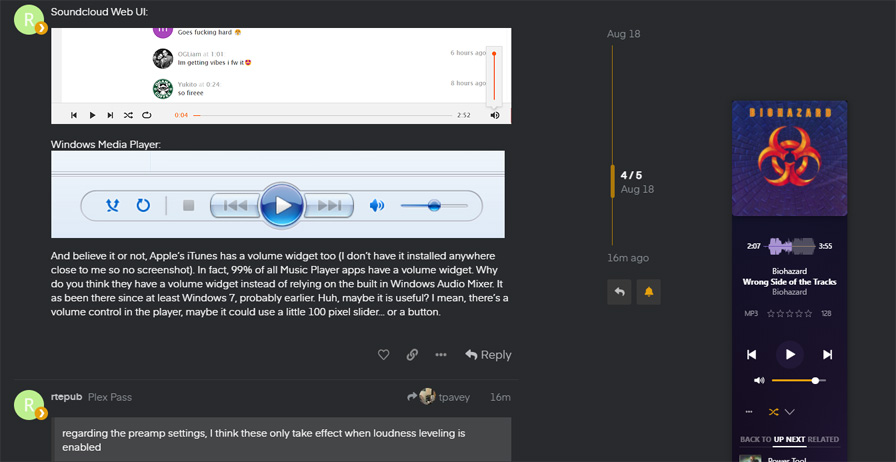
And believe it or not, Apple’s iTunes has a volume widget too (I don’t have it installed anywhere close to me so no screenshot). In fact, 99% of all Music Player apps have a volume widget. Why do you think they have a volume widget instead of relying on the built in Windows Audio Mixer. It as been there since at least Windows 7, probably earlier. Huh, maybe it is useful? I mean, there’s a volume control in the player, maybe it could use a little 100 pixel slider… or a button.
regarding the preamp settings, I think these only take effect when loudness leveling is enabled
loudness leveling was already enabled when I tested. I also tried with and without the EQ enabled - loudness leveling still never works. EQ does work when enabled, however.
There is a volume control in the Windows PlexAmp you just need to elongate it before it shows. I noticed this issue when I was told on Reddit it exists.
@Forkboy is that in the current Windows PlexAmp release? When I make the window wider, I only see the layout switch and the album art pops up on the left. No volume slider, just the very minimal controls moving from one part of the window to another.