I don’t see where to do it now, but when I was in the browser version of Plex, it had something in the top right corner (where your avatar and settings are located). I can’t remember what it looked like now. When I clicked it, it asked if I wanted to add my Sonos account to Plex. Once I did that, all of my Sonos speakers showed up in Plex to cast to them. The only thing I see in the browser now is that “Plex for Sonos” is now in my “Authorized Devices” list.
Not sure if this is what you guys are seeing, but I’ve had situations where when I have my Android Plexamp cast to my Sonos system, it often resets the volume of the Sonos speakers to 0; the connection is super squirrelly and I often need to disconnect and reconnect it. I’ve been able to get it to work every time, though, FWIW.
There’s also this long-standing bug with Sonos and Plex which doesn’t really improve the troubleshooting process, where it will pause after 20 seconds of playback.
Same problem
Same issue for a long time. Plex is synced with sonos account, other media cast does not stop immediately after stop. Plexamp eventually plays but when first cast it starts and stops…
How do you get it to eventually play?
I can’t get it to play at all. I use Symfonium to cast now (as the Sonos app connected service also doesn’t reliably access my Plex Library). I didn’t want to use another app, but my hand was forced. Hopefully if this gets fixed as I’d love to go back to Plexamp.
Does Symfonium have loudness leveling?
Sonos does not connect to Plex directly on a local network but instead uses an internet relay. Through my multiple connection attempts, I can confirm this. This is likely why the connection is always slow and unstable. I’m not sure why it was designed this way.
I’m also having the same issue. Is there any way to ask Plex for a fix?
This ‘Authorised Devices’ show that you granted the SONOS app access to plex. I tried removing this from my list and again tried to cast to the SONOS speakers with no success.
The issue is obviously plexamp to sonos specifically. I completely rebooted my modem and router, shut down the plex server and restarted.,. etc. No difference in the behavior from plexamp app to sonos,. a disaster. However, in the sonos app the communication with plex is much faster,. more responsive. Its worth noting that plexamp to my Wiim Pro is flawless,. the way it used to be with sonos. So,… to the powers that be at Plex,. What is the story on this? Is there any ETA on a fix?
Hi, I’m having the exact same problem. From Android, IOS and windows. Tryed Symfonium for android and this works perfectly with my Plex server. So problem is’nt that sonos can’t reach the Plex server from an external app. Has to be something within Plexamp. Plexamp did work perfectly until about a week ago. Something to do with a update maybe?
I found a solution in my case. Have a new fritzbox router wich has dns rebinding security on. Added “plex.direct” as a excluded hostname as suggested elswhere on this forum.
Your reply sent me down a little rabbit hole, and I think I found a similar (if not the same) fix. On my Asus router, WAN-DDNS was set to on. I don’t ever remember doing that, but who knows. I can cast from Plexamp now, however it doesn’t answer why I’ve always been able to cast from Symfonium even with that setting on.
Any updates on this?
@ledouxrt had the golden tip for me.
So make sure to check the following settings:
- Plex accessible remotely
- Settings - Network - Enable local network discovery (GDM) activated
- Settings - Network - Enable Relay
- Your router settings should have Multicast forwarding enabled.
And now what @ledouxrt suggested is going to the WEB VERSION of Plex (because the Desktop app doesn’t work for this fix) and going to the cast icon and activate the Sonos integration. I will attach a printscreen for everyone to see

This is one of the most ridiculous and convoluted things I had to do to get a simple feature working. But it works now (hopefully it stays working forever)…
1 Like
It’s still not working for me.
I enabled network discovery and Relay. My Plex doesn’t seem to be remotely accessible, but I doubt this is the issue because I am only trying to stream within my local network. Please let me know if remote access still needs to be on.
In my case, when I stream from my Plexamp to my Sonos Amp, metadata gets through but the music never starts playing. It tries for a few seconds then skips to the next song. It does this endlessly but never plays.
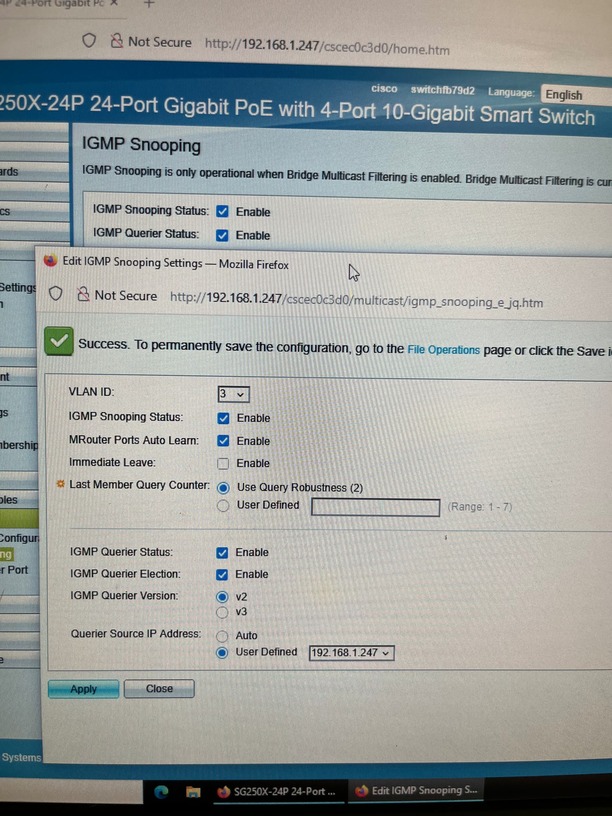
Here are my Multicast settings on my Cisco SG250X switch.
Any ideas?
With Sonos, your server needs to be set up for remote access. They have implemented their protocol to require that.
Thanks this clarification helps.
I’m having a challenging time getting remote access to stay “green”. It’ll flash green for a minute or so and then revert back to “Not available outside of your nw” I’ve confirmed that the port forward is in place.
As I mentioned, we running through a few Cisco sg250 switches, but the settings seem right on there as well.
Any ideas?

Might anyone have an insight on my post just above?
