Now that AppleTV3 can be jailbroken the wiki has been updated to include instructions to install PlexConnect in the AppleTV3 instead of a separate computer.
Edit: the jailbreak requires firmware 7.4. If your ATV3 is not at this level it’s possible to download the firmware from here (select your ATV3 model, and then the firmware published on Sep/2019). The update process requires a suitable USB cable and a tool, such as iTunes.
Apple published firmware 7.5 on Mar/2020 and if your ATV3 is that level you need to install 7.4 manually before initiating the jailbreak process.
Edit2: From Oct 1, 2020 onwards login to plex.tv requires TLS 1.1, and in turn this requires python 2.7.9 or higher. The python version available for Apple TV2/3 is at level 2.7.6. Therefore, if you jailbreak ATV3 to install PlexConnect you are limited to local/GDM communication.
Excellent! Thank you so much! Cos we still need a way to connect to PMS. Someone had a way to use a different app rather than the Trailers app, was that in the Wiki? Cos my Trailers app is now being used by the Etason JB. Thanks again.
OK - I have done the preliminary, but I am going to hold off - I want to use a different app for PC, so I’ll need the ID for say, the WSJ Video app. Or something that is not used much. Also, I don’t know if I understand how to log into my plex account via Plexconnect, you mean through the app itself, after it is loaded? I am at the step to install PC to my ATV3, but first I am going to see if I can update PC on my PC. Heh. So I have to read the update instructions. Do I need to update Python from 2.7.8?
Hm, if I want to use the PC that’s on my PC, I need to reinstall my Cert file. I still have the cert file, but I don’t know if that will conflict with the ETAson Trailers profile? Switching to the new PC is easy, and I have it already set to update. I have been leaving the previous versions in the folder I use to run PC, I have different PY files to launch each version, all the way back to v5.
It is now, OK thanks I’ll just go ahead and go through the process. But I’m just wondering exactly where I perform the login to Plex connect, would this be through the interface or is there someplace in the script where I need to add my login?
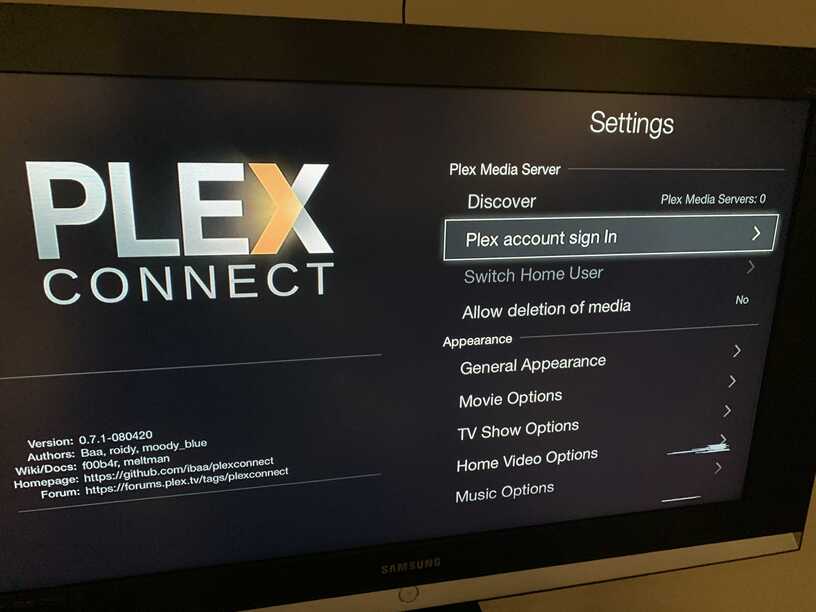
Follow the process from the wiki to install plex connect in the atv3. When done open iMovie Theater in the atv. It will not find any libraries. Navigate to settings at the right, and among other options you will be able to login to plex.tv
I’m up to “./install_atv3.bash” and I’m getting “Permission Denied”, is this a permissions issue? Oh, I ran PuTTy as admin and then I changed the sticky of the script to 0777. But now, I’m not sure how to create my certificate? You have the example there, but it’s been so long since I created my original PC 0.5 cert. I found this: https://miapple.me/plexconnect-windows-hijack-imovie-theatre-wsj-instead-trailers-app/, but my brain is fried. and my iPhone Config Utility isn’t working, wont load. I have everything I need, but I can’t figure it out this time. I had no trouble originally…
Hey there, i try to Install Plexconnect but failed when i try to Install the certificate. At first i must Change the permission for install_atv3 to Run the Installer but when i try to add the certificate with localhost/iMovie.cer i got Always the Errorcode -1004. I try it with 127.0.0.1/iMovie.cer and the real ip-adress in my Network but Always get the Same Error. Is there a Missing step in the DNS configuration or is there an another solution for this?
i found whats wrong in the instruction. The step when you copy the atv3_setting.cfg into Settings.cfg. You must switch to /Applications/PlexConnect and then type cp /Applications/PlexConnect/support/aTV_jailbreak/Settings_atv3.cfg Settings.cfg otherwise you copy the Settings into the Application Folder. And then when you want to start the installer first chmod 777 install_atv3.bash then it should work. Now i can finally watch over my Jailbreaked Apple TV my Plex Library.
Looks like I will have to reset and re-jailbreak. So you are saying that if we follow the instructions it will install a sample certificate? that’s where I’m stuck. I finally got the iPhone configuration utility working on one laptop.
I’m trying to install Plex on my 3rd generation Apple TV using the guide found here and https://github.com/iBaa/PlexConnect/wiki/Install-Guide-AppleTV-3. It’s gone pretty smoothly so far but I have run into issues. I require it so there is no need to have a separate computer to run PlexConnect and was wondering if someone could give me a more step by step guide.
After logging into plex.tv, it just won’t load my Plex library no matter what I try, Plex Media Servers: 0. I think I’m going wrong at the “install certificates” or possibly the “enter IP of your PlexConnect server as the DNS” section.
It is now 4:50am so going to bed and will try again once I wake up. I would greatly appreciate a response as I’m scratching my head somewhat and will happily post further information if required. Thanks in advance.
Certificates seem to be ok otherwise you would not be able to enter PlexConnect. Did you modify Settings.cfg ? There are some mandatory parameters that cannot be changed.