Plexmediaserver keeps crashing

Server Version#:1.22.3.4523-d0ce30438
Player Version#:Every (Chromecast, Windows, Android, Samsung Smart TV)

Hardware: Intel BNUC11TNKV70000, 64 GB of RAM, Ubuntu 20.04 LTS
Media is stored on: Synology Nas, DS414j (4 x 8 TB WD-Red)

I installed the plexmediaserver, created the library for “Serien” and for “Filme”. Both media is laying on a Synology NAS, connected via NFS. The Movies/Series are analyzed and showing up.
I can watch them.
Yesterday around 23:00, the server stopped working and was constantly rebooting the plexmediaserver. I was not able to watch anything on the server. I was not able to gather a log, because the log-directory is empty.
The command “sudo service plexmediaserver status” says:

Summary

#################################################
johannes@NUC11:/mnt$ sudo service plexmediaserver status
● plexmediaserver.service - Plex Media Server
Loaded: loaded (/lib/systemd/system/plexmediaserver.service; enabled; vendor preset: enabled)
Active: deactivating (stop-sigterm) (Result: signal) since Mon 2021-05-24 23:20:39 CEST; 35s ago
Process: 8757 ExecStartPre=/bin/sh -c /usr/bin/test -d “${PLEX_MEDIA_SERVER_APPLICATION_SUPPORT_DIR}” || /bin/mkdir -p “${PLEX_MEDIA_SERVER_APPLICATION_SUPPORT_DIR}” (code=exited, status=0/SUCCESS)
Process: 8759 ExecStart=/bin/sh -c export PLEX_MEDIA_SERVER_INFO_VENDOR="$(grep ^NAME= /etc/os-release | awk -F= “{print $2}” | tr -d " )"; export PLEX_MEDIA_SERVER_INFO_DEVICE=“PC”; export PLEX_MEDIA_SERVER_INFO_MODEL="$(uname>
Main PID: 8759 (code=killed, signal=SEGV)
Tasks: 25 (limit: 76663)
Memory: 83.5M
CGroup: /system.slice/plexmediaserver.service
├─8794 Plex Plug-in [com.plexapp.system] /usr/lib/plexmediaserver/Resources/Plug-ins-d0ce30438/Framework.bundle/Contents/Resources/Versions/2/Python/bootstrap.py --server-version 1.22.3.4523-d0ce30438 /usr/lib/plexmediaserv>
├─8935 Plex Plug-in [com.plexapp.agents.imdb] /usr/lib/plexmediaserver/Resources/Plug-ins-d0ce30438/Framework.bundle/Contents/Resources/Versions/2/Python/bootstrap.py --server-version 1.22.3.4523-d0ce30438 /usr/lib/plexmedi>
└─8968 /usr/lib/plexmediaserver/Plex Relay -p 443 -N -R 0:127.0.0.1:32401 -o StrictHostKeyChecking=yes -o UserKnownHostsFile=/var/lib/plexmediaserver/Library/Application Support/Plex Media Server/Cache/relayHostKey.txt -o L>

Mai 24 23:19:53 NUC11 systemd[1]: Starting Plex Media Server…
Mai 24 23:19:53 NUC11 systemd[1]: Started Plex Media Server.
Mai 24 23:20:39 NUC11 Plex Media Server[8759]: ****** PLEX MEDIA SERVER CRASHED, CRASH REPORT WRITTEN: /var/lib/plexmediaserver/Library/Application Support/Plex Media Server/Crash Reports/1.22.3.4523-d0ce30438/PLEX MEDIA SERVER/34e62c4a>
Mai 24 23:20:39 NUC11 systemd[1]: plexmediaserver.service: Main process exited, code=killed, status=11/SEGV
###########################################

I uninstalled the server, and installed it again. Then it was up and working for this day. No, again around 23:00 the server stopped working and kept rebooting, when i tried to access the media. I tried
Android Plex App, Google Chromecast, Windows Plex App, Samsung SmartTV, AmazonFireTV App

Is there a way to find out, why the server stops working, and that anything other than reinstalling is working?

Kind regards
Johannes
The server log might be helpful in this case.

I downloaded these both files from the plex web app.

Plex Media Server Logs_2021-05-25_09-03-53.zip (3.9 MB)
Plex Media Server Databases_2021-05-25_09-03-56.zip (9.8 MB)

I only have the console. I have no GUI installed. The Server runs headless, just with network and powercable connected.
If the server never runned, how was it possible that i could watch the movies from my library?

Hi, the server keeps restarting and fails after some time again.

Summary

johannes@NUC11:/mnt$ service plexmediaserver status
● plexmediaserver.service - Plex Media Server
Loaded: loaded (/lib/systemd/system/plexmediaserver.service; enabled; vendor preset: enabled)
Active: active (running) since Tue 2021-05-25 08:44:10 CEST; 13min ago
Process: 12247 ExecStartPre=/bin/sh -c /usr/bin/test -d “${PLEX_MEDIA_SERVER_APPLICATION_SUPPORT_DIR}” || /bin/mkdir -p “${PLEX_MEDIA_SERVER_APPLICATION_SUPPORT_DIR}” (code=exited, status=0/SUCCESS)
Main PID: 12249 (Plex Media Serv)
Tasks: 56 (limit: 76663)
Memory: 122.1M
CGroup: /system.slice/plexmediaserver.service
├─12249 /usr/lib/plexmediaserver/Plex Media Server
├─12275 Plex Plug-in [com.plexapp.system] /usr/lib/plexmediaserver/Resources/Plug-ins-d0ce30438/Framework.bundle/Contents/Resources/Versions/2/Python/bootstrap.py --server-version 1.22.3.4523-d0ce30438 /usr/lib/plexmediaser>
├─12316 /usr/lib/plexmediaserver/Plex Tuner Service /usr/lib/plexmediaserver/Resources/Tuner/Private /usr/lib/plexmediaserver/Resources/Tuner/Shared 1.22.3.4523-d0ce30438 32600
└─12360 Plex Plug-in [com.plexapp.agents.imdb] /usr/lib/plexmediaserver/Resources/Plug-ins-d0ce30438/Framework.bundle/Contents/Resources/Versions/2/Python/bootstrap.py --server-version 1.22.3.4523-d0ce30438 /usr/lib/plexmed>

Mai 25 08:44:10 NUC11 systemd[1]: Starting Plex Media Server…
Mai 25 08:44:10 NUC11 systemd[1]: Started Plex Media Server.
Mai 25 08:49:51 NUC11 Plex Media Server[12400]: Connection to 172.104.130.172 closed by remote host.

Summary

johannes@NUC11:/mnt$ service plexmediaserver status
● plexmediaserver.service - Plex Media Server
Loaded: loaded (/lib/systemd/system/plexmediaserver.service; enabled; vendor preset: enabled)
Active: deactivating (stop-sigterm) (Result: signal) since Tue 2021-05-25 09:31:44 CEST; 22s ago
Process: 12247 ExecStartPre=/bin/sh -c /usr/bin/test -d “${PLEX_MEDIA_SERVER_APPLICATION_SUPPORT_DIR}” || /bin/mkdir -p “${PLEX_MEDIA_SERVER_APPLICATION_SUPPORT_DIR}” (code=exited, status=0/SUCCESS)
Process: 12249 ExecStart=/bin/sh -c export PLEX_MEDIA_SERVER_INFO_VENDOR=“$(grep ^NAME= /etc/os-release | awk -F= “{print $2}” | tr -d " )”; export PLEX_MEDIA_SERVER_INFO_DEVICE=“PC”; export PLEX_MEDIA_SERVER_INFO_MODEL="$(unam>
Main PID: 12249 (code=killed, signal=SEGV)
Tasks: 13 (limit: 76663)
Memory: 104.2M
CGroup: /system.slice/plexmediaserver.service
└─12275 Plex Plug-in [com.plexapp.system] /usr/lib/plexmediaserver/Resources/Plug-ins-d0ce30438/Framework.bundle/Contents/Resources/Versions/2/Python/bootstrap.py --server-version 1.22.3.4523-d0ce30438 /usr/lib/plexmediaser>

Mai 25 08:44:10 NUC11 systemd[1]: Starting Plex Media Server…
Mai 25 08:44:10 NUC11 systemd[1]: Started Plex Media Server.

Mai 25 08:49:51 NUC11 Plex Media Server[12400]: Connection to 172.104.130.172 closed by remote host.
Mai 25 09:31:44 NUC11 Plex Media Server[12249]: ****** PLEX MEDIA SERVER CRASHED, CRASH REPORT WRITTEN: /var/lib/plexmediaserver/Library/Application Support/Plex Media Server/Crash Reports/1.22.3.4523-d0ce30438/PLEX MEDIA SERVER/49837a1>
Mai 25 09:31:44 NUC11 systemd[1]: plexmediaserver.service: Main process exited, code=killed, status=11/SEGV

Summary

johannes@NUC11:/mnt$ service plexmediaserver status
● plexmediaserver.service - Plex Media Server
Loaded: loaded (/lib/systemd/system/plexmediaserver.service; enabled; vendor preset: enabled)
Active: active (running) since Tue 2021-05-25 09:33:19 CEST; 13min ago
Process: 12699 ExecStartPre=/bin/sh -c /usr/bin/test -d “${PLEX_MEDIA_SERVER_APPLICATION_SUPPORT_DIR}” || /bin/mkdir -p “${PLEX_MEDIA_SERVER_APPLICATION_SUPPORT_DIR}” (code=exited, status=0/SUCCESS)
Main PID: 12701 (Plex Media Serv)
Tasks: 57 (limit: 76663)
Memory: 321.2M
CGroup: /system.slice/plexmediaserver.service
├─12701 /usr/lib/plexmediaserver/Plex Media Server
├─12727 Plex Plug-in [com.plexapp.system] /usr/lib/plexmediaserver/Resources/Plug-ins-d0ce30438/Framework.bundle/Contents/Resources/Versions/2/Python/bootstrap.py --server-version 1.22.3.4523-d0ce30438 /usr/lib/plexmediaser>
├─12767 /usr/lib/plexmediaserver/Plex Tuner Service /usr/lib/plexmediaserver/Resources/Tuner/Private /usr/lib/plexmediaserver/Resources/Tuner/Shared 1.22.3.4523-d0ce30438 32600
└─12811 Plex Plug-in [com.plexapp.agents.imdb] /usr/lib/plexmediaserver/Resources/Plug-ins-d0ce30438/Framework.bundle/Contents/Resources/Versions/2/Python/bootstrap.py --server-version 1.22.3.4523-d0ce30438 /usr/lib/plexmed>

Mai 25 09:33:19 NUC11 systemd[1]: Starting Plex Media Server
Mai 25 09:33:19 NUC11 systemd[1]: Started Plex Media Server.
Mai 25 09:39:49 NUC11 Plex Media Server[12840]: Connection to 172.104.130.172 closed by remote host.

I now found logs in the directorie. Here are the logs.
Plex Mediaserver.zip (3.4 MB)

Hi, on my clients, the library for movies and series are empty.
The files are reachable via NFS.
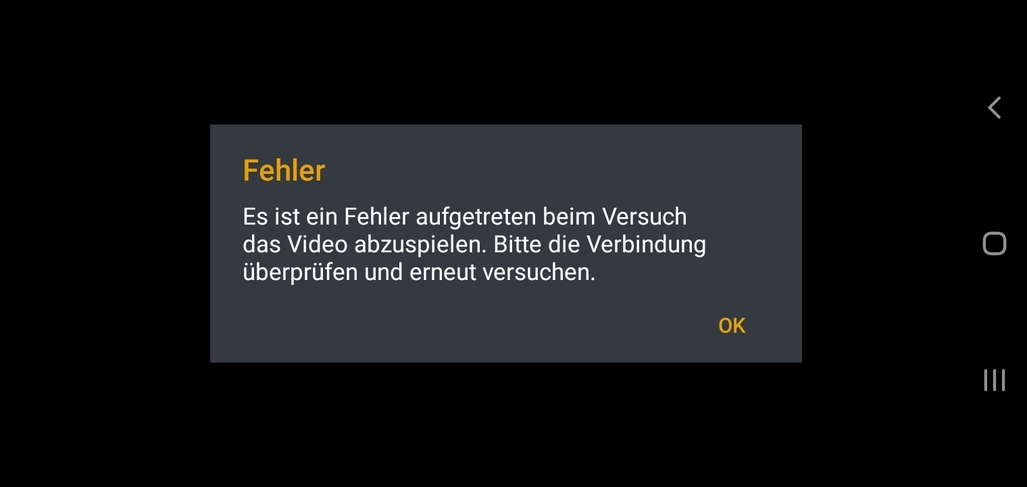
But why i am getting the error that says the there was an error, and that the file could not be played.
The Android App is showing me the following error.


The Chromecast is displaying this error.

Can you help me solve the problem. And tell me where the problem exactly is?

Hi trumpy81,
many thanks for your advice.
It seems to work now. I will try it today night again, and tomorrow. Hopefully it stays now connected.

Kind regards
Johannes

Hi, the same error again.
I came up, when a friend accessed my library. I shared it with him. When he is accessing it, the same situation like the last 2 days appear.
I did the same steps like today morning. Now it is working for me. But i did now not share it with anybody. Is there a possibility to share my mediathek without running into the same error?

May I see the DEBUG logs ZIP file please ?

Hi ChuckPa,

here are the logs. I hope that the Debug Log is onby.

Plex Media Server Logs_2021-05-25_21-56-02.zip (3.7 MB)
25.05.2021.zip (1.1 MB)

Moderator Edit: Database not needed - removed.

Thank you for that. I see it crashing when the transcoder is invoked.

May 25, 2021 19:28:59.468 [0x7ff4e0279700] INFO - Processor 11th Gen Intel(R) Core(TM) i7-1185G7 @ 3.00GHz

Did you install Intel Compute Runing as instructed by the installer ?

I am not sure if i have anything installed in this way.
The Plexmediaserver is installed via

apt-get install plexmediaserver

The processor should be able to do the hardware encoding and decoding. i7-1185g7 (Hardware Encoding/Decoding)
Do i need to install something like a driver for the ubuntu?

When you installed, did you see the notification messages by the installer regarding Intel Compute Runtime?

I am the maintainer of those scripts. I’m wondering if there was a misdetection of CPU type.

Hi, i have removed the plexmediaserver from the system via

sudo apt-get remove plexmediaserver
sudo apt-get autoclean

and installed it again with

sudo apt-get install plexmediaserver

here are the messages from the installation.

johannes@NUC11:~$ sudo apt-get install plexmediaserver
Paketlisten werden gelesen… Fertig
Abhängigkeitsbaum wird aufgebaut.
Statusinformationen werden eingelesen… Fertig
Die folgenden NEUEN Pakete werden installiert:
plexmediaserver
0 aktualisiert, 1 neu installiert, 0 zu entfernen und 14 nicht aktualisiert.
Es müssen 81,6 MB an Archiven heruntergeladen werden.
Nach dieser Operation werden 223 MB Plattenplatz zusätzlich benutzt.
Holen:1 https://downloads.plex.tv/repo/deb public/main amd64 plexmediaserver amd64 1.23.1.4571-6119e8eed [81,6 MB]
Es wurden 81,6 MB in 3 s geholt (28,3 MB/s).
Vormals nicht ausgewähltes Paket plexmediaserver wird gewählt.
(Lese Datenbank … 167597 Dateien und Verzeichnisse sind derzeit installiert.)
Vorbereitung zum Entpacken von …/plexmediaserver_1.23.1.4571-6119e8eed_amd64.deb …
PlexMediaServer install: Pre-installation Validation.
PlexMediaServer install: Pre-installation Validation complete.
Entpacken von plexmediaserver (1.23.1.4571-6119e8eed) …
plexmediaserver (1.23.1.4571-6119e8eed) wird eingerichtet …
PlexMediaServer install: PlexMediaServer-1.23.1.4571-6119e8eed - Installation starting.
PlexMediaServer install:
PlexMediaServer install: Now installing based on:
PlexMediaServer install: Installation Type: Update
PlexMediaServer install: Process Control: systemd
PlexMediaServer install: Plex User: plex
PlexMediaServer install: Plex Group: plex
PlexMediaServer install: Video Group: render
PlexMediaServer install: Metadata Dir: /var/lib/plexmediaserver/Library/Application Support
PlexMediaServer install: Temp Directory: /tmp
PlexMediaServer install: Lang Encoding: en_US.UTF-8
PlexMediaServer install: Intel i915 Hardware: Found
PlexMediaServer install: Nvidia GPU card: Not Found
PlexMediaServer install:
PlexMediaServer install: Completing final configuration.
PlexMediaServer install: Starting Plex Media Server.
PlexMediaServer install: PlexMediaServer-1.23.1.4571-6119e8eed - Installation successful. Errors: 0, Warnings: 0
Trigger für mime-support (3.64ubuntu1) werden verarbeitet …
Trigger für gnome-menus (3.36.0-1ubuntu1) werden verarbeitet …
Trigger für desktop-file-utils (0.24-1ubuntu3) werden verarbeitet …

The processor is a i7-1185g7. Maybe the line, telling Intel i915 Hardware is wrong? Is there a possibilty to change this, and is there the need of changing it?

Or do you mean by the installing of the operating system? I can also do a reinstall of the operating system. The server is new, and until now the plexmediaserver is the only thing installed.

Thank you for sharing the results of the installation configuration.

I was unaware Intel uses this -1185g7 designation for the new 11th generation CPUs.

11th generation CPUs need additional packages, which I do instruct to add, transcoding to work properly.

Would you also please share the contents of /tmp/plexinstaller.log for me?

I would like you to install the following packages:

  1. beignet-opencl-icd
  2. ocl-icd-libopencl1
  3. The Intel Compute Runtime packages listed here.

This will add the support you need for the processor while I add this processor to the list of CPUs .

Hi, here are the answers.

plexinstaller.log (1.0 KB)

the both packages are already installed. (See output)

sudo apt-get install beignet-opencl-icd

johannes@NUC11:~$ sudo apt-get install beignet-opencl-icd
Paketlisten werden gelesen… Fertig
Abhängigkeitsbaum wird aufgebaut.
Statusinformationen werden eingelesen… Fertig
beignet-opencl-icd ist schon die neueste Version (1.3.2-7build1).
beignet-opencl-icd wurde als manuell installiert festgelegt.
0 aktualisiert, 0 neu installiert, 0 zu entfernen und 14 nicht aktualisiert.

sudo apt-get install ocl-icd-libopencl1

johannes@NUC11:~$ sudo apt-get install ocl-icd-libopencl1
Paketlisten werden gelesen… Fertig
Abhängigkeitsbaum wird aufgebaut.
Statusinformationen werden eingelesen… Fertig
ocl-icd-libopencl1 ist schon die neueste Version (2.2.11-1ubuntu1).
ocl-icd-libopencl1 wurde als manuell installiert festgelegt.
0 aktualisiert, 0 neu installiert, 0 zu entfernen und 14 nicht aktualisiert.

the other packets are downloaded and installed.

sudo dpkg -i *.deb

johannes@NUC11:~/Downloads/neo$ sudo dpkg -i *.deb
(Lese Datenbank … 170081 Dateien und Verzeichnisse sind derzeit installiert.)
Vorbereitung zum Entpacken von intel-gmmlib_21.1.3_amd64.deb
Entpacken von intel-gmmlib (21.1.3) über (21.1.3) …
Vorbereitung zum Entpacken von intel-igc-core_1.0.7423_amd64.deb
Entpacken von intel-igc-core (1.0.7423) über (1.0.7423) …
Vorbereitung zum Entpacken von intel-igc-opencl_1.0.7423_amd64.deb
Entpacken von intel-igc-opencl (1.0.7423) über (1.0.7423) …
Vorbereitung zum Entpacken von intel-level-zero-gpu_1.1.19883_amd64.deb
Entpacken von intel-level-zero-gpu (1.1.19883) über (1.1.19883) …
Vorbereitung zum Entpacken von intel-ocloc_21.20.19883_amd64.deb
Entpacken von intel-ocloc (21.20.19883) über (21.20.19883) …
Vorbereitung zum Entpacken von intel-opencl_21.20.19883_amd64.deb
Entpacken von intel-opencl (21.20.19883) über (21.20.19883) …
intel-gmmlib (21.1.3) wird eingerichtet
intel-igc-core (1.0.7423) wird eingerichtet
intel-igc-opencl (1.0.7423) wird eingerichtet
intel-level-zero-gpu (1.1.19883) wird eingerichtet
intel-ocloc (21.20.19883) wird eingerichtet
intel-opencl (21.20.19883) wird eingerichtet
Trigger für libc-bin (2.31-0ubuntu9.2) werden verarbeitet …
johannes@NUC11:~/Downloads/neo$

How can i check if it is now working. Can you check if it should now work? What are the next steps?

I shared the library again with my friend and he will try to access it today evening.
When its working, i will post it here.
If it is not working, i will also post it here.

Hi, tested it again. I didnt work. When its just playing, it seems working.
When my friend is jumping to another time in the video, the server is crashing again.
My friend is using the amazon fire tv stick, with the plex app.

here are the logs.

Plex Media Server Logs_2021-05-27_23-05-25.zip (5.9 MB)

here it was running for a long time. only i accessed it.

long run, only me

johannes@NUC11:~$ service plexmediaserver status
● plexmediaserver.service - Plex Media Server
Loaded: loaded (/lib/systemd/system/plexmediaserver.service; enabled; vendor preset: enabled)
Active: active (running) since Wed 2021-05-26 07:57:15 CEST; 1 day 15h ago
Process: 7944 ExecStartPre=/bin/sh -c /usr/bin/test -d “${PLEX_MEDIA_SERVER_APPLICATION_SUPPORT_DIR}” || /bin/mkdir -p “${PLEX_MEDIA_SERVER_APPLICATION_SUPPORT_DIR}” (code=exited,>
Main PID: 7946 (Plex Media Serv)
Tasks: 124 (limit: 76663)
Memory: 60.4G
CGroup: /system.slice/plexmediaserver.service
├─ 7946 /usr/lib/plexmediaserver/Plex Media Server
├─ 7981 Plex Plug-in [com.plexapp.system] /usr/lib/plexmediaserver/Resources/Plug-ins-6119e8eed/Framework.bundle/Contents/Resources/Versions/2/Python/bootstrap.py --serve>
├─ 8072 /usr/lib/plexmediaserver/Plex Tuner Service /usr/lib/plexmediaserver/Resources/Tuner/Private /usr/lib/plexmediaserver/Resources/Tuner/Shared 1.23.1.4571-6119e8eed>
├─ 8185 Plex Plug-in [tv.plex.agents.series] /usr/lib/plexmediaserver/Resources/Plug-ins-6119e8eed/Framework.bundle/Contents/Resources/Versions/2/Python/bootstrap.py --se>
├─ 8195 Plex Plug-in [tv.plex.agents.movie] /usr/lib/plexmediaserver/Resources/Plug-ins-6119e8eed/Framework.bundle/Contents/Resources/Versions/2/Python/bootstrap.py --ser>
├─ 8320 Plex Plug-in [tv.plex.agents.music] /usr/lib/plexmediaserver/Resources/Plug-ins-6119e8eed/Framework.bundle/Contents/Resources/Versions/2/Python/bootstrap.py --ser>
├─18357 Plex EAE Service
└─23138 /usr/lib/plexmediaserver/Plex Transcoder -codec:0 h264 -hwaccel:0 vaapi -hwaccel_fallback_threshold:0 10 -hwaccel_output_format:0 vaapi -hwaccel_device:0 vaapi -c>

Mai 27 07:57:41 NUC11 Plex Media Server[19510]: Got nothing for: 20160903210004
Mai 27 07:57:41 NUC11 Plex Media Server[19510]: Got nothing for: 20160905114602
Mai 27 07:57:41 NUC11 Plex Media Server[19510]: Got nothing for: 20160919075612
Mai 27 07:57:41 NUC11 Plex Media Server[19510]: Got nothing for: 20160922163118
Mai 27 07:57:41 NUC11 Plex Media Server[19510]: Got nothing for: 20160926080938
Mai 27 07:57:41 NUC11 Plex Media Server[19510]: Got nothing for: 20161002201003
Mai 27 07:57:41 NUC11 Plex Media Server[19510]: Got nothing for: Strbergdvd S04exx
Mai 27 07:57:41 NUC11 Plex Media Server[19510]: Got nothing for: Utopia Series S03bonus
Mai 27 07:57:41 NUC11 Plex Media Server[19510]: Got nothing for: Utopia Series S03interviews
Mai 27 07:57:41 NUC11 Plex Media Server[19510]: Got nothing for: Utopia Series S03makingof

server crash after changing time of video

server crash after changing time of video

johannes@NUC11:~$ service plexmediaserver status
● plexmediaserver.service - Plex Media Server
Loaded: loaded (/lib/systemd/system/plexmediaserver.service; enabled; vendor preset: enabled)
Active: deactivating (stop-sigterm) (Result: signal) since Thu 2021-05-27 23:02:21 CEST; 39s ago
Process: 7944 ExecStartPre=/bin/sh -c /usr/bin/test -d “${PLEX_MEDIA_SERVER_APPLICATION_SUPPORT_DIR}” || /bin/mkdir -p “${PLEX_MEDIA_SERVER_APPLICATION_SUPPORT_DIR}” (code=exited,>
Process: 7946 ExecStart=/bin/sh -c export PLEX_MEDIA_SERVER_INFO_VENDOR=“$(grep ^NAME= /etc/os-release | awk -F= “{print $2}” | tr -d " )”; export PLEX_MEDIA_SERVER_INFO_DEVIC>
Main PID: 7946 (code=killed, signal=SEGV)
Tasks: 43 (limit: 76663)
Memory: 60.2G
CGroup: /system.slice/plexmediaserver.service
├─ 7981 Plex Plug-in [com.plexapp.system] /usr/lib/plexmediaserver/Resources/Plug-ins-6119e8eed/Framework.bundle/Contents/Resources/Versions/2/Python/bootstrap.py --serve>
├─ 8185 Plex Plug-in [tv.plex.agents.series] /usr/lib/plexmediaserver/Resources/Plug-ins-6119e8eed/Framework.bundle/Contents/Resources/Versions/2/Python/bootstrap.py --se>
├─ 8195 Plex Plug-in [tv.plex.agents.movie] /usr/lib/plexmediaserver/Resources/Plug-ins-6119e8eed/Framework.bundle/Contents/Resources/Versions/2/Python/bootstrap.py --ser>
├─ 8320 Plex Plug-in [tv.plex.agents.music] /usr/lib/plexmediaserver/Resources/Plug-ins-6119e8eed/Framework.bundle/Contents/Resources/Versions/2/Python/bootstrap.py --ser>
└─18357 Plex EAE Service

Mai 27 07:57:41 NUC11 Plex Media Server[19510]: Got nothing for: 20160922163118
Mai 27 07:57:41 NUC11 Plex Media Server[19510]: Got nothing for: 20160926080938
Mai 27 07:57:41 NUC11 Plex Media Server[19510]: Got nothing for: 20161002201003
Mai 27 07:57:41 NUC11 Plex Media Server[19510]: Got nothing for: Strbergdvd S04exx
Mai 27 07:57:41 NUC11 Plex Media Server[19510]: Got nothing for: Utopia Series S03bonus
Mai 27 07:57:41 NUC11 Plex Media Server[19510]: Got nothing for: Utopia Series S03interviews
Mai 27 07:57:41 NUC11 Plex Media Server[19510]: Got nothing for: Utopia Series S03makingof
Mai 27 23:02:21 NUC11 Plex Media Server[19510]: Got nothing for:
Mai 27 23:02:21 NUC11 Plex Media Server[7946]: ****** PLEX MEDIA SERVER CRASHED, CRASH REPORT WRITTEN: /var/lib/plexmediaserver/Library/Application Support/Plex Media Server/Crash Rep>
Mai 27 23:02:21 NUC11 systemd[1]: plexmediaserver.service: Main process exited, code=killed, status=11/SEGV

What can i do to solve the problem?

Thank you for the info.

This machine does need the packages I detailed above.

11th gen CPUs will not have HW transcoding without it.
(Intel changed everything except the i915)

Processor=11th Gen Intel(R) Core(TM) i7-1185G7 @ 3.00GHz
CPUSKU=0
NeedOpenCL=0
NeedBeignet=0
NeedIntelCompute=0
HaveIntelGmmlib=0
HaveIntelIGCCore=0
HaveIntelIGCOpenCL=0
HaveIntelOpenCL=0
HaveIntelOCLoc=0
HaveIntelZeroGPU=0
HaveIntelCompute=0
HaveBeignet=1
HaveOpenCL=1

Shows me you have Beignet and OpenCL installed but did not install any of the Intel Compute Runtime packages from that link which are needed,

If they are installed, the “0” would be “1”

I will find a way to get that CPUSKU=0 to be more meaningful in light of Intel breaking its numbering standard AGAIN

When CPUSKU > 7000, magic happens -

7000 - 10000 = Beignet + OpenCL
10000+ = Intel Compute Runtime

I will try to do it again. I will send you the output of the commands. Can you then tell me, if everything should be ok?
