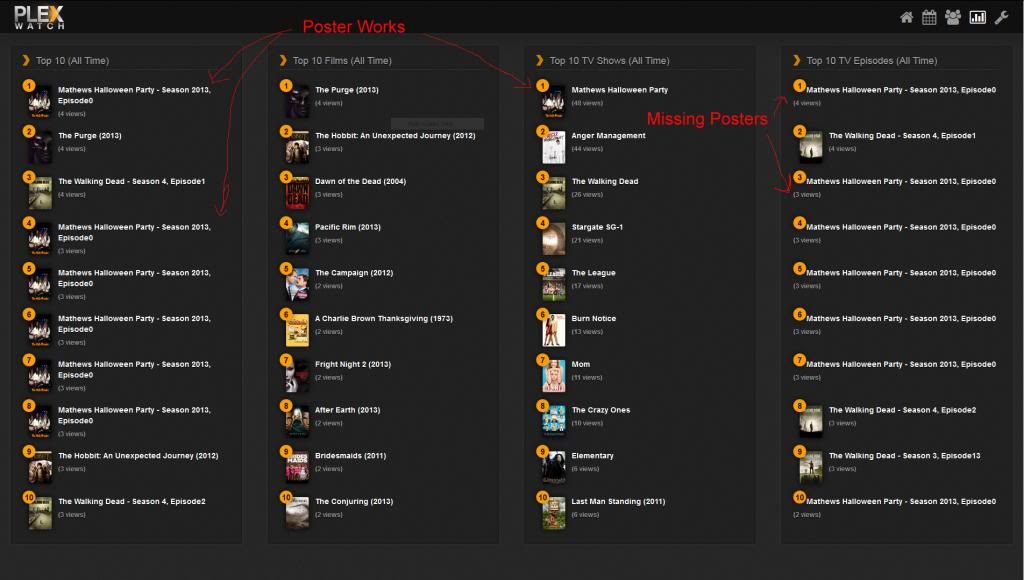
I am not sure if this is a bug that has already been reported, or if it's just due to functions that have not been added or released yet, but I thought I'd mention it just in case you were unaware of this behavior, eleese.
I have some videos on my server that I have setup as TV series on my server, but are essentially Home Videos. They are videos I've recorded of various local bands that my friends and/or I play in. I recently added one of these, and it's received some views which is why I've only just now seen this type of behavior. But essentially the show Posters are not appearing for these videos in the Episode column of the Charts. The Posters do appear in the Series and All-Time columns though for the same videos. I'm attaching a screen shot to help show what I mean.
Also, it is by no means a major bug, nor even a nuisance. I just wanted to mention it in case you were unaware of how these types of files were working.
I am not sure if this is a bug that has already been reported, or if it's just due to functions that have not been added or released yet, but I thought I'd mention it just in case you were unaware of this behavior, eleese.
I have some videos on my server that I have setup as TV series on my server, but are essentially Home Videos. They are videos I've recorded of various local bands that my friends and/or I play in. I recently added one of these, and it's received some views which is why I've only just now seen this type of behavior. But essentially the show Posters are not appearing for these videos in the Episode column of the Charts. The Posters do appear in the Series and All-Time columns though for the same videos. I'm attaching a screen shot to help show what I mean.
Also, it is by no means a major bug, nor even a nuisance. I just wanted to mention it in case you were unaware of how these types of files were working.
Hey Pruitt62, thanks for the report.
It looks as though I displaying the season poster for top10episodes while the other two are displaying the show poster. I would prefer season posters throughout but that would cause more images not to display for you. For now, you could either create season posters for those that are missing or make a simple change to the code. Find the following segment in line 267 in charts.php
It looks as though I displaying the season poster for top10episodes while the other two are displaying the show poster. I would prefer season posters throughout but that would cause more images not to display for you. For now, you could either create season posters for those that are missing or make a simple change to the code. Find the following segment in line 267 in charts.php
Don't have the problem on plexWatch/Web Version: v1.4.0.9 dev
There has been another push since that dev version which fixes that error but I would recommend using the master branch release (v1.4.0). On a day to day basis I may push a commit with partially completed features or changed something that could cause new bugs to pop up. The only time I would recommend using the dev branch is after an announcement is posted in this forum stating it's ready for testing.
Just downloaded plexwatch web and I don't have a clue where to start. After unzipping the folder I can find anything that looks like an install?
I currently use a Synology NAS as my server and I run plexwatch on my mac mini.
Reading through, it seems some people have installed plexwatch web on their Synology. Is this where I need to place the unzipped files or can they be on my mac?
Is someone able to explain to me fairly simply how I get it installed / working?
Just downloaded plexwatch web and I don't have a clue where to start. After unzipping the folder I can find anything that looks like an install?
I currently use a Synology NAS as my server and I run plexwatch on my mac mini.
Reading through, it seems some people have installed plexwatch web on their Synology. Is this where I need to place the unzipped files or can they be on my mac?
Is someone able to explain to me fairly simply how I get it installed / working?
Any help would be great.
I will put together a how-to for Synology NAS units and will post it on the plexWatch/Web wiki. I will reply here after I get it online.
Just downloaded plexwatch web and I don't have a clue where to start. After unzipping the folder I can find anything that looks like an install?
I currently use a Synology NAS as my server and I run plexwatch on my mac mini.
Reading through, it seems some people have installed plexwatch web on their Synology. Is this where I need to place the unzipped files or can they be on my mac?
Is someone able to explain to me fairly simply how I get it installed / working?
Any help would be great.
I read your post a little more in-depth and I'm debating which method would be easier for you....
I would probably choose to run the web server on your MAC. XAMPP is pretty easy to install and has good documentation. The plexWatch/Web wiki has a couple things XAMPP users should read about after installation is complete.
IMO, if you wanted to run a web server on your Synology NAS the most difficult part will most likely be automating the database transfer. I started a wiki article for setting up plexWatch/Web on a Synology Diskstation. You are welcome to review it and see if it's something you would prefer to try over installing a web server on your MAC.
I've installed it on Synology NAS, the same place where the Plex server is. It works good, except that I don't see any movie images anymore. I used to see them at first, but now they disappeared and there only place holders with small question mark in it. Any hints what can I do to restore the image display?
I've installed it on Synology NAS, the same place where the Plex server is. It works good, except that I don't see any movie images anymore. I used to see them at first, but now they disappeared and there only place holders with small question mark in it. Any hints what can I do to restore the image display?
If you right click on an image and either open the image in a new tab or copy the image URL what is the IP address or host name it's trying to get the image from?
What IP or host name do you have in your plexWatch/Web settings?
Are you using myPlex authentication?
Do you have auth enabled for local networks in PMS?
I've installed it on Synology NAS, the same place where the Plex server is. It works good, except that I don't see any movie images anymore. I used to see them at first, but now they disappeared and there only place holders with small question mark in it. Any hints what can I do to restore the image display?
If you right click on an image and either open the image in a new tab or copy the image URL what is the IP address or host name it's trying to get the image from?
What IP or host name do you have in your plexWatch/Web settings?
Are you using myPlex authentication?
Do you have auth enabled for local networks in PMS?
If you right click on an image and either open the image in a new tab or copy the image URL what is the IP address or host name it's trying to get the image from?
What IP or host name do you have in your plexWatch/Web settings?
Are you using myPlex authentication?
Do you have auth enabled for local networks in PMS?
A little strange. I've went to settings page and saved it again, without change. Now images are back. The only difference is that when I've inspected config.php with text editor it had wired line endings (ssh vi on Synology) so I've corrected them to look normal. This probably screwed something, going back to wired line endings 'fixed' things. Whatever, it is working now. The only problem on synology is that when I try to write config.php from the web interface then it cannot write it. I must manually change config directory permissions to 777 as config.php is written with 'nobody nobody' user and group while my plexWatchWeb dir is set to 'root root'. Standard stuff in linux, permissions...
Anyway, I'm fine now, thanks for this nice piece of software.
Hi, I'm having issues with the timing being off.. see the debug log for PlexWatch below
Sun Nov 10 21:30:05 2013: rymusa Watching: The Simpsons - Mr. Lisa Goes to Washington - s03e02 [T] [1991] [TV-PG] on Plex/Web (Chrome) [0 seconds in]
Sun Nov 10 21:30:24 2013: rymusa Watched: The Simpsons - Mr. Lisa Goes to Washington - s03e02 [T] [1991] [TV-PG] on Plex/Web (Chrome) for 19 seconds [1%]
Mon Nov 11 19:49:46 2013: rymusa Watching: Friends - The One With The Thanksgiving Flashbacks (a.k.a. The One With All The Thanksgivings) - s05e08 [T] [1998] [TV-14] on Plex/Web (Chrome) [15 minutes in]
Mon Nov 11 19:52:28 2013: rymusa Watched: Friends - The One With The Thanksgiving Flashbacks (a.k.a. The One With All The Thanksgivings) - s05e08 [T] [1998] [TV-14] on Plex/Web (Chrome) for 3 minutes [68%]
Wed Nov 13 14:31:58 2013: rymusa Watching: The Simpsons - The Springfield Connection - s06e23 [T] [1995] [TV-PG] on RyanGN2 [3 minutes in]
Wed Nov 13 14:49:51 2013: rymusa Watched: The Simpsons - The Springfield Connection - s06e23 [T] [1995] [TV-PG] on RyanGN2 for 18 minutes [16%]
Wed Nov 13 14:59:34 2013: DEBUG: rymusa Watching: The Simpsons - Who Shot Mr. Burns? (1) - s06e25 [T] [1995] [TV-PG] on RyanGN2 [0 seconds in]
Wed Nov 13 15:00:58 2013: DEBUG: rymusa Watched: The Simpsons - Who Shot Mr. Burns? (1) - s06e25 [T] [1995] [TV-PG] on RyanGN2 for 1 minute [8%]
and then the screenshot of what actually is reporting on the web interface.. also, any reason why the IP isn't showing?