Can you elaborate? Isn’t setting kodi UI to 4K the same?
Edit: also, I can recommend using the kodinerds Maven builds instead of the official ones for ATV/FTV.
Can you elaborate? Isn’t setting kodi UI to 4K the same?
Edit: also, I can recommend using the kodinerds Maven builds instead of the official ones for ATV/FTV.
Omg thank you so much! I didn’t even think to check the add-on settings in Kodi vs the settings inside the add-on itself! Worked perfectly (I had to go up to 300% for it to look as crisp as my Apple TV)
What is the benefit of these?
They used to be one of the best builds for dolby vision etc, but that’s changed with omega. Now its only differentiators are the Blu-ray menu support and picture in picture (Android).
Besides that, they install separately, so you can have the current stable kodi and the bleeding edge at the same time.
I tested version 0.7.9-rev2. When the number of unwatched episodes of a TV show exceeds two digits, that is, when the number of unwatched episodes is three digits or more, the Watched indicator currently displays as “x…,” only showing the first digit. I feel this is not very reasonable, as there doesn’t seem to be a need to abbreviate the number of unwatched episodes. I hope the display method can be optimized.
Yeah that’s the label overflowing, kodi does that automatically. Thank you for reporting, I’ll look into it 
One more interesting issue! My “recommendations” rows are set to “Recently released movies” and then “Recently added movies” in my movie library, and “Recently added TV shows” for my TV library. However, on the home screen, The TV row appears above the movie rows despite my putting the movie library first in the top bar ordering. Any way to fix this? Long-pressing on home and hitting “Reset” does nothing.
I noticed this as well: on the home screen the configured recommendations often reset to the default ones. Sometimes they are displayed correctly, though. Have been planning to investigate further at some point.
Hmm, the hub order is set in stone right now, in PM4K. Maybe something to consider for 0.8.0.
Oooh what does that mean “set in stone”?
It means the order is hardcoded right now, at least which hub types are displayed in which order.
That’s not what I’m seeing, quite often the content set on the home page matches what I see in other clients. Could you point to the part of the code where this is hardcoded?
Yes it does, it’s a little complicated.
That’s the hubmap, which includes the indexes: plex-for-kodi/lib/windows/home.py at 31f814b3306ffae16f11fad5918bdbc05a508b4d · pannal/plex-for-kodi · GitHub
Based on what /hubs from the server returns, the order is determined based on the index attribute. So it’s somewhat hardcoded, but dynamic because the server decides what to return.
Wait, you are using a non default font, right? For Chinese? Probably the Arial-based one?
That one scales differently. I’ve tested 3-digit unwatched counts for 0.7.9 with the default font.
So this is not that bad (e.g. Not worth a 0.7.9-rev3). I’ll take a look, though.
Edit: maybe PM4K can be a little smart with different fonts and the templating system. I won’t be able to properly detect the character width of a font, but I should be able to make some labels a different size based on the font used (at least for Arial)
Edit 2: Alternatively I can add a font-scale setting
Hey, first thanks for creating and maintaining this. I’ve been using it for a fair while without any issues on my Android TV.
Have been having pretty much constant issues with PM4K (0.7.9-rev2) on the Xbox One X.
Opening Kodi (v21) is fine, no problems, however opening the PM4K Add-On takes on average 56 seconds (splash screen to home). Playback then either loads infinitely, or starts playback after about 14 seconds of waiting. Attempting to then back out of media playback takes a further 15-20 seconds. The Plex App can start playback within 2-5 seconds for comparison.
As mentioned had previously been using this on an Android TV without issues, and have confirmed playback there is absolutely fine (down to the same RJ45 connection).
After a complete Add-On reinstall, I’m seeing the same 56 second waiting time, however am now crashing out of PM4K with an error message of “No Data - Disconnected?”
Complete Kodi reinstall fixed the Add-On issue, however I’m back to square one. So from a fresh install on an Xbox One X I’m unable to get playback working, and when I do it’s extremely slow to respond to inputs.
Having to switch back to the Plex App temporarily as I’m not quite sure what I should be troubleshooting from here. Is there any way I can grab debug logs for this from the Xbox that you know of?
Oof, that sounds bad. Please open a ticket on github and post logs. I will try to determine what’s going on.
You might be the only xbox user I’ve ever seen, so don’t get your hopes up. It might just be kodi.
Edit: for logs on xbox: How do you upload Kodi logs from XBox?
Edit 2: have you seen this for playback issues on kodi xbox? Kodi 20.1 broke video playback on xbox
Edit 3: does this happen with 0.7.8 as well? Can you check?
One factory reset later and things look to have fixed themselves, so probably an Xbox/MS issue as I was able to repro even on a fresh reinstall of the Kodi application, weird considering the official Plex App had no problem. Assuming this arises again (though hopefully not) I’ll get a Github issue raised with debug logs from the Add-On.
On whether it was happening with 0.7.8, I upgraded to latest to determine whether or not it was some bug that had been fixed in a later version. Believe I was on 0.7.6-rev2 prior to that and was seeing the same behavior, so most likely would have seen the same on 0.7.8.
Thanks for your help with this, especially with the linked resources!
Yes, because the default font does not support Chinese, Chinese users need to select the Aria-based font to correctly display Chinese characters.
I tested it, and using the default font does indeed display three-digit numbers completely, but what about four-digit numbers? Currently, the Watched indicator box is of fixed size, meaning that there will always be cases where multiple digits exceed the size of the box. However, the Watched indicator box in the Plex app is dynamic in size. If the number exceeds two digits, the width of the box increases with the number of digits, so there is always enough space to display the episode count.
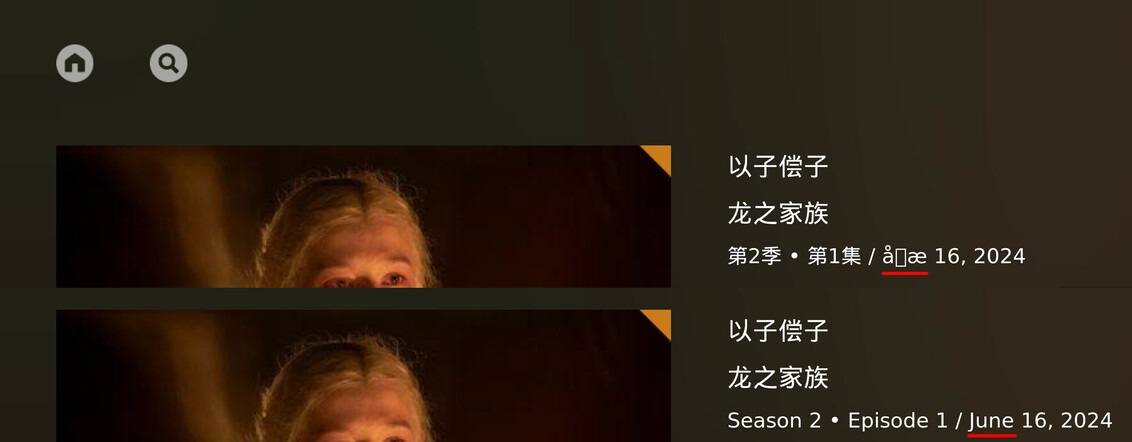
Another issue is that on the TV show page, the episode’s release date is displayed. However, when the user’s language is set to Chinese, the month information is not correctly displayed in Chinese; instead, it appears as garbled text.
Additionally, according to Chinese conventions, “June 16, 2024” would be written as “2024年6月16日”.
Thanks for reporting.
Edit: is that only the case for episodes?
Is that so? I checked against Plex Web and it doesn’t seem like the watched count indicators scale.