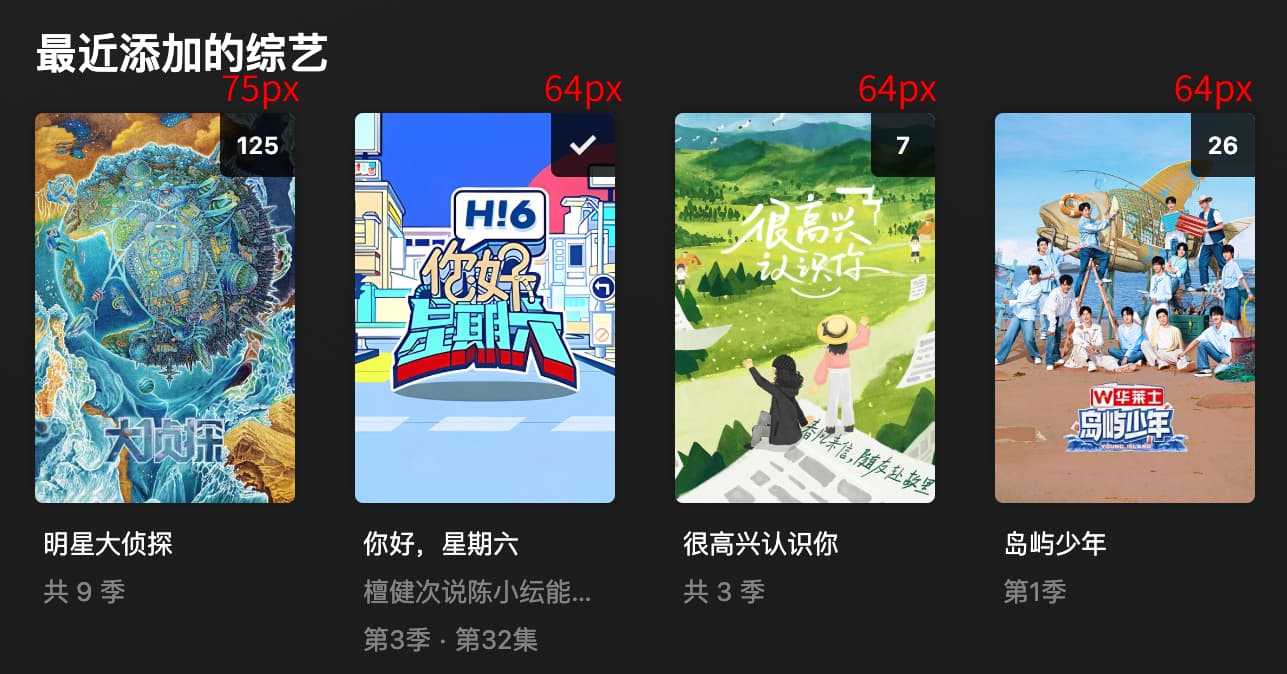
I estimate that this issue occurs wherever months are displayed, but I haven’t found other places yet, as I haven’t come across other instances where months are shown. Movies only display the year, so for now, I haven’t noticed this issue elsewhere.
I believe it will, as shown in the image below. This is the case for both Plex Web and Plex App. When the count exceeds two digits, the width of the watched count indicator increases according to the content.
Any chance the ability to auto rewind on resume can be implemented? The regular Plex client has that option. It is useful for me because my receiver takes about 9 seconds after a codec switch for audio to actually start.
God, just the list of things I’ve found or logged from you guys, while being a little more detached. In a matter of days.
This can get quite overwhelming fast
(my all time Google notes list is probably 100m long printed out, this is just five days)
Add season watched/unwatched context menu in episodes on seasons
Minimum width for buffer line?
Don't focus home on Screensaver wake
Postplay: when replaying previous episode and landing on postplay again, the wrong one is shown as next (off by one)
Postplay: can paginate early and wrong (alone germany)
When no currentserver, home errors on uuid
Episodes: No disabled play button state with modern themes while loading data/theme music?
Theme description is wrong
Add http chunk size option (check when this was added)
Slow connection description wrong (readfactor)
Update tv spoiler genres
Slim VideoPlayer overlay mode
Sign in not clickable (windows)?
Rev3: Add new default combo bundle; "acme_combo.crt"
Read SERVERNAME.crt
Quality of avatar icons
Episodes: while queueing theme music, keep last action and execute after theme started
Episodes: theme music timing can still mess up volume; button press when opening episodes view, before theme music is queued, still works
Episodes: Chinese issues https://forums.plex.tv/t/pm4k-plexmod-for-kodi-18-19-20-21/481208/2828
User select: wrong pin entered when timeout (no auto login)
No servers found: can't navigate
3 digits unwatched overflows on Arial font; add scaling? Maybe possible to detect character width? Add scaling above 2 digits (like Plex web)
No buffer spinner during video playback?
Server switch removes S00/E00 while switching
Movies: position action buttons further down (same offset as title)
Scan library files shows no content for a short time
Home: empty trash on context menu of item, in the item's library
Atmos detection? Atmos in filename and stream title (not just 768kbit)
Videoinfo: handle No Bitrate on stream
I18n: add hints to specific translations to make them easier to understand for translators

(home/hubs) Data caching possible?


Try not scrolling when deactivating Screensaver and refreshing hubs. Also make hub refresh on wake optional.

Beta updater via service entrypoint
Always start via service entrypoint?
Log uploader

Subtitle language filter for libraries (check feasibility for shows)
More bindable actions

Wiki

Offer applying appropriate cache settings on first start
Edit: my wife just observed me while scrolling that list to add something. You should’ve seen her reaction
My understanding of the Plex official clients is the Home Hub order is as follows: Pinned Library Order → “Managed Recommendations” as defined in Server > Settings > Manage > Libraries > Manage Reccomendations This is mentioned here: Customizing Plex Web | Plex Support
Now that PM4K supports Library ordering, perhaps it could follow a similar approach?(assuming the plex server “/hubs/” api weirdness gets sorted )
Maybe. The official clients do a lot more magic, as they combine multiple servers at the same time and thus use other/newer API endpoints sometimes.
Ideally I’d want PM4K to be able to do the same, but that’s a feature for a full new version. Maybe something late in the 0.8.x’s. Filling and reordering the hubs based on which server is currently available (keeping in mind that they answer at different times), is a tall order in the hacky Kodi GUI we’ve built/are using. Not impossible, but would probably require a good couple of weeks of me being locked in the basement to do just this.
And there’s so much more on the list that needs to be done before that. Wa*cough*list for example.
This is true for SMB/NFS, especially. This fixes hitching on max Blu-ray spec bitrates.
I’ll include a setting for this in 0.8.0.
Edit: this is especially important for SMB (path mapping), as kodi’s SMB default is 64 KB (NFS/http/file 128 kb). This is not enough to sufficiently play back high Bitrate content.
Bug report: When playing an episode that has chapters from the Post Play screen, the chapters don’t show up and are replaced with the auto-chapters created by Plex instead. Stopping the episode and then restarting it from the Pre Play (is that the correct name?) screen makes the chapters appear properly.
Sorry for not explaining clearly earlier. My previous report was based on Kodi on Mac, where PM4K had issues with incomplete display of three-digit numbers and garbled month display. I thought it would be the same on Android, but today I tested it on an Android TV, and PM4K indeed doesn’t have these issues on Android TV.
On Android TV, three-digit numbers are displayed fully (though I’m not sure if numbers over three digits will display properly), and the months are displayed in English.
You should check one more thing if plex.tv is properly accessible.
I have the same thing, but its intentional as i made some modification for my server connection.
if you end up going that route of redesigning the entire UI, I would suggest modelling it on the current Android TV homescreen. (with multi-server support)
Not sure if this has been mentioned before, the search function seems only allow English (on android TV), it does not bring up the android keyboard. Is there a way to search the library in other languages?
I have just installed kodi 21 on my shield for the first time.
Then I followed the (very good) installation instructions as given here.
Result: I can’t see any pictures/thumbnails and playing movies doesn’t work either.
After a restart the same problem appeared.
Uninstalled everything again and went back to the plex app for the shield.
I still don’t understand why kodi is used with plex at all. The user experience is horrible.