Hello,
Any idea why it is not showing a poster? (

What is it named and what is it matched to?


must have different collection settings
Plex doesn’t have Collection metadata agents to begin with, so that would be obvious. 
His issue is the poster added to it is not appearing in PM4K. The first question should be if the same poster is working in the web interface or official Plex client for the device he is using.
It has agents to select. I use plex agent for both. I don’t do anything to collections, it’s 100% automatic. Poster display is not up to client side.
Ah, they added an auto collections feature? That’s neat. If it’s like the plug-in that Jellyfin has to pull from TMDB’s collections you should be able to edit the collection and choose other posters then. So the poster being different than yours doesn’t mean necessarily the method used to get it is any different.
But this really doesn’t help brian with his issue regardless.
@brian_s242 Images in Plex can be changed where one client has them still and another is not able to see them. See this post I made about actor images disappearing. The actor image was still visible on the web, but not on the FireOS client. Try changing the collection poster (saving changes) and then going back to the one you want, so it gets reapplied to the collection.
You might need to clear cache on Kodi so the poster has to be re-fetched from the server to the client.
I got it working, I saved the image and did drag n drop to my Plex. I uploaded the image by the URL.
All of collection posters were done by the URL method.
1 Like
How do you clear the caches on Kodi?
That’s the only thing client specific. It has nothing to do with picking anything server side.
It’s been there a long time
I’m not sure how it’s handled on CoreELEC-type platforms. On Android TV/FireTV Kodi is just a normal app, so you can clear it from the app manager.
Fire Stick:
- Go to the FireOS Settings and select “Applications”.
- Select “Manage Installed Applications”.
- Locate and select Kodi in the list.
- Select “Clear cache”.
Android TV:
- Open Settings on the device.
- Choose Apps.
- If you don’t see Kodi appear on the short list, choose “see all apps”
- Select Kodi from the list.
- You’ll see the option to clear cache there.


The forum is back up to read and most importantly the repos are back up.
1 Like
Hello
I have just installed the latest PM4K to my fresh libreelec Omega on a Rasppi. After starting the addon, I couldn’t change something. Means I can’t select any Server because the remotecontrolle is not active.
are there any ideas how I can fix that?
regards
Floonder
Running Kodi 21.0 Omega with latest PM4K on a Firecube 3. I find that I have audio sync issues unless I switch the Passthrough output device for certain audio codecs. The recommended AudioTrack (IEC) works perfect for DTS-HD or ATMOS, but not regular DTS or Dolby 5.1 (out of sync). But for these older formats I can switch to AudioTrack (RAW) and it will play just fine, but not for DTS-HD or ATMOS. So, in other words there doesn’t seem to be a solution for all formats. (RAW) for older and (IEC) for the newer. I have to manually switch it depending on what I am watching. Does anyone else experience this? Maybe I need to check a setting somewhere else?
This is a Kodi issue, not a PM4K one. But anyways, have a look here: PM4K / PlexMod for Kodi (18, 19, 20, 21, 22+) - #3877 by panni
1 Like
I tried the 22.0-Alpha1 (21.90.700) build and the problem of audio sync remains the same with the Firecube 3. Newer codecs with (IEC) Packer are perfect. Older codecs like DTS or AT3 require Audiotrac (RAW).
Keith, when I read about this (I’m not a firecube user), I’m not clear if you have run this with the advanced settings file that’s mentioned in the steer that panni gave you.
Can you clarify? That said, remember that this is a Kodi issue as panni says, so this is the limit for support in this forum.
Hey Panni, I’m a new user to PM4K and it is VERY impressive how seamless it all works - thank you!
I’ve noticed PM4K won’t show chapter names if Plex isn’t able to generate thumbnails for certain Extras files - this seems common for still galleries and deleted scenes, for some reason, while other clients can show the chapter names with a generic no-image thumbnail under each chapter marking in these cases. The files otherwise play the same.
For example, in the Plex web client:
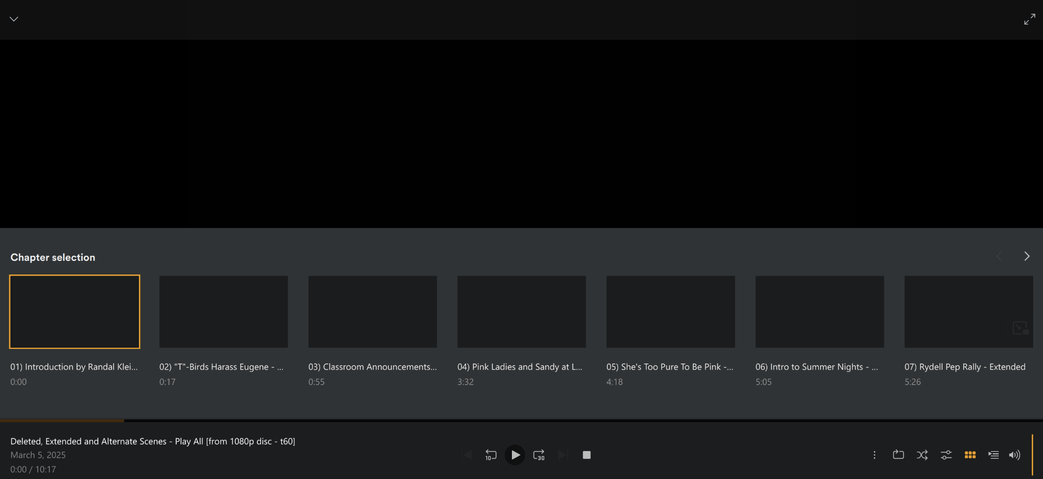
vs. Kodi + PM4K:

I can still navigate through the chapters okay, I’m just not sure which one I’m going to on PM4K. If I load the file directly into Kodi I can see chapter names in the native UI so it doesn’t seem to be related to Kodi as far as I can tell.
I had some issues as well like you describe, dts 5.1 having around 0,2 offset.
There is an addon called Audio offset manager for Kodi where you can change offset per codec. Workaround, but it works;)
