@panni I have an idea for the Spoilers feature. I took a quick peek at the py for the feature and saw how you enumerate the common ones, and I think it would be awesome to expand it to include custom genres. For example, many “Sports” are instead classified by the actual sport, such as “Football” “Basketball” etc. so trying to exclude “Sport” does not un-spoiler those live TV recordings. The idea would be to define custom genres in the UI, which just string matches what the recording’s genre is with whatever the user types in. You can either have this custom genre string be included or excluded from spoiler hiding using the existing feature you have in the User Interface settings. If it’s too much work don’t worry about it, just thought it would be cool. :). Thank you for working on this mod, it is better than any Plex client out there and I love it.
Hmm, that’s a nice idea. What about a manual list of genres that you could simply drop into addon_data/script.plexmod? Something like spoilers_exempt.txt or json, which would list the Plex genres to ignore spoilers for?
Edit: This could also include tmdb/imdb/plex IDs to exclude (or include?) certain shows!
Your thought on “Plex IDs” to include or exclude makes me think of the feature more generally: a list of custom genres or IDs that the add-on would then recognize, and you could use them either in the allow or exempt feature (since I believe they both use the same overall genres enum). It would be easy for many of us to drop a text file into the folder, and you were feeling generous you could make it editable in the UI. It’s up to you how and what to do, of course! Thanks!
edit: would the text file stick even after the add-on updates? that would be important. 
Something like this is definitely making it into the feature list
Anything makes stuff stick. I’m making sure of that.
Awesome, keep up the good work. I got into this mod so I could finally watch lossless audio remuxes using Plex, and this add-on plus CE’s work on DoVi is basically lightning in a bottle.
So it’s an update to skins for a build he can’t share, from a person he can’t name, and from a source that is closed?
Instead of FL, FR, FC, LFE, BL, BR, SL, SR as shown in the screenshot, it should display RAW, RAW, RAW, RAW, RAW, RAW, RAW unless you decode the audio. when using CPM’s build.
This is because CPM has not implemented this change.
Only those using the new build which i can not share would have “FL, FR, FC, LFE, BL, BR, SL, SR” as “Input”…
Since I’m not sharing the build anyway, there’s no need for source code to be available.
I’m using the same builds and been testing them the last couple of weeks, good stuff, currently I think I’m the only one testing for the Homatics S905X4 as I have three of them and two AM6B+, for AM6B+ the build is basically complete, for the Homatics S905X4 it’s been huge improvements on DV FEL playback, previously DV FEL titles like for example Saving Private Ryan had audio sync issues but those are now working fine, the one I’m testing now is Count of Monte Cristo (2024 French) which seems to be issues with the master itself but as soon as you notice audio sync problem rewinding 10 sec fixes it completely, but developer is trying to fix it without need to rewind, but we’ll see if we get there.
Hi, using 1.0.5d with Ugoos AM6b+. I got a subtitle bug where english subs are not showing on certain files (entire season 2 of Poker Face, 12 episodes) that have only two UTF-8 subtitle tracks; english & spanish. If I play the files on my W10 computer using the plex imbedded player, the english subs show fine. If I play the files directly on the Ugoos (on usb stick stuck in it), the english subs show fine. But using 1.0.5.d only the spanish subs will ever show. If I select between the two it doesn’t matter, only the spanish ones will ever show, the english ones will never display…. weird.
After further troublshooting I found some other files that also only have english & spanish subs (Chad Powers season 1) thinking to duplicate the problem but these display fine. Grrr, what could the problem be with the Poker Face files that their subs won’t play nice with pm4k?

Not sure yet, please supply logs. You also probably want to try the early 1.1.0 test builds from the ugoos-mediaplayer channel of the TRaSH guides Discord. I’ve been posting builds there for the past few weeks especially for the AM6B+.
Edit: No worries everyone, they will arrive here, but they’re pretty specific for CE.
@panni I’m back with another idea - this time for the filters in both the Movies and TV Shows libraries. First off, I LOVE these filters, they are so much more useful than the ones with commercial Plex clients.
Why not unify them as much as possible? For example, I have more DoVi TV shows than movies at the moment, lol. I’d love to see filters in both Libraries for:
- DoVi
- HDR
- 8K
- 4K
- DTS Lossless (HD, Master, 96/24, etc.)
- Dolby Lossless (TrueHD, etc. - or just unify DTS and Dolby under a “Lossless Audio” one?)
- Atmos
- DD+/EAC3
- DD/AC3
- etc.
I know some of these exist, and I also know the list is getting really long, so some organizing may be needed. Anyway, just an idea! Keep up the excellent work.
All those filters are official ones taken from PlexWeb. If they’re on PlexWeb, I can implement them, because they exist in the API. I’ve done nothing custom here and I can’t implement custom filters!
Promoted 1.0.5e to stable (on Don’t Panic repo)
1.0.5 pull request created in the official Kodi repository (currently still on 0.7.9): [script.plexmod] 1.0.5 by pannal · Pull Request #2779 · xbmc/repo-scripts · GitHub
1.1.3-beta1: script.plexmod.zip (3.2 MB)
Notes
Sooo yeah, 1.0.5 has been promoted to stable and Kodi repository, so here’s the changes I’ve been working on in the meantime.
CoreELEC
As many of you know, I’ve switched to a Ugoos AM6B+ running CPM A14 as my daily driver, which lead me to further massively improve the Alternate Seek solution for those devices. We now actively pause the player during seeking, resulting in a more stable and accurate “target” frame. Additionally, the option to seek back on start has been added, which issues a short seek-forward to 5 seconds, then back to 50ms, to avoid A/V-sync issues on media without a resume point or early intro skip. The short flicker you see at the beginning of playback is intentional.
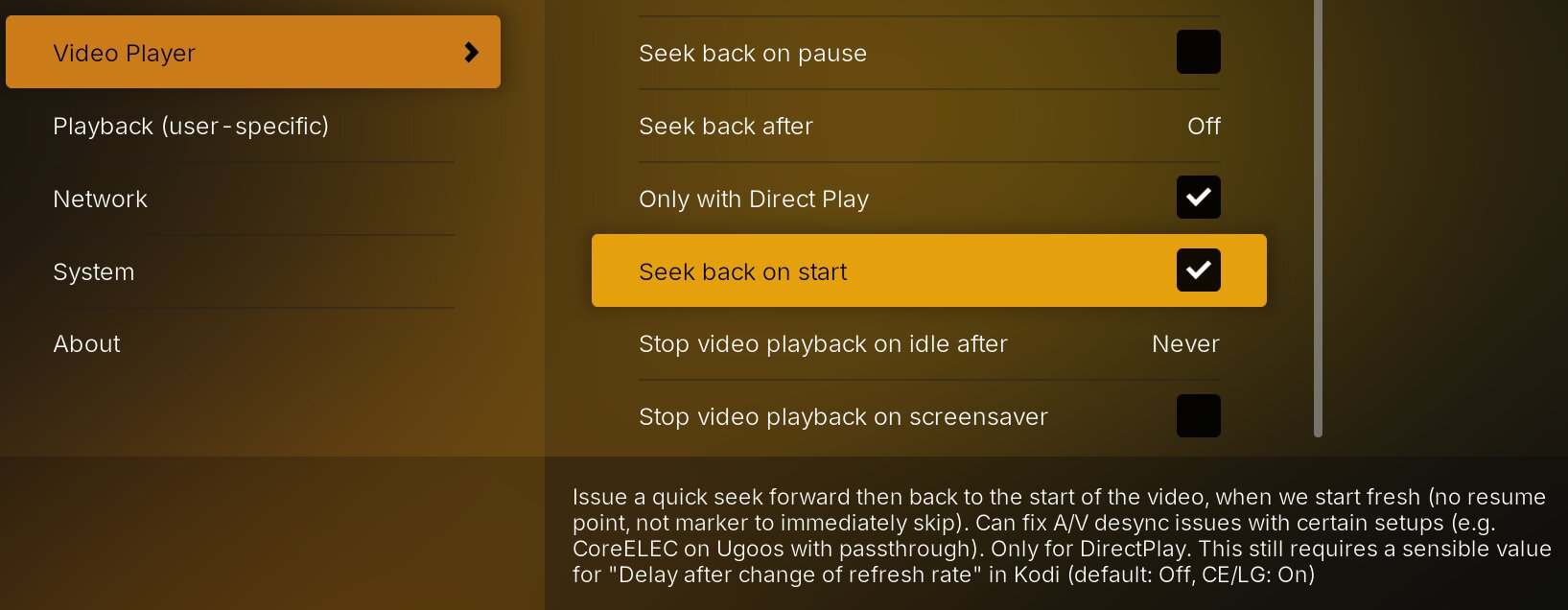
Additionally, I’ve discovered a good couple of improvements to the seek fix itself, which lead to a reset of the Wait for seek AddonSetting (was 850ms, is now 100ms and can even be lower).
Attention: If you’re running a CoreELEC build with A/V fixes (some inofficial ones have those), you can disable Alternate Seek.
Theme music
Theme music has been mostly decoupled and now shouldn’t block the UI as massively as before. Also, I’ve added theme music fading, which is just a lot more pleasant than the hard cutoff we had before. True cross-fading is sadly not possible.
We also cache theme music now, before playing it back, which should reduce the massive hangs some people experienced especially when looking at watchlist (remote) items.
Trailer pre-roll
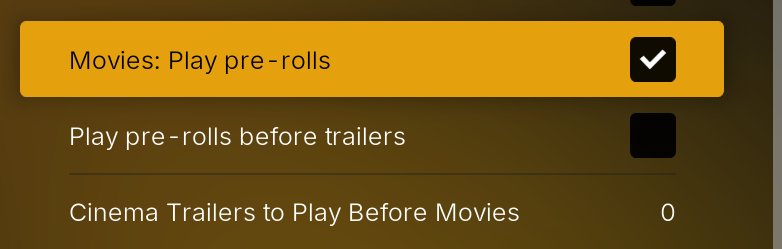
One of the many long-requested features has been added: Trailer pre-roll. We now have several options (trailers are disabled by default):
- Play server-defined pre-rolls (for a couple of Plex Server versions admins can define short clips to play before playback)
- Play pre-rolls before trailers (on official Plex clients pre-rolls are played after trailers, before playback)
- Play cinema trailers from your library before movies
UI Performance
If you have a powerful device (such as the Ugoos AM6B+), you can make the UI even snappier by setting the AddonSetting “UI wait poll rate (Hz)” from 10 hz to 100 hz. This basically changes the rate at which we check for certain events to occur. At the base value, 10 hz, we check for certain states every 100ms. With 100 hz, that’s done every 10 ms.
Worker limit
We’ve had an openly configurable worker limit in AddonSettings for many versions, and people tended to set it to their SOC CPU core count. This is now hard clamped to 3, which is also the default, as anything above 3 could be detrimental to performance. Unless we’re running Python 3.14+, the Python process of Kodi only runs on one of the available CPU cores (google Python GIL). If we detect Python 3.14 (which isn’t out, yet), the limit is unclamped.
Changelog:
- Core/UI: Performance improvements
- Core: Slimify backgroundthread.py import size
- Core: Detect and store python version
- Backgroundthread: Limit concurrency to 3 unless we’re on python 3.14+ (overrides addonSetting if necessary)
- Utils: Move more logging utils to the logging package (including _SHUTDOWN flag and showNotification)
- CoreELEC/ResumeFix: Further improvements
- CoreELEC/ResumeFix: Allow seeking to 0
- CoreELEC/ResumeFix/Settings: Add setting to seek forward then back on start without a resume point (or any immediate seek action); still needs a sensible value for “Delay after change of refresh rate” (2.5s) in Kodi (default: Off, CE/LG: On)
- CoreELEC/Player: Don’t use the seek fix when seeking behind on pause/resume (assume we’ve seeked)
- CoreELEC: Alternate Seek: Improve accuracy of Seek fix; widen lower bounds to twice the seek window size
- CoreELEC: Alternate Seek: Pause while applying seek fix (auto and manual seeking)
- CoreELEC/SeekFix: Wait until player actually paused when pausing for seek
- CoreELEC/SeekFix: Prefer reported seek time over reported current player time if set and valid
- SeekDialog: Don’t show non-button OSD when Plextuary is used and we’re pausing during seeking
- SeekDialog: Document both OSD states in template
- Episodes: Make sure we select the play button on higher UI tick rates
- Episodes: Improve list handling when returning from playback and switching to a new season automatically
- Episodes: Move play button wait-for-visibility logic outside of busy window context on first init
- Episodes: Fill episodes after deletion (thanks @andybkma)
- Movies: Play pre-roll clips or cinema trailers before playback
- Watchlist: Try being more resilient when a removal didn’t work; retry three times (experimental); also check watchlist state again after blindly removing
- ThemeMusic: Implement fading
- ThemeMusic: Cache theme locally to avoid UI hangs
- PlayQueue: Implement immediately POSTing a playqueue request to the PMS
- Player: Don’t report timeline with video extras (clips, prerolls, trailers)
- Player/SeekDialog/CombineChapters: Added option to toggle whether to combine virtual chapters with video chapters when both are present (thanks @daddy-cool)
- SeekDialog: Markers: Consider any intro start offset below or equal to 2 seconds as an early skippable intro marker (was: 0 seconds)
- SeekDialog: Markers: Fix Player not seeing early intro markers while initializing playback due to late initialization of button settings
- Settings: Add setting to honor pre-roll definitions server-side (plays them back when starting a movie)
- Settings: Add setting to play pre-rolls before trailers (instead of afterwards, which is Plex default)
- Settings: Add setting similar to other Plex clients, that defined how many (if any) cinema trailers to play before playing a movie fresh
- Settings: Implement user-aware ListSetting
- Settings: Fix ‘Video play completion behaviour’ options and translations
- AddonSettings: Add settings for theme music fade and caching
- AddonSettings: Add “UI wait poll rate (Hz)” (default: 10hz); set to 100hz if you have a powerful device (e.g. Ugoos AM6B+)
- AddonSettings: Add “Use alternate seek” prefer reported time; default: On
- AddonSettings: Add “Use alternate seek” wait for valid player time; default: On
- AddonSettings/CoreELEC: Reset resume fix wait for seek to 100ms (default now)
- Update translations from POEditor
A big thanks to the folks at #ugoos-mediaplayer on the TRaSH-Guides Discord, who stuck with me through a lot of test builds of 1.1.0.
The next steps with 1.1.X+ will be:
- decouple the updater service into a separate Kodi addon
- further work on dynamic home hubs
No problem! Thanks for clarifying.
Thank you so much panni amazing work.
With the 1.1.3b1 noticed that rewinding quite often jumps right to the beginning of the video. Using AM6B+ with regular 21.3 CoreELEC.
Interesting, please upload some logs using the PM4K Log Uploader (Don’t Panic repo)(please tell me what you did at roughly which timestamp). You can also try toggling off one of these:


I tried to accomodate all use cases with all (broken) CE variants, but obviously I haven’t caught all of them. That’s beta for you
Edit: You do mean seeking, right, not rewinding?
Edit 2: Also, please try disabling Alternate Seek and see if that works now (I assume you are on a nightly 21.3?)
Edit: You do mean seeking, right, not rewinding?
I mean the Kodi “smallstepback” command Will try to experiment a bit more.
Does anyone else have hi-res music working for all bit rates? I cannot get 88.2/24 bit flac to play at all it’s completely silent. I do have hi-res music enabled under settings.
192/24 bit files play fine as well as 96/24 bit and of course no issue with 44/16. Just 88.2/24 that is completely silent. Any tips much appreciated! Running CE 21.2 on Ugoos AM6B+
