Thank you for the clarification.
I am running the latest beta.
I was hoping to take advantage of the new avdv build while still using your superior audio fixes with Alternate Seek. However, since Alternate Seek isn’t intended for this build and the avdv build doesn’t seem to offer meaningful benefits for my setup as far as I am aware (AM6B+ with an LG G4), I will switch back to CPM A14 so I can continue using Alternate Seek reliably.
Also thanks for all the work you put into PM4K, it’s truly appreciated.
Yes, CPM A14 with 1.1.4-beta1 is the golden combination right now. Please continue testing newer builds, though!
Intended != will never work, though. Alternate seek should work on any proper kodi based build. I guess the newer A/V sync related builds try different approaches to fix the stuff I fix, but on a lower level. That has huge potential to break other kodi universal assumptions.
Keep in mind that I test most of alternate seek on windows Kodi (and on the Ugoos separately). So any build that actively breaks while using alternate seek is very specific and doesn’t handle relative seeking well. We’re doing nothing special with alternate seek, apart from monitoring states, offsets, and reacting appropriately (and doing relative seeks vs absolute seeks).
That also means that the avdvplus build broke something concerning a native kodi feature/function.
From what I read the avdvplus build has fixes for the homatics box too. Also, while the cpm a14 build was very sluggish on my homatics, this one feels ok on the box.
For instance, while playing back DV+FEL movies on the A14 build, the buffers were always almost empty and the ui was very unresponsive, with this one, the same movie plays fine, buffers are full and the cpu usage is below 70%.
I set the audio fixes in avdvplus to “Off”. Than I activate the PM4K “alternative seek” again, but I get massive stutter, hanging and async Video back again.
For me audio fixes in avdvplus can be “Off”, “1” or “3”. But PM4K “alternative seek” must be deactivated. SD 576, 720p, 1080p and 2160p running fine. Also HDR10/DV P4, P5, P7, P8.1.
Using Ugoos AM6B Plus with avdvplus to Denon A10H to Bravia9.
I use it daily and yes, it makes a huge difference depending on what you’re viewing.
We have automatic semi smart cache cleaning, but remember: if a file gets changed/upgraded on the server side, PM4K won’t know (at the moment). You can then clear the cache for that item (or for a full TV show in case we’re talking about an episode).
You also always have the option to clear the full cache via home icon long press.
Edit: it only makes a difference if you reboot PM4K often. The persistence mode is exactly for that, to keep the cache across PM4K restarts.
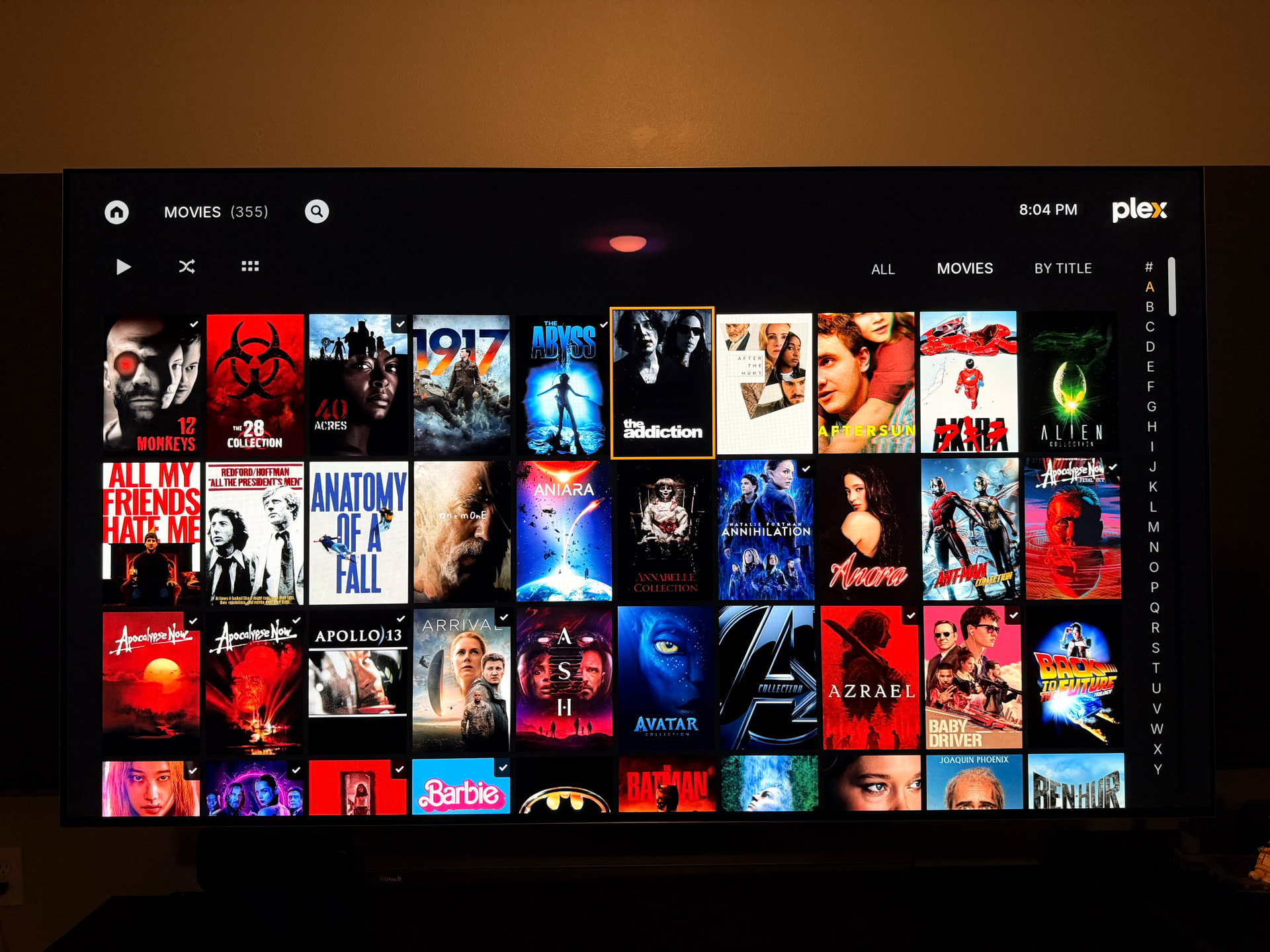
Just making sure I’m not missing something. Is there a way to remove the movie name under the poster?
If not is it possible to consider? In small poster mode they all get cutoff and look bad anyway. Might be able to maintain 3 visible rows and lose one entry horizontally in each row to bring back a little size to the posters. Reducing the spacing by half might look really cool in small poster mode. Just a few thoughts.
Possibly, I have to smartly pick my battles, though. Please ping me again about this when the separate updater app is out and I’ve implemented dynamic home hubs. Thanks!
I actually dug into the code for the first time and was able to pretty easily figure out what I needed to change. Got it almost exactly how I wanted it. Removed the text, tightened the spacing, and increased the small poster size a bit. Trickiest part was the badges.
Will updates overwrite these changes?
I’ll ask after the new year. Maybe a large and small textless view would be something people would enjoy. Or maybe it’s just me, haha.
We have a dynamic template loading system. It loads custom templates from addon_data first, then ours if missing. Make sure to copy and edit the xml.tpl file, not the .xml file itself.
You can then place this file into userdata/addon_data/script.plexmod/templates if I’m not mistaken, go to PM4Ks AddonSettings and set always compile templates to true, then start PM4K and it’ll use your template instead of mine to compile the final xml. This survives updates. You can turn off the setting once you’re happy.
Paths should be correct, but I might be remembering them wrong.
Looks great for what it is. I could incorporate this as a separate view quite easily. I should consolidate a good couple of things in the posters small template first, though, so yours is basically only a modifier that builds upon the base template.
Edit: I mean this could essentially be a flag to set in the child template.
Edit 2: you’re the second person to ever use this feature I think. I built this because I knew it would happen, but nobody ever wants to touch code (or take the time to understand the somewhat straight forward skinning engine)
Not sure how far the template is, inheritance/reusability wise, and how easy it’ll be for you to adapt your changes. But if you make those changes on the template I can easily adapt them and until I do, your custom template will survive updates.
Edit: doing it this way allows you to fully customize the UI basically. And point out areas where I need to make the templates more dynamic as well. And essentially you’d be able to provide full conversion UI packs.
Edit 3: and hopefully you’ll notice the beauty of creating/incorporating a jinja2-style templating engine, why I spent months of developing it, and especially where this could go. Kodi itself has nothing even remotely comparable (for plugins, only for real skins, and just barely).
I guess by badges you mean the watched indicators? That’d be a part I could make overridable in child templates in the blink of an eye. As you can see, those are included from an include snippet. I could make that an overridable block.
There’d be some work left for this to actually be applicable to live usage, but imagine a “script-plex-posters-small.xml.tpl” and you could simply drop your own “script-plex-posters-small.custom.xml.tpl” that just inherits it and changes some blocks. I began work on something like this via custom themes, but the implementation is outdated at the moment so it was disabled.

 (or take the time to understand the somewhat straight forward skinning engine)