@bowlingbeeg I checked this with the latest commit of @pannihttps://github.com/pannal/plex-for-kodi multiple times.
But this kind of auto shifting of screen is not happening in the latest commit.
I checked the logs and can’t figure out what is causing it. After API Call of dialog.xml there is no error
Also for the time being, I am using this code, which is working fine for me:
def setPostReloadItemInfo(self, video, mli):
        self.setItemAudioAndSubtitleInfo(video, mli)
        mli.setProperty('unwatched', not video.isWatched and '1' or '')
        mli.setProperty('video.res', video.resolutionString())
        mli.setProperty('audio.codec', video.audioCodecString())
        mli.setProperty('video.codec', video.videoCodecString())
        mli.setProperty('audio.channels', video.audioChannelsString(metadata.apiTranslate))
        mli.setProperty('video.rendering', video.videoCodecRendering)
        mli.setBoolProperty('unavailable', not video.available())

        ids = [301, 302, 303, 304, 305, 307]
        if len(list(filter(lambda x: x.isAccessible(), video.media()))) > 1:
            mli.setBoolProperty('media.multiple', True)
            # adjust button sizes
            for id in ids:
                ctrl = self.getControl(id)
                ctrl.setWidth(161)
                ctrl.setHeight(125)
                del ctrl
        else:
            mli.setBoolProperty('media.multiple', False)
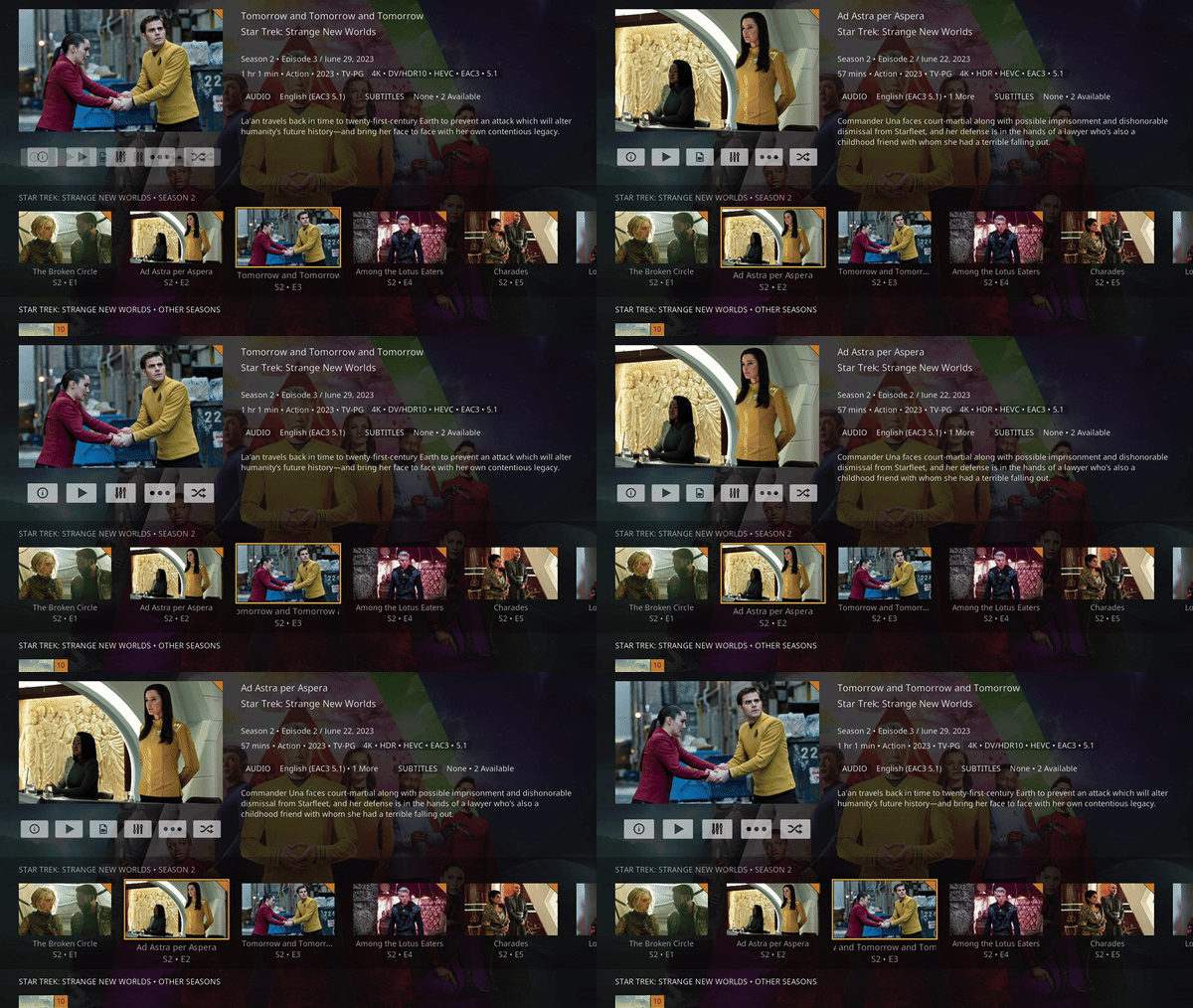
It just doesn’t reset buttons size for the episode when and only if some episodes of a season have multiple file version and some don’t, it shows small button for every episode. But in normal case where season and episodes are having only one file version it generate normal buttons as seen here:
Your above commit is also fine, but don’t know why it is having that small screen shift for only specific season, other than than your code should be pulled into the commit.
I think in the new commit the upper edge of the small & big buttons needs to be aligned when the transition happens from big to small or vice-versa.
OR
maybe from center if we are zooming in/out grow in/out
This is from <posy>409.5</posy> vertical upper edge aligned
This is from <posy>412.4</posy> vertical center aligned
Edit: smaller buttons will be aligned vertically based on the center of the bigger buttons; also I’ll remove the animations, they’re not necessary in this case
While looking for this issue, identifying the cause and fixing it (that user has a fresh install, so there’s no last-background-url, the BG rendering is practically transparent, and legacy fallback image is disabled by default), I’ve also fixed seemingly all dialog flickering. The next version will have the previous band-aid, only sometimes working, flicker fix removed.
Now we’re displaying a background image of solid #111111 in that exact case as long as there’s no background-image (yet). Seems like between window transitions, while BG images were loading (even from cache), the dialog transition bugged out, which is fixed now.
Edit: Wow, even the transitions in certain situations are smoother now. Awesome.
Had also some ocassional flickering at startup of the addon or stopping a movie and going back to library on a fire stick 4k - so much less power as the cube 3 (where I didn’t see any flickering so far).
I am testing currently on the stick and the flickering at startup seams gone with the new beta. Also transition between movies without background to ones with it is a bit faster / smoother it seems.
Mentioned button size changes on episodes etc. Look also good (as far as I can tell)
Awesome
The flickering has gone from background and icons, the effect was like PM4K was sucking some energy.
The UI is also fluid, and the buttons are also aligned and working fine.
Again great work, thank you so much @panni for the release & @bowlingbeeg for fixing the issues.
@panni Little thing i have noticed on the music side: there’s still the issue with missing albums on artist pages if the albums are soundtracks. When I checked the last responses of the plex server I remember there was a separate type for these (same topic we had with the missing EPs and compilations where you added these types in the addon)
Will try to find the type (if you are not faster in the meantime )
Beta 12. Stopped playing some music and then pressed back repeatedly to get to the exit button which wouldn’t let me out. I had to minimise to use other kodi features. Not much time to investigate or give logs but I have to say.
Edit: insomnia caused by too much wine has given me time to look at this again. I can’t recreate this after a reboot (of my SBC and me), so please ignore.
Can you DM me your advancedsettings.xml so I can verify the fix?
Probably artist.albums.live, I’ll add that to 0.7.4-beta13 tonight Oh no, we had that one already. artist.albums.soundtrack, I’ll add that to 0.7.4-beta13 tonight.
Edit: Adding artist.albums.demo and artist.albums.remix as well.
The official Plex desktop apps (but not the web app) do in fact employ additional filters, depending on their “Video Quality” setting. These can be very computing-intensive and using the highest quality level in 4K is usually only possible with a pretty recent top-tier GPU.
Please discuss these not in this thread, but open a new one in the appropriate forum section!
I think the consensus seems to be that the picture produced by Kodi looks better. That’s a pretty generic/wild assumption, though, as that should depend on the SOC, resolution, and codec config.
Thankyou
I asked this question because, while using the Plex Android App, the video becomes more sharp and have more grains, seems like some filter is applied, while if the same video is played on kodi it looks flat (as is).
But i can compromise some quality, as kodi still plays everything, almost all file formats. Kodi is really the best video engine.
& now we also have PM4K
Sorry thought I had tried and replied about beta 12 but I hadn’t. (Thought I was having same issue on the n2+ with beta12 but that was beta11)
I just gave it a quick test on the n2+ and the switching between collections and movies view seems to be more stable / it hasn’t crashed yet, though occasionally there is a delay before the switch starts or the busy / working animation displays this seems to happen after a couple of switches. This seems to only happen on the n2+ though so probably because of processing power.
Also the issue with missing posters / watched statuses I reported in these posts seems to have disappeared / been fixed:
I did notice a small bug when viewing the settings menu while playing a video:
When you use a keyboard / remote and navigate to the scrollbar you cannot navigate off the scrollbar with a keyboard / remote you have to use a back or exit button to leave the menu then return to it to navigate again.
Edit: Didn’t actually notice those horizontal lines until they were pointed out.
Thanks - tried to find it in the plex API online documentation but haven’t found the detailed types I was looking for.
That’s great - so we should have covered all special album types now I guess.
Awesome. Yes, there can be the occasional delay as the UI waits for any running item-load tasks to finish (for up to 4 seconds per task), the loading animation is shown if this takes longer than 200ms. Also the panel is fully reset before nulling it, before switching the view, to hopefully remove any dangling references that might temporarily clog up the interface and cause crashes on slower devices.
Will be fixed in beta13.
Already implemented a setting for those for beta13, default: off (the poll is pretty clear).
Edit: Seems like 0.7.4 will be an awesome new stable. So many things fixed, and a lot of them by accident
A new feature request: Can we add an option to select skin, right now every texture is displayed from script.plex, if we have a select option under settings we can duplicate script.plex and start experimenting with the textures from another directory.




 )
)


