Server Version#: 1.14.1.5488
Player Version#: 2.24.0.924-63fcaa8e (OS X 10.12.6 Sierra)
When I’m remote controlling another player (also same player and version) for music playback, the “Now Playing” track title doesn’t update in the player display, it always shows the first track in the queue. The track time and progress DO update, just the title is wrong.
This does not happen when controlling the same player from my Android phone, just controlling from PMP Mac.
I have logging enabled but I’m unsure which of the 110 log file(s) to attach. Can someone please advise?
I have the exact same issue. When Track 1 of an album finishes and Track 2 begins, the title of the currently playing track does not change (i.e it remains Track 1). It doesn’t even change if you skip tracks - the only thing that will update the song title/yellow spectrum playing indicator is if you play a different album.
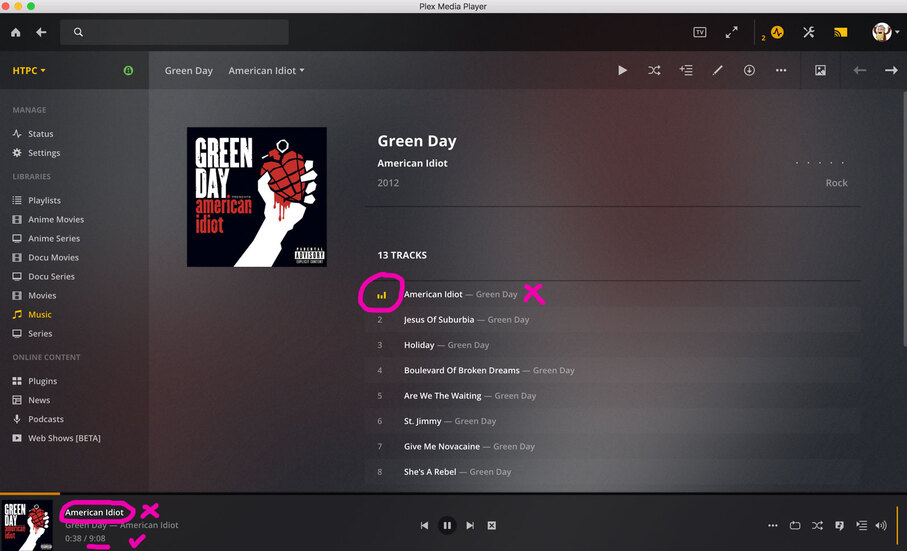
See screenshots attached. In the first, I’m playing the first track of the album American Idiot (American Idiot). All good - track title, playing indicator. In the second screenshot, I’ve hit the Next button to move onto track 2 - Jesus of Suburbia. The track title has not updated, and the playing indicator still shows American Idiot as playing. However, the length of the track is correct, and the song correct song can be heard playing.
I’m trying to replicate on Windows. I don’t use Mac and so far not seeing this issue on Windows. I have seen a similar issue reported with regular Plex Web. Basically, the page is being too aggressively cached so the now playing item doesn’t switch when the next track plays. This can be fixed by reloading the page. I don’t know if PMP on a Mac has a reload option. On Windows, I can right click and select reload.
If it’s an Electron app or similar it should have a reload. But that would of course interrupt the playback, so I’m not too interested in that. But I can test the theory by disabling cache if you’re suggesting it’s in the client-side code.
I am using Plex Media Player on macOS Mojave, to remote control a PMP client on Windows 10 and I’m experiencing the same issue as ab_za. I may try this on the web player and see if it yields different results.