I am not aware of any persistent Plex Media Server crashes on your servers and the posts you added here are not really relating to crashes
The server crashes all the time in connection to other LiveTV issues. MANY people report it. The tuning issues and the aborted play backs and the “random guide content” typically precede a crash or a lock up. I’ve reported NUMEROUS times I have to restart my server every hour or so. I don’t know how much more reported this could have been. I’ve even hinted that it has classic symptoms of a memory leak someplace. Holy smokes, there have been neon signs with all the reports made by MANY…
MAYBE the problem is no one was listening??? Or maybe since it’s been going on for so long it just seems normal to many…
I cannot find any crash report from your server for past two weeks.All the other points you mention are not related to this forum thread.
That’s because I turned off all reporting when you guys went on vacation. I’ve also not used it much since it doesn’t function for LiveTV/DVR in its current state. I’m waiting on bug fixes.
In a quick search I found this
And I’ll bet some of the other posts are in the threads that no longer exist (or I can’t see or find). Regardless, MANY have been reporting the server issues since before 5488 but much more frequently after 5488. Much of it got lost in all the UI disgust. I kept trying to separate the two but was unsuccessful.
Dumps were still being looked into.
If you care to re-enable crash reporting, then all the crash reports from all your crashes since you disabled reporting should get uploaded and I can have a look at them and see if they are the crashes that will be fixed in 1.15.0.
I just update my previous post so you can look at it again.
Once we receive an update I’ll consider spending more time on this but not before.
Thanks
An update for anyone viewing this thread looking for temporary relief from their Plex server crashing with version 1.14.1.5488 until the next release. I am surprised there aren’t more posts about this issue, maybe it is not a widespread problem.
I am currently using Windows 10 version 1809.
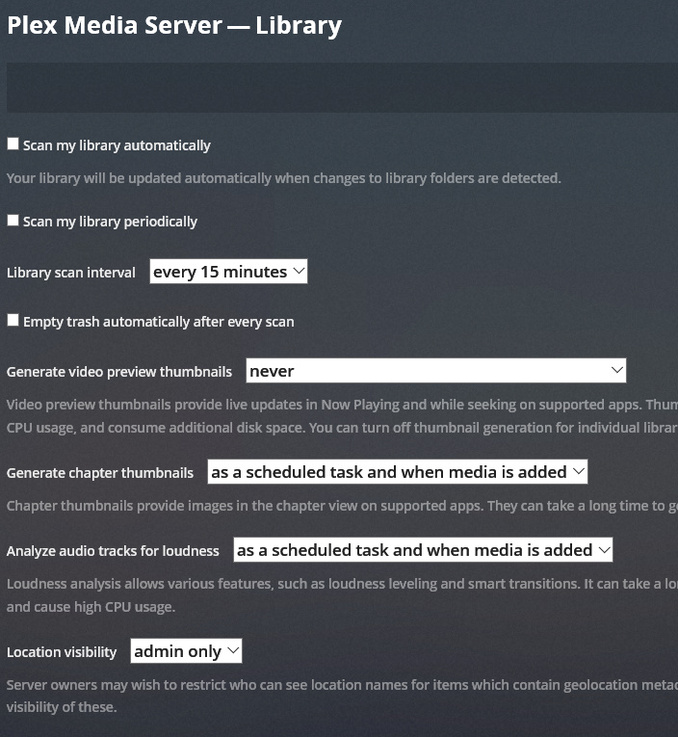
I posted above that I disabled all scheduled tasks. I realized this morning that in trying various options, I also disabled all automatic library scanning in “settings”.
As soon as I activate automatic or manual library scanning, my Plex server will shut down shortly after, if files have been added or deleted from my libraries. This requires a manual restart of Plex.exe or sometimes a full computer reboot.
I leave the automatic library scanning disabled and then pick a time that is convenient to manually scan for changes each day. This will stop any DVR recording, or remote viewing as the server will shut down afterwards but has kept my server running during all other times. I also have to manually empty trash for each library to remove deleted files from the directory.
I presume you have disabled crash reporting. I cannot tell if your crashes are ones that have been fixed for 1.15.0 - the only crash report i found is from December and it is one where only your server and two other servers encountered it
To make sure the issue is addressed, could you enable debug logging and crash reporting and attach logs zip after one of these crashes
Thanks
https://support.plex.tv/articles/201643703-reporting-issues-with-plex-media-server/
https://support.plex.tv/articles/200250417-plex-media-server-log-files/
I enabled the logging and ran the server until it just crashed. The crash reporting has been enabled and I have never disabled it. Thanks for checking this out!
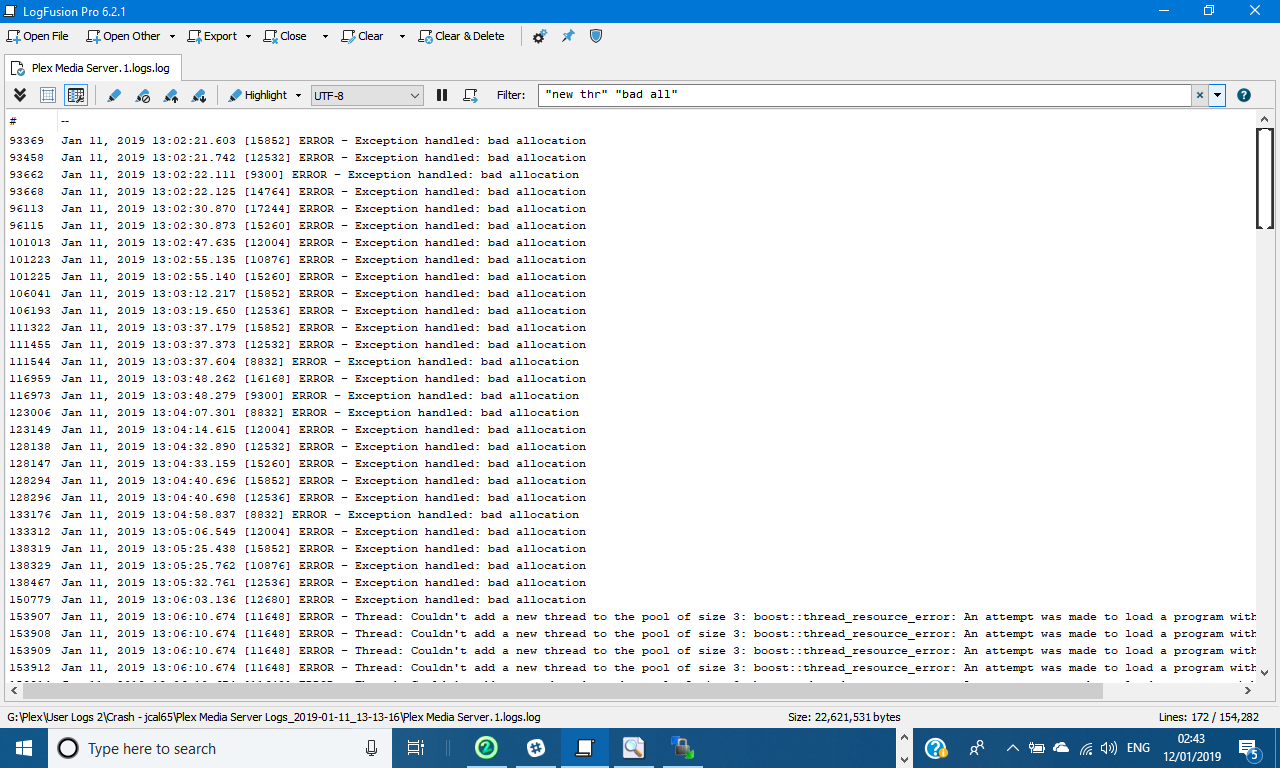
Thank you - very different. We have not had this for long time. It is a memory leak or memory issue leading to the server process running out of memory
Investigating memory issues is not straightforward - if there are no clues in the log. Initial investigation would be through launching Microsoft VMMAP tool (see VMMap - Sysinternals | Microsoft Learn) and connecting it to the Plex Media Server.exe process after the server is launched and then refreshing periodically to see memory usage and using the timeline . when usage goes over 1.5Gb that would be time to save the vmmap data as .mmp file and capture server logs and zip mmp and attach
To see the timeline of memory usage in VMMAP, click on View/Refresh and then click on Timeline button at the bottom. You would see build up in usage - may need to periodically do view / refresh
From my post above 3 days ago. I’ve reported this elsewhere as well but since you told to stop that practice, I won’t link them for you and I won’t post in those threads. Don’t want to “troll”.
These are log files and .mmp from last night.
Plex Media Server Logs_2019-01-11_22-32-36.zip (2.0 MB)
Plex Media Server VMMAP.zip (7.2 MB)
Thank you - i will look into these on Monday. Busy this weekend
At the moment you are trolling and you have not added any value to this forum thread. If you have a crash which is what this thread is about whether it is to do with running out of memory or not, upload your logs zip captured after the crash and make sure you have debug logging and crash reporting enabled. Otherwise stop posting here
Have looked at the vmmap and the logs.
I can see that there was a memory allocation failure at 13:06 on 11th January and the server soon crashed after that. -that was the crash covered by the previously supplied logs.
You restarted the server at 13:09 but for some reason you decided to disable debug logging at 13:19 - why?
Jan 11, 2019 13:19:00.075 [14084] DEBUG - Request: [99.22.xxx.xxx:17889 (WAN)] PUT /:/prefs?logDebug=0 (30 live) TLS GZIP Signed-in Token (jzxxxxxx@hotmail.com)
So we have no debug logging between 13:19 and 20:33 when the logs were saved
We have vmmap logging as follows
from 20:45 to 20:57
from 20:45 to 21:00
from 20:45 to 21:04
from 21:03 to 21:06
I do not have any corresponding debug logging Plex Media Server log files for these periods covered by VMMAP memory monitoring
What was the reason fro disabling debug logging at 13:19 ?
To go forward, please enable debug logging again on the server. Leave it enabled throughout
Close any vmmap session you may have running
Restart the server to get a fresh starting point
Once Plex Media Server.exe is running, launch Vmmap.exe and from the File menu, Select this Plex Media Server.exe process. click on View / Refresh and then click on Timeline
Leave this VMMAP session running for as long as it takes to get the memory allocation failures.
When you get the failure or the crash or you notice the Plex Media Server.exe process getting to 2Gb of memory use, then save the VMMAP mmp file and capture the server logs. i actually believe the limit on memory is 4Gb for Plex Media Server.exe on windows
basically what i am after is debug logs from the server to go with mmp file so i can see what server activity corresponds to memory increase
thanks
This took a little effort, but I think these are two good sets. I got frequent crashes tonight.
Plex Media Server Logs_2019-01-14_20-13-51.zip (4.5 MB)
Plex Media Server VMMap_2019-01-14_20-13-51.zip (3.5 MB)
Thank you very much. Hopefully there are enough clues in the logs and memory snapshots to address this. I have added this information to the original info provided to the development team
Thank you for your help in getting the diagnostics
Thank you.
Just to summarize what I am seeing. Whenever I enable automatic scanning of the libraries, partial scanning and emptying of trash, the server will always crash over time. If I uncheck the these in settings, my server will run without any crashes.
1 Like
Could you run for a couple of days without these enabled and with vmmap running throughout and then take logs and vmmap snapshot - so the mmp file would cover whole period of 2 days and will see how memory usage is
So debug logging enabled
Automatic scans disabled
Restart server
Launch vmmap immediately after launch and connect to the process
Leave running - so should be no crashes
Capture logs every 6 to 12 hours abd after 2 days also capture mmp file and logs
Then enable automatic scanning and partial scabby and emptying of trash and restart the server and connect vmmap to the new process
Leave it monitoring until it crashes
Save mmp file and restart server and get the logs
I thought the memory issue was to do with scheduling of DVR recordings - will need to have confirmation that it is not
Yes, I will start this process shortly and will report back.
