Server Version#: 1.22.2.4256-6000, DS1019+ (x86_64), DSM 6.2.4-25556 Update 0
Player Version#: any client
If a music song title has letters with accents (e.g. “ñ”), those songs are being listed as a split/separated media item from other songs within the same matching album. The song titles are being displayed with a “�” instead of the accented letter.
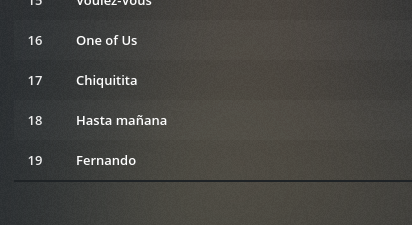
As an example, I have an album by ABBA with a song title “Hasta mañana”. Since upgrading to 1.22.2.4256-6000, that song title shows as “Hasta ma�ana”, and I now have (2) listing for the same album. One album with the one song title “Hasta ma�ana”, and another album of the exact same album artist, album name, etc - but with all of the other songs.
This used to list properly as a single album. All of the songs physically reside in the same folder and have been curated to contain all the same/matching artist/album data. This split and inability to display various characters with European-style accents only occurred after upgrading to 1.22.2.4256-6000.
This has happened to multiple albums in my collection on Plex. Here are screenshots of another album affected the same way, showing what it looks like as viewed via Plexamp:
Sorry, I should have been more clear. It’s displayed split like this in all of my clients. Plex for Web, Plex for Android (mobile and shield). The Plexamp screenshot was a screen orientation that I thought would be easier to see.
They automatically will rejoin if I manually fix the corrupt character and rescan my music library.
I’m not aware of how to roll-back a Plex version on the Synology platform. Attempting to install older .pkg files always results in an error [267] for me
Uninstall the package. (your data is kept safely out on the main storage volume in the Plex share)
Install the version you want. It will find the existing Plex share & data when it starts
WHAT! How did I not know that was possible after all this time! OMG, thank you. I will give this a test later this evening.
Something that I am additionally curious about is: Can/will Plex alter metadata /in/ a music file? Looking at the physical files involved, I can see that they were altered by their date stamp and that that accented characters now show that invalid character (other songs of the same album did not have modified date stamps). I didn’t think Plex directly modified media, so now I am thinking that something else on my system altered the titles of those song titles.
Yeah, I didn’t think it did, so I have to track down exactly how/why that happened to only files with song titles that have accented letters in them. No other file modifications can be observed via the filesystem. It’s bizarrely coincidental timing with the installation of the beta PMS.
It’s absolutely possible that its something that I inadvertently yet unintentionally caused. But, these are song files that I otherwise had no intentional reason to touch and did not do so knowingly.
I will downgrade shortly to see if the older PMS version still keeps the albums split
I rolled-back to 4163 and my albums with corrupted accented characters are still split. If I manually edit the song title metadata to not be an invalid character, the albums will rejoin after a library scan.
I’m still unsure of how these letters became altered/corrupted in the first place.

 How did I not know that was possible after all this time! OMG, thank you. I will give this a test later this evening.

