I did not alter the LSIO container after updating. Can’t remember what I did months ago when it originally broke.
HDR tone mapping still broken. See the logs
Plex Media Server Logs_2023-09-29_17-19-59.zip (3.9 MB)
Remove the subtitles from the equation and retest
Sep 29, 2023 17:16:56.775 [23015155346232] DEBUG - [Req#1c1/Transcode] Streaming Resource: Adding session 0x14eea4b47698:dmvhtc2zb4wqjo7ugnf9sdvd which is using 29659kbps of WAN bandwidth.  Used is now 29659kbps
Sep 29, 2023 17:16:56.775 [23015155346232] DEBUG - [Req#1c1/Transcode] Streaming Resource: Added session 0x14eea4b47698:dmvhtc2zb4wqjo7ugnf9sdvd
Sep 29, 2023 17:16:56.776 [23015155346232] DEBUG - [Req#1c1/Transcode] Streaming Resource: Reached Decision id=6802 codes=(General=1001,Direct play not available; Conversion OK. Direct Play=3000,App cannot direct play this item. Direct play is disabled. Transcode=1001,Direct play not available; Conversion OK.) media=(id=13922 part=(id=13927 decision=transcode container=mp4 protocol=dash streams=(Video=(id=44889 decision=copy width=3840 height=2160) Audio=(id=44891 decision=transcode bitrate=256 encoder=aac channels=2 rate=48000) Subtitle=(id=44890 decision=transcode bitrate=2147483647 encoder=ass languageCode=eng location=sidecar))))
Tonemapping works on GeminiLake.
The Plex container is a Ubuntu environment
Below is it working on native Ubuntu installation
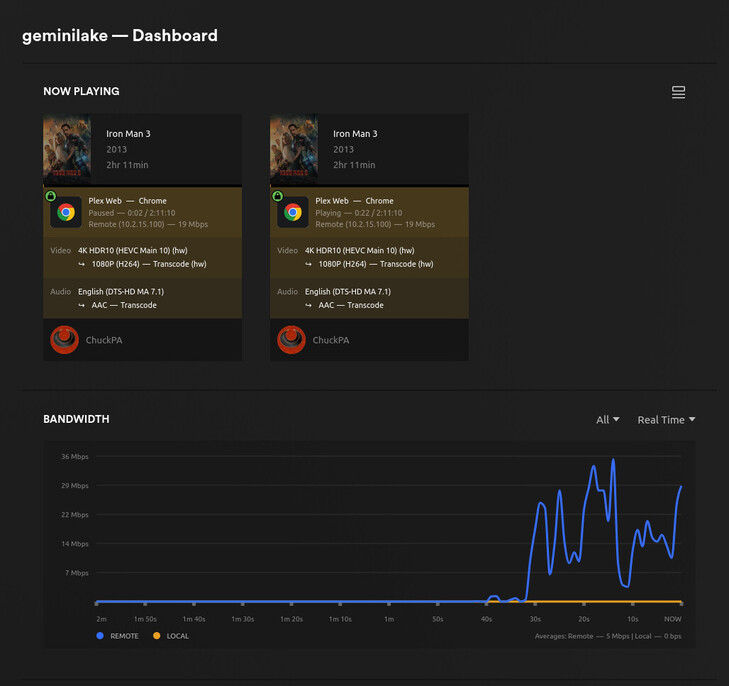
The results are the same (Unraid 6.12.4 with kernel 6.1.49). See the logs
Plex Media Server Logs_2023-09-30_11-08-30.zip (4.4 MB)
Sep 30, 2023 11:21:05.584 [23015218576184] Info — [Req#dbb7/Transcode] Preparing driver imd for GPU GeminiLake [UHD Graphics 600]
Sep 30, 2023 11:21:06.041 [23015169203000] Chyba — [Req#df08/Transcode/dayh2on2zn70u8sm57yhxjev/bd71efe6-f461-4531-ba15-aab41def25f4] [AVHWDeviceContext @ 0x14e764b73cc0] No matching devices found.
Sep 30, 2023 11:21:13.677 [23015218576184] Chyba — [Req#df1e/Transcode/dayh2on2zn70u8sm57yhxjev/bd71efe6-f461-4531-ba15-aab41def25f4] [Parsed_tonemap_opencl_3 @ 0x14e764eb0a00] Failed to finish command queue: -5.
Sep 30, 2023 11:21:14.183 [23015216466744] Chyba — [Req#df2b/Transcode/dayh2on2zn70u8sm57yhxjev/bd71efe6-f461-4531-ba15-aab41def25f4] Error while filtering: I/O error
Sep 30, 2023 11:21:14.184 [23015218576184] Chyba — [Req#df2f/Transcode/dayh2on2zn70u8sm57yhxjev/bd71efe6-f461-4531-ba15-aab41def25f4] Failed to inject frame into filter network: I/O error
Sep 30, 2023 11:21:14.185 [23015169203000] Chyba — [Req#df31/Transcode/dayh2on2zn70u8sm57yhxjev/bd71efe6-f461-4531-ba15-aab41def25f4] Error while processing the decoded data for stream #0:0
Hardware transcode still doesn’t work for me
Synology DS918+ w. Celeron J3455 and DSM7
PlexMediaServer-1.32.6.7557-1cf77d501-x86_64_DSM7.spk
If I un-check hardware transcode then it will work, but not with it enabled.
Revert back to 1.32.1.6999 and it works with hardware transcode on (as it always did up until 1.32.2)

When it fails I see this in logging.
Oct 01, 2023 00:56:02.872 [140123444632376] Info — [Req#3cf/Transcode/dyq14916knmi7ris020l3juf] Preparing driver imd for GPU HD Graphics 500
Oct 01, 2023 00:56:04.965 [140123353287480] Warning — [Req#3d0/Transcode/dyq14916knmi7ris020l3juf] Transcode runner appears to have died.
Oct 01, 2023 00:56:04.978 [140123444632376] Warning — [Req#3cf/Transcode/dyq14916knmi7ris020l3juf] Transcode runner appears to have died.
Oct 01, 2023 00:56:04.995 [140123344849720] Warning — [Req#402/Transcode/dyq14916knmi7ris020l3juf] Transcode runner appears to have died.
Oct 01, 2023 00:56:05.008 [140123349068600] Warning — [Req#405/Transcode/dyq14916knmi7ris020l3juf] Transcode runner appears to have died.
Oct 01, 2023 00:56:05.094 [140123346959160] Info — [Req#480/Transcode] Preparing driver imd for GPU HD Graphics 500
I need much more than 6 lines to diagnose with.
I have it working on ApolloLake in the lab as shown here.
chuck@apollolake:~$ grep 'model name' /proc/cpuinfo | uniq
model name	: Intel(R) Celeron(R) CPU J3455 @ 1.50GHz
chuck@apollolake:~$
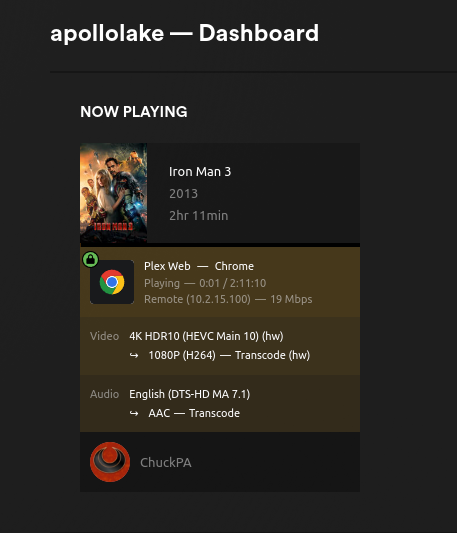
There are issues with certain Android devices we’re working on.
For purposes of verification, please use Plex/Web player only


CPU’s match 
root@NAS1:~# grep 'model name' /proc/cpuinfo | uniq
model name      : Intel(R) Celeron(R) CPU J3455 @ 1.50GHz
Windows 10 Pro 64. v22H2 (build 19045.3448)
Chrome Version 117.0.5938.132 (Official Build) (64-bit)
Plex for windows: Version 1.79.1.3984-879339ed
I re-updated to 1.32.6.7557 and retried using the player as you suggested. It took a few seconds but it did start to play transcoded content for a 720 (0.7mb/s) file.
I retried with Chrome and it took a minute but it also began to play.
Then I tried a 4K file in the player and it failed with an error.
An unknown error occurred (4294967279)
Error code: 4294967279
File transcode in the player was HEVC BT709 2160@35mb/s > 1080@8mb/s
Didn’t test in Chrome
Retested with 1.32.1.6999 and 1080@8mb/s played
What logs would you need - Debug or Verbose?

Getting the same error as many here on any recent version of Plex with 4K HDR content to be tonemapped + transcoded. Normally I don’t mind downgrading and waiting to resolve issues like these, but quite literally every single recent version of Plex has the same exact issue (1.32.5,1.32.4,1.32.3,1.32.1, 1.31.3, etc.) Luckily the 13600k’s 8 virtual cores actually somehow manage to keep up with the software transcoding fallback, but it can really only handle about 1 HDR transcode at a time (plus using 95% CPU is less than ideal). Also note that this is running in a Docker container in a VM, but the Docker container clearly has GPU support because it can transcode any file that isn’t HDR w/integrated graphics.
This is on a 13600k with Intel UHD 770 graphics (quicksync). The source file is 4K HDR10 (HEVC Main 10). This does not happen with 4K files that are not HDR but need transcoding. I appreciate @ChuckPa and his constant feedback, but it is shocking that the Plex engineers haven’t nipped this in the butt for months, if not longer.
EDIT: i965 workaround does not work for my CPU because AFAIK i965 only supports older Intel HD revisions. Will there be a new plex beta soon?
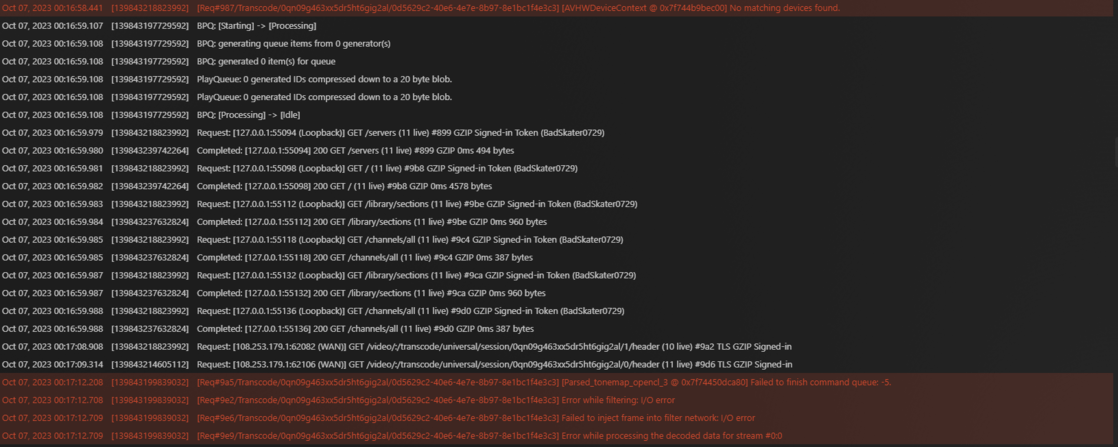
- What is the host distro & version?
- Need log files ZIP – not a screenshot excerpt (which isn’t actionable)
Respectfully, I recommend “ALL STOP” on how you have Plex configured.
– Unless you’re using ESXi, the VM is probably overkill
– Docker in a VM is “just because I can” and overcomplicating — Wrong.
When you put PMS in Docker , inside a VM, you have 3 layers to deal with.
Get any one of them wrong and it’s GAME OVER.
This is from the lab QA machine: i5-13400 - 100% native on the OS.
root@plexqa-av1:/var/lib/plexmediaserver/Library/Application Support/Plex Media Server# cat /proc/cpuinfo | grep 'model name' | uniq
model name	: 13th Gen Intel(R) Core(TM) i5-13400
root@plexqa-av1:/var/lib/plexmediaserver/Library/Application Support/Plex Media Server#
HW transcode & tone mapping on

Running on Debian 12 (which is less forgiving than Ubuntu)
PRETTY_NAME="Debian GNU/Linux 12 (bookworm)"
NAME="Debian GNU/Linux"
VERSION_ID="12"
VERSION="12 (bookworm)"
VERSION_CODENAME=bookworm
ID=debian
HOME_URL="https://www.debian.org/"
SUPPORT_URL="https://www.debian.org/support"
BUG_REPORT_URL="https://bugs.debian.org/"
root@plexqa-av1:/var/lib/plexmediaserver/Library/Application Support/Plex Media Server#
chuck@plexqa-av1:~$ dpkg -l | grep plexm
ii  plexmediaserver                         1.32.7.7571-13cdc68dc               amd64        Plex organizes all of your personal media so you can easily access and enjoy it.
chuck@plexqa-av1:~$
While I definitely understand, I’m pretty sure that my issue is not my setup (which in my case is required) because transcoding does function when tonemapping is not involved. I’ve attached logs of the transcoder failing with a 4K HDR file and succeeding with a regular 1080p transcode.
Additionally, while I’m glad the 13400 is functioning properly, it does not have the same GPU (730 != 770). While their architecture is identical, I do wonder if that is playing a part here. Nevertheless I can test out plex on my hypervisor system soon with a kernel module loaded in but I would be shocked if I got a different result.


4khdrtranscode.txt (122.4 KB)
nonhdrtranscode.txt (201.8 KB)
Plex Media Server Logs_2023-10-07_13-24-12.zip (3.0 MB)
I also edited my original message and attached my entire Download Logs output
- I see the error
Oct 07, 2023 12:46:09.661 [139906741734200] Debug — Completed: [108.253.179.1:58499] 200 GET /status/sessions (12 live) #879c TLS GZIP 0ms 475 bytes (pipelined: 16)
Oct 07, 2023 12:46:09.704 [139906701065016] Debug — Request: [108.253.179.1:58499 (WAN)] GET /video/:/transcode/universal/session/gsf5reescsfbjz4kpd9k88iv/1/header (12 live) #87a9 TLS GZIP Signed-in
Oct 07, 2023 12:46:09.708 [139906695621432] Debug — Request: [108.253.179.1:58501 (WAN)] GET /video/:/transcode/universal/session/gsf5reescsfbjz4kpd9k88iv/0/header (12 live) #878f TLS GZIP Signed-in
Oct 07, 2023 12:46:09.722 [139906685586232] Error — [Req#8764/Transcode/gsf5reescsfbjz4kpd9k88iv/81b76cb6-5d33-429d-8253-66c70e71e57e] [AVHWDeviceContext @ 0x7f89edd7cb40] No matching devices found.
Oct 07, 2023 12:46:20.693 [139906698328888] Debug — Request: [108.253.179.1:58500 (WAN)] GET /video/:/transcode/universal/session/gsf5reescsfbjz4kpd9k88iv/0/header (12 live) #7c98 TLS GZIP Signed-in
Oct 07, 2023 12:46:20.772 [139906691992376] Debug — Request: [108.253.179.1:58527 (WAN)] GET /video/:/transcode/universal/session/gsf5reescsfbjz4kpd9k88iv/1/header (13 live) #86ea TLS GZIP Signed-in
Oct 07, 2023 12:46:23.228 [139906685586232] Error — [Req#87b6/Transcode/gsf5reescsfbjz4kpd9k88iv/81b76cb6-5d33-429d-8253-66c70e71e57e] [Parsed_tonemap_opencl_3 @ 0x7f89e8e8d780] Failed to finish command queue: -5.
Oct 07, 2023 12:46:23.728 [139906685586232] Error — [Req#87c7/Transcode/gsf5reescsfbjz4kpd9k88iv/81b76cb6-5d33-429d-8253-66c70e71e57e] Error while filtering: I/O error
Oct 07, 2023 12:46:23.729 [139906685586232] Error — [Req#87cd/Transcode/gsf5reescsfbjz4kpd9k88iv/81b76cb6-5d33-429d-8253-66c70e71e57e] Failed to inject frame into filter network: I/O error
Oct 07, 2023 12:46:23.729 [139906685586232] Error — [Req#87d1/Transcode/gsf5reescsfbjz4kpd9k88iv/81b76cb6-5d33-429d-8253-66c70e71e57e] Error while processing the decoded data for stream #0:0
Oct 07, 2023 12:46:24.242 [139906746563384] Debug — Jobs: '/usr/lib/plexmediaserver/Plex Transcoder' exit code for process 872 is 1 (failure)
- Now please provide the rest of the information I need:
- Host Distro & Version
- Hypervisor used
- Guest Distro & Version
- PMS version (exact docker image tag)
Apologies:
Guest Distro & Version:
root@XXX:~# cat /etc/os-release
PRETTY_NAME=“Debian GNU/Linux 11 (bullseye)”
NAME=“Debian GNU/Linux”
VERSION_ID=“11”
VERSION=“11 (bullseye)”
VERSION_CODENAME=bullseye
ID=debian
HOME_URL=“https://www.debian.org/”
SUPPORT_URL=“Debian -- User Support”
BUG_REPORT_URL=“https://bugs.debian.org/”
root@XXX:~# uname -a
Linux XXX 6.5.3-2-liquorix-amd64 #1 ZEN SMP PREEMPT liquorix 6.5-2.1~bullseye (2023-09-17) x86_64 GNU/Linux
Hypervisor distro (Proxmox):
root@XXX-hypervisor~# cat /etc/os-release
PRETTY_NAME=“Debian GNU/Linux 12 (bookworm)”
NAME=“Debian GNU/Linux”
VERSION_ID=“12”
VERSION=“12 (bookworm)”
VERSION_CODENAME=bookworm
ID=debian
HOME_URL=“https://www.debian.org/”
SUPPORT_URL=“Debian -- User Support”
BUG_REPORT_URL=“https://bugs.debian.org/”
root@XXX-hypervisor:~# uname -a
Linux XXX-hypervisor 6.2.16-15-pve #1 SMP PREEMPT_DYNAMIC PMX 6.2.16-15 (2023-09-28T13:53Z) x86_64 GNU/Linux
PMS Version:

Output of vainfo on guest:
root@XXX:~# vainfo
error: can’t connect to X server!
libva info: VA-API version 1.17.0
libva info: Trying to open /usr/lib/x86_64-linux-gnu/dri/iHD_drv_video.so
libva info: Found init function __vaDriverInit_1_17
libva info: va_openDriver() returns 0
vainfo: VA-API version: 1.17 (libva 2.10.0)
vainfo: Driver version: Intel iHD driver for Intel(R) Gen Graphics - 23.1.1 ()
vainfo: Supported profile and entrypoints
VAProfileNone : VAEntrypointVideoProc
VAProfileNone : VAEntrypointStats
VAProfileMPEG2Simple : VAEntrypointVLD
VAProfileMPEG2Main : VAEntrypointVLD
VAProfileH264Main : VAEntrypointVLD
VAProfileH264Main : VAEntrypointEncSliceLP
VAProfileH264High : VAEntrypointVLD
VAProfileH264High : VAEntrypointEncSliceLP
VAProfileJPEGBaseline : VAEntrypointVLD
VAProfileJPEGBaseline : VAEntrypointEncPicture
VAProfileH264ConstrainedBaseline: VAEntrypointVLD
VAProfileH264ConstrainedBaseline: VAEntrypointEncSliceLP
VAProfileHEVCMain : VAEntrypointVLD
VAProfileHEVCMain : VAEntrypointEncSliceLP
VAProfileHEVCMain10 : VAEntrypointVLD
VAProfileHEVCMain10 : VAEntrypointEncSliceLP
VAProfileVP9Profile0 : VAEntrypointVLD
VAProfileVP9Profile0 : VAEntrypointEncSliceLP
VAProfileVP9Profile1 : VAEntrypointVLD
VAProfileVP9Profile1 : VAEntrypointEncSliceLP
VAProfileVP9Profile2 : VAEntrypointVLD
VAProfileVP9Profile2 : VAEntrypointEncSliceLP
VAProfileVP9Profile3 : VAEntrypointVLD
VAProfileVP9Profile3 : VAEntrypointEncSliceLP
VAProfileHEVCMain12 : VAEntrypointVLD
VAProfileHEVCMain422_10 : VAEntrypointVLD
VAProfileHEVCMain422_12 : VAEntrypointVLD
VAProfileHEVCMain444 : VAEntrypointVLD
VAProfileHEVCMain444 : VAEntrypointEncSliceLP
VAProfileHEVCMain444_10 : VAEntrypointVLD
VAProfileHEVCMain444_10 : VAEntrypointEncSliceLP
VAProfileHEVCMain444_12 : VAEntrypointVLD
VAProfileHEVCSccMain : VAEntrypointVLD
VAProfileHEVCSccMain : VAEntrypointEncSliceLP
VAProfileHEVCSccMain10 : VAEntrypointVLD
VAProfileHEVCSccMain10 : VAEntrypointEncSliceLP
VAProfileHEVCSccMain444 : VAEntrypointVLD
VAProfileHEVCSccMain444 : VAEntrypointEncSliceLP
VAProfileAV1Profile0 : VAEntrypointVLD
VAProfileHEVCSccMain444_10 : VAEntrypointVLD
VAProfileHEVCSccMain444_10 : VAEntrypointEncSliceLP
Your responses and verbosity are beyond appreciated here. Thank you Please let me know what additional info you need.
EDIT: I attached all the plex logs to my older reply.
I will need the full DEBUG server logs not just excerpts. I will avail a PM for you if needed.
I need to see the entire process from MDE: to invocation
How are you passing the GPU? What’s the spec you’re using?
Supplemental:
The 6.5 kernel is problematic (being kind).
Using a ‘boxes’ QEMU hypervisor ?
Got it, here are some answers:
I’m passing the GPU through with a kernel module on both the guest/hypervisor that enables SR-IOV support:
This lets multiple VMs use the same GPU.
I then installed vainfo and intel-media-driver on both the host/guest using apt. Docker is then passed /dev/dri.
Also, I’m just using the proxmox “Create VM” function, which I believe is a QEMU hypervisor. Would you like me to try and downgrade the kernel to 6.2? I can always try plex on the hypervisor as well
EDIT: Downgrading the kernel now
So turns out I can’t really downgrade the kernel because 6.1 is missing multiple critical symbols for SR-IOV. But that’s all the information I know of currently. vGPU (SR-IOV) with Intel 12th Gen iGPU [Updated 2023]
here is the guide I followed for more information. @ChuckPa any thoughts?
NO NO NO. don’t do that. You’re ASKING for trouble.
The Intel Media Driver isn’t up to that. It hasn’t worked all year for anyone.
This is where you need to simplify.
- Dump the VM
- Dump the SR-IOV
- Run native on the host -OR- , at most, in a container which uses the native kernel drivers.
If you’re gaming, then maybe… but not with Plex and simultaneous QSV + OpenCL.
The best use case for SR-IOV is when you have GPUs in a different box than the computational host. When the CPU and the GPU are both singular on the same host – it is unnecessary because the kernel provides all the necessary isolation and context switching.
Please tell me what you have which REQUIRES SR-IOV ?
